
ITIL-141 · Lesson 6 of 12 · 27 min
Release management
A change makes something different; a deployment moves it into an environment; a release makes it available for use. These three ideas are easy to blur, and organizations that blur them often struggle. They treat every deployment as a big event with users, or they ship features nobody was told about, or they hold finished work for months waiting for a "release window". ITIL 4 separates the practices so organizations can manage each well. This lesson covers release management; lesson 7 covers deployment management. ITIL-140 covered change enablement.
Purpose of release management
In plain words, the purpose of the release management practice is to make new and changed services and features available for use. A release is a version of a service or other configuration item, or a collection of configuration items, that is made available for use. The key phrase is available for use. A release is about users and customers gaining access to something new, which involves more than technology: documentation, training, communication, support readiness and sometimes commercial and legal steps.
Release management plans what goes into a release, when and how it will be made available, and how the organization and its users will be ready. It coordinates with change enablement, which authorizes changes; deployment management, which moves components into environments; service validation and testing, which checks that they work; knowledge management, which prepares articles; and the service desk, which must be ready to support users.
Separating deployment from release
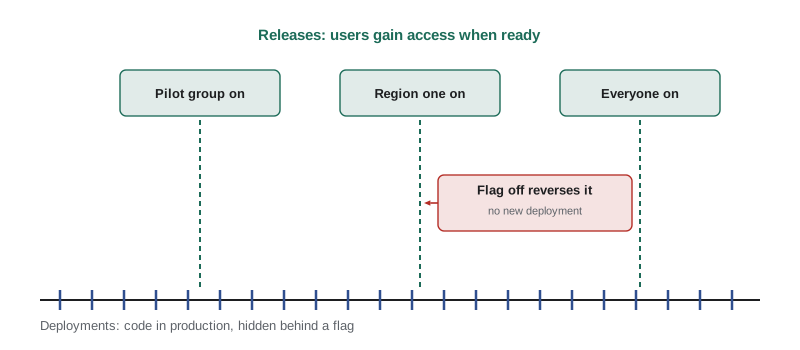
Modern practice separates deployment from release. Code can be deployed to production but hidden behind a feature flag, so it is present but not yet available to users. The release then happens when the flag is switched on, perhaps for a small group first. This separation reduces risk: deployments can happen often, during working hours, with small changes, while releases to users can be timed to suit the business, communicated properly and reversed quickly by switching the flag off.
| Concept | Question it answers | Larchmont example |
|---|---|---|
| Change | Should we modify this, and is the risk acceptable? | Approve adding a carrier rate comparison to the portal |
| Deployment | How do we move the new components into an environment? | Deploy the comparison code to production behind a flag on Tuesday |
| Release | When and how do users gain access, and are they ready? | Turn on the comparison for dispatchers in two regions after training on Friday |
Release models and cadence
Organizations release in different ways depending on their services, users and technology. In a traditional model, many changes are bundled into a large release on a fixed schedule, such as quarterly. Big releases are easier to communicate and train for, but they carry high risk: many changes land at once, problems are hard to isolate and rollback is difficult. In a continuous model, small releases happen frequently, sometimes many times a day, as soon as each feature is ready. Small releases carry less risk each, but users may find constant change disruptive unless it is managed carefully.
Many organizations use a mix. Internal components might be released continuously, while changes that affect user workflows, such as a new screen in the warehouse management system, are grouped into regular, well-communicated releases. Vendor software often arrives in releases set by the vendor, such as a twice-yearly cycle for a software-as-a-service platform, and the organization must decide how to adopt each one.
| Release approach | Strengths | Risks | Suits |
|---|---|---|---|
| Large scheduled release | Predictable, easy to train and communicate | Many changes at once, hard rollback, long waits for value | Regulated workflows, vendor-driven upgrades |
| Frequent small release | Low risk per release, fast feedback, early value | Change fatigue for users, needs strong automation | Web and mobile services, internal platforms |
| Feature-flagged release | Deploy and release separately, quick reversal | Flag debt if old flags are not removed | Services needing controlled exposure |
| Phased (ring) release | Limits blast radius, learns from early groups | Users in different groups see different versions | Large user bases, devices and desktops |
Phased releases and rings
Phased release, sometimes called ring release, makes a change available to progressively larger groups. A typical pattern for Larchmont might be: ring 0, the IT team; ring 1, a pilot group of volunteers in one distribution centre; ring 2, one region; ring 3, everyone. Each ring runs long enough to surface problems before the next begins. Device and desktop updates, such as operating system upgrades, are often handled this way. The same idea applies to features turned on by flags.
Phased release depends on good monitoring and feedback. If nobody watches the pilot group's incident rates, satisfaction and business metrics, the phases add delay without reducing risk. Release management should define in advance what evidence is needed to move to the next ring and what would trigger a pause or rollback.
Planning a release
Release planning answers several questions. What is in scope: which changes, features and fixes? Who are the affected users and customers, and what do they need to know or learn? What are the dependencies: does this release need a database change, a supplier update or a network change first? What are the acceptance criteria, and who confirms they are met? When should the release happen, given business calendars, freezes and other changes? How will success be measured? How will the release be reversed if needed?
For Larchmont, release planning must respect the business calendar. Peak season runs from mid-November to the end of December, when freight volumes double. Releases that change dispatcher or warehouse workflows are avoided during peak, and major ones are scheduled for late January or the summer, when volumes are lower and staff can attend training.
| Release plan element | Question | Example for the rate comparison feature |
|---|---|---|
| Scope | What is included? | Rate comparison screen, two new reports, a bug fix to address lookup |
| Audience | Who is affected and how? | 180 dispatchers, 12 transport managers |
| Dependencies | What must happen first? | Carrier rate data feed upgraded by the integration team |
| Readiness | Are support and users ready? | Knowledge articles published, service desk briefed, 30-minute training held |
| Acceptance criteria | How do we know it works? | Rates match carrier quotes for 50 sample lanes; page loads in under 2 s |
| Timing | When is the best moment? | Pilot in late January, full release mid-February |
| Success measures | How will we judge success? | Share of loads booked with comparison, carrier cost per load, incident rate |
| Reversal | How do we back out? | Feature flag off; data feed remains backward compatible |
Release readiness
A release is ready when the technology works and the organization is prepared to use and support it. Readiness checks typically include: testing completed and acceptance criteria met; changes authorized; deployment verified in a production-like environment; knowledge articles and user guides published; service desk and support teams briefed; monitoring updated for new components; communications sent; training delivered where needed; and support arrangements with suppliers confirmed. Many organizations use a short go or no-go meeting or an automated checklist in their pipeline to confirm readiness.
Readiness is where release management meets the service desk and knowledge management from ITIL-140. A release that surprises the service desk generates confused contacts and poor first contact resolution. Briefing agents and publishing articles before the release turns a potential wave of incidents into routine questions.
Release versions and naming
Release management keeps track of what is in each release and which version is where. Many software teams use semantic versioning, a convention of major.minor.patch numbers: a major version change signals incompatible changes, a minor version adds functionality compatibly and a patch fixes bugs. For example, moving from 8.4.2 to 8.5.0 adds features without breaking compatibility, while moving to 9.0.0 may require changes by users or integrated systems. Clear version information, recorded in the CMDB and release notes, helps support teams diagnose issues and helps users know what changed.
# Classify releases by semantic version change and check upgrade paths
def parse(v):
    return tuple(int(x) for x in v.split("."))

def kind(old, new):
    o, n = parse(old), parse(new)
    if n <= o:
        return "not an upgrade"
    if n[0] > o[0]:
        return "major: may break compatibility, plan user and integration changes"
    if n[1] > o[1]:
        return "minor: new features, backward compatible"
    return "patch: fixes only"

history = ["8.3.7", "8.4.0", "8.4.1", "8.4.2", "8.5.0", "9.0.0", "9.0.1"]
for a, b in zip(history, history[1:]):
    print(f"{a:>6} -> {b:<6} {kind(a, b)}")
print("8.4.2 -> 8.4.2", kind("8.4.2", "8.4.2"))8.3.7 -> 8.4.0 minor: new features, backward compatible 8.4.0 -> 8.4.1 patch: fixes only 8.4.1 -> 8.4.2 patch: fixes only 8.4.2 -> 8.5.0 minor: new features, backward compatible 8.5.0 -> 9.0.0 major: may break compatibility, plan user and integration changes 9.0.0 -> 9.0.1 patch: fixes only 8.4.2 -> 8.4.2 not an upgrade
Release notes and communication
Users need to know what is changing, why, when and what they need to do. Good release notes are written for their audience. Technical teams need a list of changes, known issues and dependencies. Users need a short explanation in plain language, focused on what they will notice and how it helps them, with links to guides. Customers of external services may need advance notice of changes that affect integrations or contracts. For larger releases, communication may begin weeks ahead and include demonstrations, champions in each team and drop-in sessions.
Worked problem
Writing user-facing release notes
The technical release notes say: "RC-412 implemented; carrier rate API v3 integration; RPT-77 and RPT-78 added; ADDR-219 fixed." Rewrite them for dispatchers.
Show solution
- Lead with the benefit: dispatchers can now compare carrier rates for a load on one screen.
- Explain what they will notice: a new Compare rates button on the booking screen, and two new reports on carrier cost.
- Mention the fix in their terms: addresses with unit numbers now look up correctly.
- Tell them what to do and where to get help: a two-minute video, a knowledge article, and the service desk.
Answer: "From 12 February you can compare carrier rates for any load on the booking screen using the new Compare rates button. Two new reports show carrier cost by lane and by month. Addresses with unit numbers now look up correctly. Watch the two-minute video or read the guide in the portal; call the service desk if anything looks wrong."
Releases from suppliers
Much of what reaches users comes from suppliers: software-as-a-service platforms that update on their own schedules, vendor patches and new versions of packaged software. Release management for supplier releases involves monitoring vendor roadmaps and release notes, assessing the impact on users, integrations and customizations, testing in advance where the vendor provides preview environments, preparing users and support teams, and deciding when to adopt updates that are optional. Some software-as-a-service providers allow customers to delay a release for a limited time; others do not, which makes early preparation essential.
Measuring release management
Useful measures include the share of releases delivered on the planned date; the share that met acceptance criteria; the number of incidents in the days after a release compared with a baseline; the share of releases reversed; user satisfaction with communication and training; and the lead time from a feature being ready to its release to users. The DORA metrics introduced in ITIL-140 lesson 8, such as deployment frequency and change failure rate, focus on deployment and change, but they give release managers important context about how quickly and safely the organization can deliver.
# Post-release incident uplift: compare incidents in the 7 days after each release with a baseline
import random, statistics
random.seed(1406)
baseline_daily = 18.0                       # average incidents a day for the service
releases = ["R-31", "R-32", "R-33", "R-34", "R-35", "R-36"]
effects = [1.05, 1.40, 0.95, 1.10, 1.85, 1.00]  # hidden multipliers; in practice unknown
print(f"{'release':<8}{'7-day incidents':>17}{'expected':>10}{'uplift':>9}  verdict")
for r, eff in zip(releases, effects):
    week = sum(max(0, round(random.gauss(baseline_daily * eff, 4))) for _ in range(7))
    expected = baseline_daily * 7
    uplift = (week - expected) / expected * 100
    verdict = "investigate" if uplift > 20 else "normal range"
print(f"{r:<8}{week:>17}{expected:>10.0f}{uplift:>8.0f}% {verdict}")release 7-day incidents expected uplift verdict R-31 144 126 14% normal range R-32 164 126 30% investigate R-33 119 126 -6% normal range R-34 138 126 10% normal range R-35 261 126 107% investigate R-36 125 126 -1% normal range
A simple uplift check like this helps release managers spot releases that disrupted users, even when no single major incident occurred. Larger uplifts trigger a review of what slipped through testing, communication or readiness.
ITIL (Version 5) note
Published summaries of ITIL (Version 5), checked in October 2026, keep release management as a separate practice in the product and service management group. As in ITIL 4, it is distinct from deployment management, which lesson 7 covers.
Common mistakes
MistakeTreating deployment and release as the same event.
InsteadSeparate them so deployments can be frequent and safe, while releases are timed and communicated for users.
MistakeBundling months of changes into one large release.
InsteadPrefer smaller releases or phased exposure to reduce risk and deliver value sooner.
MistakeReleasing before the service desk and users are ready.
InsteadCheck readiness: knowledge, briefings, training, monitoring and communication.
MistakeWriting release notes only for technical staff.
InsteadWrite user-facing notes that explain benefits, what changes and where to get help.
MistakeLeaving old feature flags in place indefinitely.
InsteadRemove flags once a release is complete to avoid complexity and flag debt.
Summary and key terms
- Release management makes new and changed services and features available for use.
- Change authorizes, deployment moves components and release makes them available; separating them reduces risk.
- Feature flags let teams deploy often and release when the business and users are ready.
- Release approaches range from large scheduled releases to frequent small and phased releases.
- Release plans cover scope, audience, dependencies, readiness, timing, success measures and reversal.
- Readiness includes the people side: knowledge, briefings, training and communication.
- Supplier releases need monitoring, impact assessment and preparation, and release success is measured by outcomes and post-release incidents.
- Release management
- The practice of making new and changed services and features available for use.
- Release
- A version of a service or configuration item, or a collection of them, made available for use.
- Feature flag
- A switch in software that turns a feature on or off without a new deployment.
- Phased release
- Making a release available to progressively larger groups of users.
- Ring
- A group of users that receives a release at a particular stage of a phased rollout.
- Release readiness
- Confirmation that technology, support and users are prepared for a release.
- Semantic versioning
- A major.minor.patch version convention signalling the kind of change.
- Release notes
- Documentation describing what a release contains and what users need to know.
- Go or no-go decision
- A checkpoint confirming whether a release should proceed.
- Flag debt
- Complexity caused by feature flags left in code after they are no longer needed.
Practice problems
Work each problem on paper first, then reveal the answer to check.
State the purpose of release management in plain words.
Show answer
To make new and changed services and features available for use.
Distinguish a deployment from a release.
Show answer
A deployment moves components into an environment; a release makes them available for users.
How do feature flags reduce release risk?
Show answer
Code can be deployed hidden and released later to chosen users, and the release can be reversed by switching the flag off.
Give one strength and one risk of large scheduled releases.
Show answer
Strength: predictable and easy to communicate. Risk: many changes at once and difficult rollback.
What is a ring in a phased release?
Show answer
A group of users that receives the release at one stage, such as IT, a pilot site, a region, then everyone.
List four elements of a release plan.
Show answer
Any four of: scope, audience, dependencies, readiness, acceptance criteria, timing, success measures, reversal.
A version moves from 4.2.7 to 4.3.0. What kind of change does semantic versioning signal?
Show answer
A minor change: new features that are backward compatible.
Why should the service desk be briefed before a release?
Show answer
So agents can recognize related contacts and help users, avoiding confusion and poor first contact resolution.
What should release management do about a SaaS vendor's upcoming mandatory update?
Show answer
Review release notes, assess impact, test in preview if possible, prepare users and support, and plan communication.
Expected incidents in a week are 120 and 156 occurred after a release. What is the uplift?
Show answer
(156 − 120) ÷ 120 = 30 %.
Lesson quiz · 5 questions
Score 60% or more to complete this lesson.
Create a free account to save your progress, take quizzes and earn a certificate.