
ITIL-141 · Lesson 7 of 12 · 30 min
Deployment management
Lesson 6 separated release from deployment. Deployment is the technical act of moving components into an environment: copying new software to servers, applying configuration, running database changes, installing an operating system update on laptops or physically installing a new switch in a distribution centre. Done badly, deployments cause outages, data loss and long nights. Done well, they become so routine that teams deploy many times a week without users noticing. This lesson covers the purpose of deployment management, deployment approaches and strategies, pipelines and automation, verification and rollback, and how deployment management works with other practices.
Purpose of deployment management
In plain words, the purpose of the deployment management practice is to move new or changed hardware, software, documentation, processes or any other component to live environments. It may also be involved in deploying components to other environments for testing or staging. Two things stand out. First, deployment is not just about software: it covers hardware, documentation and processes as well. Installing 600 new handheld scanners across eleven distribution centres is a deployment. Second, deployment covers more than production: moving a build into a test or staging environment is also deployment, and the same disciplines apply.
In ITIL 4, deployment management is one of three technical management practices. Published summaries of ITIL (Version 5), checked in October 2026, move it into the product and service management group, reflecting how central deployment has become to delivering products and services. Its purpose is described in similar terms.
Environments
Most organizations use several environments. A development environment is where code is written and first tried. A test environment is used for functional and integration testing. A staging or pre-production environment mirrors production as closely as possible for final checks, performance tests and rehearsals. Production, also called live, is where users and customers use the service. Each environment should be as similar to production as cost allows, because differences between environments are a common cause of deployments that pass testing and then fail in production.
| Environment | Purpose | Typical data | Who can deploy |
|---|---|---|---|
| Development | Write and try code | Synthetic or sample data | Developers, freely |
| Test | Functional and integration testing | Synthetic or masked data | Pipeline after automated checks |
| Staging | Final checks, performance tests, rehearsal | Masked copy of production | Pipeline after test approval |
| Production | Live use by users and customers | Real data | Pipeline after authorization, with controls |
Using real personal data in non-production environments is risky and may breach privacy obligations. Test environments are usually less protected than production, and developers may not need to see real customer details. Masked or synthetic data protects privacy while still allowing realistic testing.
Deployment approaches
ITIL 4 describes several broad approaches to deployment. A phased deployment moves new or changed components into parts of the production environment at a time, for example one distribution centre after another. A continuous delivery approach integrates, tests and deploys components whenever they are ready, often many times a day, with automation doing most of the work. A big bang deployment moves components to all targets at once, which is sometimes unavoidable, as when a database schema must change for everyone at the same moment. A pull deployment makes new or changed software available in a controlled repository, from which users or devices download it when they choose or when a schedule triggers it; mobile app stores and many desktop update systems work this way.
| Approach | How it works | Example at Larchmont |
|---|---|---|
| Phased | Deploy to part of production at a time | New scanner firmware, one distribution centre a week |
| Continuous delivery | Automated pipeline deploys small changes whenever ready | Shipment portal code, several times a week |
| Big bang | Deploy to all targets at once | Warehouse management system database upgrade over a weekend |
| Pull | Publish to a repository; devices or users download | Laptop software from the company software centre |
Deployment strategies for software
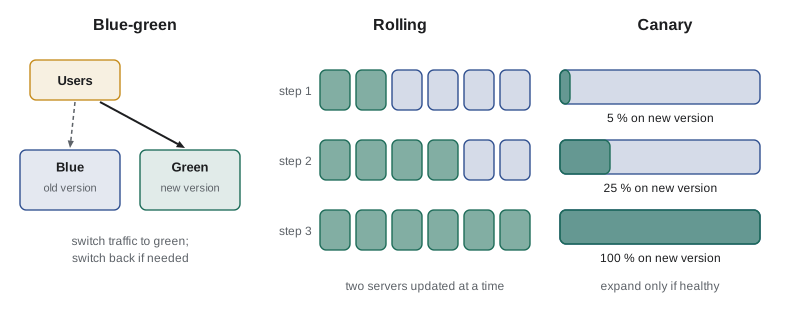
Within these approaches, software teams use specific strategies to reduce risk. In a blue-green deployment, two identical production environments exist. One, say blue, serves users while the new version is deployed to the other, green. After checks, traffic switches to green. If something goes wrong, traffic switches back to blue in seconds. The cost is running two environments, at least during the deployment.
In a rolling deployment, servers are updated a few at a time while the rest keep serving users. This needs no duplicate environment, but for a while two versions run side by side, so they must be compatible, and rollback means rolling back each server. In a canary deployment, the new version is deployed to a small share of servers or users first, perhaps 5 %, while monitoring compares error rates and performance with the old version. If the canary is healthy, the share grows step by step; if not, it is withdrawn before most users are affected. Feature flags, covered in lesson 6, complement all of these by separating deployment from release.
| Strategy | Rollback speed | Extra cost | Main risk |
|---|---|---|---|
| Blue-green | Very fast (switch traffic back) | Duplicate environment during deployment | Data changes that cannot be switched back |
| Rolling | Moderate (redeploy old version server by server) | Little | Two versions running together must be compatible |
| Canary | Fast for most users (withdraw canary) | Monitoring and traffic control | Too small or short a canary misses problems |
| Recreate (stop, then start new) | Slow | None | Downtime during the switch |
How big should a canary be?
A canary is only useful if it is large enough and runs long enough to detect a problem. Suppose a faulty version raises the error rate for affected requests from 0.5 % to 1.5 %. If the canary handles only a few hundred requests, random variation could hide the difference. The simulation below estimates how often a canary of different sizes would catch such a fault using a simple rule: halt if the canary's error rate exceeds the baseline by more than a set margin.
# How often does a canary of a given size catch a fault? (simple simulation)
import random
random.seed(7)
base_err, bad_err = 0.005, 0.015        # error rate of old version vs faulty new version
threshold = 0.010                        # halt if canary error rate is above 1.0 %
trials = 2000

def caught(requests, err):
    errors = sum(1 for _ in range(requests) if random.random() < err)
    return errors / requests > threshold

print(f"{'canary requests':>16}{'catch faulty':>14}{'false alarm':>13}")
for n in [200, 500, 1000, 2000, 5000]:
    detect = sum(caught(n, bad_err) for _ in range(trials)) / trials
    false = sum(caught(n, base_err) for _ in range(trials)) / trials
print(f"{n:>16}{detect * 100:>13.1f}%{false * 100:>12.1f}%") canary requests catch faulty false alarm
200 58.2% 7.8%
500 77.3% 4.7%
1000 89.3% 1.1%
2000 97.2% 0.2%
5000 99.9% 0.0%The results show the trade-off. With 200 requests the canary often misses the fault and sometimes raises false alarms. With several thousand requests it catches the fault nearly every time and almost never cries wolf. The practical lesson is that canary steps should be sized and timed by the traffic needed for a reliable signal, not by a fixed percentage alone. A low-traffic internal service may need its canary to run for hours, while a busy portal may get enough data in minutes.
Rolling deployment capacity
Rolling deployments take servers out of service while they are updated, so the remaining servers must handle the load. Planning the batch size is simple arithmetic but often forgotten.
Worked problem
Batch size for a rolling deployment
The shipment portal runs on 8 web servers. At the morning peak, it needs the capacity of at least 6 servers to keep response times within target. How many servers can be updated at once during the peak, and how many outside it, when 4 are enough?
Show solution
- Peak: 8 − 6 = 2 servers can be out of service at a time.
- Off-peak: 8 − 4 = 4 servers can be out at a time.
- With each batch taking 10 minutes, a peak deployment takes 4 batches (40 minutes); off-peak takes 2 batches (20 minutes).
Answer: Update 2 at a time during the peak or 4 at a time off-peak. Many teams simply deploy off-peak or add temporary capacity during the deployment.
Pipelines and automation
Modern software deployment relies on automated pipelines. A continuous integration and continuous delivery (CI/CD) pipeline builds the software, runs automated tests, packages it, deploys it to test and staging environments, runs further checks and, when authorized, deploys it to production. CMPUT-301 covers the engineering of such pipelines. From a service management point of view, the pipeline is where several practices meet: change enablement controls can be built into it as automated approvals for low-risk changes; deployment management defines the steps; service configuration management can be updated automatically with what was deployed; and information security checks such as dependency scanning run as pipeline stages.
Infrastructure as code extends the same idea to servers, networks and cloud resources. Instead of configuring infrastructure by hand, teams describe it in files that are version-controlled, reviewed and deployed through pipelines. This makes environments reproducible and reduces differences between staging and production, one of the main causes of deployment failures.
| Pipeline stage | What happens | Practices involved |
|---|---|---|
| Build | Compile and package code | Software development and management |
| Automated tests | Unit, integration and security tests | Service validation and testing, information security |
| Deploy to test and staging | Install in non-production environments | Deployment management |
| Authorization | Automatic for low-risk changes, human review for others | Change enablement |
| Deploy to production | Blue-green, rolling or canary deployment | Deployment management |
| Verify and record | Smoke tests, monitoring checks, CMDB update | Monitoring, service configuration management |
Verification, rollback and roll-forward
After every deployment, the team should verify that it worked. Verification includes smoke tests that exercise key functions, checks of monitoring dashboards and error rates, and confirmation that versions in the environment match what was intended. Automated verification can halt a canary or trigger a rollback without waiting for a human.
Rollback returns the environment to the previous version. It should be planned and, ideally, rehearsed before every significant deployment. Some changes cannot be easily rolled back, especially database schema changes that transform data. Teams handle these with expand and contract patterns: first add new structures while keeping the old ones (expand), deploy code that works with both, migrate data, and only later remove the old structures (contract). Sometimes teams choose to roll forward instead, fixing the problem with a new deployment, which is reasonable when the fix is small and well understood but risky under pressure.
Deploying hardware and end-user devices
Deployment management also covers physical deployments. Rolling out 600 new handheld scanners involves configuring devices with a standard image, enrolling them in device management, delivering them to the right sites, swapping them with old devices without stopping warehouse operations, collecting and securely wiping old devices, and updating asset and configuration records. Phased deployment, one site at a time, is common. Pilot sites help refine the process before the bulk of the rollout.
# Plan a phased scanner rollout across sites within a weekly capacity
sites = [("Site 01", 100), ("Site 02", 85), ("Site 03", 70), ("Site 04", 65), ("Site 05", 50),
         ("Site 06", 48), ("Site 07", 45), ("Site 08", 42), ("Site 09", 40), ("Site 10", 35), ("Site 11", 20)]
weekly_capacity = 130        # devices the deployment team can swap per week
pilot = "Site 05"            # mid-sized pilot site goes first
order = [s for s in sites if s[0] == pilot] + [s for s in sites if s[0] != pilot]
week, used, plan = 1, 0, {}
for name, n in order:
    if used + n > weekly_capacity:
        week, used = week + 1, 0
    plan.setdefault(week, []).append((name, n))
    used += n
for w, items in plan.items():
    print(f"week {w}: " + ", ".join(f"{s} ({n})" for s, n in items) + f"  total {sum(n for _, n in items)}")
print("devices:", sum(n for _, n in sites), " weeks:", len(plan))week 1: Site 05 (50) total 50 week 2: Site 01 (100) total 100 week 3: Site 02 (85) total 85 week 4: Site 03 (70) total 70 week 5: Site 04 (65), Site 06 (48) total 113 week 6: Site 07 (45), Site 08 (42), Site 09 (40) total 127 week 7: Site 10 (35), Site 11 (20) total 55 devices: 600 weeks: 7
Separation of duties and control
Regulators and auditors often expect separation of duties: the person who writes a change should not be the only person who can deploy it to production. In traditional organizations this meant developers could not touch production at all. In automated organizations, the pipeline itself can enforce controls: code must be peer-reviewed before merging, tests must pass, deployments to production are performed by the pipeline rather than by individuals, and every deployment is logged. Auditors increasingly accept these automated controls when they are well designed and evidenced.
For federally regulated financial institutions in Canada, OSFI Guideline B-13 on technology and cyber risk management expects sound change and release controls, including segregation of duties and testing. Other organizations apply similar controls voluntarily or to meet customer and audit requirements.
Measuring deployment management
Useful measures include deployment frequency, deployment lead time, the share of deployments that succeed without rollback, the time taken to roll back when needed, the share of deployments fully automated, and the number of incidents caused by deployments. These overlap with the DORA metrics from ITIL-140 lesson 8, which research has linked with organizational performance: high-performing teams deploy frequently with low change failure rates and fast recovery.
Worked problem
Deployment success
In a quarter, LTS performs 420 production deployments. 12 are rolled back and 5 more cause incidents that are fixed by rolling forward. What is the deployment failure rate?
Show solution
- Failed deployments = 12 rolled back + 5 needing remediation = 17.
- Failure rate = 17 ÷ 420 ≈ 4.0 %.
Answer: About 4 %. Tracking the causes of the 17 failures, such as environment differences, untested data changes or configuration errors, points to improvements.
Common mistakes
MistakeThinking deployment management covers only software.
InsteadIt covers hardware, software, documentation, processes and other components.
MistakeTesting in environments that differ greatly from production.
InsteadKeep staging as close to production as possible, ideally through infrastructure as code.
MistakeRunning a tiny canary for a few minutes and calling it safe.
InsteadSize and time canaries for enough traffic to detect a real difference.
MistakeDeploying without a rehearsed rollback plan.
InsteadPlan and rehearse rollback, and use expand and contract for data changes.
MistakeUsing real personal data in test environments.
InsteadUse masked or synthetic data to protect privacy.
Summary and key terms
- Deployment management moves new or changed hardware, software, documentation, processes and other components to live and other environments.
- Environments run from development to test, staging and production; differences between them cause failures.
- ITIL 4 describes phased, continuous delivery, big bang and pull deployment approaches.
- Blue-green, rolling and canary strategies reduce risk; canaries need enough traffic to detect faults.
- CI/CD pipelines and infrastructure as code automate deployment and embed controls.
- Verification, rehearsed rollback and expand and contract patterns protect services and data.
- Version 5 summaries move deployment management from technical management into product and service management.
- Deployment management
- The practice of moving new or changed components to live and other environments.
- Environment
- A set of infrastructure and configuration used for a stage such as development, test, staging or production.
- Blue-green deployment
- Deploying to an idle copy of production and switching traffic to it.
- Rolling deployment
- Updating servers a few at a time while others keep serving users.
- Canary deployment
- Deploying a new version to a small share of traffic first and expanding if healthy.
- Pull deployment
- Publishing software to a repository from which users or devices download it.
- CI/CD pipeline
- An automated sequence that builds, tests and deploys software.
- Infrastructure as code
- Describing infrastructure in version-controlled files deployed through automation.
- Rollback
- Returning an environment to its previous version after a failed deployment.
- Expand and contract
- A pattern for data changes that adds new structures before removing old ones.
Practice problems
Work each problem on paper first, then reveal the answer to check.
State the purpose of deployment management in plain words.
Show answer
To move new or changed hardware, software, documentation, processes or other components to live environments, and sometimes to other environments for testing or staging.
Name the four deployment approaches described in ITIL 4.
Show answer
Phased, continuous delivery, big bang and pull.
What is the main advantage of a blue-green deployment?
Show answer
Very fast rollback by switching traffic back to the old environment.
Why must versions be compatible in a rolling deployment?
Show answer
Because old and new versions run side by side while servers are updated.
Why might a small canary fail to detect a fault?
Show answer
With little traffic, random variation can hide a real increase in errors.
A service has 10 servers and needs 7 at peak. How many can be updated at once during the peak?
Show answer
3.
How can a pipeline enforce separation of duties?
Show answer
By requiring peer review and passing tests and having the pipeline, not individuals, deploy to production with logging.
What is the expand and contract pattern for?
Show answer
Making data changes safely so code and data can be rolled back or migrated gradually.
Give an example of a pull deployment.
Show answer
Publishing laptop software to a company software centre for users to install, or mobile apps in an app store.
Of 300 deployments, 9 were rolled back and 3 needed a fix forward. What is the failure rate?
Show answer
12 ÷ 300 = 4 %.
Lesson quiz · 5 questions
Score 60% or more to complete this lesson.
Create a free account to save your progress, take quizzes and earn a certificate.