
PHOT-440 · Lesson 5 of 12 · 28 min
Camera movement and composition in motion
Photographers compose a single rectangle. Video composition is a rectangle that changes over time, either because the subject moves, the camera moves, or both. Movement can reveal information, follow action, build energy or create a sense of place, and it is one of the clearest signals of production value in client work. But aimless movement is one of the clearest signals of amateur video. This lesson covers the main camera moves, how fast to move, how to compose frames that work while things change, how to compose for different aspect ratios and social platform interfaces, and how stills techniques such as time-lapse translate into motion. CINE-230 covers professional camera support, dollies and cranes, and CINE-301 covers composition and blocking for narrative scenes.
Why move the camera at all
Every move should answer a question: what does the viewer gain by the camera moving? Good reasons include revealing something that was hidden (a slider moving past a doorframe to reveal a room), following a subject (walking with a guide through a vineyard), changing emphasis (a slow push in on a speaker during an emotional line), showing spatial relationships (an orbit around a product to show its shape) and adding energy (a quick handheld move into a busy kitchen). Poor reasons include "the gimbal was on", "the shot was boring" and "everyone else does it". A static shot of a beautiful moment is better than a move that distracts from it.
Movement also changes how long a shot can hold. A locked-off shot of a static scene feels long after four or five seconds; a slow push in on the same scene can hold for eight or ten. Conversely, constant movement in every shot tires viewers. Most strong client films mix static, slow-moving and occasional dynamic shots.
The main camera moves
A pan rotates the camera horizontally on a fixed point; a tilt rotates it vertically. Pans and tilts are made on a tripod with a fluid head. A push in, sometimes called a dolly in, moves the camera physically toward the subject; a pull out moves it away. A truck or track moves the camera sideways, parallel to the subject. A pedestal or boom moves the camera straight up or down. An arc or orbit moves the camera around the subject while keeping it centred. A follow moves behind or alongside a moving subject; a lead moves ahead of them, looking back. A reveal is any move that brings something into view, usually from behind a foreground object.
A zoom changes focal length without moving the camera. It is not the same as a push in. A push in changes perspective: foreground objects grow faster than background objects and pass by, which gives a sense of entering the space. A zoom magnifies everything equally, which looks flatter and more like observation from a distance. Slow, controlled zooms are a legitimate documentary style, but quick zooms during a shot usually look like a stills shooter reframing.
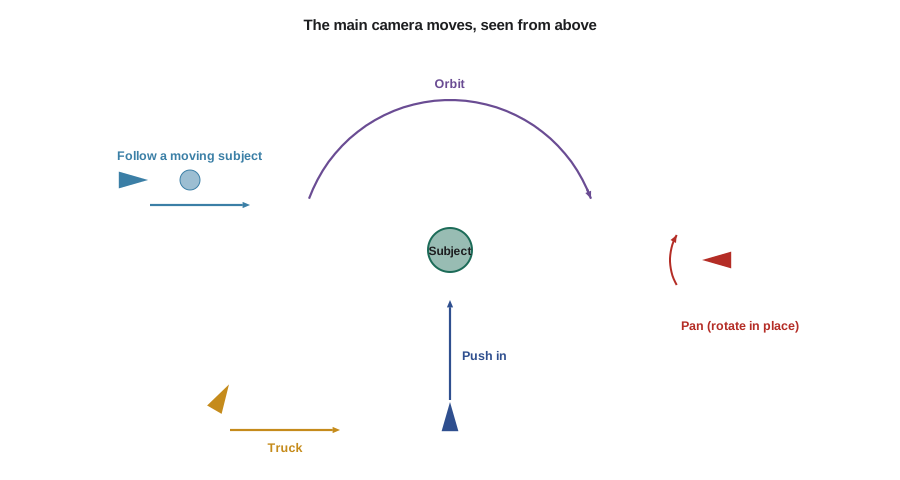
| Move | Effect | Easiest tool |
|---|---|---|
| Pan or tilt | Scans or follows across a scene | Tripod with fluid head |
| Push in or pull out | Increases or releases emphasis; enters space | Slider, gimbal, or careful walk |
| Truck | Shows parallax and depth | Slider or gimbal |
| Pedestal or boom | Rises over foreground; reveals scale | Gimbal with a slow lift, small jib |
| Orbit | Shows shape and the space around a subject | Gimbal |
| Follow or lead | Travels with a moving subject | Gimbal or shoulder rig |
| Reveal | Brings a subject into view from behind something | Slider or gimbal |
Start frames, end frames and motivation
A good move has a clear composition at the start and at the end, and the editor should be able to use either the move or the held frames. Before recording, rehearse: find the start frame, hold it for two or three seconds, move smoothly at a consistent speed, settle on the end frame and hold it for another two or three seconds. Motivated movement follows something in the scene: a pan follows a person walking; a tilt follows a glance upward; a push in follows a speaker's rising emotion. Unmotivated movement can work in music-driven pieces, but even then the move should have intention.
Parallax is the reason sideways moves look rich. When the camera trucks past objects at different distances, near objects move faster across the frame than far ones, revealing depth. You can exaggerate parallax by placing something close to the lens in the foreground, such as a plant, a glass or a doorframe, and using a wider lens. Photographers who already layer foreground, middle ground and background find this natural.
How fast to move: judder and strobing
At 24 frames per second, fast pans produce a stuttering effect called judder or strobing, because each frame captures the scene in a different position with gaps in between. The effect is worst with high-contrast vertical lines, such as fences and window frames, and with short shutter speeds that reduce motion blur. Cinematographers use pan-speed tables; a simpler working rule is that an object should take at least five to seven seconds to cross the frame from edge to edge during a pan at 24 fps.
Here \( \theta \) is the lens's horizontal angle of view and \( t \) the minimum crossing time. Faster frame rates tolerate faster pans. If you need a fast whip pan, make it very fast so the motion blur becomes a deliberate transition rather than a stutter.
Worked problem
Maximum pan speed for a 35 mm lens
On a full-frame camera, a 35 mm lens has a horizontal angle of view of about 54 degrees. Using a crossing time of 7 seconds at 24 fps, what is the maximum comfortable pan speed? How long should a 90-degree pan across a hotel lobby take?
Show solution
- Maximum speed: \( 54 / 7 \approx 7.7 \) degrees per second.
- Duration for 90 degrees: \( 90 / 7.7 \approx 11.7 \) seconds.
- Add two to three seconds of held frame at each end.
Answer: About 7.7 degrees per second, so the 90-degree pan should take about 12 seconds plus held frames. A shorter version can be made with a wider lens or by cutting between two static shots instead.
Composition while things move
Many stills composition rules carry over, with adjustments. Looking room, also called nose room, is space in front of a person's face in the direction they are looking; in video it also applies to direction of movement, so a person walking left to right needs space on the right side of the frame. Headroom should be modest; in close-ups, slightly cutting the top of the head is normal and keeps the eyes near the upper third. Rule-of-thirds placement works for interviews, with the subject on one third looking across the frame toward the interviewer.
Compose for the whole shot, not just the first frame. If a chef will step forward to plate a dish, leave room for that step; if a speaker gestures widely, avoid framing so tight that hands leave the frame. When subjects move toward or away from the camera, focus and exposure may change; rehearse and set focus tracking appropriately (lesson 3). Depth staging, placing people and objects at different distances and letting movement happen along the depth axis, tends to look more cinematic than movement parallel to the frame.
Aspect ratios and platform interfaces
Client deliverables now commonly include 16:9 horizontal (websites, YouTube, presentations), 9:16 vertical (Reels, TikTok, Shorts and Stories), 4:5 portrait (feed posts) and 1:1 square (some ads and thumbnails). At the time of writing in October 2026, Instagram recommends 1080 by 1920 pixels for Reels, allows Reels of up to three minutes, crops Reels to 4:5 in the main feed and shows rectangular 3:4 thumbnails on profile grids. Platforms change these specifications often, so check current guidance before each job.
Social platforms overlay their interface on vertical video: the account name and caption at the bottom, buttons for likes and comments on the right, and sometimes a search bar or tabs at the top. Keep faces, products and on-screen text inside a central safe area. A common working rule for 1080 by 1920 video is to avoid roughly the top 15 per cent, the bottom 20 per cent and about 120 pixels on the right edge for important content.
| Aspect ratio | Typical pixels | Common uses | Composition notes |
|---|---|---|---|
| 16:9 | 1920 x 1080 or 3840 x 2160 | Websites, YouTube, presentations, TV | Classic landscape; interviews on thirds |
| 9:16 | 1080 x 1920 | Reels, TikTok, Shorts, Stories | Centre subjects; keep away from interface areas |
| 4:5 | 1080 x 1350 | Feed posts, ads | Taller than square; feed crop of Reels |
| 1:1 | 1080 x 1080 | Some ads, thumbnails | Centred compositions |
| 3:2 open gate | Full sensor | Capturing for multiple crops | Leave room top and bottom |
Time-lapse, hyperlapse and motion from stills
Time-lapse is one place where photographers have a head start. A time-lapse is a sequence of still frames taken at intervals and played back at video frame rates, compressing hours into seconds. Most cameras have an interval timer, and shooting raw stills gives more latitude than a built-in time-lapse video mode. The interval controls how much time each frame represents; the number of frames controls the clip length.
Worked problem
Planning a sunset time-lapse
A resort wants a 10-second time-lapse of the sun setting over a lake for a 24 fps film. The interesting period lasts about 2 hours. What interval should you set, and how many raw files will you take?
Show solution
- Frames needed: \( 10 \times 24 = 240 \).
- Interval: \( 2 \text{ h} = 7200 \) s, so \( 7200 / 240 = 30 \) seconds.
- Shoot extra, say 300 frames, to allow trimming, about 2.5 hours at 30-second intervals.
- Use manual focus, manual white balance and either manual exposure with gradual adjustment or an aperture-priority "holy grail" method to handle the change from day to dusk; a shutter of about half the interval or longer gives smoother motion in water and clouds.
Answer: Set a 30-second interval and expect 240 to 300 frames. At about 25 MB per raw file, 300 frames is about 7.5 GB.
def timelapse(event_minutes, clip_seconds, fps=24):
    frames = clip_seconds * fps
    interval = event_minutes * 60 / frames
    return frames, interval
for event, clip in [(120, 10), (30, 8), (480, 15)]:
    f, i = timelapse(event, clip)
    print(f'{event:3d} min event -> {clip:2d} s clip: {f} frames every {i:.1f} s')
for name, fov in [('24 mm', 74), ('35 mm', 54), ('85 mm', 24)]:
print(f'{name}: max pan about {fov / 7:.1f} degrees per second at 24 fps')120 min event -> 10 s clip: 240 frames every 30.0 s 30 min event -> 8 s clip: 192 frames every 9.4 s 480 min event -> 15 s clip: 360 frames every 80.0 s 24 mm: max pan about 10.6 degrees per second at 24 fps 35 mm: max pan about 7.7 degrees per second at 24 fps 85 mm: max pan about 3.4 degrees per second at 24 fps
A hyperlapse is a time-lapse in which the camera moves between frames, for example by walking a set distance between shots along a street. It needs careful alignment and stabilization in post. Motion from stills can also mean subtle digital pans and zooms over photographs, sometimes called the documentary pan-and-scan technique. When a client wants a video slideshow from your stills, keep moves slow and purposeful, use high-resolution images and avoid moving every image in the same direction.
Drones and aerial movement
Aerial shots are popular in tourism, real estate and event films. Drone flights are regulated in both countries: Transport Canada rules under the Canadian Aviation Regulations Part IX require a pilot certificate and registration for drones of 250 g to 25 kg, and in the United States commercial flights fall under the FAA's Part 107 rules with a remote pilot certificate. PHOT-350 and CINE-410 cover aerial photography and drone regulations; for this course, treat aerial footage as a specialized service that requires the right certificate, insurance and site permissions.
Common mistakes
MistakeMoving the camera in every shot because a gimbal is attached
InsteadMove only when the move reveals, follows, emphasizes or adds intended energy.
MistakeUsing quick zooms to reframe during a shot
InsteadStop, reframe and record a new shot, or use a slow, deliberate zoom as a style.
MistakePanning too fast at 24 fps so fences and windows stutter
InsteadLet objects take at least five to seven seconds to cross the frame, or use a deliberate whip pan.
MistakeStarting and ending moves without held frames
InsteadHold the start and end frames for two to three seconds each.
MistakePlacing captions and products where platform buttons cover them
InsteadKeep important content inside the platform's safe area.
Summary and key terms
- Every move should reveal, follow, emphasize, show space or add intended energy.
- Pans, tilts, pushes, trucks, pedestals, orbits, follows and reveals each have a distinct effect.
- Zooms magnify; pushes change perspective and enter the space.
- Clear start and end frames and motivated movement make moves usable.
- Keep pans slow enough to avoid judder at 24 fps.
- Compose for the whole shot, including looking room and room for movement.
- Deliver in 16:9, 9:16, 4:5 and 1:1 as needed, respecting platform safe areas and current specifications.
- Pan
- A horizontal rotation of the camera on a fixed point.
- Tilt
- A vertical rotation of the camera on a fixed point.
- Push in
- Moving the camera physically toward the subject.
- Truck
- Moving the camera sideways, parallel to the subject.
- Orbit
- Moving the camera around a subject while keeping it framed.
- Parallax
- The different apparent movement of near and far objects as the camera moves.
- Judder
- Stuttering motion caused by fast movement at low frame rates.
- Looking room
- Space in the frame in the direction a subject faces or moves.
- Safe area
- The part of the frame not covered by platform interface elements.
- Time-lapse
- A sequence of frames taken at intervals and played back at normal speed.
Practice problems
Work each problem on paper first, then reveal the answer to check.
How many frames are needed for an 8-second time-lapse at 30 fps?
Show answer
240 frames.
An event lasts 1 hour and the clip should be 10 s at 24 fps. What interval?
Show answer
\( 3600/240 = 15 \) seconds.
What is the maximum pan speed for a lens with a 74-degree angle of view, using a 7-second crossing time?
Show answer
About 10.6 degrees per second.
How does a zoom differ from a push in?
Show answer
A zoom magnifies without changing perspective; a push in moves the camera and changes perspective.
Why place an object close to the lens during a truck move?
Show answer
To increase parallax and the sense of depth.
What is looking room?
Show answer
Space in front of a subject in the direction they look or move.
Name two reasons to move the camera.
Show answer
To reveal, follow, emphasize, show space or add energy.
Why hold start and end frames in a move?
Show answer
So the editor can use the move or the static frames and cut cleanly.
Which areas of a vertical social video should avoid important content?
Show answer
The top, the bottom and the right edge where interface elements appear.
Which regulators govern commercial drone flights in Canada and the United States?
Show answer
Transport Canada and the FAA.
Lesson quiz · 5 questions
Score 60% or more to complete this lesson.
Create a free account to save your progress, take quizzes and earn a certificate.