
BUS-120 · Lesson 4 of 12 · 31 min
Emails, messages and memos
Email remains the backbone of workplace communication. Office workers commonly receive more than 100 emails a day and spend a large share of their working week reading and answering them, while instant messaging platforms such as Microsoft Teams and Slack carry an ever-growing share of quick internal exchanges. Because these messages are so frequent, small improvements add up: a clearer subject line, a request in the first sentence, a message sent only to the people who need it. This lesson covers how to write effective emails, when to use instant messaging instead, how to write memos, and how to measure whether bulk emails are working.
When email is the right channel
Email is ideal for messages that need a record, for contacting people outside your organization, for sharing attachments and for communication across time zones. It is a poor channel for urgent issues (people may not see it for hours), for emotional or sensitive matters (tone is easily misread), for long discussions with many participants (threads become tangled) and for confidential information that could be forwarded. Before writing, ask whether a quick conversation, a chat message or an update to a shared document would work better.
Anatomy of an effective email
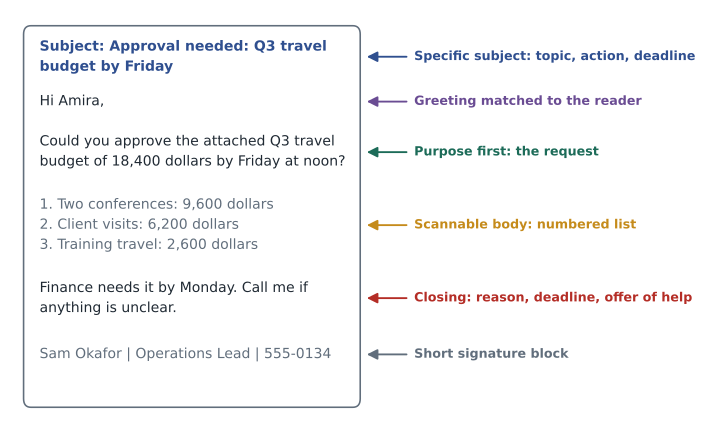
An effective business email has six parts.
- Subject line: specific and informative, ideally with the action or topic and any deadline: "Approval needed: Q3 travel budget by Friday", not "Question" or "Update".
- Greeting: "Hi Amira," for colleagues; "Dear Ms. Laporte," or "Good morning, Dr. Singh," for formal or first contacts. Match the formality the other person uses.
- Opening: state the purpose or main point in the first one or two sentences. If you need something, ask for it here.
- Body: give the details the reader needs, in short paragraphs. Use numbered lists for steps or questions and bullets for items, so the reader can reply point by point.
- Closing: restate the action and deadline, and offer help: "Could you send your figures by noon Thursday? Call me if anything is unclear."
- Signature: name, title, organization and phone number, and any legally required information. Keep it short and avoid images that clutter replies.
Worked problem
Rewriting a vague email
Rewrite this email from a marketing coordinator to the design team. Subject: "Brochure". Body: "Hi all, so as you probably know we have the trade show coming up and we've been talking about the brochure for a while. Marketing has been going back and forth on the copy but I think we're close now. I've attached the latest. Let me know what you think and whether the timing works. Thanks!"
Show solution
- Purpose: the designers need to lay out the brochure by a deadline using the attached final copy.
- Subject: "Brochure layout needed by May 12: final copy attached".
- Opening: "Hi Jordan and Mei, could you lay out the trade show brochure using the attached final copy and send a proof by noon, May 12?"
- Body: a short list of specifications: size (four-panel, letter-size, folded), quantity (2,000), brand colors from the 2026 guide, and photos in the shared folder.
- Closing: "The printer needs files by May 15. If May 12 does not work, please let me know by Wednesday so we can adjust."
Answer: The rewrite names the readers, states the action and deadline in the first sentence, lists the specifications and explains the reason for the deadline.
Email etiquette and good habits
| Habit | Why it matters |
|---|---|
| Use Reply All only when everyone needs your reply | Unnecessary replies waste many people's time |
| Use Bcc sparingly and never to hide recipients from a colleague | Hidden copies can damage trust; use Bcc mainly to protect email addresses in bulk messages |
| Change the subject line when the topic changes | Keeps threads searchable and clear |
| Summarize long threads before forwarding | The new reader should not have to read 20 messages to understand the request |
| Respond within one working day, even if only to acknowledge | Sets expectations and builds trust |
| Check attachments and recipients before sending | Missing attachments and wrong recipients are among the most common errors; a misaddressed email can be a privacy breach |
| Avoid writing in anger; wait before sending | Messages are permanent and can be forwarded |
| Use an out-of-office reply with an alternative contact | Senders know when to expect a reply and whom to contact |
Two errors deserve special attention. Sending confidential information to the wrong person can breach privacy law as well as embarrass you; many organizations configure a delay on outgoing mail or warnings when you email outside the organization. And forwarding a thread can expose earlier messages that were never meant for the new reader, so read the whole thread before you forward it.
Instant messaging and collaboration platforms
Instant messaging (IM) suits quick questions, coordination and informal updates. Good IM habits differ slightly from email habits. Put your whole question in one message rather than sending "Hi" and waiting for a reply. Use threads to keep topics separate. Use public channels for work topics so others can find the answer later, and direct messages for personal or sensitive matters. Respect status indicators and time zones; a message sent at 11 p.m. may feel like a demand to respond. Remember that IM is a business record too: many organizations retain chat messages, and they can be produced in legal proceedings.
| Use instant messaging for | Use email for | Use a meeting or call for |
|---|---|---|
| Quick questions with short answers | Requests that need a record | Discussions with many viewpoints |
| Coordination ("Running 5 minutes late") | External contacts | Sensitive or emotional topics |
| Informal team updates | Attachments and formal documents | Decisions that need debate |
| Alerts that need fast attention | Messages across time zones | Brainstorming and relationship building |
Memos
A memo (short for memorandum) is an internal document that announces a policy, procedure or decision to a group of people. Many organizations now send memos as emails or post them on an intranet, but the memo format remains useful for messages that must be formal, filed or printed. A memo has a heading block with TO, FROM, DATE and SUBJECT lines, followed by a body that opens with the main point, gives details (often with headings and lists) and closes with any action, deadline or contact. Memos do not have a greeting or signature, although the writer may initial the FROM line.
Worked problem
Writing a policy memo
Write a memo announcing that, from June 1, all visitors to a manufacturing plant must sign in electronically at the front desk and wear a visitor badge and safety glasses at all times on the production floor.
Show solution
- Heading: TO: All plant employees; FROM: Dana Kowalski, Plant Manager; DATE: May 15, 2027; SUBJECT: New visitor sign-in and safety rules from June 1.
- Opening (main point): "From June 1, every visitor must sign in at the front desk tablet, wear a visitor badge and wear safety glasses on the production floor."
- Details: why (a recent near-miss involving an unescorted contractor and a request from our insurer); how (hosts book visitors in advance; reception issues badges and glasses); what employees must do (escort visitors at all times; report anyone without a badge).
- Closing: "Questions? Contact Raj Patel in Health and Safety at extension 214."
Answer: The memo states the rule and date first, explains the reason briefly, lists responsibilities and names a contact.
Measuring bulk email
When you send newsletters, announcements or marketing emails to large lists, you can measure what happens. Email platforms report the delivery rate (the share of messages that reached an inbox rather than bouncing), the open rate (the share of delivered messages that were opened), the click-through rate (the share of delivered messages in which a link was clicked) and the click-to-open rate (the share of openers who clicked). Open rates have become less reliable since 2021, when Apple's Mail Privacy Protection began preloading images and reporting many messages as opened whether or not a person read them, so clicks, replies and completed actions are better measures of success.
Worked problem
Comparing two subject lines
An HR team tests two subject lines for the benefits enrollment email, each sent to half of a 4,000-person list. Version A, "Benefits update", was delivered to 1,960 people, with 980 unique opens and 196 unique clicks. Version B, "Action needed: choose your benefits by Nov. 15", was delivered to 1,970 people, with 1,182 unique opens and 473 unique clicks. Which performed better?
Show solution
- A: open rate = 980 ÷ 1,960 = 50.0 %; click-through rate = 196 ÷ 1,960 = 10.0 %; click-to-open rate = 196 ÷ 980 = 20.0 %.
- B: open rate = 1,182 ÷ 1,970 = 60.0 %; click-through rate = 473 ÷ 1,970 = 24.0 %; click-to-open rate = 473 ÷ 1,182 = 40.0 %.
- B's click-through rate is 24.0 − 10.0 = 14 percentage points higher, or 2.4 times A's.
Answer: Version B, the specific subject line with an action and a deadline, more than doubled the share of employees who clicked through to enrol.
tests = {
    "A: Benefits update": (1960, 980, 196),
    "B: Action needed: choose your benefits by Nov. 15": (1970, 1182, 473),
}
for name, (delivered, opens, clicks) in tests.items():
    print(f"{name}")
print(f" open rate {opens / delivered:.1%} click-through {clicks / delivered:.1%} click-to-open {clicks / opens:.1%}")A: Benefits update open rate 50.0% click-through 10.0% click-to-open 20.0% B: Action needed: choose your benefits by Nov. 15 open rate 60.0% click-through 24.0% click-to-open 40.0%
Managing your own inbox
Good email writing is half the story; the other half is managing the messages you receive. Common strategies include processing email in set blocks of time rather than constantly; applying a quick decision to each message (do it now if it takes under two minutes, delegate it, schedule it or delete it); using folders or labels sparingly and relying on search; turning off notifications during focused work; and unsubscribing from lists you do not read. Teams can also agree to shorter emails, clear subject-line tags such as [Action] and [FYI], and fewer copies.
Worked problem
Estimating the cost of email overload
A team of 12 people each receives 120 emails a day. They estimate that 30 % are unnecessary copies and that each unnecessary email costs 45 seconds to scan and dismiss. With a loaded labor cost of $50 an hour and 230 working days a year, what do unnecessary emails cost the team annually?
Show solution
- Unnecessary emails per person per day = 0.30 × 120 = 36.
- Time per person per day = 36 × 45 s = 1,620 s = 27 minutes.
- Team time per year = 27 min × 12 people × 230 days = 74,520 min ≈ 1,242 hours.
- Cost = 1,242 × $50 = $62,100.
Answer: Unnecessary emails cost the team about 1,240 hours, or roughly $62,000 a year, which is a strong argument for a team agreement on copies and Reply All.
Portfolio task for lesson 4: revise one of the messages you collected in lesson 1 into a well-structured email with a specific subject line, a purpose-first opening, a scannable body and a clear closing. Then write a one-page memo announcing a change to a procedure you know well.
Common mistakes
MistakeWriting subject lines such as "Hi" or "Question".
InsteadWrite specific subject lines with the topic, action and any deadline.
MistakePutting the request at the end of a long email.
InsteadState the purpose or request in the first one or two sentences.
MistakeUsing Reply All by default.
InsteadReply only to the people who need your answer.
MistakeSending "Hi" in a chat and waiting.
InsteadSend the whole question in one message so the reader can answer when they see it.
MistakeForwarding a long thread with "See below."
InsteadSummarize the thread and state what you need from the new reader.
MistakeJudging a bulk email by its open rate alone.
InsteadTrack clicks, replies and completed actions, since privacy features inflate opens.
Summary and key terms
- Use email for records, external contacts, attachments and cross-time-zone messages; not for urgent, emotional or complex discussions.
- An effective email has a specific subject line, a suitable greeting, a purpose-first opening, a scannable body, an action-focused closing and a short signature.
- Check recipients and attachments; misaddressed emails can breach privacy.
- Instant messages should be complete, threaded and respectful of time zones; they are business records too.
- Memos use a TO, FROM, DATE, SUBJECT heading and present policies or decisions formally.
- Measure bulk email with delivery, click-through and click-to-open rates; open rates are inflated by privacy features.
- Subject line
- The short description that tells recipients what an email is about.
- Reply All
- An email command that sends a reply to every recipient of the original message.
- Bcc
- Blind carbon copy; recipients whose addresses are hidden from others.
- Thread
- A chain of related messages and replies.
- Memo
- An internal document with a TO, FROM, DATE and SUBJECT heading.
- Open rate
- Unique opens divided by delivered emails.
- Click-through rate
- Unique clicks divided by delivered emails.
- Click-to-open rate
- Unique clicks divided by unique opens.
- Bounce
- An email that could not be delivered.
- A/B test
- An experiment that compares two versions of a message by sending each to part of an audience.
Practice problems
Work each problem on paper first, then reveal the answer to check.
Improve the subject line "Meeting".
Show answer
For example, "Budget review moved to Tues., 2 p.m., Room 4B".
What should the first sentence of a request email do?
Show answer
State the request or purpose.
When is Bcc appropriate?
Show answer
For bulk messages where recipients should not see each other's addresses.
An email was delivered to 2,500 people, with 900 unique opens and 225 unique clicks. Find the open, click-through and click-to-open rates.
Show answer
Open 36 %; click-through 9 %; click-to-open 25 %.
Why are open rates less reliable since 2021?
Show answer
Privacy features such as Apple's Mail Privacy Protection preload images and register opens that may not be real reads.
List the four heading lines of a memo.
Show answer
TO, FROM, DATE, SUBJECT.
Give two IM habits that respect colleagues.
Show answer
Send the full question in one message, and respect status indicators and time zones (also use threads).
An email of 450 words is sent to 60 people who read at 225 words per minute. Find the total reading time.
Show answer
2 minutes each, or 120 minutes in total.
Name two situations where email is a poor choice.
Show answer
Urgent issues and emotional or sensitive conversations (also long multi-party debates).
What is the two-minute rule in inbox management?
Show answer
If a message takes less than two minutes to handle, do it now.
Lesson quiz · 5 questions
Score 60% or more to complete this lesson.
Create a free account to save your progress, take quizzes and earn a certificate.