
CINE-210 · Lesson 9 of 12 · 26 min
Coverage, image circles and large format
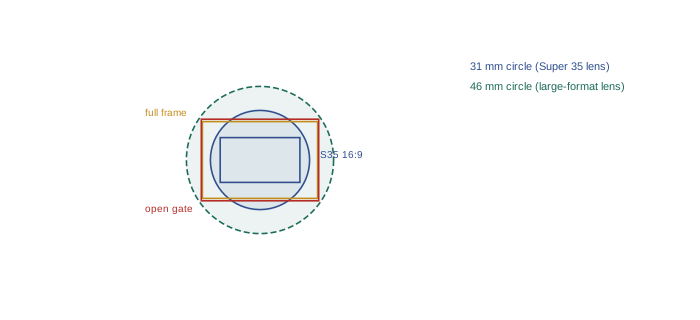
Every lens projects a circular image, and the sensor captures a rectangle within it. Whether that rectangle fits comfortably inside the circle, touches its edges or extends beyond them determines whether the image has clean corners, gentle falloff or dark, vignetted edges. With cinema cameras now offering sensors from Super 16 to 65 mm and many sensor modes in between, matching lenses to formats has become an essential skill. CINE-201 introduced sensor formats and image circles; this lesson examines coverage from the lens side: image circle specifications, how coverage interacts with sensor modes, vignetting and its types, large-format lenses and their design challenges, expanders and focal reducers, shooting with lenses that do not fully cover, and planning coverage for a production.
Image circles and coverage
The image circle is the circular area behind the lens within which it forms an image. Manufacturers usually specify a usable image circle: the diameter within which illumination and sharpness meet the design standard, such as 31 mm for a lens designed for Super 35, 46 mm for full frame or large format, or larger for 65 mm formats. A sensor area is covered if its diagonal is smaller than the usable image circle. Beyond the usable circle, the image darkens and degrades progressively, sometimes with a hard cut-off where the lens barrel blocks light.
Worked problem
Will this lens cover?
A lens has a usable image circle of 43 mm. Will it cover a full-frame 3:2 mode of 36 × 24 mm, an open-gate mode of 36.7 × 25.5 mm, and a Super 35 4:3 mode of 24.9 × 18.7 mm?
Show solution
- Full frame: \(\sqrt{36^2 + 24^2} = \sqrt{1872} \approx 43.3\) mm, just over 43 mm: corners may darken slightly.
- Open gate: \(\sqrt{36.7^2 + 25.5^2} = \sqrt{1997} \approx 44.7\) mm: noticeable corner vignetting.
- Super 35 4:3: \(\sqrt{24.9^2 + 18.7^2} \approx 31.1\) mm: comfortably covered.
Answer: Borderline on full frame, insufficient for open gate, and fine for Super 35; test the full-frame mode to see whether the corners are acceptable.
| Format or mode (approximate) | Dimensions | Diagonal |
|---|---|---|
| Super 16 | 12.5 × 7.4 mm | 14.5 mm |
| Super 35 16:9 | 24.9 × 14.0 mm | 28.6 mm |
| Super 35 4:3 | 24.9 × 18.7 mm | 31.1 mm |
| Full frame 3:2 | 36 × 24 mm | 43.3 mm |
| ARRI ALEXA Mini LF open gate | 36.7 × 25.5 mm | 44.7 mm |
| ARRI ALEXA 65 open gate | 54.1 × 25.6 mm | 59.9 mm |
Coverage and sensor modes
Most cinema cameras offer several sensor modes, using different areas of the sensor, and the required coverage depends on the mode, not just the camera. A large-format camera in a Super 35 crop mode can use Super 35 lenses; in open gate, it needs lenses with large image circles. Anamorphic modes often use a taller 4:3 or 6:5 area, which may require larger coverage than a 16:9 mode of the same width. When planning, list each lens and each sensor mode to be used and check coverage for every combination; rental houses publish coverage charts and can advise. Camera framing lines and frame guides should match the delivery aspect ratio, so that a lens vignetting slightly outside the delivery frame may still be acceptable if the vignetted area is cropped.
Vignetting
Vignetting is the darkening of the image toward the corners and edges. It has several causes:
- Natural vignetting, inherent in optics: light reaching the edges travels obliquely and is reduced roughly according to the cosine to the fourth power of the angle, strongest in wide lenses.
- Optical vignetting: the lens barrel and element edges block part of the light for off-axis points at wide apertures, producing cat's-eye bokeh and darkened corners that improve when stopped down.
- Mechanical vignetting: matte boxes, hoods, filters or adapters intrude into the field of view, producing hard-edged dark corners.
- Pixel vignetting: sensors receive light less efficiently at steep angles, sometimes with color shifts at the edges, particularly with short-flange vintage lenses.
Some vignetting is natural and often pleasing, concentrating attention in the frame; heavy or hard-edged vignetting looks like a mistake. Vignetting can be reduced in grading, at the cost of amplifying noise in the corners, and is easier to correct when soft and even.
Large-format lenses
Large-format cameras, with sensors about the size of full-frame stills cameras or larger, need lenses designed for larger image circles. Designing fast, compact large-format cinema lenses is challenging: covering a larger area at the same angle of view requires longer focal lengths and larger elements, increasing size, weight and cost. Manufacturers have responded with families designed for full frame and beyond, such as ARRI Signature Primes, Zeiss Supreme Primes, Cooke S7/i and S8/i, Leitz Thalia and M 0.8, Panavision Primo 70 and DXL lenses, and many more affordable sets. Large-format stills lenses, including medium-format designs, are often rehoused for their coverage. Large format also reveals edge performance more clearly, so lenses must perform well toward the edges of their image circles.
Expanders and focal reducers
Optical accessories can change a lens's coverage. Expanders, placed between lens and camera, enlarge the image circle by a fixed factor, such as 1.4× or 1.6×, allowing Super 35 lenses, especially zooms, to cover larger sensors; they also multiply the focal length by the same factor and lose light, about one stop for 1.4×. Focal reducers, sometimes called speed boosters, do the opposite: they shrink the image circle, allowing full-frame lenses to be used on smaller sensors with a wider field of view and a gain of about one stop, at the cost of some image quality. Both affect the lens's character and require testing.
Worked problem
Using an expander
A production wants to use a Super 35 24–290 mm T2.8 zoom on a full-frame camera with a 1.4× expander. What is the effective focal range and maximum aperture?
Show solution
- Focal range: \(24 \times 1.4 \approx 34\) mm to \(290 \times 1.4 = 406\) mm.
- Aperture: \(2.8 \times 1.4 \approx 3.9\), so about T4, one stop slower.
- The field of view on full frame matches the original zoom on Super 35.
Answer: About 34–406 mm at T4, with the same fields of view on full frame as the original on Super 35.
Shooting with lenses that do not fully cover
Sometimes cinematographers deliberately use lenses whose image circles do not fully cover the sensor, accepting dark corners or strong falloff for a specific look, or because a favorite vintage lens only covers Super 35. Options include using a crop mode or windowed sensor area that fits the lens; cropping in post-production, which reduces resolution; framing with the expectation that soft, dark corners will remain as a stylistic vignette; or combining lenses so that wider focal lengths, which usually have smaller relative coverage, are used in crop modes. Visual effects plates shot with heavy vignetting are harder to work with, so productions with significant effects work usually avoid it.
Planning coverage for a production
A practical coverage plan includes: listing cameras, sensor modes and aspect ratios; listing lenses with published image circles; checking each combination against the sensor diagonals; testing borderline combinations on the actual cameras, at the widest stops and closest focus to be used, since coverage can shrink at close focus and wide apertures for some designs; recording results in a coverage chart for the camera team; and setting framing lines that reflect what is usable. Rental houses and camera assistants often prepare such charts during prep. When a production uses multiple cameras, such as an A-camera in large format and a B-camera or drone in Super 35, coverage and equivalent focal lengths must be planned for each.
Format, lenses and look
Ultimately, coverage connects technical compatibility with the look of the film. Large format with large-format lenses offers shallow depth of field, a sense of scale and smooth tonality; Super 35 with classic lenses offers decades of cinematic precedent and easier focus; large format with lenses barely covering offers distinctive falloff. The interplay between sensor size, lens design and coverage is one of the richest areas of creative choice in contemporary cinematography.
Format choice and lens availability
The format a production chooses limits the lenses it can use, and vice versa. Super 35 offers the widest range of cinema lenses, including decades of classic primes, zooms and specialty lenses. Full-frame and large-format sensors require lenses with larger image circles, a range that has grown rapidly but remains smaller, particularly for fast wide-angle lenses and long zooms. 65 mm formats, such as the ALEXA 65, rely on specialized lenses, often rented from the camera manufacturer or Panavision, and rehoused medium-format stills lenses. Productions that need a specific lens, such as a favorite vintage set or a particular long zoom, may choose a format partly to accommodate it.
Shading and color shifts at the edges
Besides vignetting, some lenses produce color shifts or uneven tints toward the corners when used on digital sensors, especially wide-angle designs whose rear elements sit close to the sensor, so that light strikes the edges of the sensor at steep angles. This color shading may appear as magenta or green tints in the corners, visible against even surfaces such as skies and walls. Cameras and lens data systems can correct shading if they have profiles for the lens, and grading can correct it with corner masks, but testing reveals whether a lens and camera combination suffers from it.
Coverage and visual effects
Visual effects work prefers lenses that cover the full sensor area evenly, with minimal vignetting and known distortion, because effects are often composited in the corners of frames, and vignetting and shading must be modeled and reapplied to computer-generated elements. Lens metadata systems that record shading and distortion simplify this work. When a production chooses lenses with heavy vignetting for creative reasons, effects shots may use a different lens or shoot additional clean plates and reference images.
Coverage tests in practice
A coverage test frames an evenly lit white or gray wall, a sky or a large card, filling the frame, at the widest stop and at the stops to be used, and at minimum and moderate focus distances. The images are reviewed on a monitor with false color or a waveform to see how much the corners darken, and with the sensor's full area visible, not just the framing lines. Results are recorded in a coverage chart listing each lens, sensor mode and acceptable framing.
Coverage and anamorphic lenses
Anamorphic lenses add complications to coverage. Many traditional 2× anamorphics were designed for the 4:3 area of 35 mm film, about 22 × 18.6 mm, and cover similar sensor areas but not full-frame sensors. Newer large-format anamorphics, often with 1.5× to 1.8× squeeze factors, cover larger sensors. Because anamorphic modes use taller sensor areas, and the desqueezed frame is wide, checking coverage requires attention to both width and height. Some productions use large-format anamorphics in a cropped area to avoid edge softness, while others embrace the falloff as part of the look. Rental houses publish compatibility charts for anamorphic lenses and camera modes, and prep tests confirm the results.
Matching lenses across formats in one production
When different formats are mixed, coverage planning extends to matching looks. A Super 35 B-camera with Super 35 lenses may need diffusion or a different stop to match the depth of field and softness of a large-format A-camera, and focal lengths must be scaled to match framing. Tests with both cameras side by side, framing the same subject, show how closely they can be matched and guide the choices.
Common mistakes
MistakeAssuming a lens covers every mode of a camera.
InsteadCheck each sensor mode diagonal against the image circle.
MistakeTesting coverage only at infinity and mid stops.
InsteadTest at close focus and wide open.
MistakeIgnoring matte box intrusion on wide lenses.
InsteadCheck for mechanical vignetting.
MistakeForgetting light loss with expanders.
InsteadPlan for about one stop slower with 1.4×.
MistakeShooting VFX plates with heavy vignetting.
InsteadUse full coverage for effects work.
Summary and key terms
- A sensor area is covered if its diagonal is within the lens's usable image circle.
- Coverage depends on the sensor mode, not just the camera.
- Vignetting has natural, optical, mechanical and pixel causes.
- Large-format lenses need larger image circles, increasing size and cost.
- Expanders enlarge coverage and focal length at a cost in light.
- Focal reducers shrink coverage and gain light.
- Coverage plans and tests prevent surprises on set.
- Image circle
- Circular area in which a lens forms an image.
- Usable image circle
- Area meeting the design standard for quality.
- Coverage
- Whether a lens's image circle covers a sensor area.
- Sensor diagonal
- Diagonal of the recorded area.
- Natural vignetting
- Falloff from oblique light at the edges.
- Optical vignetting
- Light blocked by lens barrel at wide apertures.
- Mechanical vignetting
- Accessories intruding into the frame.
- Expander
- Accessory enlarging a lens's image circle.
- Focal reducer
- Accessory shrinking a lens's image circle.
- Coverage chart
- Table of lenses and modes with coverage results.
Practice problems
Work each problem on paper first, then reveal the answer to check.
Diagonal of a 36 × 24 mm sensor?
Show answer
About 43.3 mm.
Typical image circle for Super 35 lenses?
Show answer
About 31 mm.
Why do anamorphic modes need more coverage?
Show answer
They use a taller sensor area.
What law describes natural vignetting?
Show answer
Cosine fourth.
What improves optical vignetting?
Show answer
Stopping down.
What causes hard dark corners?
Show answer
Mechanical vignetting.
Effective focal length of a 50 mm with a 1.6× expander?
Show answer
80 mm.
What does a focal reducer gain?
Show answer
About one stop and a wider view.
Why test coverage at close focus?
Show answer
Coverage can shrink at close focus for some designs.
Name two large-format prime families.
Show answer
Signature Primes, Supreme Primes, S7/i, Thalia, Primo 70.
Lesson quiz · 5 questions
Score 60% or more to complete this lesson.
Create a free account to save your progress, take quizzes and earn a certificate.