
CINE-401 · Lesson 11 of 12 · 29 min
VFX, virtual production, dailies and on-set problem solving
Few narrative films are finished exactly as they were shot. Visual effects remove, add and extend; virtual production blends live action with digital environments; dailies reveal problems and opportunities; and every shooting day brings surprises that the DP must solve on the spot. This lesson covers how the DP plans and shoots for visual effects, works with green screens and LED volumes, captures the reference data that VFX artists need, reviews dailies with a critical eye, and approaches problems on set calmly and systematically. Course CINE-330 introduced LED volumes for commercial work; this lesson focuses on narrative practice.
Planning visual effects with the VFX supervisor
On most productions, a VFX supervisor joins prep to break down the script for effects. The DP and VFX supervisor agree, scene by scene, what will be achieved in camera and what in post.
- Invisible effects: removing modern objects, rigs, wires and crew reflections; changing signs; adding crowds; set extensions. These are the most common effects in drama.
- Composites: placing actors in environments shot separately or built digitally, often using green or blue screens.
- Creature, vehicle and destruction effects: requiring detailed previs, motion control or reference passes.
- Practical versus digital: some effects are better and cheaper done in camera (rain, smoke, practical explosions handled by special effects), others digitally. Decide together, early.
The DP's priority is that the live-action plate supports the final image: lighting direction, quality and color must match the digital elements that will be added, and the camera data must let artists reproduce the camera's movement.
Shooting plates
A plate is any live-action footage intended for compositing. Plates include background plates without actors, clean plates (the same shot without actors, for removal work) and element plates (smoke, fire, water, debris).
- Match lens, height, angle, stop and lighting between the main plate and any separate elements.
- Shoot a clean plate immediately after the main take whenever objects or people must be removed, with the camera locked or, for moving shots, using repeatable heads or motion control.
- Record camera data: lens, focal length, focus distance, stop, height, tilt, distance to subject and any filters. Many productions use lens metadata systems that record this automatically.
- Shoot extra frames at the head and tail of shots, and avoid cropping action that VFX may need.
Green and blue screens
Chroma key screens let compositors separate actors from the background.
- Choose green or blue based on costumes, hair and the background to be added: green is brighter and keys easily on most digital cameras; blue reduces spill on skin and suits night or dark backgrounds and blond hair.
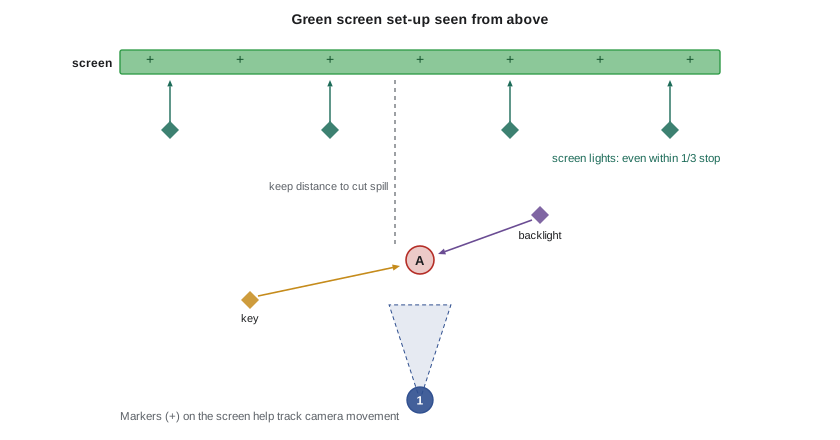
- Light the screen evenly, typically within about a third of a stop across its surface, and light it separately from the actors.
- Expose the screen near the brightness the VFX team requests, often around the actors' key level or a little under, never clipped.
- Keep actors as far from the screen as practical to reduce colored spill on their edges, and use backlight to separate them.
- Light the actors to match the planned background: direction, color and contrast must look as if they belong in the final environment.
- Avoid motion blur and very shallow focus on hair and edges unless the VFX supervisor agrees.
Worked problem
Spacing tracking markers
A moving camera shot frames a 20 ft wide section of green screen. The VFX supervisor wants at least four markers visible in every frame, both horizontally and vertically, with no marker so large it is hard to remove. What spacing should the grips use?
Show solution
- Four markers across 20 ft means at most about 20 ÷ 4 = 5 ft between markers; to allow for framing changes and movement, use about 3 to 4 ft.
- If the frame is about 2.39:1, the visible height is the width divided by 2.39, so vertical spacing should be similar or slightly closer to keep four markers vertically on tight frames, or the tracker accepts fewer vertically.
- Use small markers, often tape crosses in a slightly different shade of green, so they track well but key out easily, and avoid placing them behind actors' hair.
Answer: A grid of roughly 1 m (3 ft) spacing gives enough markers in every frame for tracking. Confirm the pattern with the VFX supervisor, who may also want markers on the floor and on set pieces.
Reference data for VFX
Beyond plates, VFX artists need reference to match light and geometry.
- Gray and chrome balls: a matte gray sphere and a mirrored sphere photographed in the shot's lighting show the direction, quality and color of light.
- Color chart: a chart in the scene's light helps match color.
- HDRI: a high dynamic range panoramic image of the set, captured with a bracketed series of exposures, used to light digital elements.
- Measurements and survey: set dimensions, camera positions and, increasingly, lidar scans or photogrammetry of sets.
- Witness cameras: small cameras that record the set from other angles to help track performers and camera movement.
Worked problem
Bracketing for an HDRI
An exterior set includes the sun and deep shadows. The VFX team estimates that the scene spans about 20 stops from the darkest shadow detail to the sun's core, and the camera used for HDRI captures about 12 stops cleanly in one exposure. If brackets are taken two stops apart, how many exposures are needed?
Show solution
- Extra range to cover beyond one exposure: 20 − 12 = 8 stops.
- At two stops per bracket, 8 ÷ 2 = 4 additional exposures.
- Total: 1 + 4 = 5 exposures for each direction of the panorama. Many teams add one or two more, or use dedicated ND filters for the sun, to be safe.
Answer: About five exposures per position, two stops apart, with extra brackets or ND for the sun's core. HDRI capture takes only a few minutes if planned, so schedule it at the end of a set-up before the light changes.
Virtual production and LED volumes
LED volumes are walls and ceilings of LED panels displaying real-time or pre-rendered backgrounds, often with camera tracking so the background's perspective moves with the camera. Course CINE-330 covered the technology: frustum, pixel pitch, moiré and brightness. In narrative work, the important questions are about planning.
- Content must be finished before the shoot: the virtual art department builds environments in prep, and changes on the day are limited and expensive.
- Lighting: the LED wall provides interactive light and reflections on actors and props, but it is often not bright or directional enough for keys, so the DP adds conventional fixtures, often controlled to match the content.
- Matching: the physical set pieces in front of the wall must blend with the digital environment in color and texture.
- Camera: lens choice and depth of field affect moiré and how the wall reads; keeping the wall slightly soft usually helps.
- Scheduling: volumes are booked by the day, so scenes are grouped by environment, and the DP works closely with the volume's technical team.
Other virtual approaches include rear projection and screen-based driving plates, which remain useful for car interiors and windows.
Dailies
Dailies are the footage from each shooting day, prepared with sound and the look applied for review. They used to be screened as a group every evening; today they are usually watched on secure streaming platforms or tablets, with the DP, director and producers watching separately.
- Watch dailies on the best display available, ideally calibrated, at the start or end of each day.
- Check focus, exposure, framing, continuity and the consistency of the look across scenes.
- Watch for technical problems: flicker, noise, dead pixels, dust on the sensor, reflections of crew, boom shadows.
- Check the editor's notes and assemblies when available: they reveal whether coverage is cutting.
- Report problems quickly so reshoots can be scheduled while the location and cast are still available.
The DIT and dailies team should send a short technical report with each batch, noting any issues with media, LUTs or sync.
Worked problem
Data and time for dailies
A production shoots 2.5 hours of footage per day across two cameras, recording at an average data rate of 1.2 GB per minute per camera. How much data is that per day, and how long does it take to copy one set of the data at an effective rate of 600 MB per second? (Use 1 GB = 1,000 MB.)
Show solution
- Minutes recorded: 2.5 hours = 150 minutes of total footage. Data: 150 × 1.2 = 180 GB per day.
- In MB: 180 × 1,000 = 180,000 MB. Copy time: 180,000 ÷ 600 = 300 seconds = 5 minutes.
- Most productions make at least two verified copies, plus dailies transcodes, so allow much more time in practice for verification and rendering.
Answer: About 180 GB per day and about 5 minutes per copy at the stated speed. Verification, multiple copies and dailies renders usually take an hour or more, which is why the DIT and data wrangler work throughout the day.
Reviewing and critiquing your work
Dailies are also a learning tool. Watch your own footage critically and honestly.
- Did each scene achieve the lighting idea and the visual plan?
- Does the look stay consistent between scenes shot on different days?
- Are faces rendered as intended for every actor?
- Did any set-up waste time without adding to the story?
- What would you change if you could shoot the scene again?
Seek feedback from the director, colorist and editor. Many DPs keep a log of lessons learned during a production and revisit it before the next one.
Solving problems on set
Problems on set are inevitable: weather changes, equipment fails, a location becomes unavailable, an actor is late, the sun goes behind a building earlier than expected. A calm, systematic approach works best.
- Stop and identify the actual problem. "The sun is gone" might really mean "the shot no longer matches the previous coverage."
- Consider the story purpose of the shot: what must it communicate? Often a simpler shot can achieve the same goal.
- Generate options quickly with the gaffer, key grip, operator and first AD: control (add light, block light), change (shoot a different angle, move the scene), cheat (hide the problem with framing) or defer (pick it up later).
- Decide, communicate clearly and move on. A good decision now is better than a perfect decision in an hour.
- Note the change for continuity, VFX and the colorist.
| Problem | Options |
|---|---|
| Sun disappears behind cloud mid-scene | Wait if clouds are breaking; add large daylight units; overhead and bounce to soften the remaining coverage so it matches |
| Rain starts on a day exterior | Move to a cover set; tent the action; shoot tighter angles that hide rain; reschedule the wide |
| Lens or camera failure | Swap to a backup body or lens; re-prioritize shots to suit available kit |
| Running out of night | Simplify coverage; use two cameras; drop "could" shots; schedule pickups |
| Unwanted reflections of crew or lights | Reposition camera or lights; flag; use polarizers; mark for VFX removal |
Common mistakes
MistakeLeaving VFX planning until post-production
InsteadPlan effects with the VFX supervisor in prep and shoot plates and references to support them
MistakeLighting the green screen and actors with the same fixtures
InsteadLight the screen evenly and separately, and light actors to match the final background
MistakeForgetting a clean plate for removal work
InsteadShoot a clean plate straight after the main take with the same camera settings
MistakeWatching dailies only on a phone
InsteadReview on a calibrated or high-quality display and check focus, exposure and continuity
MistakeReacting to problems on set without considering the story purpose
InsteadIdentify the problem and the shot's purpose, then choose to control, change, cheat or defer
Summary and key terms
- VFX planning starts in prep, agreeing what will be done in camera and what in post.
- Plates, clean plates and camera data let VFX artists integrate digital work.
- Green and blue screens must be lit evenly and separately, with actors lit to match the final environment.
- Reference data includes gray and chrome balls, charts, HDRIs, measurements and witness cameras.
- LED volumes need finished content, matched set pieces and supplementary lighting.
- Dailies reveal problems in time to fix them and are a tool for self-critique.
- On-set problems are solved by identifying the real problem and the story purpose, then choosing to control, change, cheat or defer.
- Plate
- Live-action footage intended for compositing
- Clean plate
- The same shot recorded without actors or objects, for removal work
- Chroma key
- Separating a subject from a colored background for compositing
- Spill
- Colored light reflected from a green or blue screen onto the subject
- Tracking marker
- A small mark on a set or screen used to calculate camera movement
- HDRI
- A high dynamic range panoramic image used to light digital elements
- Gray and chrome balls
- Reference spheres that record the direction and quality of light on set
- Witness camera
- A camera recording the set from another angle to help VFX tracking
- LED volume
- A stage of LED walls displaying digital environments behind actors
- Dailies
- Footage from each shooting day prepared with sound and the look for review
Practice problems
Work each problem on paper first, then reveal the answer to check.
Why shoot a clean plate?
Show answer
So VFX can remove objects, people or rigs by replacing them with the background
When might a blue screen be better than green?
Show answer
With blond hair, green costumes, night or dark backgrounds, or to reduce spill on skin
A frame shows a 4 m wide screen and VFX want four markers across. What spacing is the maximum?
Show answer
About 1 m
A scene spans 18 stops and the camera captures 12. How many 2-stop brackets in total?
Show answer
1 + (18 − 12) ÷ 2 = 4 exposures
Three hours of footage at 1 GB per minute: how much data?
Show answer
180 GB
Name three items of VFX reference.
Show answer
Any three of gray ball, chrome ball, color chart, HDRI, measurements, lidar scans or witness cameras
Why does an LED wall usually need extra conventional lighting?
Show answer
It is often not bright or directional enough to key actors
Give two things to check in dailies.
Show answer
Any two of focus, exposure, framing, continuity, look consistency or technical faults
What are the four broad options for solving a problem on set?
Show answer
Control, change, cheat or defer
Why report dailies problems quickly?
Show answer
So reshoots can be scheduled while locations and cast are still available
Lesson quiz · 5 questions
Score 60% or more to complete this lesson.
Create a free account to save your progress, take quizzes and earn a certificate.