
CRE-130 · Lesson 6 of 12 · 26 min
Stabilization, support and camera movement
Shaky footage is one of the clearest signs of amateur video, and blurred photos waste good moments. Phones are light, which makes them easy to carry but also easy to shake, and their small sensors often need slower shutter speeds in dim light, which magnifies any movement. Modern phones include impressive stabilization, but technique and simple support still make a large difference, and deliberate camera movement, done smoothly, adds energy and production value. This lesson covers how phone stabilization works, holding the phone steadily, tripods and mounts, gimbals, stabilization modes and their trade-offs, the main types of camera movement and how to perform them smoothly with a phone, and choosing support for different kinds of content.
How phone stabilization works
Phones use two kinds of stabilization, often together:
- Optical image stabilization (OIS) physically moves the lens or the sensor to counteract small hand movements, measured by gyroscopes. Sensor-shift systems move the sensor itself. OIS improves sharpness in photos at slow shutter speeds and smooths small jitters in video without cropping the image.
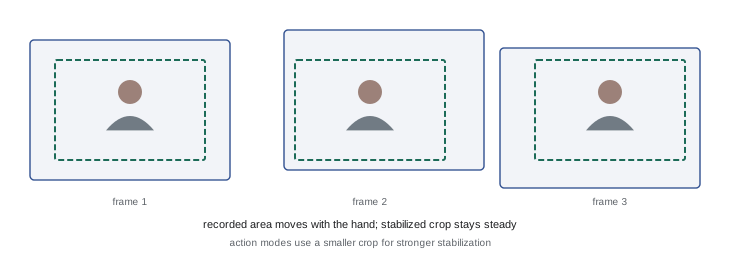
- Electronic image stabilization (EIS) works on the video frames: the phone records a slightly larger area than the final frame and shifts the crop from frame to frame to cancel movement, using gyroscope data and image analysis. EIS can smooth larger movements such as walking, but it crops the image, reducing the field of view, and can cause artifacts such as wobbly, jelly-like distortion or motion blur that appears to smear while the frame stays still, especially in low light.
Many phones also offer enhanced modes, often called action mode, super steady or similar, which crop the image heavily to stabilize running, cycling and other vigorous movement, producing footage that looks as if it were filmed with a gimbal. These modes work best in bright light and reduce resolution or field of view.
Holding the phone steadily
Good handheld technique reduces shake before stabilization has to correct it:
- Hold the phone with both hands, elbows tucked against your body, rather than at arm's length with one hand.
- Brace against something solid: lean on a wall, rest your elbows on a table or railing, or kneel with an elbow on your knee.
- Breathe out slowly and press the shutter gently, or use the volume button, a timer, a watch or a remote, since tapping the screen jolts the phone.
- When walking with the camera, bend your knees slightly, walk heel to toe in small steps, and let your arms act as shock absorbers, sometimes called the ninja walk.
- Avoid zooming while recording unless it is deliberate, since zoom magnifies shake.
- Use the main camera rather than the telephoto, because longer focal lengths magnify movement and telephoto cameras often have weaker stabilization.
Accessories such as phone grips, cages and handles give a more secure hold, with a camera-like grip and mounting points for microphones and lights.
Tripods and mounts
For talking heads, product videos, time-lapses, overhead shots, night photos and anything in which the camera does not need to move, a tripod is the most effective stabilizer. Options include:
- Small tabletop tripods and flexible tripods with bendable legs, which can wrap around railings and branches.
- Full-size tripods with a phone clamp, giving eye-level height for talking heads and standing shots.
- Light stands with phone mounts, often used with ring lights, and stands with an arm that extends horizontally for overhead shots of desks and food.
- Selfie sticks, some with built-in tripod legs and remote shutters, for wider self-filming and group shots.
- Suction, clamp and magnetic mounts for cars, windows, desks and walls, useful for driving vlogs and unusual angles, though magnetic mounts may affect stabilization and compasses on some phones.
Choose a phone clamp that holds the phone securely in both vertical and horizontal orientations, and a tripod head that tilts and pans smoothly. Check that the tripod is level using the camera's grid or level indicator, and that it is stable, especially outdoors in wind; hanging a bag from the center column adds stability.
Gimbals
A gimbal is a handheld stabilizer with motors on three axes (pan, tilt and roll) that keep the phone steady while you move. Gimbals produce the smooth, floating movement seen in professional travel, real estate and event videos, and they enable movements that would be difficult by hand, such as walking alongside a subject, following them around a corner or rising smoothly from the ground. Many gimbals add features such as subject tracking, which turns the gimbal to follow a face or object; motion time-lapse; panorama; and quick switching between vertical and horizontal orientations.
Gimbals have limitations. They correct rotation, not vertical bobbing, so walking technique still matters. They add bulk, need charging and balancing, and attract attention in public. They are unnecessary for static shots and can make footage look overly smooth and impersonal for content that benefits from a handheld, authentic feel. With modern phone stabilization and action modes, many creators find they need a gimbal only for specific shots. A sensible approach is to try your phone's built-in modes first and rent or borrow a gimbal before buying one.
| Support | Best for | Limitations |
|---|---|---|
| Handheld with OIS/EIS | Quick shots, authentic feel, walking | Some shake, crop with strong EIS |
| Action mode | Running, cycling, vigorous movement | Heavy crop, needs bright light |
| Tripod | Talking heads, products, time-lapse, night | No movement, setup time |
| Overhead arm | Food, crafts, desks, unboxing | Space, stability |
| Gimbal | Smooth walking, tracking, reveals | Bulk, charging, can look impersonal |
Types of camera movement
Camera movement adds interest, reveals information and guides attention. The basic movements are:
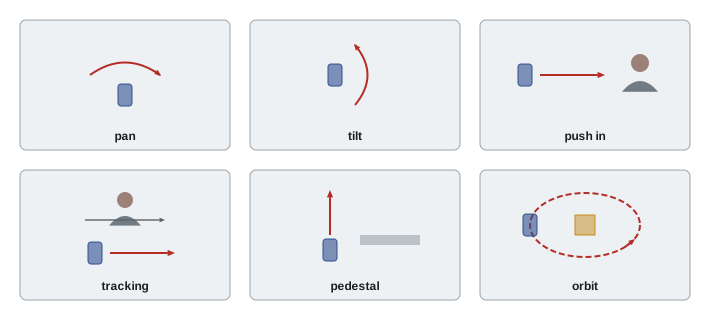
- Pan: rotating the camera horizontally from a fixed position, to follow action or survey a scene.
- Tilt: rotating the camera vertically, for example from a person's feet to their face, or from the ground up to a building.
- Push in (dolly in) and pull out (dolly out): moving the camera toward or away from the subject, building intensity or revealing context.
- Tracking or trucking: moving alongside a subject, parallel to their movement.
- Pedestal or crane: moving the camera straight up or down, for example rising over a table or a wall.
- Orbit or arc: circling around a subject, showing it from different angles, popular for products and dramatic reveals.
- Handheld: deliberate, natural movement that feels immediate and personal, suited to vlogs and documentary.
Zooming optically or digitally changes framing without moving the camera, but it changes perspective differently from moving the camera and on phones can cause a visible jump when switching cameras. A push in with the camera usually looks more natural than a zoom.
Performing smooth movements with a phone
Smooth movement comes from technique more than equipment. Start and end each movement with a still hold of a second or two, giving editors clean points to cut. Move slowly; movements that feel slow while filming usually look right on screen, and fast movements become blurry and disorienting. Move with your body rather than your wrists: for a pan, rotate from your hips with your arms fixed; for a push in, walk forward smoothly or lean forward from the waist. Keep the horizon level by watching the grid. Rehearse the movement before recording, and record several takes at different speeds. Use the main camera, lock exposure and focus, and consider shooting at 60 fps, which gives smoother motion and allows slowing the shot in editing to hide small bumps.
Simple tools help. A phone on a tripod with a smooth pan head makes clean pans and tilts. Sliding a phone on a cloth across a smooth table, or on a small motorized slider, creates gentle tracking moves for products. A phone on a skateboard, office chair or trolley can make a dolly. Hanging the phone on a strap or holding it upside down near the ground creates low tracking shots.
Worked problem
Planning movements for a product reveal
A creator wants a 10-second vertical opening for a video about a new pair of headphones sitting on a desk. They have a tripod, a gimbal and the phone's action mode. What movements could they use?
Show solution
- Shot 1 (3 s): a slow push in on the headphones from a medium shot to a close-up, with the gimbal or by sliding the phone along the desk.
- Shot 2 (3 s): a slow orbit around the headphones, revealing the side profile and logo, using the gimbal.
- Shot 3 (2 s): a detail shot on a tripod of the ear cushion texture with a hand pressing it.
- Shot 4 (2 s): a tilt up from the headphones to the creator picking them up, hold on their face.
- Hold still for a second at the start and end of each move, record at 60 fps and lock exposure.
Answer: A push in, an orbit, a static detail and a tilt up, each slow with holds at the start and end, give an engaging reveal.
Motivated movement
Movement is most effective when it has a reason. Motivated movement follows a subject, reveals something new, emphasizes an emotion or shows a relationship between elements. A push in as someone says something important adds emphasis; a tilt from a messy desk to a tidy one shows a transformation; tracking alongside someone walking keeps the audience with them. Unmotivated movement, constant swirling, drifting or zooming without purpose, distracts and can make viewers feel unsettled. Mix moving shots with steady ones: a sequence of entirely moving shots tires the eye, while a few well-placed movements among stable shots feel deliberate. Short-form content often uses quick movements and whip pans as transitions between clips, discussed in Lesson 11.
Time-lapse and hyperlapse
Time-lapse compresses time by recording frames at intervals, turning minutes or hours into seconds: clouds racing, a city waking up, a meal being prepared, a painting created. Phones offer built-in time-lapse modes that adjust the interval automatically based on recording length; third-party apps allow manual intervals, exposure locks and night time-lapses. Time-lapses require a tripod or very stable mount, exposure locked to avoid flicker as the light changes, and enough battery and storage; plug the phone into a power bank for long sequences. Hyperlapse, or moving time-lapse, combines time-lapse with camera movement, such as walking through a city or driving along a road; phone hyperlapse modes stabilize the footage heavily.
Choosing support for your content
Match support to the content and the way you work. Talking-head creators benefit most from a sturdy tripod at eye level and good lighting. Food and craft creators need an overhead arm or a tripod with a horizontal extension. Travel and lifestyle creators value light, fast tools such as a small tripod that doubles as a grip, and may add a gimbal for walking shots. Action and sports creators rely on action modes and secure mounts. Whatever your genre, the goal is footage that looks intentional: steady when it should be steady, moving smoothly when it moves, and handheld only when the handheld feel serves the story.
Stabilization in editing
Editing apps can also stabilize footage after recording, analyzing the movement between frames and cropping and shifting the image to smooth it. Software stabilization is useful when a clip is slightly shaky and cannot be reshot, but it has the same limitations as in-camera EIS: it crops the frame, it can cause warping and wobble when movement is large, and it cannot remove motion blur already recorded within each frame. Recording in 4K gives more room for cropping without losing quality in a 1080p export. Some desktop and mobile apps use gyroscope data recorded by the phone, or by action cameras, for more accurate stabilization. As a rule, get footage as steady as possible during recording and use software stabilization only as a repair tool.
Safety with mounts and rigs
Phones mounted on tripods, arms, cars and poles can fall, damaging the phone and anything below it. Tighten clamps fully, check that the phone sits securely before letting go, and add a safety strap or tether for overhead and elevated positions. Do not mount phones where they distract drivers or obstruct their view, and follow local laws about handling phones while driving; filming should be set up before the vehicle moves and controlled by a passenger or remotely. In crowds and public spaces, keep tripods and selfie sticks out of walkways, and be aware that some venues ban them.
Common mistakes
MistakeFilming with one hand at arm's length.
InsteadUse two hands, tuck elbows and brace.
MistakeMoving the camera fast and constantly.
InsteadMove slowly, with purpose and still holds at each end.
MistakeZooming while recording.
InsteadMove the camera instead of zooming.
MistakeUsing action mode in dim light.
InsteadUse it in bright light or switch to normal stabilization.
MistakeBuying a gimbal before trying built-in modes.
InsteadTest phone stabilization first and borrow before buying.
Summary and key terms
- OIS moves lens or sensor; EIS shifts a crop within a larger frame.
- Action modes stabilize vigorous movement with a heavy crop.
- Two hands, bracing and gentle shutter presses reduce shake.
- Tripods and overhead arms suit static shots; gimbals suit smooth movement.
- Basic movements include pan, tilt, push, track, pedestal and orbit.
- Move slowly, rehearse, and hold still at the start and end.
- Use movement with motivation and mix it with steady shots.
- OIS
- Optical image stabilization moving the lens or sensor.
- EIS
- Electronic image stabilization shifting a crop.
- Action mode
- Heavily cropped stabilization for vigorous movement.
- Gimbal
- Motorized three-axis stabilizer.
- Pan
- Horizontal rotation of the camera.
- Tilt
- Vertical rotation of the camera.
- Push in
- Moving the camera toward the subject.
- Orbit
- Moving the camera in an arc around a subject.
- Motivated movement
- Camera movement with a clear purpose.
- Hyperlapse
- Time-lapse with camera movement.
Practice problems
Work each problem on paper first, then reveal the answer to check.
How does EIS work?
Show answer
It shifts a crop within a larger recorded frame.
What is the drawback of action modes?
Show answer
Heavy crop and need for bright light.
Name three handheld techniques.
Show answer
Two hands, elbows tucked, bracing, gentle shutter, ninja walk.
Why avoid the telephoto for handheld shots?
Show answer
It magnifies shake.
What does a gimbal not correct?
Show answer
Vertical bobbing from walking.
What is a tilt?
Show answer
Rotating the camera vertically.
Why hold still at the start and end of a move?
Show answer
To give clean editing points.
Name a cheap way to make a dolly.
Show answer
Skateboard, office chair, cloth on a table.
What is motivated movement?
Show answer
Movement with a clear reason, such as following or revealing.
What does a time-lapse need?
Show answer
A stable mount, locked exposure, power and storage.
Lesson quiz · 5 questions
Score 60% or more to complete this lesson.
Create a free account to save your progress, take quizzes and earn a certificate.