
PHOT-430 · Lesson 6 of 12 · 33 min
Prepress: files, color and proofing
Prepress is everything that happens between a finished layout and a running press: preparing images for the printing process, converting or tagging color, exporting print-ready files, checking them, and approving proofs. Problems that slip through prepress become expensive on press or permanent in the finished book. PHOT-301 explained the ICC color management system, soft proofing and printing on inkjet papers. This lesson applies that foundation to commercial printing, which uses cyan, magenta, yellow and black inks on presses with their own characteristics. You will learn how offset printing reproduces tone with halftone screens, which standard printing conditions are used in Canada and the United States, who should convert files to CMYK, how to manage total ink coverage and black-and-white reproduction, how to export and preflight PDF files, and how to read and approve proofs.
How a press reproduces tone
An offset press cannot print gray: each ink is either present or absent at any point. Tones are created by halftone screening, which breaks images into tiny dots whose size or frequency varies. In conventional amplitude-modulated (AM) screening, dots sit on a regular grid and vary in size; screen ruling is given in lines per inch (lpi), commonly 150 to 175 lpi for coated paper in sheetfed offset and 120 to 150 lpi for uncoated. In frequency-modulated (FM) or stochastic screening, tiny dots of fixed size are scattered randomly in greater or lesser density, which can render fine detail smoothly and avoid moiré patterns. Many art book printers offer FM or hybrid screening for photography.
Ink dots spread slightly when ink is transferred to paper, so printed tones look darker than the file values. This is called dot gain or, in current standards, tone value increase. Uncoated paper absorbs more ink and shows more dot gain than coated paper. Standard printing conditions account for typical dot gain, and color management compensates when files are converted with the correct profile. If you prepare files for an uncoated stock using a coated profile, midtones and shadows will print noticeably darker than expected.
Worked problem
Resolution for a halftone screen
A printer will use a 175 lpi AM screen. A common rule is that image resolution should be 1.5 to 2 times the screen ruling at final size. What resolution range is needed, and does a 300 ppi file suffice?
Show solution
- Lower bound: \( 1.5 \times 175 = 262.5 \) ppi.
- Upper bound: \( 2 \times 175 = 350 \) ppi.
- A 300 ppi file sits within the range.
Answer: About 260 to 350 ppi. A file at 300 ppi at final size is suitable; much higher resolution adds file size without visible benefit for AM screening, though FM screens and very fine detail can benefit modestly.
Standard printing conditions
To make color predictable, the printing industry defines standard printing conditions: target values for ink colors, tone value increase and paper color, measured from test prints and published as characterization data. ICC profiles built from this data describe how a typical press behaves under that condition. Canadian and American printers commonly work to one of two families of standards.
| Condition | Typical use | Common profile names |
|---|---|---|
| GRACoL 2013 (CRPC6) | North American sheetfed offset on premium coated paper | GRACoL2013_CRPC6 |
| SWOP 2013 (CRPC5) | North American web offset and publication printing on lighter coated paper | SWOP2013_CRPC5 |
| FOGRA51 | ISO 12647-2 offset on premium coated paper, widely used in Europe and by Asian printers | PSO Coated v3 |
| FOGRA52 | ISO 12647-2 offset on uncoated paper | PSO Uncoated v3 (FOGRA52) |
| Printer-specific | A press calibrated and profiled for a particular paper | Supplied by the printer |
Many photobook printers in Europe and Asia, which print a large share of independent photobooks for North American publishers, work to FOGRA standards; many North American printers work to GRACoL or G7-calibrated conditions. Ask your printer which condition and profile they use for your paper. If they provide a custom profile, use it for soft proofing even if they do the conversion themselves.
Who converts to CMYK?
There are two common workflows. In an RGB workflow, you supply images in RGB with embedded profiles (usually Adobe RGB or a similar working space), and the printer converts them to CMYK with their own settings at the last stage. In a CMYK workflow, you or your separator convert images to CMYK using the printer's profile and supply print-ready CMYK files. Both can produce excellent results.
| Workflow | Advantages | Risks |
|---|---|---|
| Supply RGB, printer converts | Printer applies settings optimized for their press; easy to change paper or printer | Less control over how out-of-gamut colors and shadows are mapped |
| Supply CMYK, you convert | Full control of separation; you see and adjust final values | Wrong profile or settings lock errors into files; harder to repurpose |
| Specialist separator or retoucher | Expert separations, often for black-and-white tritones | Extra cost |
For a first book, many photographers supply carefully edited RGB files with embedded profiles, soft proof them using the printer's profile, and ask the printer to convert. They then judge contract proofs and adjust RGB files if needed. Photographers with experience, or projects with demanding black-and-white work, may work with a specialist who makes separations directly. Whichever workflow you choose, agree on it in writing with the printer.
Total area coverage and rich black
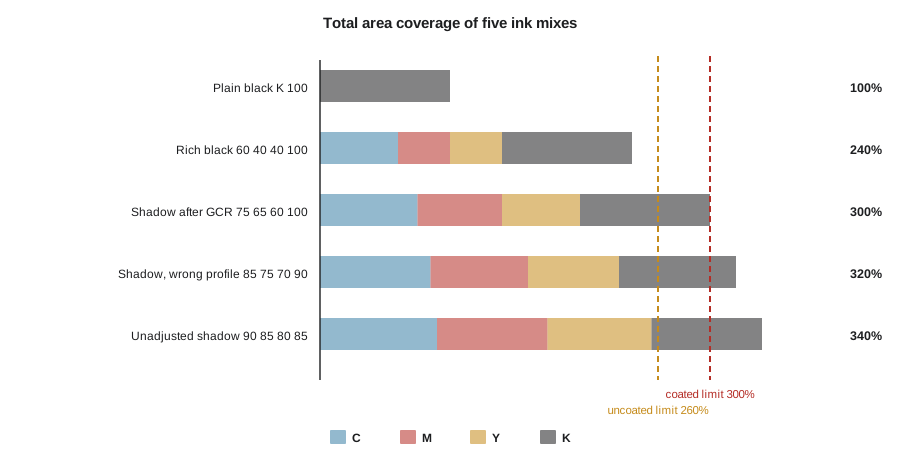
Total area coverage (TAC), also called total ink limit, is the sum of the four ink percentages at a point. A deep shadow could theoretically be 100 percent of each ink, 400 percent in total, but presses cannot dry or trap that much ink without smearing, setting off onto the next sheet or causing the sheets to stick. Printing conditions set a maximum, typically around 300 to 330 percent for coated sheetfed offset and 260 to 300 percent for uncoated paper. ICC profiles enforce this limit during conversion.
Black (K) ink alone at 100 percent looks slightly weak and grayish on press. Designers create a rich black by adding some cyan, magenta and yellow under the black, for example C 60 M 40 Y 40 K 100, which totals 240 percent. Rich black should be used for large dark areas, not for small text, because slight misregistration of the four plates would make small text fuzzy. Use plain 100 percent K for body text.
Worked problem
Checking total area coverage
An image converted with the wrong profile contains a deep shadow of C 85, M 75, Y 70, K 90. The printer's limit for coated paper is 300 percent. Is the shadow acceptable, and what is a typical fix?
Show solution
- TAC: \( 85 + 75 + 70 + 90 = 320 \) percent.
- This exceeds the 300 percent limit by 20 points.
- Gray component replacement (GCR) replaces some of the equal amounts of C, M and Y that make gray with black ink. Removing 10 from each of C, M and Y and adding 10 to K gives C 75, M 65, Y 60, K 100.
- New TAC: \( 75 + 65 + 60 + 100 = 300 \) percent.
Answer: The original shadow is 320 percent and too heavy. Reconverting with the correct profile, which applies the printer's ink limit and black generation, is the proper fix; manual GCR shows the principle.
import numpy as np
rng = np.random.default_rng(430)
# a synthetic dark region of 10,000 pixels, ink percentages 0 to 100
c = rng.uniform(55, 95, 10_000); m = rng.uniform(45, 90, 10_000)
y = rng.uniform(40, 85, 10_000); k = rng.uniform(60, 100, 10_000)
tac = c + m + y + k
limit = 300
print(f"pixels over {limit}%: {np.mean(tac > limit) * 100:.1f}%  max TAC {tac.max():.0f}%")
# replace part of the neutral component (the minimum of C, M, Y) with black
excess = np.clip(tac - limit, 0, None)
neutral = np.minimum(np.minimum(c, m), y)
r = np.minimum(excess / 2, neutral)         # removing r from C, M, Y and adding r to K cuts TAC by 2r
r = np.minimum(r, 100 - k)               # black cannot exceed 100%
c2, m2, y2, k2 = c - r, m - r, y - r, k + r
tac2 = c2 + m2 + y2 + k2
print(f"after GCR: over {limit}%: {np.mean(tac2 > limit + 0.01) * 100:.1f}% max TAC {tac2.max():.0f}%")pixels over 300%: 28.1% max TAC 363% after GCR: over 300%: 9.9% max TAC 362%
The output shows that simple replacement cuts the share of pixels over the limit from about 28 percent to about 10 percent, but where black is already near 100 percent there is little room to substitute, so some pixels remain heavy. Proper conversion with a profile handles this smoothly across the whole tonal range, which is why manual adjustment is a last resort.
Black-and-white reproduction
Black-and-white photographs are surprisingly hard to print well in offset, because a single black ink at 150 to 175 lpi cannot reproduce the full tonal range and depth of a fine print. Photobook printers use several methods.
| Method | How it works | Character |
|---|---|---|
| Single black (monotone) | One black ink | Economical but limited depth; shadows can look flat |
| Duotone | Two inks, often black plus a gray or warm black | More depth and smoother tones |
| Tritone or quadtone | Three or four inks, such as two blacks and a gray, or black, gray and a warm tone | Rich, deep, closest to a fine print; standard for high-end monographs |
| Four-color neutral (CMYK) | Black-and-white image separated into all four process colors | Rich blacks, but neutrality can drift with press variation |
| Process plus extra black | CMYK plus an additional black or gray | Depth with some color flexibility |
Duotones and tritones are made with special separations, often by specialist separators, and require the printer to mix custom inks. They cost more but can transform a black-and-white book. Four-color neutral printing allows color and black-and-white images in the same book without extra inks, but gray balance must be carefully controlled; slight shifts on press can turn neutral images faintly green or magenta. Discuss your black-and-white images with the printer before choosing a method, and request printed samples.
Spot colors and expanded gamut
Spot colors are premixed inks printed separately from CMYK, often specified with a color matching system such as Pantone. They are used for exact brand colors, metallic or fluorescent inks, and extra blacks or grays in black-and-white books. Expanded-gamut printing, sometimes called extended color gamut or seven-color printing, adds orange, green and violet to CMYK to reproduce more saturated colors. Some art book printers offer it for color-critical work. Both add cost and require separations made for that ink set.
Preparing images for press
Images that look excellent on screen may need adjustment for press. Typical steps after editing and before conversion include:
- Check shadow and highlight detail in a soft proof. Offset printing, especially on uncoated paper, compresses shadows; you may need to open dark midtones slightly.
- Avoid pure white highlights where detail matters; a printed area of 0 percent ink is bare paper, and very light tones below about 3 percent may not hold dots.
- Apply output sharpening for the final size and screen. Halftone screening softens fine detail; moderate sharpening at final resolution helps.
- Remove dust, sensor spots and edge artifacts at full resolution; press sheets show defects that screens hide.
- Confirm that each image is in the intended color space with an embedded profile.
Keep layered master files and export flattened print files for placement in the layout. Name files consistently with the image codes used in your flatplan, so prepress staff and you can track corrections.
Exporting PDF files for print
Printers almost always want print-ready PDF files. The PDF/X family of standards (ISO 15930) defines PDF subsets designed for reliable print exchange.
| Standard | Color | Transparency | Typical use |
|---|---|---|---|
| PDF/X-1a | CMYK and spot only | Flattened | Older workflows; CMYK-only files |
| PDF/X-3 | Allows RGB and Lab with profiles | Flattened | Less common now |
| PDF/X-4 | Allows RGB and Lab with profiles, CMYK, spot | Live transparency preserved | Current recommended standard for most printers |
A PDF/X file embeds fonts, includes an output intent that specifies the intended printing condition, and records trim and bleed boxes. Export from your layout software using the printer's preset if they provide one, or the PDF/X-4 preset with bleed and crop marks. Export single pages rather than spreads unless the printer asks for spreads; printers impose pages themselves. Name files clearly, for example with the book title and page range.
Preflight
Preflight is a systematic check of files before they go to press. Layout software has live preflight tools, and printers run their own checks, but catching problems yourself saves time and money.
- Fonts embedded and licensed; no missing fonts.
- All images linked, at least about 250 to 300 ppi at final size, in the agreed color space.
- Bleed present on all edges where images or color run off the page.
- No text or key details within the safe area or gutter allowance.
- Rich black used for large areas only; small text in 100 percent K.
- Total ink coverage within the printer's limit (if supplying CMYK).
- No unintended spot colors, RGB elements in a CMYK file or overprint settings.
- Page count and order match the flatplan; blank pages are intended.
- Cover spine width matches the printer's final figure.
Keep a preflight checklist and tick it before every file delivery, including corrected files. Many problems come from late corrections made in a hurry.
Proofs and what they show
A proof is a representation of the printed result used for approval. Different proofs show different things, and you should know what each can and cannot tell you.
| Proof | What it is | What it shows | What it does not show |
|---|---|---|---|
| Soft proof | On-screen simulation using the printer's profile | Approximate color and gamut limits | Paper feel, dot structure, press variation |
| PDF proof | The printer's processed PDF | Content, layout, imposition errors | Accurate color |
| Contract proof | A certified inkjet or similar proof simulating the press condition, with a control strip | Color the printer agrees to match | Paper texture and screening, unless printed on similar stock |
| Digital press proof | Pages printed on a digital press | Layout, sequence, approximate color | Exact offset color |
| Wet proof | Pages printed on a press with the actual inks and paper | The closest preview of the final result | Costly; rarely used for full books |
| Ozalid or imposition proof | Folded proof showing page order and imposition | Pagination and signature order | Color |
A contract proof is the reference for color agreement. It is usually produced on an inkjet proofing system calibrated to the printing condition and includes a control strip, such as a Fogra or Idealliance media wedge, that can be measured to verify accuracy. Under ISO 12647-7, the proof is considered valid if the measured patches fall within specified tolerances. When you approve a contract proof, the printer commits to matching it on press within normal variation. View proofs in a standard viewing booth or under consistent, neutral light; PHOT-301 covered viewing conditions.
Worked problem
Budgeting proofs
A printer charges $35 per contract proof page. A 112-page book has 58 image pages, but the photographer decides to proof only the 24 most demanding images plus 4 images that represent the range of the rest. A second round is expected for 30 percent of the proofed pages. What is the proofing cost?
Show solution
- First round: \( 24 + 4 = 28 \) pages, costing \( 28 \times 35 = \$980 \).
- Second round: \( 0.3 \times 28 = 8.4 \), about 9 pages, costing \( 9 \times 35 = \$315 \).
- Total: \( 980 + 315 = \$1295 \).
Answer: About $1,300. Proofing every image page twice would cost \( 58 \times 2 \times 35 = \$4060 \), so selecting critical images saves money, though risk rises for unproofed pages.
Approving proofs
When reviewing proofs, mark corrections clearly and specifically. Instead of writing "make it better", write "open shadows in the lower left by about a quarter stop" or "reduce magenta in skin tones slightly". Number corrections and refer to page and image codes. Distinguish between corrections you will make in your own files and those you ask the printer to make. Sign and date approved proofs and keep copies. After approval, any further change usually costs money and time, so check everything, including text pages, before signing.
Common mistakes
MistakeConverting to CMYK with a generic profile instead of the printer's condition
InsteadAsk the printer for their profile and either supply RGB or convert with that profile.
MistakeUsing rich black for small body text
InsteadSet small text in 100 percent K and keep rich black for large areas.
MistakeExceeding the total ink limit in deep shadows
InsteadConvert with the correct profile so the ink limit is applied, and check TAC.
MistakeJudging press color from a PDF proof on a laptop
InsteadUse a contract proof viewed under standard light for color approval.
MistakeSending corrected files without repeating preflight
InsteadRun the full preflight checklist on every delivery.
Summary and key terms
- Offset printing reproduces tone with halftone dots; screen rulings of 150 to 175 lpi are common on coated paper.
- Image resolution of 1.5 to 2 times the screen ruling, about 300 ppi, is usually sufficient.
- Standard printing conditions such as GRACoL 2013 and FOGRA51 define how a press behaves.
- Total area coverage must stay below about 300 to 330 percent on coated and 260 to 300 percent on uncoated paper.
- Duotones, tritones and quadtones give black-and-white photographs depth beyond a single black ink.
- PDF/X-4 is the current recommended format for print-ready files, with fonts embedded and an output intent.
- Contract proofs with measurable control strips are the reference for color agreement.
- Halftone screening
- Reproducing tones with dots that vary in size or frequency.
- Lines per inch (lpi)
- The ruling of an AM halftone screen.
- FM screening
- Stochastic screening with tiny fixed-size dots varying in density.
- Tone value increase
- The darkening of printed tones caused by dot spread, also called dot gain.
- Total area coverage
- The sum of CMYK ink percentages at a point.
- Rich black
- Black built from K plus some C, M and Y for deeper large areas.
- Gray component replacement
- Replacing equal amounts of C, M and Y with black ink.
- Tritone
- A black-and-white image printed with three inks.
- PDF/X-4
- An ISO standard PDF subset for print exchange that preserves transparency and color profiles.
- Contract proof
- A certified proof that the printer agrees to match on press.
Practice problems
Work each problem on paper first, then reveal the answer to check.
A 150 lpi screen: what resolution range is recommended?
Show answer
\( 225 \) to \( 300 \) ppi.
What is the TAC of C 40 M 30 Y 30 K 100?
Show answer
200 percent.
Why not use rich black for 8-point text?
Show answer
Slight misregistration would make small text fuzzy.
Name two standard printing conditions used in North America.
Show answer
GRACoL 2013 (CRPC6) and SWOP 2013 (CRPC5).
Which PDF/X standard preserves live transparency?
Show answer
PDF/X-4.
What does a contract proof's control strip allow?
Show answer
Measurement to verify that the proof matches the standard within tolerance.
Give two methods for printing black-and-white images with more depth.
Show answer
Duotone, tritone, quadtone, four-color neutral.
Why does uncoated paper print darker midtones?
Show answer
It absorbs ink, causing more dot gain.
20 proof pages at $40 plus a 25 percent second round: total?
Show answer
\( 800 + 5 \times 40 = \$1000 \).
List three preflight checks.
Show answer
Fonts embedded, images linked at adequate ppi, bleed present, TAC within limit, page order matches flatplan.
Lesson quiz · 5 questions
Score 60% or more to complete this lesson.
Create a free account to save your progress, take quizzes and earn a certificate.