
ROB-110 · Lesson 8 of 12 · 28 min
Custom interfaces, packages, colcon and workspaces
So far you have run nodes as loose Python files. Real ROS 2 software is organized into packages, the units in which code is built, installed, shared and released. A package bundles nodes with their launch files, configuration and a description of what they depend on, so that anyone can build and run them with a few commands. Packages live in a workspace and are built with a tool called colcon. This lesson shows how a workspace is laid out, how to create and build a Python package, how to declare dependencies so that rosdep can install them, and how to define your own message, service and action types when the standard ones do not fit.
Workspaces, underlays and overlays
A workspace is simply a directory with a src folder containing the source code of one or more packages. When you build it, colcon creates three more folders beside src: build, which holds intermediate files; install, which holds the finished, runnable packages; and log, which holds build logs. Only src is yours. The other three are generated, should be listed in .gitignore and can be deleted at any time to force a clean build.
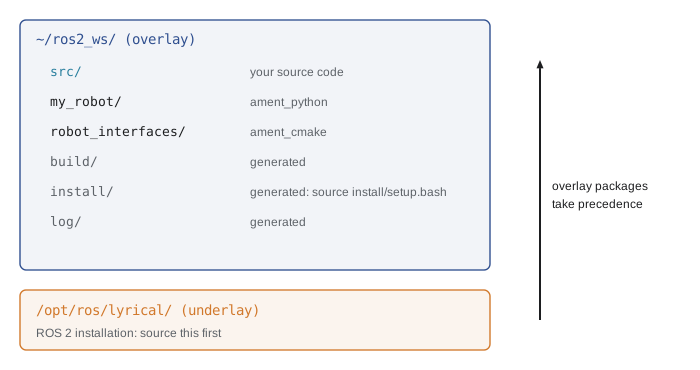
Workspaces stack. The ROS 2 installation in /opt/ros is itself a workspace, called the underlay, and your own workspace is an overlay built on top of it. When you source a workspace's install/setup.bash, it adds the workspace's packages in front of those of the underlay, so if both contain a package with the same name, the overlay's version wins. This lets you modify a copy of a standard package without touching the installed one. Always source the underlay before building an overlay, and source the overlay in any terminal where you want to run its nodes.
Worked problem
Which version runs?
The ROS 2 installation contains turtlesim version 1.8.4. You clone turtlesim's source into ~/ros2_ws/src, change it and build it as version 1.9.0. Which version runs in a terminal that has sourced only /opt/ros/lyrical/setup.bash, and in one that has also sourced ~/ros2_ws/install/setup.bash?
Show solution
- The first terminal knows only the underlay, so it runs the installed 1.8.4.
- The second terminal has the overlay in front of the underlay in its search paths.
- The overlay's turtlesim shadows the installed one, so it runs your 1.9.0.
Answer: 1.8.4 in the first terminal and 1.9.0 in the second. When behavior differs between terminals, check which workspaces each has sourced.
Creating a Python package
ROS 2 packages come in two main build types. ament_python packages are pure Python and are built with Python's standard setuptools. ament_cmake packages use CMake and are used for C++ code and, importantly, for defining custom interfaces. The ros2 pkg create command generates a package skeleton with the right files. The --node-name option also creates a first node and registers it as a runnable program.
cd ~/ros2_ws/src
ros2 pkg create my_robot --build-type ament_python \
  --license Apache-2.0 --node-name talker \
  --dependencies rclpy std_msgs geometry_msgs sensor_msgs
The generated package contains package.xml, which describes the package and its dependencies; setup.py and setup.cfg, which tell setuptools how to install it; a resource folder holding an empty marker file that lets ROS 2 find the package; a Python package folder with the same name, where your node files go; and a test folder with automatic style and license checks. Copy talker.py and obstacle_stop.py from lesson 6 into the inner my_robot folder.
setup.py does three important jobs. Its entry_points section lists console scripts: each line maps a program name to a function, so talker = my_robot.talker:main means that ros2 run my_robot talker will call the main function in my_robot/talker.py. Its data_files section installs non-Python files, such as launch files and YAML configuration, into the package's share directory, where ROS 2 tools look for them. And its metadata, such as version and license, should match package.xml.
import os
from glob import glob
from setuptools import find_packages, setup

package_name = 'my_robot'

setup(
    name=package_name,
    version='0.1.0',
    packages=find_packages(exclude=['test']),
    data_files=[
        ('share/ament_index/resource_index/packages',
            ['resource/' + package_name]),
        ('share/' + package_name, ['package.xml']),
        (os.path.join('share', package_name, 'launch'),
            glob('launch/*.launch.py')),
        (os.path.join('share', package_name, 'config'),
            glob('config/*.yaml')),
    ],
    install_requires=['setuptools'],
    zip_safe=True,
    maintainer='Ada Robotics',
    maintainer_email='ada@example.com',
    description='Nodes for my robot',
    license='Apache-2.0',
    entry_points={
        'console_scripts': [
            'talker = my_robot.talker:main',
            'obstacle_stop = my_robot.obstacle_stop:main',
        ],
    },
)
A frequent puzzle for beginners is a launch file or YAML file that exists in src but cannot be found at run time. The reason is almost always a missing data_files entry: ROS 2 looks in the installed share directory, not in your source tree, so every file the package needs at run time must be installed.
Declaring dependencies
package.xml is an XML file in a standard format that lists the package's name, version, description, maintainer, license and dependencies. Dependencies are declared with tags that say when they are needed: build_depend for building, exec_depend for running, test_depend for tests, and depend as a shorthand for all of them. For a Python package, which needs no compilation, most dependencies are exec_depend or depend. The names are ROS package names such as rclpy and sensor_msgs, or keys that rosdep maps to system packages, such as python3-numpy.
<?xml version="1.0"?>
<package format="3">
  <name>my_robot</name>
  <version>0.1.0</version>
  <description>Nodes for my robot</description>
  <maintainer email="ada@example.com">Ada Robotics</maintainer>
  <license>Apache-2.0</license>

  <depend>rclpy</depend>
  <depend>geometry_msgs</depend>
  <depend>sensor_msgs</depend>
  <depend>robot_interfaces</depend>
  <exec_depend>python3-numpy</exec_depend>

  <test_depend>python3-pytest</test_depend>
  <export>
    <build_type>ament_python</build_type>
  </export>
</package>
Declaring dependencies accurately is not paperwork. rosdep reads package.xml files and installs whatever is missing for your distribution and operating system, so a new teammate, a fresh robot or an automated build server can go from source code to a working system in minutes. The commands are run once per machine to set up rosdep, then whenever dependencies change.
# once per machine
sudo rosdep init
rosdep update
# install everything the workspace needs
cd ~/ros2_ws
rosdep install --from-paths src --ignore-src -y
Building with colcon
colcon builds every package in a workspace in the right order, working out from package.xml which packages depend on which. Run it from the top of the workspace, never from inside src, then source the result. The --symlink-install option links Python files and other resources from install back to src instead of copying them, so edits to Python code take effect without rebuilding; you still need to rebuild after changing setup.py, package.xml, or adding new files. --packages-select builds only named packages, which saves time in a large workspace, and colcon test runs the packages' tests.
cd ~/ros2_ws
colcon build --symlink-install
source install/setup.bash
ros2 run my_robot talker
# rebuild one package, then run its tests
colcon build --packages-select my_robot
colcon test --packages-select my_robot
colcon test-result --verbose| Symptom | Likely cause | Fix |
|---|---|---|
| Package not found by ros2 run | Workspace not sourced, or build failed | Check the colcon output, then source install/setup.bash |
| No executable found | Missing entry point in setup.py | Add the console script and rebuild |
| Launch or YAML file not found | File not installed | Add it to data_files and rebuild |
| Import error for a ROS message | Dependency missing or interface package not built | Declare it in package.xml and build the interface package |
| Old code still runs | Built without --symlink-install, or wrong workspace sourced | Rebuild and check which workspaces are sourced |
| Strange build errors after big changes | Stale build products | Delete build, install and log, then rebuild |
Defining your own interfaces
Use standard message types whenever they fit, but sometimes none does: a robot may report the speeds of both wheels together with a sequence number and its emergency-stop state, or offer an action, such as DriveDistance in lesson 7, with no standard equivalent. Custom interfaces are defined in .msg, .srv and .action files, conventionally in a separate package whose name ends in _interfaces or _msgs, so that other packages can depend on the interfaces without depending on your nodes. Interface types are written in CamelCase and fields in lowercase with underscores. Fields can be primitive types, strings, fixed or variable-length arrays and other messages, and can have default values and comments.
Interfaces are generated into Python and C++ code at build time by a code generator called rosidl, which currently requires an ament_cmake package even if all your nodes are in Python. Create one with ros2 pkg create robot_interfaces --build-type ament_cmake, put the definitions in msg, srv and action folders, and list them in CMakeLists.txt.
cmake_minimum_required(VERSION 3.8)
project(robot_interfaces)

find_package(ament_cmake REQUIRED)
find_package(rosidl_default_generators REQUIRED)

rosidl_generate_interfaces(${PROJECT_NAME}
  "msg/WheelSpeeds.msg"
  "action/DriveDistance.action"
)

ament_export_dependencies(rosidl_default_runtime)
ament_package()
Its package.xml must declare the generator and the runtime support, and mark the package as an interface package: add a buildtool_depend on rosidl_default_generators, an exec_depend on rosidl_default_runtime, a depend on action_msgs because the package defines an action, and the line <member_of_group>rosidl_interface_packages</member_of_group>. After building and sourcing, ros2 interface show robot_interfaces/msg/WheelSpeeds prints your definition, and Python code imports it with from robot_interfaces.msg import WheelSpeeds, exactly like a standard type.
It is worth estimating how big a custom message is. The program below reads a message definition and adds up the sizes of its fixed-size fields, which gives the payload size before serialization adds alignment padding and a small header.
SIZES = {"bool": 1, "byte": 1, "int8": 1, "uint8": 1,
         "int16": 2, "uint16": 2, "int32": 4, "uint32": 4,
         "float32": 4, "int64": 8, "uint64": 8, "float64": 8}

definition = """
# robot_interfaces/msg/WheelSpeeds.msg
float64 left      # rad/s
float64 right     # rad/s
uint32 sequence
bool estop_active
"""


def payload_bytes(text):
    total = 0
    for line in text.splitlines():
        line = line.split("#")[0].strip()   # drop comments
        if not line:
            continue
        ftype, name = line.split()[:2]
        total += SIZES[ftype]
        print(f"  {name:13s} {ftype:8s} {SIZES[ftype]} B")
    return total


size = payload_bytes(definition)
rate = 100   # Hz
print(f"payload {size} B, at {rate} Hz: "
f"{size * rate * 8 / 1000:.1f} kbit/s")left float64 8 B right float64 8 B sequence uint32 4 B estop_active bool 1 B payload 21 B, at 100 Hz: 16.8 kbit/s
Worked problem
Adding a header
You add a std_msgs/Header to WheelSpeeds so each message carries a timestamp and frame name. A Header holds a time (two 4-byte integers) and a frame name string, here base_link. Estimate the new payload and the bandwidth at 100 Hz.
Show solution
- Time: \( 4 + 4 = 8 \) bytes.
- String base_link: 9 characters, plus a 4-byte length and a terminating byte in the serialized form, about 14 bytes.
- New payload: \( 21 + 8 + 14 \approx 43 \) bytes.
- At 100 Hz: \( 43 \times 100 \times 8 \approx 34 \) kbit/s.
Answer: About 43 bytes and 34 kbit/s, double the original but still tiny. Timestamps are almost always worth their cost.
Once an interface is in use, treat its definition as a contract. Changing a field's name or type breaks every node built against the old definition, and nodes built with different versions of an interface will refuse to communicate. Plan interfaces carefully, prefer adding new fields to changing existing ones, and when you must make a breaking change, increase the package's major version as lesson 4 described.
Common mistakes
MistakeRunning colcon build from inside the src folder.
InsteadAlways build from the top of the workspace.
MistakeEditing files in install or build instead of src.
InsteadEdit only src; build, install and log are regenerated.
MistakeAdding a launch file to the package but not to data_files in setup.py.
InsteadInstall every run-time file through data_files, then rebuild.
MistakeTrying to generate custom messages from an ament_python package.
InsteadDefine interfaces in a separate ament_cmake package and depend on it.
MistakeLeaving dependencies out of package.xml because they happen to be installed on your laptop.
InsteadDeclare every dependency so rosdep can set up other machines.
Summary and key terms
- A workspace holds packages in src; colcon generates build, install and log.
- Your workspace is an overlay on the ROS 2 underlay; sourcing an overlay puts its packages first.
- ament_python packages use setup.py for entry points and data files; ament_cmake packages are used for C++ and interfaces.
- package.xml declares dependencies with depend, exec_depend, build_depend and test_depend; rosdep installs them.
- colcon build --symlink-install builds the workspace; source install/setup.bash before running nodes.
- Custom .msg, .srv and .action files go in an ament_cmake interfaces package listed in rosidl_generate_interfaces.
- Interfaces are contracts: estimate their size, include headers where timing matters and avoid breaking changes.
- Package
- The unit of ROS 2 software that is built, installed and released, with a package.xml.
- Workspace
- A directory whose src folder contains packages to build together.
- Underlay
- A workspace, such as the ROS 2 installation, on which another is built.
- Overlay
- A workspace built on top of an underlay whose packages take precedence when sourced.
- colcon
- The command-line tool that builds and tests ROS 2 workspaces.
- ament_python
- The build type for pure Python ROS 2 packages.
- ament_cmake
- The build type for CMake packages, used for C++ and interface definitions.
- Entry point
- A setup.py line mapping a program name to a Python function.
- rosdep
- A tool that installs the system dependencies declared in package.xml files.
- rosidl
- The ROS 2 code generator that turns interface files into Python and C++ code.
Practice problems
Work each problem on paper first, then reveal the answer to check.
Which of src, build, install and log should be committed to Git?
Show answer
Only src.
What does --symlink-install change?
Show answer
Installed Python files and resources link back to src, so edits take effect without rebuilding.
Write the setup.py entry point that makes ros2 run my_robot stopper call main in my_robot/obstacle_stop.py.
Show answer
'stopper = my_robot.obstacle_stop:main'
Your YAML file is in src/my_robot/config but the node says it cannot be found. Why?
Show answer
It was not installed: add config/*.yaml to data_files and rebuild.
Why put custom interfaces in their own package?
Show answer
So other packages can use the interfaces without depending on your nodes, and because they need an ament_cmake build.
Which package.xml tag declares a dependency needed only for running tests?
Show answer
test_depend.
Estimate the payload of a message with three float32 fields and one uint8.
Show answer
3 × 4 + 1 = 13 bytes.
Two terminals run different versions of the same node. What should you check?
Show answer
Which workspaces each terminal has sourced, and in what order.
What command installs all missing dependencies for the packages in src?
Show answer
rosdep install --from-paths src --ignore-src -y
You rename a field in a widely used message. What version change does the interface package need?
Show answer
A major version increase, because nodes built against the old definition break.
Lesson quiz · 5 questions
Score 60% or more to complete this lesson.
Create a free account to save your progress, take quizzes and earn a certificate.