
ROB-110 · Lesson 9 of 12 · 28 min
Launch files and configuration
A real robot runs dozens of nodes: drivers for each sensor and motor, state estimation, mapping, planning, safety monitors, user interfaces. Starting each by hand in its own terminal, with the right parameters and topic names, would be slow and error-prone. ROS 2 launch files describe a whole system, or a part of one, so that a single command starts everything in the right configuration. This lesson shows how to write launch files, how to rename topics and group nodes with remapping and namespaces so the same code serves many robots, how to keep configuration organized, and how managed lifecycle nodes and component containers give finer control over start-up and performance.
Your first launch file
Launch files can be written in Python, XML or YAML. Python launch files are the most flexible, because they can compute values, loop and make decisions, and they are the most common in ROS 2 packages; XML is more compact for simple systems. A Python launch file is a module with a function called generate_launch_description that returns a LaunchDescription, a list of actions to perform. The most important action is Node, which starts a node from a package with a given name, parameters and remappings.
import os
from ament_index_python.packages import get_package_share_directory
from launch import LaunchDescription
from launch.actions import DeclareLaunchArgument
from launch.conditions import IfCondition
from launch.substitutions import LaunchConfiguration
from launch_ros.actions import Node


def generate_launch_description():
    params = os.path.join(get_package_share_directory('my_robot'),
                          'config', 'params.yaml')
    use_teleop = LaunchConfiguration('use_teleop')
    return LaunchDescription([
        DeclareLaunchArgument('use_teleop', default_value='true'),
        Node(package='my_robot', executable='obstacle_stop',
             name='obstacle_stop', parameters=[params],
             remappings=[('cmd_vel', 'base/cmd_vel')]),
        Node(package='teleop_twist_keyboard',
             executable='teleop_twist_keyboard',
             remappings=[('cmd_vel', 'teleop_cmd')],
             prefix='xterm -e',
             condition=IfCondition(use_teleop)),
    ])
This file starts two nodes. obstacle_stop gets its parameters from the params.yaml file installed in the package's share directory, as lesson 8 arranged, and its output topic cmd_vel is remapped to base/cmd_vel. The keyboard teleoperation node, which normally publishes on cmd_vel, is remapped to publish on teleop_cmd, where obstacle_stop listens; because it reads key presses, it is started in its own terminal window with the prefix option. A launch argument, use_teleop, lets the user leave teleoperation out, for example when a joystick is used instead. You run the file with ros2 launch my_robot bringup.launch.py, optionally adding use_teleop:=false.
Launch output from every node appears in the same terminal, prefixed with the node name, and log files are written under ~/.ros/log. When you press Ctrl+C, launch sends each node a signal and waits for it to exit, escalating to stronger signals if a node does not stop. A node can be marked respawn=True so that launch restarts it if it crashes, which is useful for flaky device drivers but can hide bugs, so log every respawn and investigate.
For comparison, here is the same system in XML. The structure maps directly: arg declares an argument, node starts a node, param loads a YAML file, remap renames a topic, and substitutions such as $(find-pkg-share my_robot) and $(var use_teleop) are evaluated when the file is launched.
<launch>
  <arg name="use_teleop" default="true"/>
  <node pkg="my_robot" exec="obstacle_stop" name="obstacle_stop">
    <param from="$(find-pkg-share my_robot)/config/params.yaml"/>
    <remap from="cmd_vel" to="base/cmd_vel"/>
  </node>
  <node pkg="teleop_twist_keyboard" exec="teleop_twist_keyboard"
        launch-prefix="xterm -e" if="$(var use_teleop)">
    <remap from="cmd_vel" to="teleop_cmd"/>
  </node>
</launch>| Launch feature | Python | XML |
|---|---|---|
| Start a node | Node(package=..., executable=...) | <node pkg="..." exec="..."/> |
| Declare an argument | DeclareLaunchArgument(name, default_value=...) | <arg name="..." default="..."/> |
| Use an argument | LaunchConfiguration(name) | $(var name) |
| Load parameters | parameters=[path or dict] | <param from="..."/> or <param name="..." value="..."/> |
| Remap a topic | remappings=[('from', 'to')] | <remap from="..." to="..."/> |
| Include another launch file | IncludeLaunchDescription(...) | <include file="..."/> |
| Conditional start | condition=IfCondition(...) | if="..." or unless="..." |
Large systems are built from smaller launch files. A robot might have one launch file for its drivers, another for localization and another for navigation, and a top-level bringup file that includes them all with IncludeLaunchDescription, passing arguments down. Each piece can then be tested on its own, and the same driver launch file can be reused in simulation and on the real robot.
Remapping: rewiring without code changes
Remapping changes a name used by a node to a different name when the node starts, without touching its code. It is how you connect nodes written by people who never coordinated topic names. If a laser driver publishes on scan but your robot has two scanners, you remap one to front/scan and the other to rear/scan. If a teleoperation node publishes on cmd_vel but you want obstacle_stop in between, you remap it to teleop_cmd, as the launch file above does. Remapping also works from the command line: ros2 run my_robot obstacle_stop --ros-args -r scan:=front/scan.
Remapping is the reason good nodes use simple, relative, conventional names, scan, cmd_vel, odom, rather than long absolute names baked into the code. A node that publishes on /my_lab_robot_v2/front_laser_data can still be remapped, but one that publishes on scan is immediately understandable and fits the conventions every other package expects.
Namespaces and running many robots
A namespace is a prefix applied to all the relative names a node uses. Start obstacle_stop in the namespace robot2 and it subscribes to /robot2/scan and publishes to /robot2/cmd_vel, without any code change. Absolute names, those starting with a slash, are not affected, which is why topics that are genuinely global, such as /clock in simulation, are written with a leading slash. Names starting with a tilde and a slash are private to the node: ~/status in a node called obstacle_stop in namespace robot2 becomes /robot2/obstacle_stop/status. The function below applies these rules, together with remapping, which happens before the namespace is added.
def resolve(name, namespace, node, remaps=None):
    """Simplified ROS 2 name resolution for topics and services."""
    remaps = remaps or {}
    name = remaps.get(name, name)              # remapping comes first
    ns = namespace.rstrip("/")
    if name.startswith("/"):                   # absolute: unchanged
        return name
    if name.startswith("~/"):                  # private: node's own
        return f"{ns}/{node}/{name[2:]}"
    return f"{ns}/{name}"                      # relative: add namespace


remaps = {"cmd_vel": "base/cmd_vel"}
for name in ["scan", "/clock", "~/status", "cmd_vel"]:
    full = resolve(name, "/robot2", "obstacle_stop", remaps)
    print(f"{name:10s} -> {full}")
print("scan (no namespace) ->", resolve("scan", "/", "obstacle_stop"))scan -> /robot2/scan /clock -> /clock ~/status -> /robot2/obstacle_stop/status cmd_vel -> /robot2/base/cmd_vel scan (no namespace) -> /scan
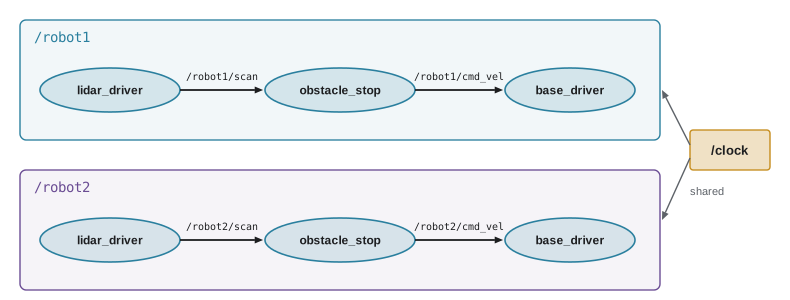
Namespaces make multi-robot systems almost free. Because a launch file is Python, a loop can start the same set of nodes for any number of robots, each in its own namespace.
def generate_launch_description():
    nodes = []
    for name in ['robot1', 'robot2', 'robot3']:
        nodes.append(Node(package='my_robot',
                          executable='obstacle_stop',
                          namespace=name,
                          parameters=[{'stop_distance': 0.5}]))
    return LaunchDescription(nodes)
Worked problem
Resolving names for a fleet
A launch file starts, for each of four robots, a driver, obstacle_stop and a battery monitor, each in the robot's namespace robot1 to robot4. obstacle_stop uses the relative names scan and cmd_vel and publishes a private ~/status topic. How many node processes run, and what are robot3's three topic names for obstacle_stop?
Show solution
- Processes: \( 4 \times 3 = 12 \) nodes.
- scan becomes /robot3/scan and cmd_vel becomes /robot3/cmd_vel.
- The private topic becomes /robot3/obstacle_stop/status.
Answer: 12 nodes; /robot3/scan, /robot3/cmd_vel and /robot3/obstacle_stop/status. The code is identical for every robot.
Coordinate frame names, which lesson 10 introduces, need the same treatment: two robots cannot both call their base frame base_link in a shared transform tree. Multi-robot launch files therefore usually pass a frame prefix as a parameter as well as a namespace.
Organizing configuration
As a robot matures, its configuration grows: calibration values, speed limits, device names, controller gains. Keep it in YAML files in a config folder of a dedicated bringup package, separate from code, and load the right file from launch. A common pattern is one YAML file per robot or per robot model, chosen by a launch argument such as robot_model:=large, so that the same launch files serve a fleet of slightly different machines. Keep values that differ between machines, such as serial numbers or network addresses, out of shared files, and commit the YAML files to Git so that tuning changes are reviewed and recorded like code.
Parameters passed in launch can be a path to a YAML file, a Python dictionary or a mixture; later entries override earlier ones, which makes it easy to start from a shared file and override a value or two. Use launch arguments for choices a person makes at start-up, such as whether to start a visualization, and parameters for values a node needs, such as a stopping distance. Avoid hiding important settings in environment variables, which are invisible in logs and easy to forget.
Managed lifecycle nodes and composition
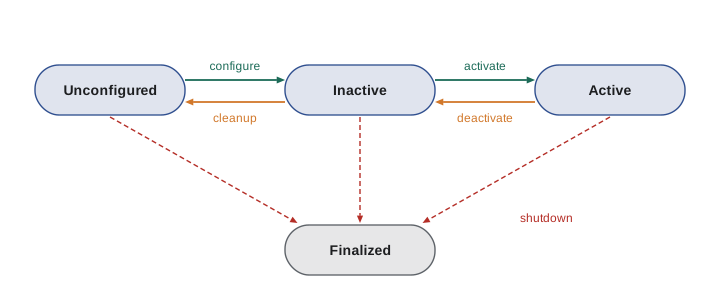
Ordinary nodes start working the moment they are created. For robots, a more controlled start-up is often better: configure every driver, check that every sensor is responding, and only then activate the motors. ROS 2 supports this with managed, or lifecycle, nodes. A lifecycle node moves through defined states, unconfigured, inactive, active and finalized, through transitions such as configure, activate, deactivate, cleanup and shutdown. A manager node, or a launch file, triggers the transitions in order and can bring the whole system down cleanly if anything fails. Nav2 uses lifecycle nodes for all its servers, and rclpy supports them through its lifecycle module.
Composition addresses performance. Normally each node runs in its own process, and messages between processes must be serialized and copied. Nodes written as components can instead be loaded into a single process, a component container, where messages between them can be passed without copying, an important saving for large data such as images and point clouds. Composition is mainly used with C++ nodes; for Python nodes the bigger performance gains usually come from reducing message rates and sizes.
Worked problem
Start-up sequence with lifecycle nodes
A robot has a lidar driver, a camera driver and a base driver, all lifecycle nodes. Configuring each takes 1.5 s, 3 s and 0.5 s respectively and activation takes 0.2 s each. If a manager configures them one after another and then activates them, how long does start-up take, and how much faster is it if all three are configured at once?
Show solution
- Sequential configure: \( 1.5 + 3 + 0.5 = 5.0 \) s; activations \( 3 \times 0.2 = 0.6 \) s; total 5.6 s.
- Parallel configure takes as long as the slowest node: 3 s; activations still 0.6 s if done in order; total 3.6 s.
- Saving: \( 5.6 - 3.6 = 2.0 \) s.
Answer: 5.6 s sequentially and 3.6 s with parallel configuration. The camera is the bottleneck either way, and the motors are only activated after every driver is ready.
Common mistakes
MistakeHard-coding absolute topic names such as /front_laser in node code.
InsteadUse simple relative names and remap or namespace them in launch files.
MistakeForgetting that remapping happens before the namespace is applied.
InsteadRemap the relative name the code uses; the namespace is then added to the result.
MistakeRunning two robots with the same frame names in one transform tree.
InsteadGive each robot a frame prefix as well as a namespace.
MistakeMarking every node respawn=True to hide crashes.
InsteadFix the cause; use respawn only for known-flaky drivers and log every restart.
MistakeScattering configuration across code, launch files and environment variables.
InsteadKeep tuned values in versioned YAML files loaded from launch, and use launch arguments for start-up choices.
Summary and key terms
- Launch files start whole systems with one command; Python launch files return a LaunchDescription of actions such as Node.
- Launch arguments, conditions and included launch files make systems configurable and modular.
- Remapping renames a node's topics at start-up without changing its code.
- Namespaces prefix relative names, so identical software runs for many robots; absolute names are unchanged and ~/ names are private to the node.
- Keep configuration in versioned YAML files in a bringup package and choose files with launch arguments.
- Lifecycle nodes move through unconfigured, inactive, active and finalized states for controlled start-up and shutdown.
- Composition runs several component nodes in one process to avoid copying large messages.
- Launch file
- A Python, XML or YAML file that describes nodes and settings to start together.
- LaunchDescription
- The list of actions returned by a Python launch file.
- Launch argument
- A value a user can set when running a launch file, such as use_teleop:=false.
- Remapping
- Replacing a name a node uses with another name when it starts.
- Namespace
- A prefix added to all of a node's relative names.
- Private name
- A name beginning with ~/ that resolves inside the node's own name.
- Respawn
- A launch option that restarts a node automatically if it exits.
- Lifecycle node
- A managed node with defined states and transitions controlled from outside.
- Component container
- A process into which several component nodes are loaded.
- Bringup package
- A package that holds a robot's launch and configuration files.
Practice problems
Work each problem on paper first, then reveal the answer to check.
Write the command to run bringup.launch.py from my_robot without teleoperation.
Show answer
ros2 launch my_robot bringup.launch.py use_teleop:=false
A node in namespace /arm uses the topic joint_states. What is the full name?
Show answer
/arm/joint_states
The same node publishes /diagnostics. What is the full name?
Show answer
/diagnostics; absolute names are unchanged.
A node called planner in namespace /r1 publishes ~/path. What is the full name?
Show answer
/r1/planner/path
Write a command-line remapping that makes obstacle_stop read from rear/scan.
Show answer
ros2 run my_robot obstacle_stop --ros-args -r scan:=rear/scan
Why is teleop_twist_keyboard started with an xterm prefix in a launch file?
Show answer
It reads key presses, which need their own terminal window.
Give one advantage of Python launch files over XML and one of XML over Python.
Show answer
Python can loop and compute values; XML is shorter and easier to read for simple systems.
Name the four primary states of a lifecycle node.
Show answer
Unconfigured, inactive, active and finalized.
A launch file starts five nodes for each of six robots. How many nodes run?
Show answer
30.
Why might a team load a different YAML file per robot model?
Show answer
So one set of launch files and code serves machines with different sizes, limits and calibration.
Lesson quiz · 5 questions
Score 60% or more to complete this lesson.
Create a free account to save your progress, take quizzes and earn a certificate.