
CINE-201 · Lesson 10 of 12 · 24 min
Recording formats, codecs and media
Uncompressed images from a modern cinema camera produce data at rates that would fill a large drive in minutes. Every camera therefore compresses its images, and the choice of recording format, a combination of raw or processed image data, codec, bit depth, chroma subsampling, data rate and file container, affects image quality, flexibility in post-production, storage costs, transfer times and the editing workflow. This lesson explains how video compression works, intraframe and interframe codecs, bit depth and chroma subsampling, the main raw and processed formats used in production, file containers and metadata, recording media, and how to calculate data volumes and plan storage.
Why compression is necessary
An uncompressed UHD image with three 10-bit colour channels contains 3,840 × 2,160 × 3 × 10 bits, about 249 megabits, or 31 megabytes. At 24 fps, that is about 6 gigabits per second, or 2.7 terabytes per hour. Raw sensor data is somewhat smaller, because each photosite records one value rather than three, but still enormous. Compression reduces data by removing redundancy, information that can be reconstructed exactly (lossless compression), and by discarding detail that viewers are unlikely to notice (lossy compression). Professional codecs are designed so that their losses remain invisible through grading and visual effects, which demand more of an image than simple viewing.
How video codecs work
Most video codecs use a similar toolkit. The image is converted from RGB into a luma (brightness) channel and two chroma (colour-difference) channels, since vision is more sensitive to detail in brightness than in colour. Each channel is divided into blocks, transformed into frequency components with a discrete cosine transform or a wavelet transform, and the components are quantized, rounded to fewer levels, with fine detail quantized more coarsely. The resulting numbers are entropy-coded for efficient storage. Higher compression ratios mean coarser quantization and more visible artefacts, such as blockiness, banding, mosquito noise around edges and loss of fine texture.
Intraframe and interframe compression
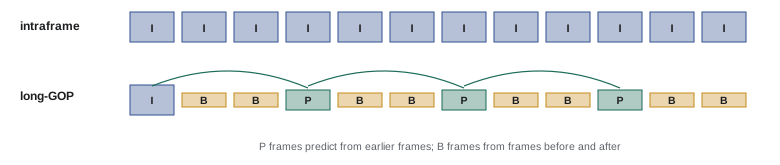
Intraframe codecs compress each frame independently. Every frame can be decoded on its own, which makes editing responsive and robust, and each frame has consistent quality. Apple ProRes, Avid DNxHD and DNxHR, Sony XAVC Intra and most raw formats are intraframe. Interframe codecs, also called long-GOP (group of pictures) codecs, exploit similarity between frames: a full intra-coded I-frame is followed by predicted P-frames and bidirectionally predicted B-frames that store only differences from other frames, using motion estimation. They achieve much higher compression for the same visual quality, so they are used in consumer cameras, drones, streaming delivery and some professional cameras, such as H.264 (AVC), H.265 (HEVC) and Sony XAVC Long GOP. Their disadvantages are heavier processing to decode, slower editing, and quality that can drop in scenes with complex motion or noise, which consume the bit budget.
Bit depth and chroma subsampling
Bit depth sets the number of levels per channel: 8 bits give 256 levels, 10 bits 1,024 and 12 bits 4,096. Eight-bit recording is adequate for finished, display-referred images but prone to banding in gradients such as skies and walls when graded, especially with log curves, which spread a wide range across the available levels. Ten-bit recording is the professional minimum for log footage, and 12 bits is preferred for raw and high-end work.
Chroma subsampling reduces colour resolution relative to brightness. The notation describes a block of pixels four wide and two tall: 4:4:4 keeps full colour resolution; 4:2:2 halves horizontal colour resolution; 4:2:0 halves both horizontal and vertical colour resolution. 4:2:2 is standard for professional acquisition and broadcast; 4:2:0 is common in consumer cameras and delivery codecs; 4:4:4 is used for high-end work, especially green-screen compositing, where colour edges must be precise.
| Format | Type | Bit depth and chroma | Typical data rate (UHD, 23.976 fps) |
|---|---|---|---|
| Apple ProRes 422 LT | Intraframe | 10-bit 4:2:2 | About 330 Mb/s |
| Apple ProRes 422 HQ | Intraframe | 10-bit 4:2:2 | About 707 Mb/s |
| Apple ProRes 4444 XQ | Intraframe | Up to 12-bit 4:4:4 | About 1,600 Mb/s |
| Avid DNxHR HQX | Intraframe | 10-bit 4:2:2 | About 700 Mb/s |
| H.265 (HEVC), camera | Long-GOP | 10-bit 4:2:0 or 4:2:2 | About 100–200 Mb/s |
| Raw (compressed, e.g. 6:1 to 8:1) | Intraframe raw | 12- to 16-bit sensor data | About 500–1,500 Mb/s depending on settings |
Raw formats
Raw formats record sensor data before debayering, typically with some compression. Each major manufacturer has its own: ARRIRAW (uncompressed, or losslessly compressed as ARRIRAW HDE), REDCODE RAW (wavelet-compressed at selectable quality levels), Sony X-OCN, Canon Cinema RAW Light, and Blackmagic RAW, which performs part of the debayering in camera to reduce file sizes and decoding effort. Apple ProRes RAW is a cross-manufacturer raw format recorded by several cameras and external recorders. Raw formats preserve the most information and allow white balance, ISO rating and debayering choices to be made later; they need appropriate software support and more processing power, and their files are larger than log codecs at similar quality. Visual effects-heavy productions often prefer raw for the cleanest plates.
Containers, metadata and proxies
A codec defines how images are compressed; a container, or wrapper, holds the compressed video together with audio, timecode and metadata. Common containers include QuickTime (MOV), Material Exchange Format (MXF), MP4, and manufacturer-specific formats such as R3D and BRAW. Metadata recorded with each clip includes camera settings, timecode, lens data such as focal length, focus distance and iris from smart lenses, clip names, reel numbers and sometimes gyroscope data for stabilization. Preserving this metadata through the pipeline helps editors, colourists and visual effects artists. Many cameras can also record proxies, small low-resolution files recorded alongside the main files, for immediate editing on modest computers; final conform relinks to the full-quality originals.
Recording media
Cameras record to removable media whose sustained write speed must exceed the camera's data rate, with margin. Common media include CFexpress cards (Type A and Type B), SD cards for lower data rates, and proprietary or standard solid-state drives, such as Codex Compact Drives, Sony AXS cards and external SSDs. Media are rated for minimum sustained write speeds; for example, CFexpress cards carrying a VPG400 rating guarantee at least 400 megabytes per second of sustained writing. Using media that are too slow can cause dropped frames or recordings that stop unexpectedly, so camera manufacturers publish lists of approved media for each format. Media must also be handled carefully: labelled, tracked in camera reports, never formatted until their contents have been verified on at least two separate drives, and protected from physical damage, heat and magnetic fields.
Calculating data volumes
Planning storage for a production starts from the data rate:
Worked problem
Planning storage for a shoot
A drama records UHD ProRes 422 HQ at 23.976 fps (about 707 Mb/s) on two cameras. Each camera records an average of 2.5 hours a day for 20 shooting days. The workflow requires three copies of all camera original media. How much storage is needed?
Show solution
- Per hour per camera: 707 × 3,600 / 8,000 ≈ 318 GB.
- Per day: 318 × 2.5 × 2 cameras ≈ 1,590 GB ≈ 1.6 TB.
- For 20 days: 1.6 × 20 ≈ 32 TB of camera originals.
- Three copies: 32 × 3 ≈ 96 TB, plus margin for proxies and renders.
Answer: About 96 TB for three copies of the camera originals, so roughly 100 TB or more allowing for proxies and margin; switching to a raw format at about 1,200 Mb/s would push this to about 160 TB.
Data volume also determines how long offloading takes. Copying 1.6 TB of daily footage with checksum verification at a sustained 500 MB/s takes nearly an hour per copy, so data management must be planned alongside the shooting schedule, with fast readers, drives and enough time or personnel to keep up.
Choosing a recording format
Choosing a format balances quality, flexibility and cost. Delivery requirements may set minimums: many streaming platforms require original productions to be captured in specified raw or high-quality intraframe formats at UHD or above. Post-production capacity matters: a small team with modest computers may cope better with ProRes than with high-resolution raw. Visual effects work favours raw or 4:4:4 formats. Documentary and long-form unscripted work, with very high shooting ratios, may choose more compact codecs to manage hundreds of hours of footage. Testing the chosen format through the entire pipeline, from camera to edit to grade to delivery, before principal photography, prevents expensive surprises.
Compression artefacts to watch for
Compression artefacts are most visible in certain kinds of images. Fine, random detail such as foliage, water, confetti, smoke and noise consumes large amounts of data, and long-GOP codecs may struggle with them, producing blocky or smeared patches. Smooth gradients, such as skies and lit walls, can show banding in low bit depths. Dark scenes with noise and fast motion are especially challenging. Testing the chosen codec on representative difficult scenes, and examining the results on a large, high-quality display after grading, reveals whether it is adequate.
Constant and variable bit rate
Some codecs use a constant bit rate, allocating the same amount of data to every frame regardless of content; others use a variable bit rate, giving more data to complex frames and less to simple ones. Constant bit rate makes storage predictable; variable bit rate uses storage more efficiently but makes planning less precise. Some raw formats offer constant-quality modes that vary data rate to maintain a target quality, which can produce much larger files for noisy or detailed scenes than expected, so data plans should allow a margin.
Long-term archiving
Camera original footage may need to be preserved for decades, for re-mastering, re-use and legal reasons. Archiving strategies include LTO data tape, which offers high capacity, low cost per terabyte and a long shelf life; multiple copies stored in different locations; regular verification and migration to new media as formats age; and documentation of codecs, colour pipelines and metadata so that future users can interpret the files. Proprietary raw formats depend on software support, so archives often also store graded masters in open or widely supported formats.
Recording to external recorders
External recorders connect to a camera's SDI or HDMI output and record in formats the camera itself may not support, such as ProRes or ProRes RAW, often to inexpensive SSDs. They are common with mirrorless cameras whose internal codecs are limited, and they add a large monitor with exposure tools. Disadvantages include extra weight, power, cabling and another device to synchronize; timecode and record triggering must be configured so that clips match the camera's internal recordings, which may be kept as backups.
Naming and organizing clips
Consistent naming makes footage manageable. Cameras typically name clips with a camera letter, reel or card number, clip number and date, such as A003C012, and these names travel through editing to the final conform. Productions agree naming conventions for cameras, cards, drives and folders before shooting, and the 2nd AC and DIT record card numbers and clip ranges in reports. Duplicate card numbers or renamed files cause serious problems when relinking to camera originals months later.
Codecs for delivery
Acquisition codecs and delivery codecs serve different purposes. Acquisition codecs prioritize quality and editability; delivery codecs prioritize efficient distribution. Streaming services deliver to viewers in highly compressed long-GOP codecs such as H.264, HEVC and AV1, using adaptive bit rates that change with the viewer's connection, while productions deliver masters to platforms in high-quality intermediate codecs, such as ProRes 4444 or IMF packages with JPEG 2000, from which the platform creates its own streams.
Common mistakes
MistakeRecording log footage in 8-bit.
InsteadUse at least 10-bit for log to avoid banding.
MistakeUsing media slower than the data rate.
InsteadUse approved media with margin above the data rate.
MistakeFormatting cards before verifying backups.
InsteadVerify at least two checksum-matched copies first.
MistakeUnderestimating storage and offload time.
InsteadCalculate volumes and transfer times before the shoot.
MistakeChoosing long-GOP for heavy VFX or grading.
InsteadUse intraframe or raw for demanding post-production.
Summary and key terms
- Compression is necessary because uncompressed data rates are enormous.
- Codecs transform, quantize and entropy-code luma and chroma data.
- Intraframe codecs compress frames independently; long-GOP codecs use frame differences.
- 10-bit is the minimum for log; 12-bit for raw and high-end work.
- Chroma subsampling 4:4:4, 4:2:2 and 4:2:0 trade colour resolution for data.
- Raw formats store sensor data for maximum flexibility.
- Gigabytes per hour = Mb/s × 3600 / 8000; plan storage and offload time.
- Codec
- Method for compressing and decompressing video.
- Lossless compression
- Compression with exact reconstruction.
- Lossy compression
- Compression discarding some information.
- Intraframe
- Each frame compressed independently.
- Long-GOP
- Compression using differences between frames.
- Bit depth
- Number of bits per channel value.
- Chroma subsampling
- Reduced resolution for colour channels.
- Container
- File format wrapping video, audio and metadata.
- Proxy
- Low-resolution copy for editing.
- VPG rating
- Guaranteed minimum sustained write speed.
Practice problems
Work each problem on paper first, then reveal the answer to check.
Uncompressed size of a UHD 10-bit RGB frame?
Show answer
About 249 megabits (31 MB).
Why convert RGB to luma and chroma?
Show answer
Vision is less sensitive to colour detail.
Name two intraframe codecs.
Show answer
ProRes, DNxHR, XAVC Intra.
What do B-frames reference?
Show answer
Frames before and after them.
Levels in 10-bit video?
Show answer
1,024 per channel.
What does 4:2:0 reduce?
Show answer
Colour resolution horizontally and vertically.
GB per hour at 400 Mb/s?
Show answer
180 GB.
Minimum sustained write speed for VPG400?
Show answer
400 MB/s.
Why record proxies?
Show answer
For immediate editing on modest computers.
Time to copy 2 TB at 500 MB/s?
Show answer
About 67 minutes per copy.
Lesson quiz · 5 questions
Score 60% or more to complete this lesson.
Create a free account to save your progress, take quizzes and earn a certificate.