
CINE-201 · Lesson 8 of 12 · 26 min
Sensitivity, ISO, gain and noise in practice
Every camera has an ISO or exposure index setting, and on video cameras a gain setting in decibels. It is tempting to think of these as controls for the sensor's sensitivity, as if turning up ISO made the sensor collect more light. It does not. A sensor's ability to convert light into charge is fixed by its physics; what ISO changes is how the recorded signal is amplified or mapped to brightness in the image, which changes where middle grey falls, how much headroom remains for highlights, and how visible noise is in the shadows. This lesson explains what ISO and exposure index mean on digital cameras, native ISO and dual native ISO designs, how ISO choices redistribute dynamic range, how noise appears in practice and how to manage it, and how temperature and calibration affect the image.
What ISO means on a digital camera
Film speed ratings described how much exposure a film needed to produce a standard density. Digital cameras borrowed the ISO scale so that light meters and photographic habits would carry over: at ISO 800, a given scene and exposure produce an image of roughly the expected brightness. The ISO standard for digital still cameras, ISO 12232, defines several ways of determining a rating, such as the standard output sensitivity, which is based on how bright a mid-grey subject appears in the output image, and the recommended exposure index, which is simply the manufacturer's recommendation. In cinema, the term exposure index (EI) is often used to make clear that the number is a rating chosen for exposure, not a fixed property of the sensor.
Doubling ISO halves the light needed for a given image brightness, a one-stop change. Each doubling (ISO 400, 800, 1600, 3200) is one stop. Video cameras express the same idea as gain in decibels: +6 dB doubles the signal, a one-stop change, so +12 dB is two stops.
Analogue gain, digital gain and metadata
Behind an ISO setting, a camera may do one of three things. It may apply analogue gain, amplifying the signal before the ADC, which can reduce the relative contribution of downstream read noise in the shadows. It may apply digital gain, multiplying the numbers after conversion, which brightens signal and noise equally. Or, in raw and many log recordings, it may simply record the sensor data and attach the ISO as metadata that tells the software how to render the image, with no change to the recorded values at all. On such cameras, changing the EI from 800 to 1600 on set does not change what the sensor records; it changes the monitoring image, and so changes the exposure decisions the cinematographer makes while looking at it. Understanding which of these a particular camera does at each ISO setting is essential for exposing well.
Native ISO
Most cinema cameras have a native or base ISO, the rating at which the sensor's full dynamic range is used most effectively, with the analogue gain chosen to balance highlight headroom against shadow noise. Manufacturers usually recommend exposing at or near native ISO for maximum image quality. Ratings above native ISO trade highlight headroom for apparent sensitivity; ratings below native ISO trade shadow detail for extra highlight protection, though on some cameras ratings below native simply clip earlier without gaining anything.
Dual native ISO and dual gain
Many recent sensors offer two native ISOs, for example 800 and 3200, or 800 and 12,800. Each photosite can be read through two different conversion gain circuits: a low-gain path with high full-well capacity for normal light, and a high-gain path with lower read noise for low light. Switching to the higher base ISO changes the circuit, not just the processing, so the camera delivers cleaner shadows at high ISO than digital gain could. Cameras such as Panasonic's VariCam, Sony's VENICE and FX series, and many Blackmagic Design cameras use this approach. A different technique, used in ARRI's ALEXA cameras, reads each photosite through two gain paths simultaneously and combines the results, so that clean shadows and protected highlights are available in every frame, at the cost of more complex processing.
| Approach | How it works | Practical consequence |
|---|---|---|
| Single native ISO with metadata EI | Fixed analogue gain; EI changes rendering only | Exposure decisions follow the EI; underlying data unchanged |
| Dual native ISO (switched) | Two conversion gains; one selected per shot | Clean high-ISO images; choose the base that suits the light |
| Dual gain combined per frame | Two gains read and merged every frame | Wide dynamic range at all EIs |
| Digital gain | Numbers multiplied after conversion | Brighter image with proportionally brighter noise |
How ISO redistributes dynamic range
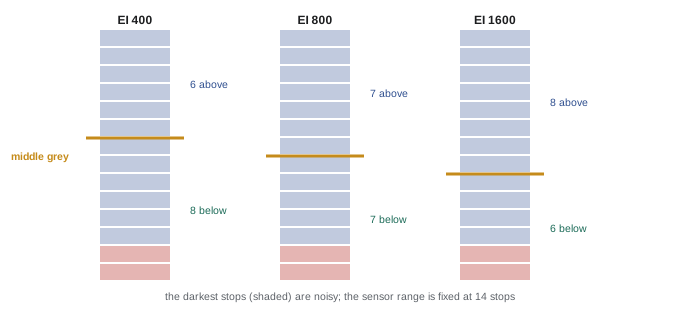
On a camera whose EI is metadata, the total dynamic range the sensor records is the same at every EI; what changes is where middle grey sits within it. Exposing for a higher EI means giving the sensor less light, so the scene's middle grey falls lower in the sensor's range: more stops are available above middle grey for highlights, and fewer below it for shadows, which become noisier. Exposing for a lower EI does the opposite: brighter exposure, cleaner shadows, less highlight headroom.
Worked problem
Choosing an EI for a high-contrast scene
A camera records 14 stops, with 7 stops above and 7 below middle grey at its native EI 800. A scene has a bright window 7.5 stops above the subject's face, which is placed one stop above middle grey. Will the window clip at EI 800, and what happens at EI 1600?
Show solution
- Window relative to middle grey: 1 + 7.5 = 8.5 stops above.
- At EI 800, headroom is 7 stops above middle grey, so the window clips by 1.5 stops.
- At EI 1600, exposing one stop less gives 8 stops of headroom; the window still clips by 0.5 stops, and shadows lose one stop to noise.
- Options: rate at EI 1600 and add ND to the window, or bring up the light on the face to reduce the contrast ratio.
Answer: The window clips at EI 800 by 1.5 stops and at EI 1600 by 0.5 stops; combining a higher EI with lighting or ND on the window is needed to hold it.
How noise looks
Noise appears in several forms, each with a different look. Luminance noise is a fine, grain-like variation in brightness, which many viewers accept, especially when it resembles film grain. Chroma noise is blotchy, coloured speckling, usually more objectionable. Fixed pattern noise appears as vertical or horizontal lines or a fixed texture, very visible in motion because it does not move with the image. Noise is most visible in shadows, in flat areas such as skies and walls, and after grading has lifted the shadows or increased contrast. Because shot noise is a property of light, the cleanest images come from giving the sensor as much light as possible while protecting the highlights, a principle sometimes summarized as "expose to the right" for raw and log capture (CINE-202).
Noise reduction can be applied in camera or in post-production. Spatial noise reduction smooths noise within each frame but can soften detail and give a plastic look; temporal noise reduction compares successive frames and averages static areas, preserving detail better but risking smearing of motion. Post-production noise reduction, applied with care to specific shots, is usually preferable to strong in-camera processing, which cannot be undone.
Temperature, black balance and calibration
Sensor noise and black level change with temperature. Dark current roughly doubles for every 6 to 8 °C increase in sensor temperature, and fixed pattern noise can appear when the sensor's temperature differs from that at which it was calibrated. Cinema cameras manage this with cooling systems, temperature monitoring and calibration routines. Black balance or black shading calibration, often prompted by the camera when its temperature changes significantly, records the sensor's dark signal with the sensor capped and subtracts it from subsequent images. Camera assistants perform black shading at the start of the day, after significant temperature changes, and when changing frame rates or sensor modes, following the manufacturer's guidance.
Worked problem
Dark current and temperature
A sensor's dark current doubles for every 7 °C rise. At 25 °C it contributes 2 electrons per frame. What does it contribute if the sensor reaches 46 °C in a hot vehicle?
Show solution
- Temperature rise: 46 − 25 = 21 °C.
- Number of doublings: 21 / 7 = 3.
- Dark current: 2 × 2³ = 16 electrons per frame.
Answer: About 16 electrons per frame, eight times more, visible as extra noise in the shadows; keeping the camera shaded and cooled, and recalibrating black balance, helps.
Choosing ISO on set
Practical guidance for choosing ISO or EI includes: know the camera's native ISO or ISOs and expose there by default; when light is limited, prefer switching to the higher native ISO rather than applying digital gain at the lower one; when highlights matter more than shadows, consider a higher EI and protect the shadows with fill light; when shadows matter more, consider a lower EI with careful highlight protection; test the camera's noise at each candidate EI under the production's lighting and grade the results, because acceptable noise depends on the look; and keep EI consistent across cameras and scenes so that footage matches. Recording the EI in camera reports helps the colourist interpret the footage.
Noise and the grade
Noise that looks acceptable on set can become objectionable after grading. Lifting shadows, increasing contrast and saturating colours all amplify noise, especially chroma noise. A scene shot at a high EI and graded to look dark and moody may be fine, while the same footage brightened to look like daylight may show heavy noise. This is why EI tests should be graded the way the production intends. Conversely, many productions deliberately add synthetic film grain in the grade, which can mask digital noise and give a more organic texture.
Matching cameras
When several cameras shoot the same scene, their images must intercut. Differences in sensor, processing and settings can produce mismatched noise, contrast and colour. Good practice includes using the same camera model and firmware where possible, setting the same EI, white balance, shutter and recording format on all cameras, matching lenses and filters, and shooting a colour chart on every camera at the start of each setup so that the colourist can match them. When different camera models must be mixed, testing them side by side in pre-production and building transforms to match them saves time in the grade.
ISO in low-light documentary work
Documentary and news crews often cannot add light and must work at high ISO. Cameras with high second native ISOs, such as 12,800 or more on some full-frame models, have transformed low-light documentary work, making usable images by streetlight or candlelight. Even so, exposure discipline matters: underexposing at high ISO and brightening later produces far more noise than exposing correctly. Crews learn the highest ISO they can use before noise becomes unacceptable for their delivery, and keep fast lenses for the darkest situations.
ISO and exposure tools
Exposure tools in the camera, such as false colour and waveforms, usually follow the selected EI on cameras where EI is metadata, so changing the EI changes their readings as well as the monitoring image. Camera teams should be consistent about which EI the tools reflect.
Common mistakes
MistakeThinking ISO changes the sensor's sensitivity.
InsteadISO changes amplification or rendering, not light collection.
MistakeUsing digital gain when a higher native ISO exists.
InsteadSwitch to the higher native base for low light.
MistakeRaising EI without considering highlight headroom.
InsteadHigher EI adds headroom; lower EI cleans shadows.
MistakeApplying heavy in-camera noise reduction.
InsteadApply noise reduction selectively in post.
MistakeSkipping black shading after temperature changes.
InsteadRecalibrate as the manufacturer recommends.
Summary and key terms
- ISO and EI set how the signal is amplified or rendered, not light collection.
- Each doubling of ISO, or +6 dB of gain, is one stop.
- ISO may be analogue gain, digital gain or metadata, depending on the camera.
- Native ISO balances highlight headroom and shadow noise.
- Dual native ISO switches conversion gain for clean low-light images.
- Changing EI moves middle grey within the dynamic range.
- Temperature affects noise; black shading calibration corrects it.
- ISO
- Sensitivity rating carried over from film.
- Exposure index
- Rating chosen to guide exposure.
- Gain
- Signal amplification, in decibels on video cameras.
- Native ISO
- Rating using the sensor's range most effectively.
- Dual native ISO
- Two base ratings from two conversion gains.
- Analogue gain
- Amplification before analogue-to-digital conversion.
- Digital gain
- Multiplication of values after conversion.
- Luminance noise
- Brightness variation resembling grain.
- Chroma noise
- Coloured blotchy noise.
- Black shading
- Calibration subtracting the sensor's dark signal.
Practice problems
Work each problem on paper first, then reveal the answer to check.
How many stops from ISO 400 to ISO 3200?
Show answer
Three.
How many stops is +18 dB of gain?
Show answer
Three.
What does changing EI do on a metadata-based camera?
Show answer
Changes rendering and monitoring, not the recorded data.
Why is a higher native ISO cleaner than digital gain?
Show answer
It uses a lower-noise conversion gain circuit.
What does a higher EI do to highlight headroom?
Show answer
Increases it.
What does a lower EI do to shadows?
Show answer
Makes them cleaner.
Which noise type is most objectionable?
Show answer
Chroma noise and fixed pattern noise.
What risk does temporal noise reduction carry?
Show answer
Smearing of motion.
Dark current increase for a 14 °C rise if it doubles every 7 °C?
Show answer
Four times.
When should black shading be performed?
Show answer
At start of day, after temperature changes, or after mode changes.
Lesson quiz · 5 questions
Score 60% or more to complete this lesson.
Create a free account to save your progress, take quizzes and earn a certificate.