
CINE-201 · Lesson 7 of 12 · 28 min
Shutter angle, motion blur, rolling shutter and flicker
Where frame rate sets how often the camera samples time, the shutter sets how long each sample lasts. That duration determines how much motion blur each frame contains, how much light reaches the sensor, and how the camera interacts with flickering light sources. The way a digital sensor exposes its frame, all at once or line by line, adds further effects that every camera operator encounters: skewed verticals during fast pans, wobbling images from vibrating mounts, and half-lit frames from camera flashes. This lesson explains the shutter angle convention, motion blur and its creative uses, rolling and global shutters and their artefacts, and how to avoid flicker from electric lighting, with particular attention to the 60 Hz power used in Canada and the United States.
The rotary shutter and shutter angle
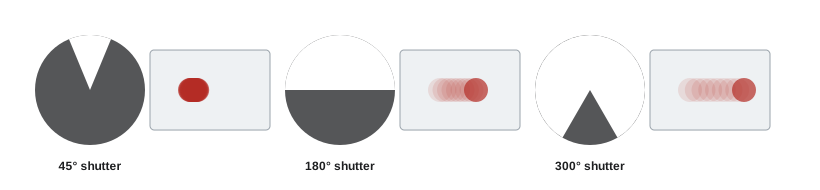
Film cameras use a rotating disc with an open segment, the rotary shutter. While the open segment passes in front of the film gate, the film is exposed; while the closed segment covers the gate, the film advances to the next frame. The size of the open segment, measured in degrees, is the shutter angle. The standard 180° shutter exposes each frame for half the frame interval. Digital cameras emulate this convention, and cinematographers continue to think in shutter angles because the angle directly expresses the proportion of each frame interval during which motion is recorded, regardless of frame rate:
At 24 fps, a 180° shutter gives 1/48 s, often rounded to 1/50 s on cameras that display shutter speed instead of angle. At 30 fps, 180° gives 1/60 s; at 60 fps, 1/120 s. Using shutter angle rather than shutter speed keeps motion rendering consistent when the frame rate changes, for example when switching to 48 fps for slight slow motion, since the camera automatically adjusts the exposure time to keep the same angle.
Motion blur and its look
The 180° shutter produces an amount of motion blur that audiences associate with natural, cinematic movement: enough to smooth motion between frames, not so much that action becomes smeared. Changing the angle changes the look:
- Narrow angles, such as 45° or 90°, produce crisp frames with little blur, making fast motion look staccato and jittery. They were used famously in the battle scenes of Saving Private Ryan (1998) and in many action sequences to heighten tension and make debris and water droplets sharp.
- Wide angles, approaching 360° on digital cameras that allow it, produce more blur and a dreamy, smeared look, and give up to one stop more exposure than 180°, which can help in very low light.
- Slight adjustments, such as 172.8° or 144°, are used to avoid flicker under certain lighting, with little visible change in motion.
Worked problem
Shutter angle and exposure
A camera shooting at 24 fps with a 180° shutter is correctly exposed. The director asks for a 45° shutter for a battle sequence. How much exposure is lost, and what are the exposure times?
Show solution
- At 180°: \(t = (180/360) \times (1/24) = 1/48\) s.
- At 45°: \(t = (45/360) \times (1/24) = 1/192\) s.
- Ratio: 192 / 48 = 4, which is 2 stops.
- Compensate by opening the aperture two stops, removing two stops of ND, raising ISO or adding light.
Answer: Two stops are lost (1/48 s to 1/192 s), to be made up with aperture, ND, ISO or light.
Rolling shutter
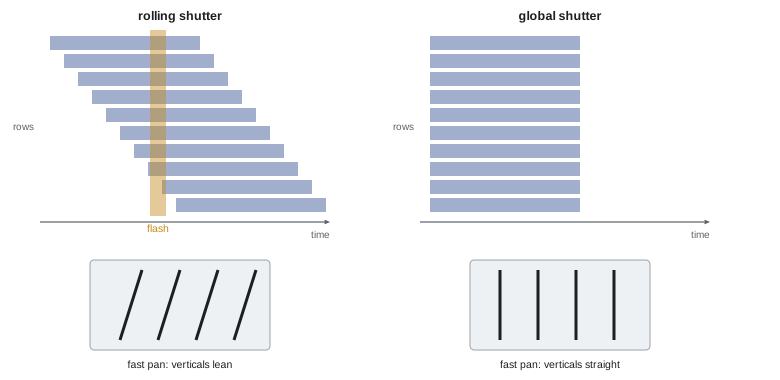
Most CMOS sensors do not expose all photosites simultaneously. Instead, they use an electronic rolling shutter: each row starts its exposure slightly later than the row above it and is read out slightly later, so the frame is captured as a wave sweeping from top to bottom. Each row receives the correct exposure time, but different rows sample slightly different moments. The time taken to sweep from the first row to the last is the readout time, typically from a few milliseconds on fast, stacked sensors to 20 milliseconds or more on older or high-resolution sensors.
Rolling shutter causes characteristic artefacts:
- Skew: during a fast horizontal pan or when filming a fast-moving subject, vertical lines lean because the bottom of the frame is captured later than the top.
- Wobble or "jello": vibration from vehicles, drones or handheld operation makes the image appear to ripple.
- Partial exposure: a brief flash of light, such as a camera flash, lightning or muzzle flash, illuminates only part of the frame, producing a bright band.
- Spatial distortion of rotating objects, such as propellers, which appear bent or detached.
Worked problem
How much skew?
A camera with a readout time of 15 ms pans so that the scene moves across the 4,096-pixel frame width in 1 second. How far does the bottom of a vertical line shift relative to the top?
Show solution
- Pan speed: 4,096 pixels per second.
- Time difference between top and bottom rows: 15 ms = 0.015 s.
- Shift: 4,096 × 0.015 ≈ 61 pixels.
- On a 2,160-pixel-tall frame, a 61-pixel lean over the full height is clearly visible.
Answer: About 61 pixels of lean from top to bottom, a visible skew; a 5 ms readout would reduce it to about 20 pixels.
Global shutter
A global shutter exposes every photosite at the same time and then reads them out while the exposure is held in memory within each photosite. It eliminates skew, wobble and partial-flash artefacts, making it valuable for fast action, vehicle and drone work, visual effects plates that must be tracked precisely, and virtual production with LED walls. Global shutter photosites need extra storage circuitry, which historically reduced fill factor, full-well capacity and dynamic range and added noise, so most high-end cinema cameras used rolling shutters with fast readout instead. Improved designs have narrowed the gap: cameras such as RED's KOMODO and V-RAPTOR [X] and Sony's Alpha 9 III brought global shutters to cinema and mirrorless cameras in the 2020s. Many rolling-shutter cameras also have fast readout modes that reduce artefacts to levels acceptable for most work.
| Shutter type | Strengths | Weaknesses | Good for |
|---|---|---|---|
| Rolling, slow readout | Larger photosites, high dynamic range | Skew, wobble, flash banding | Static or slow-moving scenes |
| Rolling, fast readout (stacked) | Low artefacts with good image quality | Cost, heat | Most cinema work |
| Global | No skew, wobble or banding | Historically more noise, less dynamic range | Action, vehicles, VFX, LED walls |
| Mechanical shutter (some cameras) | Eliminates rolling artefacts | Moving parts, limited motion use | Specialty applications |
Flicker from electric lighting
Many light sources flicker invisibly with the alternating current that powers them. Mains power in Canada and the United States alternates at 60 Hz, and the light output of discharge lamps, many fluorescent fixtures and some LED fixtures pulses at twice that frequency, 120 times per second, because light output peaks on both halves of each cycle. If the camera's exposure time contains a whole number of these pulses, every frame receives the same amount of light; if not, the amount varies from frame to frame, producing flicker or rolling bands on screen. In regions with 50 Hz power, the pulses occur 100 times per second.
Flicker-safe exposure times are therefore whole multiples of the pulse period: in 60 Hz regions, 1/120 s, 1/60 s, 1/40 s, 1/30 s and so on. At 30 fps, a 180° shutter gives 1/60 s, which is safe. At 24 fps, a 180° shutter gives 1/48 s, which is not a multiple of 1/120 s, so cinematographers working at 24 or 23.976 fps under suspect lighting often switch to a 144° shutter (1/60 s). In 50 Hz regions, the same problem is solved with a 172.8° shutter at 24 fps, giving 1/50 s. High frame rates are the most vulnerable: at 120 fps the exposure time is shorter than one pulse, so lighting must be flicker-free.
Worked problem
Choosing a flicker-safe shutter
A crew shoots at 23.976 fps in an old warehouse lit by sodium-vapour lamps on 60 Hz power. What shutter angle avoids flicker?
Show solution
- Light pulses at 120 Hz, so safe exposure times are multiples of 1/120 s.
- At 23.976 fps, a 144° shutter gives (144/360) × (1/23.976) ≈ 1/59.94 s, very close to 1/60 s.
- A 72° shutter gives about 1/120 s, also safe but crisper motion.
- The tiny difference between 23.976 and 24 fps can still produce a slow, gentle pulsing; test on a monitor or use a camera that offers a precise shutter speed of 1/60 s.
Answer: A 144° shutter (about 1/60 s), confirmed by a test shot; or switch the shutter to exactly 1/60 s if the camera allows it.
Flicker from screens and LED fixtures
Modern sets contain many other flicker sources. Computer monitors, phones, televisions and LED video walls refresh at their own rates and may use pulse-width modulation (PWM) to dim their backlights, causing banding or rolling lines on camera. LED lighting fixtures designed for film use high-frequency or constant-current drivers that are flicker-free across a wide range of frame rates and shutter speeds, but consumer and architectural LEDs may flicker badly, especially when dimmed. Practical solutions include testing each light and screen at the planned frame rate and shutter, replacing or re-driving problem fixtures, synchronizing screen refresh rates with the camera, adjusting the shutter in small steps until banding disappears using the camera's fine shutter controls, and, for LED walls in virtual production, genlocking the wall and camera together.
Shutter speed versus shutter angle on hybrid cameras
Mirrorless and hybrid cameras often display shutter speed in fractions of a second rather than angle. Operators working with these cameras should remember the 180-degree equivalent for their frame rate: about 1/50 s at 24 fps, 1/60 s at 30 fps and 1/120 s at 60 fps. When changing frame rate on such a camera, the shutter speed does not change automatically, so it is easy to shoot 60 fps with a 1/50 s shutter, which is impossible, or 24 fps with 1/250 s by accident, producing staccato motion. Many hybrid cameras allow switching the display to shutter angle, which avoids these errors.
Shutter and exposure control outdoors
Because shutter angle controls motion rendering, cinematographers rarely use it to control exposure. In bright daylight, a camera at T2.8 and 180 degrees may be several stops overexposed, and the correct solution is ND filtration, either internal or in front of the lens, rather than a narrow shutter, which would change the look. Internal ND in fine steps has made this much easier. Where ND is unavailable, stopping down the lens is the next choice, accepting deeper depth of field and possible diffraction softening.
Rolling shutter and visual effects
Rolling shutter complicates visual effects work. Camera tracking software assumes that each frame is captured at a single instant; skew and wobble introduce errors that make inserted elements slide relative to the scene. Modern tracking tools can model rolling shutter if they know the readout time, so camera teams should record the camera model, sensor mode and frame rate for visual effects shots. For demanding work such as fast vehicle plates, global shutter cameras or cameras with very fast readout are preferred.
Testing shutter and flicker on set
Before rolling under unfamiliar lighting, it is quick to check for flicker by pointing the camera at the lit area and watching the monitor at the planned frame rate and shutter, ideally with a waveform, which shows flicker as a pulsing trace.
Common mistakes
MistakeChanging frame rate in shutter-speed mode without adjusting.
InsteadWork in shutter angle to keep motion rendering consistent.
MistakeForgetting exposure changes with shutter angle.
InsteadHalving the angle loses one stop.
MistakeFast pans with a slow-readout rolling shutter.
InsteadUse fast readout or global shutter, or moderate the move.
MistakeAssuming 180° is always flicker-safe at 24 fps.
InsteadUse 144° (1/60 s) under 60 Hz lights.
MistakeNot testing practical lights and screens.
InsteadTest every source at the planned frame rate and shutter.
Summary and key terms
- Exposure time = shutter angle / 360 × 1 / frame rate.
- The 180° shutter is the standard cinematic motion blur.
- Narrow angles freeze motion; wide angles smear it and add exposure.
- Rolling shutters expose rows in sequence, causing skew, wobble and flash bands.
- Global shutters expose all rows at once, eliminating these artefacts.
- Under 60 Hz power, lights pulse at 120 Hz; safe times are multiples of 1/120 s.
- At 24 fps, use 144° to avoid flicker under 60 Hz lighting.
- Shutter angle
- Fraction of the frame interval exposed, in degrees.
- Motion blur
- Streaking of moving subjects within a frame.
- Rotary shutter
- Rotating disc shutter in film cameras.
- Rolling shutter
- Row-by-row sensor exposure.
- Readout time
- Time to read the sensor from top to bottom.
- Skew
- Leaning verticals from rolling shutter.
- Global shutter
- Simultaneous exposure of all photosites.
- Flicker
- Frame-to-frame brightness variation from pulsing light.
- PWM dimming
- Dimming by rapidly switching light on and off.
- Genlock
- Synchronizing devices to a common timing signal.
Practice problems
Work each problem on paper first, then reveal the answer to check.
Exposure time at 24 fps, 90° shutter?
Show answer
1/96 s.
Exposure time at 48 fps, 180° shutter?
Show answer
1/96 s.
Exposure change from 180° to 360°?
Show answer
One stop more.
Why do cinematographers think in shutter angle?
Show answer
It keeps motion blur consistent across frame rates.
What causes skew?
Show answer
Rows captured at different times during motion.
Skew for a 10 ms readout and 3,000 px/s motion?
Show answer
30 pixels.
Name an artefact a global shutter eliminates.
Show answer
Skew, wobble or partial flash bands.
At what frequency do lights pulse on 60 Hz power?
Show answer
120 Hz.
Flicker-safe shutter at 24 fps under 60 Hz lights?
Show answer
144° (1/60 s).
Flicker-safe shutter at 24 fps under 50 Hz lights?
Show answer
172.8° (1/50 s).
Lesson quiz · 5 questions
Score 60% or more to complete this lesson.
Create a free account to save your progress, take quizzes and earn a certificate.