
CINE-202 · Lesson 8 of 12 · 25 min
LUTs, show looks and the ASC CDL
Look-up tables, or LUTs, are the everyday tools that turn flat log footage into viewable images on set, in editing and in dailies. They also carry a production's intended look from the cinematographer to the colourist. Used well, LUTs give everyone a consistent, accurate view of the image; used carelessly, they cause confusion, mismatched footage and baked-in mistakes. This lesson explains what LUTs are, 1D and 3D LUTs, technical and creative LUTs, show LUTs and how they are built, the ASC Color Decision List (CDL) for communicating scene-by-scene adjustments, LUT file formats and sizes, the limits of LUTs, and good practice for managing looks across a production.
What a LUT is
A look-up table is a precomputed mapping from input values to output values. Instead of calculating a complex transform for every pixel, the system looks up the output for each input in a table, interpolating between entries where necessary. LUTs can represent anything from a simple contrast curve to a complete conversion from a camera's log and wide gamut to a graded Rec.709 image. They are fast enough to run in real time in cameras, monitors, LUT boxes, editing systems and grading software, which is why they are universal on set.
1D and 3D LUTs
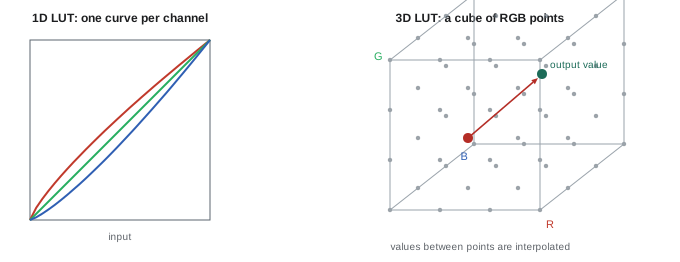
A 1D LUT maps each channel independently: an input red value produces an output red value, and similarly for green and blue. It can change brightness, contrast, gamma and the balance between channels, but it cannot change how colours interact, for example making a red more orange without affecting other colours. A 3D LUT maps each combination of red, green and blue input values to an output colour, represented as a cube of points; values between points are interpolated. 3D LUTs can perform colour space conversions, saturation changes, hue shifts and complex looks. Common 3D LUT sizes are 17 × 17 × 17, 33 × 33 × 33 and 65 × 65 × 65 points; larger cubes are more accurate, especially for extreme transforms, but use more memory, and some devices accept only certain sizes.
Technical and creative LUTs
LUTs serve two broad purposes. Technical LUTs convert between encodings: for example, from ARRI LogC4 and ARRI Wide Gamut 4 to Rec.709, from S-Log3 to Rec.2020 PQ for HDR monitoring, or from one camera's log to another's. Manufacturers supply technical LUTs for their cameras, and they are designed to be neutral, accurate representations. Creative LUTs apply a look: a particular contrast, colour palette, film emulation or stylization, often designed for a specific production. Many show LUTs combine a technical conversion with a creative look in a single file. It is good practice to understand which parts of a LUT are technical and which are creative, and to keep the creative part separable where possible, so that it can be reproduced or adjusted in grading.
Show LUTs
A show LUT is the production's standard monitoring LUT, designed before shooting to represent the intended look of the film or series. It is typically developed in pre-production by the cinematographer with a colourist or DIT, using camera tests shot under representative lighting, and approved by the director. The show LUT is loaded into cameras, monitors and LUT boxes on set, used for dailies and editorial proxies, and serves as the starting point for the final grade. It ensures that the director, producers, editors and studio executives see a consistent image throughout production, rather than flat log footage or a generic conversion. A show LUT should be designed to work across the expected range of scenes, with smooth highlight roll-off and well-behaved shadows, rather than looking spectacular on one test shot and failing elsewhere. Some productions use a small family of LUTs, such as day, night and flashback versions.
Worked problem
Designing a show LUT
A cinematographer and colourist prepare a show LUT for a drama with warm interiors, cool night exteriors and a desaturated look. What steps should they take?
Show solution
- Shoot camera tests with the production camera, lenses and EI, covering faces of the cast or stand-ins, interiors, exteriors, night scenes, charts and grey cards.
- Grade the tests in a colour-managed pipeline, building a look that works across all scenes, with natural skin and smooth highlights.
- Export the look as a 3D LUT (for example 33-point .cube) from the camera's log to Rec.709, and an HDR version if needed.
- Test the LUT on the actual on-set monitors and in editorial, then document the LUT name, version and intended input and output.
Answer: Test-shoot representative scenes, grade a robust look, export technical-plus-creative LUTs for each display, test them in every system and document them.
The ASC Color Decision List
A single show LUT cannot account for every scene: one setup may be a little warm, another slightly underexposed, a third deliberately cooler. The American Society of Cinematographers Color Decision List (ASC CDL) is a simple, standardized way to record and communicate primary colour adjustments made on set, so that they can be reproduced exactly in dailies and passed to the final colourist. A CDL consists of ten numbers: slope, offset and power for each of red, green and blue, plus a single saturation value. The adjustment applied to each channel is:
Slope acts like gain, scaling the signal; offset adds or subtracts a constant, lifting or lowering the whole range; and power acts like gamma, adjusting the midtones. Saturation is then applied using a standard weighting of the channels. Because the CDL is mathematically defined, any system that implements it produces the same result, which is why it is widely supported in on-set grading tools, dailies systems, editing software and grading suites. CDLs are stored in simple XML files (.cdl, .cc or .ccc for collections) or embedded in edit decision lists and ALE files, linked to each shot by clip name or ID.
| CDL parameter | Effect | Analogy |
|---|---|---|
| Slope | Multiplies each value | Gain or highlights |
| Offset | Adds a constant to each value | Lift or overall level |
| Power | Raises to an exponent | Gamma or midtones |
| Saturation | Scales colour intensity | Overall saturation |
Where CDLs sit in the pipeline
CDL adjustments are usually applied before the show LUT, in the log or working space, so that the LUT's look and highlight handling stay intact. On set, a DIT applies CDL adjustments in a live grading tool, viewing the result through the show LUT on a calibrated monitor, and saves the CDL values for each setup. Dailies systems apply the same CDL and LUT to create dailies and editorial proxies, so that the editor and director see the intended look. In the final grade, the colourist can load the CDLs as a starting point, though many prefer to start from a neutral base and use the dailies as reference. Clear documentation of the order of operations, CDL then LUT, and the colour space in which the CDL is applied, is essential; applying a CDL in a different space produces different results.
LUT file formats
Common LUT file formats include .cube, originally from Adobe and now widely supported for both 1D and 3D LUTs; .3dl, used by some older systems; .csp, from Rising Sun Research; and proprietary formats for specific cameras and monitors, such as ARRI's look files and RED's IPP2 creative looks. Many cameras, monitors and LUT boxes accept .cube files of 17 or 33 points; check each device's requirements and test that the LUT loads and displays correctly, since devices can differ in interpolation and in whether they expect legal or full range input. A frequent cause of problems is a LUT designed for full-range input loaded into a device that feeds it legal-range video, or vice versa, producing lifted blacks or clipped whites.
Limitations of LUTs
LUTs are powerful but limited. They are fixed transforms: they cannot adapt to different shots, which is why CDLs or live grading are used alongside them. A 3D LUT has finite resolution, so extreme transforms may show banding or artefacts between points. LUTs clip input values outside their defined range, usually 0 to 1, which means a LUT designed for display-referred data may discard highlight information if applied to scene-linear data, and LUTs for HDR must be designed carefully. A LUT converts from one specific input encoding to one specific output; applying a LUT designed for S-Log3 to LogC footage, or a Rec.709 LUT on an HDR monitor, produces incorrect images. And baking a LUT into recorded footage, rather than applying it only for monitoring, permanently removes the range and flexibility that log recording provided. For these reasons, many high-end productions now use colour-managed pipelines, such as ACES or manufacturer frameworks, in which the transforms are calculated mathematically rather than stored in LUTs (Lessons 9 and 10).
Managing looks on a production
Good practice for LUTs and looks includes:
- Naming LUTs clearly, with the production, version, input and output encodings, for example "SHOW_v03_LogC4-AWG4_to_Rec709.cube".
- Keeping a master list of approved LUTs and distributing them to camera, DIT, dailies and editorial, with older versions retired.
- Loading and testing LUTs on every device at the start of production, using test patterns and charts.
- Recording log footage clean, without baked-in LUTs, unless the production intentionally requires burned-in looks.
- Saving CDLs for every setup and linking them to clips in metadata.
- Documenting the order of operations and colour spaces in a pipeline document shared with all departments.
These habits prevent the common situation in which editors, producers and colourists see different versions of the same footage and decisions are made on the wrong image.
Live grading on set
Live grading systems, such as Pomfort Livegrade, Colorfront On-Set Dailies, DaVinci Resolve Live and others, allow the DIT to apply CDL adjustments and LUTs to camera feeds in real time, controlling LUT boxes that sit between the cameras and the monitors. The DIT can save a grade for each setup, recall it for later shots in the same scene, and export CDLs or LUTs for dailies. Live grading lets the cinematographer and director see a closer approximation of the final look during shooting, which can help actors' performances, production design and lighting decisions, and reduces surprises later. It should be used thoughtfully: heavy grading on set can mask exposure problems or lead to looks that are difficult to reproduce, so the DIT and cinematographer usually keep on-set adjustments to modest primary corrections.
Film emulation and print LUTs
Many productions seek a look reminiscent of film. Film emulation LUTs and transforms model the response of particular negative stocks and print films, including their highlight roll-off, contrast, colour crossover and saturation behaviour. Some are created from measurements of real film stocks, others are artistic interpretations. Used well, they give digital images warmth, smooth highlights and a pleasing palette; used carelessly, they can crush shadows, shift skin tones or clash with the production design. Film emulation is usually applied as part of the show look or as a look transform in a colour-managed pipeline, rather than baked into footage.
Versioning and approval
Looks evolve during pre-production and sometimes during shooting. Each change should create a new version of the LUT or look file, with a clear name and date, and the approved version should be communicated to all departments. Editorial in particular must know which version was applied to dailies, so that any re-rendering of proxies matches. Keeping a record of approvals, such as an email from the director and cinematographer confirming a look, prevents disputes later.
Common mistakes
MistakeUsing a LUT designed for a different log curve.
InsteadMatch LUT input to the camera's exact encoding.
MistakeBaking a creative LUT into the recording.
InsteadRecord clean log and apply LUTs for monitoring.
MistakeApplying CDLs after the LUT.
InsteadApply CDLs before the LUT in the defined space.
MistakeMixing legal and full range LUT expectations.
InsteadTest LUTs on each device with charts.
MistakeUnclear LUT names and versions.
InsteadName, version and document every LUT.
Summary and key terms
- A LUT maps input values to output values via a precomputed table.
- 1D LUTs adjust channels independently; 3D LUTs map colours as a whole.
- Technical LUTs convert encodings; creative LUTs apply looks.
- Show LUTs give a consistent view of the intended look.
- The ASC CDL records slope, offset, power and saturation per shot.
- CDLs are usually applied before the show LUT in a defined space.
- LUTs have limits; manage, name and test them carefully.
- LUT
- Look-up table mapping input to output values.
- 1D LUT
- Per-channel mapping table.
- 3D LUT
- Cube mapping RGB inputs to output colours.
- Technical LUT
- LUT converting between encodings.
- Creative LUT
- LUT applying a look.
- Show LUT
- Production's standard monitoring look.
- ASC CDL
- Standard colour decision list of slope, offset, power and saturation.
- Slope
- CDL multiplier, similar to gain.
- Offset
- CDL constant added to values.
- Power
- CDL exponent, similar to gamma.
Practice problems
Work each problem on paper first, then reveal the answer to check.
What does a 1D LUT not allow?
Show answer
Changes that depend on combinations of channels, such as hue shifts.
Name three common 3D LUT sizes.
Show answer
17, 33 and 65 points per side.
Give an example of a technical LUT.
Show answer
LogC4/AWG4 to Rec.709.
Who typically designs a show LUT?
Show answer
The cinematographer with a colourist or DIT.
How many numbers make up a CDL?
Show answer
Ten.
Write the CDL channel formula.
Show answer
out = (in × slope + offset)^power.
Where is the CDL applied relative to the LUT?
Show answer
Before it.
Name two LUT file formats.
Show answer
.cube, .3dl, .csp.
Why avoid baking LUTs into recordings?
Show answer
It removes range and flexibility.
What should a LUT name include?
Show answer
Production, version, input and output.
Lesson quiz · 5 questions
Score 60% or more to complete this lesson.
Create a free account to save your progress, take quizzes and earn a certificate.