
CMPUT-201 · Lesson 1 of 12 · 33 min
Why C and the Unix environment
CMPUT-174 taught you to think like a programmer in Python, a language that manages memory for you, checks every list index and stops with a clear traceback when something goes wrong. This course moves one level closer to the machine. You will write programs in C, the language in which most operating systems, language runtimes, databases, embedded controllers and networking stacks are written, and you will build, run and debug them with the standard Unix tools. C gives you direct control over memory and very fast, predictable code; in exchange it trusts you completely, and mistakes that Python would catch become silent corruption or crashes. Learning to work safely in that environment, with discipline, tools and tests, is what practical programming methodology means.
This first lesson explains why C still matters more than fifty years after it was created, what the Unix environment provides, how a C program is different from a Python script, and how to write, compile and run your first program from the shell. It also sets out the working habits the rest of the course depends on: compile with warnings turned on, use the sanitizers, test as you go and keep your work under version control. If you have done ROB-110, the shell will already be familiar; this lesson concentrates on what is new for C.
A short history and why C endures
C was designed by Dennis Ritchie at Bell Labs between 1969 and 1973, alongside the Unix operating system that Ken Thompson and Ritchie were building. Unix was rewritten in C in 1973, which was unusual at the time: operating systems were normally written in assembly language for one particular machine. Writing Unix in a portable high-level language meant it could be moved to new hardware by rewriting a small part and recompiling the rest, and that portability is a large part of why both Unix and C spread so widely. Brian Kernighan and Dennis Ritchie's book The C Programming Language (1978, second edition 1988) defined the language for a generation, and C was standardized by ANSI in 1989 and by ISO in 1990.
The standard has been revised several times since. C99 added // comments, declarations anywhere in a block, the bool type and fixed-width integer types; C11 added threads and atomics; C17 was a bug-fix release; and C23, published by ISO in 2024, added features such as the nullptr constant, true and false as keywords, and binary literals. This course uses C17, which every current compiler supports fully, and mentions C23 where a newer feature is useful. You select the standard with a compiler flag, -std=c17, so that your code means the same thing on every machine.
Why learn C today, when newer languages such as Rust, Go and Zig exist? First, a huge amount of the world's infrastructure is written in C and will be maintained for decades: the Linux kernel, the CPython interpreter that ran your CMPUT-174 programs, SQLite, the Git version control system, OpenSSL and the firmware in countless devices. Second, C is the common language for talking to the operating system and to other languages: Python, Java and Rust all call C libraries through a foreign function interface. Third, C exposes the machine model, memory as a sequence of addressed bytes, the stack, the heap and the cost of every operation, and understanding that model makes you a better programmer in any language. Later courses in computer organization (CMPUT-229), operating systems (CMPUT-379) and security (CMPUT-331) all assume you can read and write C.
What makes C different from Python
The most visible difference is that C is compiled ahead of time. Python reads your source file each time you run it; a C compiler translates the whole program into machine code once, producing an executable file that the operating system can run directly, with no interpreter. Compilation catches many errors before the program ever runs, such as misspelled names and calls with the wrong number of arguments, and it lets the compiler optimize the code heavily. The price is an extra step every time you change the program, and the fact that the executable runs only on the kind of machine and operating system it was built for.
The second difference is static typing. Every variable in C has a type fixed when it is declared, such as int for a whole number or double for a floating-point number, and the compiler uses the type to decide how many bytes the variable occupies and which machine instructions operate on it. In Python a name can refer to an integer one moment and a string the next; in C, int count; declares a box that can only ever hold an integer of a fixed size.
The third and most important difference is that C does not protect you. If you read the eleventh element of a ten-element array, Python raises IndexError; C simply reads whatever bytes happen to be in memory just past the array. If you use memory after giving it back, write past the end of a string or let an integer overflow, the C standard says the behaviour is undefined, which means the program may appear to work, may crash, or may do something completely unexpected, and it may behave differently with a different compiler or optimization level. A large part of this course is about avoiding undefined behaviour and using tools that detect it.
#include <stdio.h>

int main(void) {
    printf("Hello from C\n");
    int squares = 0;
    for (int i = 1; i <= 10; i++) {
        squares += i * i;
    }
    printf("Sum of the first 10 squares: %d\n", squares);
    return 0;
}Hello from C Sum of the first 10 squares: 385
Compare this with the Python you know. The #include line pulls in declarations from the standard input/output header so the compiler knows what printf is. Every C program starts running in a function called main, and int main(void) says that main takes no arguments and returns an integer, the program's exit status, where 0 means success. Statements end with semicolons and blocks are marked with braces rather than indentation, although you should still indent consistently for people reading the code. The loop variable i must be declared with its type, and printf takes a format string in which %d is replaced by an integer argument.
The Unix environment
Unix is a family of operating systems descended from the Bell Labs system. Today the main members are Linux, which runs most servers, cloud machines, Android phones and many embedded devices, and macOS, which is certified as Unix. Windows is not Unix, but the Windows Subsystem for Linux (WSL) runs a real Linux environment, and it is the recommended way to follow this course on a Windows computer. University computing labs and remote servers usually give you Linux accounts reached over SSH.
The Unix philosophy, summarized by Doug McIlroy, is to write programs that do one thing well, that work together, and that handle text streams, because text is a universal interface. Rather than one large program that does everything, Unix provides many small tools, such as ls to list files, grep to search text, sort to sort lines and wc to count words, and the shell lets you connect them so that the output of one becomes the input of the next. C programs fit naturally into this world: a well-behaved command-line program reads standard input, writes results to standard output, writes errors to standard error and returns an exit status, so it can be combined with other tools.
printf "pear 3\napple 7\nfig 2\napple 1\n" > fruit.txt
cat fruit.txt
echo "--- sorted, apples only:"
sort fruit.txt | grep apple
echo "--- lines, words, bytes:"
wc fruit.txtpear 3 apple 7 fig 2 apple 1 --- sorted, apples only: apple 1 apple 7 --- lines, words, bytes: 4 8 29 fruit.txt
The vertical bar is a pipe: sort fruit.txt | grep apple runs sort and grep at the same time, with sort's output flowing directly into grep's input. Lesson 12 returns to pipelines, redirection and the classic text tools in more depth, and shows how to write your own C programs so that they can sit in the middle of a pipeline.
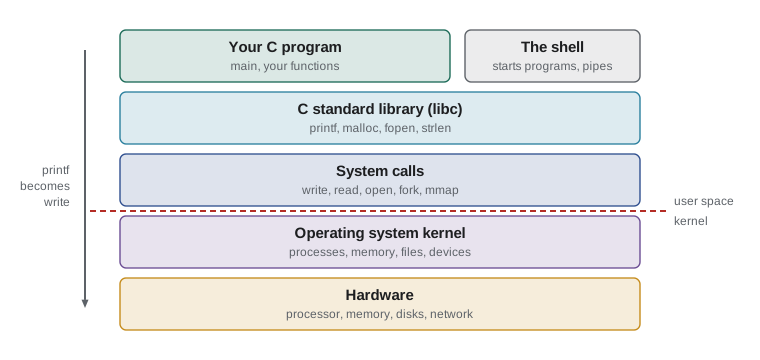
The figure shows the layers your program passes through. When you call printf, the C standard library formats the text into a buffer and eventually asks the operating system kernel to write the bytes, using a system call named write. The kernel decides which process runs, gives each process its own memory and controls access to files and devices. C programs can call system calls directly, which is how operating systems courses work, but most programs use the portable standard library and let it deal with the system underneath.
The tools you will use
A C programmer on Unix needs only a handful of tools, all free and installed on most Linux systems. You need a text editor: Visual Studio Code, Vim, Emacs, nano or any editor that saves plain text. You need a compiler: this course uses GCC, the GNU Compiler Collection, and also mentions Clang, which accepts the same options and often gives clearer error messages. You need make, which rebuilds programs automatically when files change; gdb, the GNU debugger; Valgrind, which finds memory errors; and Git for version control. On Ubuntu or Debian, sudo apt install build-essential gdb valgrind git installs all of them; on macOS, the Xcode command-line tools provide Clang, make and Git.
You will run all of these from a terminal. Integrated development environments can drive the same tools through buttons, and you are welcome to use one, but knowing the commands underneath means you can work on any machine, including a remote server with no graphical interface, and you can automate everything in scripts and Makefiles.
Compiling and running: the edit, compile, run cycle
The basic workflow in C is a loop: edit the source file, compile it, read and fix any errors and warnings, run the program and check its output. The command gcc -std=c17 -Wall -Wextra -g hello.c -o hello compiles hello.c into an executable called hello. The options matter. -std=c17 selects the language standard. -Wall and -Wextra turn on a large set of warnings about code that is legal but probably wrong. -g includes debugging information so gdb can show source lines. -o hello names the output file; without it gcc writes a file called a.out. You then run the program by typing ./hello, where ./ means the current directory, because for security the shell does not look in the current directory for commands by default.
Compiler warnings deserve special attention. Unlike Python, the C compiler will accept many programs that are almost certainly wrong, and its only complaint will be a warning. Professional teams treat warnings as errors, and you should too: add -Werror while you are learning, so that any warning stops the build. The next example shows the kind of mistake the compiler can catch: printing a double with %d, which tells printf to expect an integer.
#include <stdio.h>

int main(void) {
    double average = 82.5;
    printf("Average: %d\n", average);   /* wrong conversion for a double */
    return 0;
}$ gcc -std=c17 -Wall -Wextra avg.c -o prog
avg.c: In function 'main':
avg.c:5:23: warning: format '%d' expects argument of type 'int', but argument 2 has type 'double' [-Wformat=]
5 | printf("Average: %d\n", average); /* wrong conversion for a double */
| ~^ ~~~~~~~
| | |
| int double
| %fThe compiler still produced an executable, and if you ran it you would see a meaningless number, because printf would read the bits of a double as if they were an integer from the wrong place. Without -Wall the build would have been completely silent. Read diagnostics carefully: each one gives the file name, line and column, the kind of message (error or warning), an explanation, and often a suggestion. Fix the first error first, because one mistake such as a missing semicolon can cause a cascade of confusing errors further down.
The sanitizers and undefined behaviour
Some errors cannot be found by looking at the code, because they depend on the data. C compilers can add run-time checks that catch the most dangerous ones. AddressSanitizer, enabled with -fsanitize=address, detects reading or writing outside an array or a block of memory, using memory after it has been freed and leaks. UndefinedBehaviorSanitizer, enabled with -fsanitize=undefined, detects signed integer overflow, shifts that are too large, dividing by zero and similar problems. Both make the program slower and larger, so they are used while developing and testing, not in the final release. In this course every example program is compiled with both sanitizers, and you should do the same with your own work.
#include <stdio.h>
#include <limits.h>

int main(void) {
    int big = INT_MAX;          /* largest value an int can hold */
    printf("big = %d\n", big);
    big = big + 1;              /* signed overflow: UB, undefined */
    printf("big + 1 = %d\n", big);
    return 0;
}big = 2147483647 big + 1 = -2147483648 overflow.c:7:9: runtime error: signed integer overflow: 2147483647 + 1 cannot be represented in type 'int'
Without the sanitizer the program would usually print -2147483648 and carry on, because the hardware wraps the value around, but the C standard does not promise that: a compiler is allowed to assume signed overflow never happens and optimize on that basis, which has caused real security bugs. The sanitizer's message names the file, line and column and explains exactly what went wrong. Lesson 3 explains integer sizes and overflow in detail, and lessons 6 and 7 use AddressSanitizer to catch memory errors.
Worked problem
Reading and fixing compiler diagnostics
A student compiles a program with gcc -std=c17 -Wall -Wextra and gets three messages: an error that printf is implicitly declared, a warning that the variable total is unused, and a warning that control reaches the end of a non-void function. What does each mean and how should each be fixed?
Show solution
- Implicit declaration of printf means the compiler has not seen a declaration of printf before its use. The fix is to add #include <stdio.h> at the top of the file. Implicit function declarations were removed from the language in C99; GCC 14 and later report them as errors, and older versions give a warning that you should never ignore.
- An unused variable usually means a forgotten step: total was declared, perhaps even assigned, but never used. Either use it as intended, for example by printing it, or delete it.
- Control reaching the end of a non-void function means a function declared to return a value can finish without a return statement, so its caller would receive an unpredictable value. Add a return statement on every path, for example return 0; at the end of main or the missing return in a helper function.
- After fixing, recompile with the same flags until there are no messages, then run the program and check its output against a hand-worked answer.
Answer: Add the missing #include, use or remove total, and make sure every path through a non-void function returns a value; then rebuild with warnings on until the build is clean.
Working habits for this course
C rewards careful habits more than any language you have used so far. The habits below are not optional extras; they are how professional C programmers avoid spending days hunting for bugs. First, compile with -std=c17 -Wall -Wextra -g and, while developing, -fsanitize=address,undefined, and fix every warning. Second, build programs in small steps, compiling and running after each change, exactly as CMPUT-174 recommended for Python, because a C bug introduced ten changes ago is much harder to find. Third, write tests from the start, using the techniques in lesson 11. Fourth, keep every project in a Git repository and commit whenever you reach a working state.
Fifth, read the documentation. The standard library is described in the manual pages, which you open with man followed by the name of the function, for example man 3 printf, where 3 selects section 3 of the manual, library functions. Online references such as cppreference.com describe the standard precisely and show which version of C introduced each feature. Finally, be honest about where code comes from. Your institution's academic integrity rules apply to C exactly as they did to Python, including rules about AI coding assistants: if they are allowed, you must still understand, test and be able to explain every line you submit.
Common mistakes
MistakeCompiling without -Wall and -Wextra, so that likely mistakes produce no message at all.
InsteadAlways compile with -std=c17 -Wall -Wextra -g, and treat every warning as something to fix, ideally with -Werror.
MistakeTyping hello instead of ./hello to run a program in the current directory.
InsteadUse ./hello; the shell searches only the directories listed in PATH, which normally does not include the current directory.
MistakeAssuming that a C program that runs and prints a plausible answer is correct.
InsteadCode with undefined behaviour can look correct by chance; compile with the sanitizers and test against hand-worked answers.
MistakeFixing compiler errors from the bottom of the list upward.
InsteadFix the first error first and recompile, because later messages are often caused by the first mistake.
MistakeForgetting to recompile after editing the source file, then wondering why nothing changed.
InsteadThe executable is a separate file; rebuild after every edit, or use make, which lesson 11 introduces.
Summary and key terms
- C was created with Unix at Bell Labs in the early 1970s and is standardized by ISO; this course uses C17.
- C remains the language of operating systems, embedded systems, interpreters and widely used libraries, and the common interface between languages.
- C is compiled ahead of time, statically typed, and performs almost no run-time checks, so errors can cause undefined behaviour.
- The Unix philosophy favours small tools that do one job and work together through text streams and pipes.
- The core toolchain is an editor, gcc or clang, make, gdb, the sanitizers, Valgrind and Git.
- Compile with -std=c17 -Wall -Wextra -g and the sanitizers, fix the first diagnostic first, and run programs with ./name.
- Work in small steps, test continuously, commit often and read the manual pages.
- Compiler
- A program that translates source code into machine code before the program runs.
- Executable
- A file of machine code that the operating system can load and run directly.
- Static typing
- A system in which every variable has a type fixed at compile time.
- UB (undefined behaviour)
- Program behaviour for which the C standard imposes no requirements, such as signed overflow or out-of-bounds access.
- Standard library
- The functions, types and macros every C implementation provides, such as printf and malloc.
- System call
- A request from a program to the operating system kernel, such as write or open.
- Shell
- The command interpreter that runs programs and connects them with pipes and redirection.
- Pipe
- A connection that sends one program's standard output to another program's standard input.
- Compiler warning
- A compiler message about legal code that is probably a mistake.
- Sanitizer
- A compiler option that adds run-time checks for memory errors or undefined behaviour.
Practice problems
Work each problem on paper first, then reveal the answer to check.
Give two reasons C is still widely used.
Show answer
For example: it is the language of operating systems and embedded systems, and it is the common interface other languages use to call libraries.
What does each part of gcc -std=c17 -Wall -Wextra -g prog.c -o prog do?
Show answer
Select C17; turn on common and extra warnings; include debugging information; compile prog.c; name the executable prog.
Why must you type ./prog rather than prog?
Show answer
The shell looks for commands only in the directories in PATH, which usually excludes the current directory.
Name three things Python checks at run time that C does not.
Show answer
Array index bounds, use of objects after they are gone, and integer overflow (Python integers simply grow).
What is undefined behaviour, and why is a program with it dangerous even if it seems to work?
Show answer
Behaviour the standard does not define; it may change with the compiler, flags or data, so apparent correctness proves nothing.
Which compiler options enable AddressSanitizer and UndefinedBehaviorSanitizer?
Show answer
-fsanitize=address and -fsanitize=undefined, usually written together as -fsanitize=address,undefined.
A build produces twenty errors. What should you do first?
Show answer
Fix the first error, recompile and look again, because many later errors may disappear.
Write the shell command that counts the lines in notes.txt that contain the word exam.
Show answer
grep exam notes.txt | wc -l (or grep -c exam notes.txt).
What does main's return value mean?
Show answer
It is the program's exit status; 0 means success and non-zero means failure.
State the Unix philosophy in one sentence.
Show answer
Write small programs that do one thing well, work together, and use text streams as a universal interface.
Lesson quiz · 5 questions
Score 60% or more to complete this lesson.
Create a free account to save your progress, take quizzes and earn a certificate.