
CMPUT-201 · Lesson 6 of 12 · 29 min
Arrays, strings and memory safety
Arrays are C's only built-in collection: a fixed number of elements of one type stored side by side in memory. Strings are not a separate type at all, just arrays of char that end with a zero byte. Both are simple and fast, and both are the source of the most famous class of security vulnerabilities in computing, the buffer overflow, in which a program writes past the end of an array and corrupts whatever lies beyond it. This lesson covers declaring and initializing arrays, how arrays relate to pointers, passing arrays to functions, multidimensional arrays, how strings are stored, the string functions in string.h and their pitfalls, safe ways to build and read strings, and the command-line arguments every C program receives. Throughout, AddressSanitizer is used to show what goes wrong when a program steps outside an array.
Declaring and initializing arrays
int marks[5]; declares an array of five ints, numbered 0 to 4. The size must be known when the array is created; for arrays at file scope or marked static it must be a constant. An initializer list sets the elements: int marks[5] = {70, 85, 91, 64, 77};. If the list is shorter than the array, the remaining elements are set to zero, so int counts[26] = {0}; zeroes all 26. If you give an initializer but omit the size, as in int primes[] = {2, 3, 5, 7};, the compiler counts the elements. C99 also allows designated initializers, such as int days[12] = {[1] = 28};, which set chosen elements.
The number of elements in an array can be computed with sizeof: sizeof marks / sizeof marks[0] gives 5, because sizeof of an array is its total size in bytes. This works only where the array itself is visible, as the next section explains. Arrays cannot be assigned or compared as a whole: marks = other; is an error, and marks == other compares addresses, not contents. Copy arrays element by element or with memcpy, and compare them with a loop or memcmp.
Accessing an element outside the array is undefined behaviour, and C does not check. marks[5] on a five-element array reads whatever is stored next in memory. Variable-length arrays, whose size is a run-time value as in int buf[n];, were added in C99 but made optional in C11; they are risky because a large n silently overflows the stack, and many coding standards forbid them. For sizes known only at run time, use heap allocation (lesson 7).
Arrays and pointers
In almost every expression, an array is automatically converted to a pointer to its first element. This conversion is called array-to-pointer decay. It is why a[i] means *(a + i), why you can assign int *p = marks; without &, and why passing an array to a function passes only an address. The exceptions are sizeof, the & operator and a string literal initializing a char array; in those cases the array stays an array. The practical consequence is important: inside a function that receives an array parameter, the parameter is really a pointer, so sizeof gives the size of a pointer, 8, not of the array. Always pass the length as a separate parameter, conventionally of type size_t.
#include <stdio.h>
#include <stddef.h>

static double average(const int values[], size_t n) {   /* values is really const int * */
    printf("  inside: sizeof values = %zu (a pointer)\n", sizeof values);
    long total = 0;
    for (size_t i = 0; i < n; i++) {
        total += values[i];
    }
    return n ? (double)total / n : 0.0;
}

int main(void) {
    int marks[] = {70, 85, 91, 64, 77};
    size_t n = sizeof marks / sizeof marks[0];
    printf("outside: sizeof marks = %zu, elements = %zu\n", sizeof marks, n);
    printf("average = %.1f\n", average(marks, n));
    int *p = marks;                       /* decay: no & needed */
    printf("marks[2] = %d, *(p + 2) = %d, 2[marks] = %d\n", marks[2], *(p + 2), 2[marks]);
    return 0;
}$ gcc -std=c17 -Wall -Wextra decay.c -o prog
decay.c: In function 'average':
decay.c:5:66: warning: 'sizeof' on array function parameter 'values' will return size of 'const int *' [-Wsizeof-array-argument]
5 | printf(" inside: sizeof values = %zu (a pointer)\n", sizeof values);
| ^~~~~~
decay.c:4:33: note: declared here
4 | static double average(const int values[], size_t n) { /* values is really const int * */
| ~~~~~~~~~~^~~~~~~~
$ ./prog
outside: sizeof marks = 20, elements = 5
inside: sizeof values = 8 (a pointer)
average = 77.4
marks[2] = 91, *(p + 2) = 91, 2[marks] = 91GCC actually warns about sizeof on an array parameter, because it is such a common mistake. The odd expression 2[marks] works because a[i] is defined as *(a + i), and addition is commutative; never write it in real code, but it shows clearly that indexing is pointer arithmetic.
Multidimensional arrays are arrays of arrays. double grid[3][4]; is three rows of four doubles, stored row after row in 12 consecutive doubles, an arrangement called row-major order. grid[r][c] is the element in row r, column c. When you pass a two-dimensional array to a function, every dimension except the first must be given in the parameter, as in void print(double g[][4], size_t rows), because the compiler needs the row length to compute addresses: grid[r][c] is at offset r x 4 + c.
Strings are character arrays
A C string is a sequence of characters followed by a null character, the byte with value 0, written '\0'. The null terminator marks the end; there is no stored length. The string literal "cat" is therefore four bytes: 'c', 'a', 't' and '\0'. Functions that work with strings, such as printf with %s and strlen, walk along the bytes until they find the terminator. If it is missing, they keep reading past the end of the array into unrelated memory.
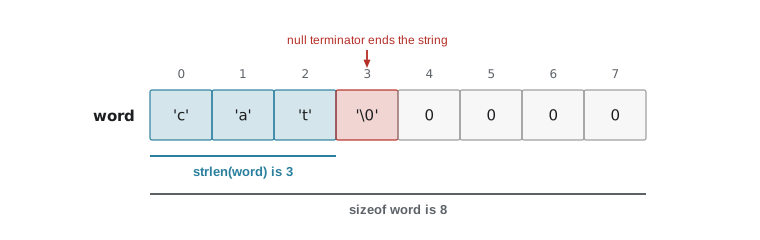
There are two common ways to create a string, and they differ in an important way. char word[8] = "cat"; creates an array of eight chars that you own, copies 'c', 'a', 't' and '\0' into it and zeroes the rest; you can change its contents. const char *name = "cat"; makes name point to a string literal stored in read-only memory; trying to modify it is undefined behaviour and on Linux crashes the program. Always declare pointers to literals as const char *, so the compiler stops accidental writes.
The header string.h declares the standard string functions. strlen(s) returns the number of characters before the terminator. strcmp(a, b) compares two strings and returns a negative number, zero or a positive number as a is less than, equal to or greater than b in byte order; comparing strings with == compares their addresses, a frequent beginner bug. strcpy(dst, src) copies a string, terminator included, and strcat(dst, src) appends src to dst. strchr and strstr search for a character or a substring and return a pointer to the match or NULL. ctype.h supplies character tests such as isdigit, isalpha and isspace, and conversions toupper and tolower; pass them an unsigned char value, because a negative char other than EOF is undefined.
#include <stdio.h>
#include <string.h>
#include <ctype.h>

int main(void) {
    char word[8] = "cat";
    const char *other = "category";
    printf("strlen(word) = %zu, sizeof word = %zu\n", strlen(word), sizeof word);
    printf("strcmp(\"cat\", \"category\") = %d\n", strcmp(word, other) < 0 ? -1 : 1);
    printf("strncmp first 3 equal? %s\n", strncmp(word, other, 3) == 0 ? "yes" : "no");

    const char *found = strstr(other, "ego");
    if (found != NULL) {
        printf("\"ego\" found at index %td\n", found - other);
    }
    for (size_t i = 0; word[i] != '\0'; i++) {
        word[i] = (char)toupper((unsigned char)word[i]);
    }
    printf("upper: %s\n", word);

    char line[] = "  42 apples ";
    size_t digits = 0;
    for (size_t i = 0; line[i]; i++) {
        if (isdigit((unsigned char)line[i])) digits++;
    }
    printf("digits in \"%s\": %zu\n", line, digits);
    return 0;
}strlen(word) = 3, sizeof word = 8
strcmp("cat", "category") = -1
strncmp first 3 equal? yes
"ego" found at index 3
upper: CAT
digits in " 42 apples ": 2Buffer overflows
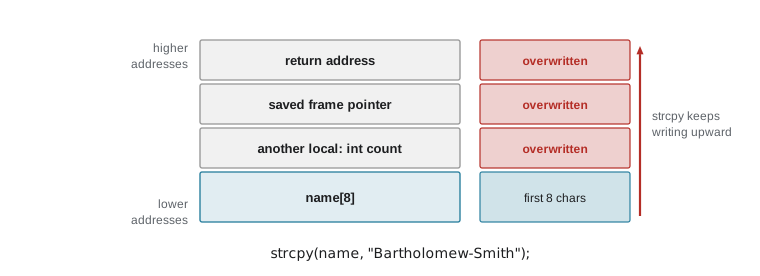
strcpy and strcat do not know how big the destination array is. They copy until they reach the source's terminator, so if the source is longer than the destination, they write past its end. That is a buffer overflow. On the stack, the bytes beyond a local array may belong to other local variables, saved registers or the function's return address; overwriting the return address can make the function "return" to code chosen by an attacker. Buffer overflows have been behind major incidents since the 1988 Morris worm, which exploited one in a Unix network service, and they remain a leading cause of vulnerabilities in C and C++ software. CMPUT-331 studies attacks and defences in depth; here the goal is never to write one.
#include <stdio.h>
#include <string.h>

int main(void) {
    char name[8];
    const char *input = "Bartholomew-Smith";     /* 17 characters */
    printf("copying %zu characters into %zu bytes\n", strlen(input), sizeof name);
    fflush(stdout);
    strcpy(name, input);                          /* overflow! */
    printf("name = %s\n", name);
    return 0;
}$ gcc -std=c17 -Wall -Wextra overflow.c -o prog
overflow.c: In function 'main':
overflow.c:9:5: warning: 'strcpy' writing 18 bytes into a region of size 8 overflows the destination [-Wstringop-overflow=]
9 | strcpy(name, input); /* overflow! */
| ^~~~~~~~~~~~~~~~~~~
overflow.c:5:10: note: destination object 'name' of size 8
5 | char name[8];
| ^~~~
$ ./prog
copying 17 characters into 8 bytes
=================================================================
==4242==ERROR: AddressSanitizer: stack-buffer-overflow on address 0x7f153c500028 at pc 0x7f153f6a7923 bp 0x7ffc1849f4d0 sp 0x7ffc1849ec78
WRITE of size 18 at 0x7f153c500028 thread T0
#0 0x7f153f6a7922 in strcpy ../../../../src/libsanitizer/asan/asan_interceptors.cpp:563
#1 0x559ae855e3e3 in main overflow.c:9
#2 0x7f153ea2a1c9 in __libc_start_call_main ../sysdeps/nptl/libc_start_call_main.h:58
#3 0x7f153ea2a28a in __libc_start_main_impl ../csu/libc-start.c:360
...
Address 0x7f153c500028 is located in stack of thread T0 at offset 40 in frame
#0 0x559ae855e2b8 in main overflow.c:4
This frame has 1 object(s):
[32, 40) 'name' (line 5) <== Memory access at offset 40 overflows this variable
(longjmp and C++ exceptions *are* supported)
SUMMARY: AddressSanitizer: stack-buffer-overflow ../../../../src/libsanitizer/asan/asan_interceptors.cpp:563 in strcpy
(shadow memory map omitted)Because the source here is a constant, GCC can see the problem at compile time and warns that strcpy writes 18 bytes into a region of size 8. When the text comes from a file or the user, as it usually does, the compiler cannot know its length, and only a run-time check helps. AddressSanitizer stops the program at the first byte written out of bounds and reports a stack-buffer-overflow, a WRITE of size 18 (17 characters plus the terminator), the line of the strcpy, and a map showing that the 8-byte variable name was overflowed. Without the sanitizer, this program might print the full name, crash, or be stopped by the stack protector that Ubuntu's compiler adds, which places a check value next to the return address and aborts with "stack smashing detected" if it changes. None of those outcomes is acceptable; the program is wrong.
Safer string handling
The fix is always to know the size of every destination buffer and never write more than it can hold. snprintf(dst, size, format, ...) is the most useful tool: it works like printf but writes into dst, never writes more than size bytes including the terminator, always terminates the result when size is at least 1, and returns the length the full result would have had, so you can detect truncation by checking whether the return value is greater than or equal to size. Despite its name, strncpy is not a safe strcpy: if the source is too long it does not write a terminator, and if it is short it pads the whole remainder with zeros. Many coding standards, including the SEI CERT C Coding Standard's rules on strings, recommend snprintf or an explicit length check instead.
#include <stdio.h>
#include <string.h>

int main(void) {
    char name[8];
    const char *input = "Bartholomew-Smith";

    int needed = snprintf(name, sizeof name, "%s", input);
    if (needed >= (int)sizeof name) {
        printf("truncated: needed %d bytes, kept \"%s\"\n", needed + 1, name);
    }

    char bad[4];
    strncpy(bad, "abcdef", sizeof bad);          /* no terminator written! */
    printf("strncpy result has terminator? %s\n",
           memchr(bad, '\0', sizeof bad) ? "yes" : "no");

    char path[32];
    snprintf(path, sizeof path, "%s/%s.%s", "data", "results", "csv");
    printf("path = %s (%zu chars)\n", path, strlen(path));
    return 0;
}truncated: needed 18 bytes, kept "Barthol" strncpy result has terminator? no path = data/results.csv (16 chars)
Reading strings needs the same care. The old function gets, which read a line with no length limit, was so dangerous that it was removed from the language in C11. Use fgets(buf, sizeof buf, stream), which reads at most one less than the buffer size, keeps the newline if there is room and always terminates the string. scanf with a bare %s has the same problem as gets; if you use it, give a width, as in %19s for a 20-byte buffer. Lesson 10 covers reading input properly, including checking every return value.
Command-line arguments
main can be declared as int main(int argc, char *argv[]) to receive the program's command-line arguments. argc is the number of arguments, and argv is an array of pointers to strings: argv[0] is the program's name as it was run, argv[1] to argv[argc - 1] are the arguments the user typed, and argv[argc] is guaranteed to be NULL. The shell splits the command line into words and handles quoting, so ./prog "two words" gives a single argument. Arguments are always strings; convert numbers with strtol or strtod, as lesson 10 shows.
#include <stdio.h>
#include <string.h>

int main(int argc, char *argv[]) {
    printf("argc = %d\n", argc);
    for (int i = 0; i < argc; i++) {
        printf("argv[%d] = \"%s\" (%zu chars)\n", i, argv[i], strlen(argv[i]));
    }
    printf("argv[argc] is %s\n", argv[argc] == NULL ? "NULL" : "not NULL");
    return 0;
}$ gcc -std=c17 -Wall -Wextra args.c -o prog $ ./prog report.txt "two words" 42 argc = 4 argv[0] = "./prog" (6 chars) argv[1] = "report.txt" (10 chars) argv[2] = "two words" (9 chars) argv[3] = "42" (2 chars) argv[argc] is NULL
Worked problem
Sizing a buffer correctly
A program builds a label of the form "ROOM-" followed by a building code of up to 4 letters, a dash and a room number from 0 to 9999, for example "ROOM-CAB-1234". What is the smallest char array that can always hold it, and how should it be written?
Show solution
- Count the longest case: "ROOM-" is 5 characters, the code up to 4, the dash 1, the number up to 4 digits: 5 + 4 + 1 + 4 = 14 characters.
- Add one byte for the null terminator: 15 bytes.
- Declare char label[15]; or, to be safe against later changes, a little larger, and build it with snprintf(label, sizeof label, "ROOM-%s-%d", code, room).
- Check the return value: if it is 15 or more, the input broke the assumptions (for example, a 5-letter code), and the program should report an error rather than silently use a truncated label.
Answer: 15 bytes (14 characters plus the terminator), filled with snprintf and a truncation check.
Common mistakes
MistakeComparing strings with ==.
Instead== compares addresses; use strcmp(a, b) == 0.
MistakeForgetting the byte for the null terminator when sizing a buffer.
InsteadA string of n characters needs n + 1 bytes.
MistakeUsing sizeof on an array parameter to find its length.
InsteadThe parameter is a pointer; pass the length separately.
MistakeModifying a string literal through a char *.
InsteadLiterals are read-only; declare pointers to them as const char *, and copy into an array to modify.
MistakeUsing strcpy, strcat, sprintf or gets with untrusted input.
InsteadUse snprintf and fgets, which take the buffer size.
MistakeTreating strncpy as a safe strcpy.
InsteadIt may not terminate the result; prefer snprintf(dst, size, "%s", src).
Summary and key terms
- An array is a fixed number of same-type elements stored contiguously; indexes run from 0 to n - 1 and are not checked.
- Arrays decay to pointers to their first element, so a[i] is *(a + i) and functions receive pointers; pass lengths separately.
- Multidimensional arrays are stored in row-major order.
- A string is a char array ending in '\0'; strlen counts to the terminator, while sizeof gives the array size.
- String literals are read-only: use const char * for them and char arrays for strings you change.
- Buffer overflows corrupt memory and cause security vulnerabilities; AddressSanitizer reports them precisely.
- Use snprintf and fgets with sizeof the buffer, and check for truncation; argv delivers command-line arguments as strings.
- Array
- A fixed-size sequence of elements of one type stored contiguously.
- Array-to-pointer decay
- The automatic conversion of an array to a pointer to its first element.
- Row-major order
- Storing a two-dimensional array one complete row after another.
- Null terminator
- The zero byte, '\0', that marks the end of a C string.
- String literal
- Text in double quotes, stored as a read-only char array with a terminator.
- Buffer overflow
- Writing beyond the end of an array, corrupting adjacent memory.
- Stack protector
- A compiler feature that detects overwriting near a function's return address.
- snprintf
- A formatted-output function that writes at most a given number of bytes into a buffer.
- argc and argv
- The parameters of main giving the number and text of command-line arguments.
- CERT C
- A coding standard from Carnegie Mellon's Software Engineering Institute for writing secure C.
Practice problems
Work each problem on paper first, then reveal the answer to check.
How many bytes does char s[] = "hello"; occupy, and what does strlen(s) return?
Show answer
6 bytes; strlen returns 5.
Write the expression for the number of elements in double v[] = {1.0, 2.0, 3.5};
Show answer
sizeof v / sizeof v[0], which is 3.
Why does sizeof give 8 for an int array parameter?
Show answer
The parameter is really a pointer, and pointers are 8 bytes on 64-bit systems.
What is the offset of grid[2][3] in double grid[5][4]?
Show answer
2 x 4 + 3 = 11 elements, or 88 bytes from the start.
Write a test that two strings a and b are equal.
Show answer
strcmp(a, b) == 0
What is wrong with char *s = "cat"; s[0] = 'b';?
Show answer
It modifies a string literal, which is undefined behaviour; use char s[] = "cat";.
Rewrite strcpy(dest, src); safely for a 32-byte dest, detecting truncation.
Show answer
if (snprintf(dest, sizeof dest, "%s", src) >= (int)sizeof dest) { /* handle truncation */ }
What is argv[0], and what is argv[argc]?
Show answer
argv[0] is the program name; argv[argc] is NULL.
Why was gets removed from C?
Show answer
It cannot limit how much it writes, so long input always overflows the buffer.
Write a loop that counts the vowels in a string s.
Show answer
for (size_t i = 0; s[i]; i++) if (strchr("aeiouAEIOU", s[i])) count++;
Lesson quiz · 5 questions
Score 60% or more to complete this lesson.
Create a free account to save your progress, take quizzes and earn a certificate.