
CMPUT-201 · Lesson 12 of 12 · 32 min
Capstone: a command-line tool, Unix tooling and professional practice
This final lesson brings the course together. You will design, build and test a complete command-line tool in C that behaves like a good Unix citizen: it reads files or standard input, writes results to standard output and problems to standard error, accepts options, returns meaningful exit statuses and works in pipelines with the standard tools. Along the way the lesson covers the shell skills you need to use such a tool well, pipelines, redirection, exit statuses and the classic text tools grep, sed, awk, sort and uniq, then the professional practices that surround code: version control with Git, code review and style, open-source licences, and the ethical responsibilities of people who write software that others depend on.
Pipelines, redirection and exit statuses
Lesson 1 introduced the pipe, and lesson 10 the standard streams. Together they are the core of Unix. A pipeline such as grep YEG weather.csv | sort -t, -k3 -n | head -n 2 runs three programs at once, each reading the previous one's output. Redirection connects streams to files: > replaces a file, >> appends, < reads, 2> redirects standard error and 2>&1 sends standard error wherever standard output is going. Each program also returns an exit status, available in the shell as $?, and the operators && and || run a second command only if the first succeeded or failed: make && ./tests runs the tests only if the build worked. That is why your C programs must return 0 on success and non-zero on failure.
cat weather.csv
echo "--- Edmonton rows, sorted by temperature (field 3):"
grep YEG weather.csv | sort -t, -k3 -n
echo "--- count rows per station:"
tail -n +2 weather.csv | cut -d, -f1 | sort | uniq -c
echo "--- exit status of a failing grep: "
grep -q CYVR weather.csv; echo "status $?"
grep -q CYVR weather.csv || echo "no Vancouver data"station,date,temp_c,rain_mm
YEG,2026-07-01,24.5,0.0
YEG,2026-07-02,27.1,1.2
YYC,2026-07-01,22.0,4.8
YEG,2026-07-03,n/a,0.0
YYC,2026-07-02,25.3,0.0
YEG,2026-07-04,19.8,12.6
--- Edmonton rows, sorted by temperature (field 3):
YEG,2026-07-03,n/a,0.0
YEG,2026-07-04,19.8,12.6
YEG,2026-07-01,24.5,0.0
YEG,2026-07-02,27.1,1.2
--- count rows per station:
4 YEG
2 YYC
--- exit status of a failing grep:
status 1
no Vancouver datagrep prints lines matching a pattern; its -q option prints nothing and reports only through the exit status, 0 if something matched and 1 if not. cut extracts fields, sort sorts (here with comma-separated fields, numerically, on field 3), uniq -c counts adjacent repeated lines, which is why its input is sorted first, and head and tail take the first or last lines. Note that sort puts the n/a row first, because a non-number sorts as zero: a reminder that text tools do not validate data, so your own programs must.
Two more tools handle many everyday transformations. sed edits text as it streams past; its most common use is substitution, sed 's/old/new/g'. awk processes records and fields with a small programming language: awk -F, '$1 == "YEG" { print $2, $3 }' prints the date and temperature of Edmonton rows. For one-off questions about data, a short pipeline of these tools is often faster than writing any program; for anything you will run repeatedly, with validation and tests, a proper program is better. Knowing both lets you choose.
sed "s/YEG/Edmonton/; s/YYC/Calgary/" weather.csv | head -n 3
awk -F, 'NR > 1 && $3 != "n/a" { s += $3; n++ }
END { printf "mean temp %.3f over %d days\n", s / n, n }' weather.csvstation,date,temp_c,rain_mm Edmonton,2026-07-01,24.5,0.0 Edmonton,2026-07-02,27.1,1.2 --- mean temp 23.740 over 5 days
Designing the tool
The capstone tool, colstat, prints summary statistics for one numeric column of a delimited text file: the count, minimum, maximum and mean, plus how many lines it skipped because the field was missing or not a number. Begin, as CMPUT-174 taught, by understanding the problem and writing hand-worked examples. For weather.csv, column 3 holds temperatures 24.5, 27.1, 22.0, n/a, 25.3 and 19.8 after a header line, so the expected result is count 5, minimum 19.8, maximum 27.1, mean 118.7 / 5 = 23.74 and 1 skipped line; the awk command above computed the same mean, which gives an independent check.
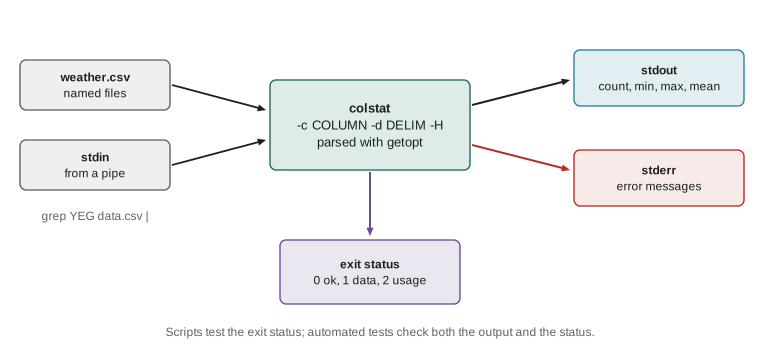
Next, design the interface following Unix conventions. Options start with a hyphen: -c COLUMN chooses the column (default 1), -d DELIM the delimiter (default comma) and -H says the first line is a header to skip. Any remaining arguments are file names; with none, the program reads standard input, so it works in pipelines. Results go to standard output in one line that is easy for other programs to parse; error messages go to standard error and begin with the program's name, as Unix tools do. Exit status 0 means success, 1 means a file could not be read or no values were found, and 2 means the command line was invalid. The POSIX function getopt parses options in the standard way, including combined forms such as -Hc3.
The implementation
The program is about a hundred lines. It defines _POSIX_C_SOURCE before any include, because getopt is part of POSIX rather than standard C and the feature-test macro makes the declarations visible under -std=c17. The field function finds the requested column by searching for delimiters with strchr and cuts it off in place; parse_double uses strtod with the full checks from lesson 10; add_stream reads one stream line by line and updates a struct of running statistics, so the program never needs to store the data and can handle files of any length. One shortcut is deliberate: atoi is used for the column number only because the result is then checked to be at least 1, and a stricter version would use strtol as in lesson 10.
/* colstat - summary statistics for one numeric column of delimited text.
   Usage: colstat [-c COLUMN] [-d DELIM] [-H] [FILE...]   (reads stdin if no FILE) */
#define _POSIX_C_SOURCE 200809L
#include <stdio.h>
#include <stdlib.h>
#include <string.h>
#include <errno.h>
#include <unistd.h>      /* getopt */

struct stats { long count, skipped; double sum, min, max; };

static int parse_double(const char *s, double *out) {
    char *end;
    errno = 0;
    double v = strtod(s, &end);
    if (end == s || errno == ERANGE) return 0;
    while (*end == ' ') end++;
    if (*end != '\0') return 0;
    *out = v;
    return 1;
}

/* Return a pointer to field number col (1-based) of line, or NULL; fields are cut in place. */
static char *field(char *line, int col, char delim) {
    char *start = line;
    for (int i = 1; i < col; i++) {
        start = strchr(start, delim);
        if (start == NULL) return NULL;
        start++;
    }
    char *end = strchr(start, delim);
    if (end) *end = '\0';
    return start;
}

static void add_stream(FILE *fp, int col, char delim, int header, struct stats *st) {
    char line[4096];
    int first = 1;
    while (fgets(line, sizeof line, fp)) {
        line[strcspn(line, "\r\n")] = '\0';
        if (first && header) { first = 0; continue; }
        first = 0;
        double v;
        char *f = field(line, col, delim);
        if (f == NULL || !parse_double(f, &v)) { st->skipped++; continue; }
        if (st->count == 0 || v < st->min) st->min = v;
        if (st->count == 0 || v > st->max) st->max = v;
        st->sum += v;
        st->count++;
    }
}

static void usage(const char *prog) {
    fprintf(stderr, "usage: %s [-c COLUMN] [-d DELIM] [-H] [FILE...]\n", prog);
}

int main(int argc, char *argv[]) {
    int col = 1, header = 0, opt;
    char delim = ',';
    while ((opt = getopt(argc, argv, "c:d:H")) != -1) {
        switch (opt) {
        case 'c':
            col = atoi(optarg);   /* validated just below */
            if (col < 1) { fprintf(stderr, "%s: bad column '%s'\n", argv[0], optarg); return 2; }
            break;
        case 'd':
            if (strlen(optarg) != 1) { fprintf(stderr, "%s: delimiter must be one character\n", argv[0]); return 2; }
            delim = optarg[0];
            break;
        case 'H':
            header = 1;
            break;
        default:
            usage(argv[0]);
            return 2;
        }
    }
    struct stats st = {0, 0, 0.0, 0.0, 0.0};
    int status = 0;
    if (optind == argc) {
        add_stream(stdin, col, delim, header, &st);
    }
    for (int i = optind; i < argc; i++) {
        FILE *fp = fopen(argv[i], "r");
        if (fp == NULL) { fprintf(stderr, "%s: %s: %s\n", argv[0], argv[i], strerror(errno)); status = 1; continue; }
        add_stream(fp, col, delim, header, &st);
        fclose(fp);
    }
    if (st.count == 0) { fprintf(stderr, "%s: no numeric values in column %d\n", argv[0], col); return 1; }
    printf("count %ld  min %g  max %g  mean %.3f  skipped %ld\n",
           st.count, st.min, st.max, st.sum / st.count, st.skipped);
    return status;
}gcc -std=c17 -Wall -Wextra -Werror -g -fsanitize=address,undefined colstat.c -o colstat
./colstat -H -c 3 weather.csv
grep YEG weather.csv | ./colstat -c 4
./colstat -c 0 weather.csv
./colstat -H -c 3 weather.csv missing.csv$ ./colstat -H -c 3 weather.csv count 5 min 19.8 max 27.1 mean 23.740 skipped 1 (exit 0) $ grep YEG weather.csv | ./colstat -c 4 count 4 min 0 max 12.6 mean 3.450 skipped 0 $ ./colstat -c 0 weather.csv ./colstat: bad column '0' (exit 2) $ ./colstat -H -c 3 weather.csv missing.csv ./colstat: missing.csv: No such file or directory count 5 min 19.8 max 27.1 mean 23.740 skipped 1 (exit 1)
The first run matches the hand-worked answer exactly: 5 values from 19.8 to 27.1 with mean 23.740 and one skipped line. In the pipeline, grep has already removed the header and the Calgary rows, so all four Edmonton rainfall values are used. The invalid column produces a message and exit status 2, and the missing file is reported on standard error while the readable file is still processed, giving status 1 so a script would know something went wrong. Because the build used the sanitizers and none reported anything, we also know that these runs made no memory errors.
Testing the tool
A command-line tool is tested from the outside, by running it on prepared inputs and comparing the output and exit status with expected values. A small shell script does this well, and make test can run it. Good tests for colstat include the hand-worked example; standard input instead of a file; a file with no header; a column number past the end of every line; a file with no numeric values at all, which should give exit status 1; an empty file; a different delimiter; negative and very large values; and Windows-style line endings, which the strcspn call with "\r\n" handles. Each bug you find in use should become a new test case.
#!/bin/sh
# test_colstat.sh - run with: sh test_colstat.sh
printf "a;b\n1;-2.5\n2;7\n" > semi.txt
: > empty.txt
pass=0; fail=0
check() { if [ "$1" = "$2" ]; then pass=$((pass+1)); else fail=$((fail+1)); echo "FAIL: got [$1] expected [$2]"; fi; }
check "$(./colstat -H -c 3 weather.csv)" "count 5  min 19.8  max 27.1  mean 23.740  skipped 1"
check "$(./colstat -H -d ";" -c 2 semi.txt)" "count 2  min -2.5  max 7  mean 2.250  skipped 0"
check "$(./colstat -c 2 weather.csv 2>/dev/null; echo $?)" "1"       # no numbers
check "$(./colstat empty.txt 2>/dev/null; echo $?)" "1"            # empty file
check "$(./colstat -x 2>/dev/null; echo $?)" "2"                   # bad option
check "$(tail -n +2 weather.csv | ./colstat -c 3 | cut -d" " -f2)" "5"   # stdin
echo "$pass passed, $fail failed"6 passed, 0 failed
Version control with Git
Git records the history of a project as a series of commits, each a snapshot of every file with a message explaining the change. If you took ROB-110 you have used the basic commands; for C projects a few practices matter especially. Commit small, working changes with messages that say why, not just what. Never commit build products such as .o files and executables: list them in a .gitignore file so the repository holds only sources, and anyone can rebuild with make. Use branches for new features or experiments, and merge them when they work. Before every commit, build with warnings as errors and run the tests, so the history contains only working states, which also makes git bisect, a tool that finds the commit that introduced a bug by binary search, effective.
git init -b main colstat-repo && cd colstat-repo
cp ../colstat.c .
printf "*.o\ncolstat\n" > .gitignore        # never commit build products
git add colstat.c .gitignore
git commit -m "Add colstat: column statistics for delimited text"
gcc -std=c17 -Wall -Wextra colstat.c -o colstat
sed -i "s/%.3f/%.2f/" colstat.c                # make a change
git status --short
git diff --stat
git commit -am "Show the mean to two decimal places"
git log --onelineM colstat.c colstat.c | 2 +- 1 file changed, 1 insertion(+), 1 deletion(-) Show the mean to two decimal places Add colstat: column statistics for delimited text
git status shows the modified source file but not the executable, because .gitignore excludes it; git diff --stat summarizes the change before it is committed. (Commit identifiers, which are unique hashes, are omitted from the log shown here.) On team projects the next steps are pushing to a shared repository such as GitHub or GitLab, opening a pull request (a merge request in GitLab) and having a teammate review it before it is merged, often after automated checks have built the code and run the tests, a practice called continuous integration.
Code review, style and documentation
Code review means having another person read your changes before they become part of the project. It catches bugs, spreads knowledge and keeps a code base consistent. When reviewing C, look for the problems this course has emphasized: unchecked return values, buffer sizes, ownership of every malloc, integer overflow and signedness, and missing tests. Be specific and kind, and comment on the code rather than the person. When receiving review, treat comments as help, not criticism. Consistent style makes review easier: choose a style (Linux kernel, GNU, or one your team agrees on), and let a formatter such as clang-format apply it automatically so reviews can focus on substance. Document every public function's purpose, parameters, return value, ownership and error behaviour in its header, as earlier lessons did, and give the project a README explaining how to build, test and use it.
Secure coding deserves special attention in C, because so many vulnerabilities come from the mistakes described in lessons 5 to 7. The SEI CERT C Coding Standard collects rules such as "guarantee that storage for strings has sufficient space for character data and the null terminator" and "do not access freed memory", and the MITRE CWE Top 25 list of the most dangerous software weaknesses has for years ranked out-of-bounds writes and use after free near the top. CMPUT-331 studies these in depth; for now, compiling with warnings, sanitizers and analysers, and reviewing code against such lists, will prevent most of them.
Licences and professional ethics
Code you publish is protected by copyright, so others may not legally reuse it unless you grant permission through a licence. Permissive licences such as MIT, BSD and Apache 2.0 let anyone use, modify and redistribute the code, even in closed-source products, provided they keep the copyright notice (Apache 2.0 also includes an explicit patent grant). Copyleft licences such as the GNU General Public License (GPL) require that anyone who distributes a modified version, or a program built from GPL code, release its source under the GPL too; the Linux kernel uses GPL version 2. Before using someone else's code, check its licence and obey it; before publishing your own, choose a licence deliberately and add a LICENSE file. Course work is different again: your institution's rules usually forbid publishing assignment solutions.
Software engineers' work affects people's safety, privacy and livelihoods, and the profession has codes of ethics to guide them. The ACM Code of Ethics and Professional Conduct asks computing professionals to contribute to society, avoid harm, be honest and trustworthy, respect privacy and honour confidentiality. In Canada, CIPS, the Canadian Information Processing Society, has its own code of ethics and professional conduct and certifies IT professionals with the I.S.P. designation, and in several provinces the title software engineer is regulated by the provincial engineering associations, so only licensed professional engineers may use it. For a C programmer, these principles become concrete: test thoroughly, do not hide known defects, protect users' data, and say so when a deadline would force you to release something unsafe.
Worked problem
Reviewing a teammate's change
A teammate adds a -o FILE option to colstat with this code: case 'o': out = fopen(optarg, "w"); break; and later fprintf(out, ...); with no other changes. Write three review comments.
Show solution
- fopen can fail (for example, a directory that does not exist or no permission). Check for NULL, report the file name and strerror(errno) on stderr, and exit with status 2 or 1 as the conventions say.
- out must have a default when -o is not given: initialize FILE *out = stdout; so the existing behaviour is unchanged.
- The file must be closed, and since it was written, fclose's return value must be checked to catch write errors; only close it if it is not stdout. Also add tests for -o, including an unwritable path, and update the usage message and README.
Answer: Check fopen for NULL and report it, default out to stdout, and close it with an fclose check, plus tests and documentation for the new option.
You now have the foundations of practical C programming: the toolchain and how it works, the type system and its traps, pointers and memory management with the discipline they demand, data structures built from scratch, robust input and output, and the tools and habits that keep C code correct. CMPUT-204 builds on this with algorithm design and analysis, CMPUT-229 takes you beneath C to assembly language and the machine, CMPUT-379 uses C to explore operating systems, and CMPUT-331 shows how attackers exploit the mistakes you have learned to avoid.
Common mistakes
MistakePrinting error messages to stdout in a command-line tool.
InsteadWrite errors to stderr, prefixed with the program name, and keep stdout for results.
MistakeReturning 0 from main even when something failed.
InsteadReturn a non-zero status on failure so scripts and && can react.
MistakeCommitting executables and object files to Git.
InsteadList build products in .gitignore and commit only sources and build files.
MistakeUsing code from the internet without checking its licence.
InsteadRead the licence and comply with it, or do not use the code.
MistakeTesting a tool only by trying it by hand once.
InsteadWrite a test script covering normal, edge and error cases, and run it before every commit.
MistakeParsing options by hand with ad hoc string comparisons.
InsteadUse getopt, which handles standard syntax such as combined options.
Summary and key terms
- Unix tools combine through pipes and redirection; exit statuses drive && and || and scripts.
- grep, cut, sort, uniq, sed and awk handle many text tasks; programs add validation and repeatability.
- A good command-line tool reads files or stdin, writes results to stdout and errors to stderr, uses getopt and returns meaningful statuses.
- Design starts from hand-worked examples, which become tests that check output and exit status.
- Git records working states; ignore build products, commit small changes with clear messages and review before merging.
- Code review, consistent style, documentation and secure coding standards keep C code correct and safe.
- Licences govern reuse of code, and professional codes of ethics guide responsible software work.
- Pipeline
- A chain of programs connected so each one's output is the next one's input.
- Exit status
- The integer a program returns; the shell stores it in $?.
- getopt
- A POSIX function that parses command-line options in the standard way.
- Feature-test macro
- A macro such as _POSIX_C_SOURCE that exposes declarations beyond standard C.
- Commit
- A recorded snapshot of a project in version control, with a message.
- .gitignore
- A file listing patterns of files Git should not track.
- Code review
- Examination of code changes by another developer before they are merged.
- Continuous integration
- Automatically building and testing every change to a shared repository.
- Copyleft
- A licence condition requiring derived works to be distributed under the same licence.
- Permissive licence
- A licence such as MIT that allows reuse with few conditions.
Practice problems
Work each problem on paper first, then reveal the answer to check.
Write a pipeline that prints the five most common words in words.txt, one word per line.
Show answer
sort words.txt | uniq -c | sort -rn | head -n 5
What does make && ./test_stats do if make fails?
Show answer
It does not run ./test_stats, because && runs the second command only on success.
How do you send both stdout and stderr of a program to log.txt?
Show answer
./prog > log.txt 2>&1
Use awk to print the second field of each line of a comma-separated file.
Show answer
awk -F, '{ print $2 }' file.csv
Why does colstat define _POSIX_C_SOURCE?
Show answer
getopt is a POSIX function, not standard C, so the macro makes its declaration visible when compiling with -std=c17.
Give three test cases for colstat beyond the hand-worked example.
Show answer
For example: an empty file (status 1), a semicolon delimiter, and input on stdin.
What should a .gitignore for a C project contain?
Show answer
Build products such as *.o, executables, and coverage files such as *.gcda and *.gcno.
What is the main obligation of the GPL that the MIT licence does not impose?
Show answer
Distributing a modified or derived program requires releasing its source under the GPL.
Name three things to look for when reviewing C code.
Show answer
Unchecked return values, buffer sizes and terminators, and ownership of every heap allocation.
Which courses build directly on CMPUT-201?
Show answer
CMPUT-204 (algorithms), CMPUT-229 (computer organization), CMPUT-379 (operating systems) and CMPUT-331 (security).
Lesson quiz · 5 questions
Score 60% or more to complete this lesson.
Create a free account to save your progress, take quizzes and earn a certificate.