
CMPUT-201 · Lesson 8 of 12 · 29 min
Structs, unions and data layout
Python programs group related data with classes, dictionaries or tuples. C has the struct: a type made of named members, possibly of different types, stored together in one block of memory. Structs are how C programs represent records, such as a student with a name, an ID and a grade, and they are the building blocks of every data structure in lesson 9. This lesson covers declaring and initializing structs, the . and -> operators, typedef, passing structs to functions, arrays of structs, enumerations, and unions. It then looks underneath at how the compiler lays out a struct in memory, including the padding bytes it inserts for alignment, which affects the size of every struct and matters for performance, file formats and network protocols.
Declaring and using structs
A struct declaration lists its members with their types. struct student { char name[32]; int id; double grade; }; defines a new type, struct student, without creating any variable. A variable is then declared as struct student s;. Members are accessed with the dot operator: s.id = 1001;. Structs can be initialized with a brace list in member order, or, more clearly, with designated initializers that name each member, as in {.id = 1001, .grade = 87.5}; any member not mentioned is set to zero. Unlike arrays, structs can be assigned as a whole: t = s; copies every member, including any arrays inside. They cannot be compared with ==; compare member by member.
typedef gives a type a new name. typedef struct student Student; lets you write Student instead of struct student. Many C programmers typedef their structs for brevity, while others, including the Linux kernel's style guide, prefer to keep struct visible so readers know what kind of type it is. Either is fine if used consistently. A common pattern combines the two: typedef struct { ... } Point;.
#include <stdio.h>
#include <string.h>

typedef struct {
    char name[32];
    int id;
    double grade;
} Student;

static void print_student(const Student *s) {      /* pass a pointer, not a copy */
    printf("%-10s %5d %6.1f\n", s->name, s->id, s->grade);
}

static void curve(Student *s, double bonus) {
    s->grade += bonus;
    if (s->grade > 100.0) s->grade = 100.0;
}

int main(void) {
    Student a = {.name = "Amara", .id = 1001, .grade = 87.5};
    Student b = {"Ben", 1002, 91.0};                /* positional initializer */
    Student c = a;                                  /* whole-struct copy */
    strcpy(c.name, "Chen");
    c.id = 1003;

    curve(&b, 12.0);
    print_student(&a);
    print_student(&b);
    print_student(&c);
    printf("sizeof(Student) = %zu bytes\n", sizeof(Student));
    return 0;
}Amara 1001 87.5 Ben 1002 100.0 Chen 1003 87.5 sizeof(Student) = 48 bytes
When you have a pointer to a struct, (*p).id reaches a member, but the parentheses are needed because . binds more tightly than *, so C provides the arrow operator: p->id means exactly (*p).id. You will use -> constantly, because structs are usually passed to functions by pointer. Passing a struct by value copies the whole thing, 48 bytes for Student and possibly much more for bigger structs, and the function cannot change the caller's copy. Pass a pointer to const when the function only reads the struct, as print_student does, and a plain pointer when it must modify it, as curve does.
Arrays of structs and nested structs
An array of structs is the natural representation of a table of records: Student roster[30]; holds 30 students, and roster[i].grade is the grade of the i-th. Structs can contain other structs and arrays, and an array of structs can be sorted, searched and written to files as a unit. The next example also shows an enumeration, a set of named integer constants declared with enum, which makes code self-documenting: enum term { FALL, WINTER, SPRING }; defines FALL as 0, WINTER as 1 and SPRING as 2. Enumerations work well with switch statements, and GCC's -Wswitch, part of -Wall, warns if a switch on an enum misses a value.
#include <stdio.h>

enum term { FALL, WINTER, SPRING };

struct date { int year, month, day; };

struct course {
    char code[12];
    enum term term;
    struct date exam;              /* a struct inside a struct */
    int enrolled;
};

static const char *term_name(enum term t) {
    switch (t) {
    case FALL:   return "Fall";
    case WINTER: return "Winter";
    case SPRING: return "Spring";
    }
    return "?";
}

int main(void) {
    struct course offered[] = {
        {"CMPUT-201", FALL,   {2026, 12, 14}, 180},
        {"CMPUT-204", WINTER, {2027, 4, 20}, 150},
        {"CMPUT-272", FALL,   {2026, 12, 9},  210},
    };
    size_t n = sizeof offered / sizeof offered[0];
    int fall_total = 0;
    for (size_t i = 0; i < n; i++) {
        const struct course *c = &offered[i];
        printf("%-10s %-7s exam %04d-%02d-%02d  %3d students\n", c->code,
               term_name(c->term), c->exam.year, c->exam.month, c->exam.day, c->enrolled);
        if (c->term == FALL) fall_total += c->enrolled;
    }
    printf("Fall total: %d students\n", fall_total);
    return 0;
}CMPUT-201 Fall exam 2026-12-14 180 students CMPUT-204 Winter exam 2027-04-20 150 students CMPUT-272 Fall exam 2026-12-09 210 students Fall total: 390 students
Alignment and padding
Processors read memory most efficiently when each value sits at an address that is a multiple of its size: a 4-byte int at a multiple of 4, an 8-byte double at a multiple of 8. This requirement is called alignment. Some processors cannot load misaligned values at all, and on others it is slower. To keep every member aligned, the compiler inserts unused padding bytes between members, and possibly at the end of the struct so that each element of an array of structs is also aligned. The order of the members therefore affects a struct's size. The offsetof macro from stddef.h gives the byte offset of a member, which lets you see the layout.
#include <stdio.h>
#include <stddef.h>

struct loose {          /* members in a careless order */
    char flag;
    double value;
    char code;
    int count;
};

struct tight {          /* same members, largest first */
    double value;
    int count;
    char flag;
    char code;
};

int main(void) {
    printf("struct loose: size %zu\n", sizeof(struct loose));
    printf("  flag  at %2zu\n  value at %2zu\n  code  at %2zu\n  count at %2zu\n",
           offsetof(struct loose, flag), offsetof(struct loose, value),
           offsetof(struct loose, code), offsetof(struct loose, count));
    printf("struct tight: size %zu\n", sizeof(struct tight));
    printf("  value at %2zu\n  count at %2zu\n  flag  at %2zu\n  code  at %2zu\n",
           offsetof(struct tight, value), offsetof(struct tight, count),
           offsetof(struct tight, flag), offsetof(struct tight, code));
    printf("1,000,000 elements: %zu MB vs %zu MB\n",
           1000000 * sizeof(struct loose) / 1000000, 1000000 * sizeof(struct tight) / 1000000);
    return 0;
}struct loose: size 24 flag at 0 value at 8 code at 16 count at 20 struct tight: size 16 value at 0 count at 8 flag at 12 code at 13 1,000,000 elements: 24 MB vs 16 MB
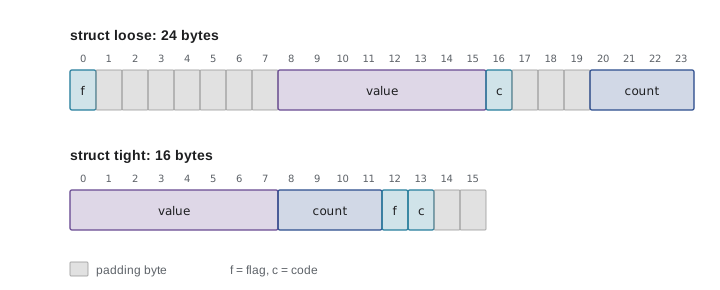
In struct loose, flag occupies byte 0, but value must start at a multiple of 8, so bytes 1 to 7 are padding. code sits at byte 16, and count must start at a multiple of 4, so three more padding bytes follow before count at 20; the struct ends at 24, a multiple of 8. Ordering members from largest to smallest alignment, as in struct tight, removes most padding: 16 bytes for the same information. For a million records that is a third less memory, which also means fewer cache misses and faster programs. The exact rules depend on the platform's application binary interface (ABI), so always use sizeof and offsetof rather than adding up member sizes by hand.
Padding also explains why you should not write a struct to a file with one fwrite and expect another program, or the same program on a different machine, to read it back correctly. The padding bytes contain unspecified values, the layout can differ between compilers and processors, and so can the byte order of multi-byte integers, known as endianness: x86 and most ARM systems store the least significant byte first (little-endian), while network protocols traditionally use the most significant byte first (big-endian). Portable file formats and protocols write each field explicitly, in a defined size and byte order. CMPUT-229 explains endianness at the machine level, and CMPUT-313 shows it in network headers.
Worked problem
Working out a struct layout
On x86-64 Linux, what are sizeof and the member offsets of struct rec { char tag; int id; char kind; double score; short year; };? Then reorder the members to minimize the size.
Show solution
- tag at 0 (1 byte). id needs a multiple of 4: padding 1 to 3, id at 4 to 7.
- kind at 8. score needs a multiple of 8: padding 9 to 15, score at 16 to 23.
- year at 24 to 25. The struct's alignment is 8 (from double), so the size rounds up from 26 to 32, with 6 bytes of tail padding.
- Reordered largest first: double score (0 to 7), int id (8 to 11), short year (12 to 13), char tag (14), char kind (15): exactly 16 bytes with no padding.
Answer: 32 bytes (offsets 0, 4, 8, 16, 24); reordered as score, id, year, tag, kind it takes 16 bytes.
Unions
A union looks like a struct, but all its members share the same memory: its size is that of its largest member (plus any padding), and storing into one member overwrites the others. Unions save memory when a value can be one of several kinds but only one at a time. Used alone they are dangerous, because nothing records which member is currently valid. The standard pattern is a tagged union, a struct containing an enum tag that says which kind of value is stored and a union holding the value; every access checks the tag first. Languages such as Rust and Swift build this pattern into the language as enums with data; in C you maintain it by discipline.
#include <stdio.h>

enum shape_kind { CIRCLE, RECTANGLE, TRIANGLE };

struct shape {
    enum shape_kind kind;            /* the tag: which union member is valid */
    union {
        struct { double radius; } circle;
        struct { double width, height; } rect;
        struct { double base, height; } tri;
    } u;
};

static double area(const struct shape *s) {
    switch (s->kind) {
    case CIRCLE:    return 3.141592653589793 * s->u.circle.radius * s->u.circle.radius;
    case RECTANGLE: return s->u.rect.width * s->u.rect.height;
    case TRIANGLE:  return 0.5 * s->u.tri.base * s->u.tri.height;
    }
    return 0.0;
}

int main(void) {
    struct shape shapes[] = {
        {.kind = CIRCLE, .u.circle = {1.5}},
        {.kind = RECTANGLE, .u.rect = {3.0, 4.0}},
        {.kind = TRIANGLE, .u.tri = {6.0, 2.5}},
    };
    for (size_t i = 0; i < 3; i++) {
        printf("shape %zu: area %.2f\n", i, area(&shapes[i]));
    }
    printf("sizeof(struct shape) = %zu (tag 4 + padding 4 + largest member 16)\n",
           sizeof(struct shape));
    return 0;
}shape 0: area 7.07 shape 1: area 12.00 shape 2: area 7.50 sizeof(struct shape) = 24 (tag 4 + padding 4 + largest member 16)
Two further layout features appear in systems code. Bit-fields, written unsigned ready : 1; inside a struct, pack members into a given number of bits, which is useful for flags, though their exact layout is implementation-defined. A flexible array member, an array with no size as the last member, as in struct packet { size_t len; unsigned char data[]; };, lets one malloc call allocate a header together with a variable amount of data. Both are common in operating systems and network code you will meet in later courses.
Worked problem
Choosing pass by value or by pointer
A program has struct image { int width, height; unsigned char pixels[1920 * 1080 * 3]; }. A function brightness(struct image img) computes the average pixel value. What is the cost of each call, and how should it be declared?
Show solution
- sizeof(struct image) is about 1920 x 1080 x 3 = 6,220,800 bytes plus 8 for the two ints.
- Passing by value copies all 6.2 MB onto the stack for every call, which is slow and may overflow an 8 MB stack outright.
- The function only reads the image, so declare it double brightness(const struct image *img) and call brightness(&img).
- A struct this large should not live on the stack at all; allocate it with malloc, or store pixels as a separately allocated array referenced by a pointer member.
Answer: By value copies over 6 MB per call; pass a const pointer, and allocate such a large struct on the heap.
Common mistakes
MistakeWriting p.member when p is a pointer to a struct.
InsteadUse p->member, which means (*p).member.
MistakeComparing two structs with ==.
InsteadC does not allow it; compare the members, or write an equality function.
MistakePassing large structs by value.
InsteadPass a pointer, adding const if the function only reads the struct.
MistakeComputing a struct's size by adding the sizes of its members.
InsteadPadding makes it larger; always use sizeof, and offsetof for member positions.
MistakeReading a union member other than the one last written, with no record of which is valid.
InsteadUse a tagged union and check the tag before every access.
MistakeWriting structs to a file with one fwrite and expecting them to be portable.
InsteadWrite each field in a defined size and byte order.
Summary and key terms
- A struct groups named members of different types; access them with . on structs and -> on pointers to structs.
- Designated initializers name members and zero the rest; structs can be assigned as a whole but not compared with ==.
- typedef gives types shorter names; enum defines named integer constants that work well with switch.
- Pass structs to functions by pointer, using const for read-only access.
- Members are aligned to their natural boundaries, so the compiler inserts padding; ordering members by size reduces it.
- Use sizeof and offsetof rather than assumptions; layout and byte order vary between platforms.
- A union's members share memory; a tagged union records which member is valid.
- Struct
- A type made of named members stored together in one block of memory.
- Member
- A named field of a struct or union.
- Arrow operator
- The -> operator, which accesses a member through a pointer to a struct.
- typedef
- A declaration that gives an existing type a new name.
- Enumeration
- A type whose values are named integer constants, declared with enum.
- Alignment
- The requirement that a value be stored at an address that is a multiple of a given number.
- Padding
- Unused bytes the compiler inserts to keep struct members aligned.
- offsetof
- A macro from stddef.h giving a member's byte offset within its struct.
- Union
- A type whose members all share the same storage.
- Endianness
- The order in which the bytes of a multi-byte value are stored in memory.
Practice problems
Work each problem on paper first, then reveal the answer to check.
Declare a struct point with double members x and y, and initialize one to (3, 4) with designated initializers.
Show answer
struct point { double x, y; }; struct point p = {.x = 3, .y = 4};
Given struct point *q, write two equivalent expressions for its x member.
Show answer
q->x and (*q).x
Write a function that returns the distance of a point from the origin, taking a const pointer.
Show answer
double norm(const struct point *p) { return sqrt(p->x * p->x + p->y * p->y); } (link with -lm)
What does Student c = a; do if Student contains a char array?
Show answer
It copies every member, including the whole array, into c.
What is the size of struct { char a; int b; } on x86-64?
Show answer
8 bytes: a at 0, 3 padding bytes, b at 4.
Reorder struct { char a; double b; char c; } to reduce its size, and give both sizes.
Show answer
Original 24 bytes; as { double b; char a; char c; } it is 16 bytes.
Why must a tagged union contain a tag?
Show answer
So code knows which union member currently holds valid data.
What does -Wswitch warn about?
Show answer
A switch on an enum that does not handle every enumerator and has no default.
Why are structs written with a single fwrite not portable between machines?
Show answer
Padding, member sizes and byte order can differ.
What does offsetof(struct student, grade) return?
Show answer
The number of bytes from the start of the struct to the grade member.
Lesson quiz · 5 questions
Score 60% or more to complete this lesson.
Create a free account to save your progress, take quizzes and earn a certificate.