
CRE-130 · Lesson 12 of 12 · 25 min
Workflow, ethics and capstone
Creating content regularly with a phone requires more than shooting and editing skills. It needs an efficient workflow that turns ideas into published posts without chaos, a system for storing and backing up footage so that nothing is lost, attention to accessibility so that everyone can enjoy the content, and an understanding of the ethical and legal responsibilities that come with filming people and places and with editing reality. This final lesson brings the course together: planning and batching content, managing storage and backups, protecting privacy and metadata, accessibility, consent and filming in public, honesty in editing and disclosure, and the capstone project.
A content workflow
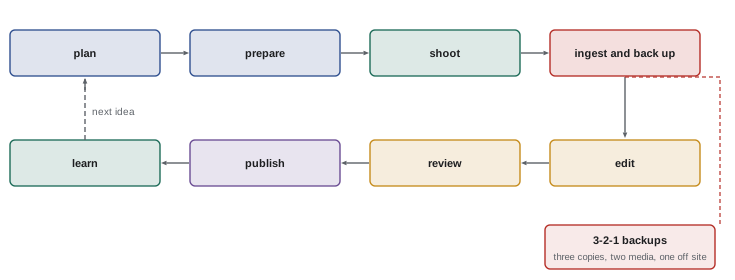
A typical phone content workflow moves through several stages:
- Idea and plan: choose the idea, the audience and the format, write a hook and script or outline, and make a shot list (Lesson 7, CRE-120).
- Prepare: charge batteries, clear storage, clean the lens, set up lights and sound, and check settings.
- Shoot: capture A-roll, B-roll and sound, reviewing as you go.
- Ingest and back up: copy footage from the phone to a computer, external drive or cloud.
- Edit: assemble, trim, add text, captions, music, colour and audio corrections.
- Review: watch the full export on a phone, check captions, sound and safe zones.
- Publish: write captions, titles, alt text and hashtags, choose a cover, schedule and post.
- Learn: review analytics after a few days and note what to repeat or change.
Writing this workflow down as a checklist, and refining it over time, saves time and reduces mistakes.
Batching and planning
Batching means doing similar tasks together: writing several scripts in one session, filming several videos in one setup, recording a large library of B-roll at once, or editing multiple clips in a row. Batching reduces the time spent setting up and switching between tasks, keeps the look consistent and builds a buffer of ready content for busy weeks, illness or holidays. A content calendar, kept in a spreadsheet, a project management app or a simple notebook, records ideas, filming dates, publishing dates, platforms and status. Planning a few weeks ahead allows creators to prepare seasonal content, coordinate with brand partners and avoid the stress of creating everything at the last minute, which is a common cause of creator burnout (CRE-350).
Storage and backups
Phone storage fills quickly with video, and phones can be lost, stolen or broken at any time. A reliable storage system protects your work:
- Transfer footage regularly to a computer or external SSD by USB-C cable, which is faster and more reliable than wireless transfers for large files. Many phones can write directly to an external SSD.
- Use cloud photo services, such as iCloud Photos, Google Photos or Dropbox, for automatic backup, checking that they store original quality and that you have enough space.
- Follow the 3-2-1 approach: three copies of important files, on two different types of storage, with one copy off site or in the cloud.
- Organize files by date and project, with consistent folder and file names, so you can find footage months later.
- Keep project files, music licences and final exports together for each project.
- Delete footage from the phone only after confirming that the backups are complete and readable.
Be aware that cloud services that optimize storage may keep only reduced versions on the phone, and that deleting an item on one synced device may delete it everywhere; understand how your services work before relying on them.
Worked problem
Planning storage for a month of content
A creator films four YouTube videos a month, each with about 60 minutes of 4K HEVC footage at about 170 MB per minute, plus about 30 short-form clips totalling 90 minutes at 1080p, about 60 MB per minute. How much storage does a month of raw footage need, and how much for three copies?
Show solution
- YouTube footage: 4 × 60 × 170 MB = 40,800 MB, about 41 GB.
- Short-form footage: 90 × 60 MB = 5,400 MB, about 5 GB.
- Total per month: about 46 GB; per year, about 550 GB.
- With three copies, about 140 GB per month, or roughly 1.7 TB per year.
Answer: About 46 GB of footage per month, roughly 140 GB with three copies, or about 1.7 TB a year, before project files and exports.
Privacy and metadata
Photos and videos can reveal more than intended. Location metadata (GPS coordinates) embedded in image files can show where a photo was taken, including your home; most platforms strip this metadata when you upload, but files shared directly, by email or messaging, may keep it. Turn off location tagging in the camera settings or remove it when sharing. Look for revealing details in the frame: house numbers, street signs, car licence plates, school uniforms, mail and packages with addresses, computer screens, documents, keys and the views from windows can reveal where you live and work. Be especially careful about children's identities and routines, including your own children's. Creators who have experienced harassment or doxxing often delay posting location-specific content until after they have left a place (CRE-350).
Accessibility
Accessible content reaches more people and is increasingly expected by audiences and platforms. Key practices include:
- Captions for all speech in videos, checked for accuracy (Lesson 11).
- Alt text for images, describing the content and purpose of the image for people using screen readers. Most platforms allow custom alt text; write a short, specific description rather than relying on automatic text.
- Readable text: large, high-contrast on-screen text, kept on screen long enough to read, avoiding thin fonts and text over busy backgrounds.
- Describing visual information verbally in videos where possible, such as reading out text shown on screen.
- Avoiding rapidly flashing effects, which can trigger seizures in people with photosensitive epilepsy; guidelines such as the Web Content Accessibility Guidelines (WCAG) recommend no more than three flashes per second.
- Clear audio, with music kept below speech, helps people with hearing loss and those listening in noisy places.
CRE-120 covers accessible and inclusive writing in more detail.
Consent and filming people
Most creator content involves people: friends, family, collaborators, customers and the public. Ask for consent before featuring people prominently, explain where the content will be published and how it will be used, and respect a refusal or a later request to remove content. Written releases are standard for commercial and sponsored work, and for anyone under 18, consent should come from a parent or guardian as well as the young person. Be thoughtful about filming people in vulnerable situations, such as illness, distress, poverty or at work, and about content that might embarrass or harm them, even if it is legal. Pranks, reaction content and filming strangers for views raise particular ethical concerns, and platforms may remove content that harasses or humiliates people.
In Canada, photographing and filming in public places is generally lawful, but privacy rights vary by province. In Quebec, the Civil Code and the Quebec Charter protect a person's right to their image; in Aubry v. Éditions Vice-Versa (1998), the Supreme Court of Canada held that publishing an identifiable photograph of a person without consent can infringe that right unless a public interest justifies it. Several provinces, including British Columbia, Manitoba, Saskatchewan and Newfoundland and Labrador, have privacy statutes, and courts in Ontario recognize privacy torts. Under the Criminal Code, recording a private communication is generally lawful when one party to the conversation consents, while voyeurism, secretly recording people in situations where they expect privacy, is a crime. Businesses collecting personal information may also be subject to federal or provincial privacy laws.
Private property, such as shops, malls, restaurants, gyms, offices and events, may restrict filming through its own rules, and owners can ask you to stop or leave. Some public places, such as transit systems, airports, government buildings and national parks, have specific rules or permit requirements for commercial filming. When in doubt, ask permission. CRE-320 covers creator law in depth.
Honesty in editing and disclosure
Phones make it easy to alter images and video, with beauty filters, background replacement, object removal and generative AI tools that can add or change content convincingly. Creators should consider how their audience will understand what they see. Stylized and artistic content is generally understood as such, but content presented as real, such as product demonstrations, before-and-after results, travel and lifestyle images used to promote destinations, or news and documentary content, should not be manipulated in ways that mislead. Beauty filters on product reviews, for example, misrepresent what a cosmetic product does. Platforms increasingly require creators to label realistic AI-generated or significantly altered content, and some add labels automatically using content credentials. Sponsored content must be disclosed clearly under advertising rules, covered in CRE-320. Honest content builds the trust on which a creator's relationship with their audience depends.
Reviewing and improving
Improvement comes from reviewing your own work critically. After publishing, watch your content as a viewer would, on a phone with and without sound. Note technical problems such as shaky shots, poor audio, unflattering light or captions in the wrong place; creative problems such as slow openings or unclear points; and audience responses such as retention drops, comments and shares. Compare your work with creators you admire, analyzing their framing, lighting, sound and editing rather than their equipment. Keep a simple log of experiments and results. Small, consistent improvements over many videos matter more than any single piece of equipment.
Capstone project
The capstone asks you to plan, shoot and edit a complete piece of content using only a phone and simple accessories, demonstrating the skills of this course. Choose a format suited to your interests, such as a tutorial, a product review, a recipe, a short documentary portrait, a travel piece or a brand promotion. Your submission should include:
- A one-page plan: the audience, the idea, the platform and aspect ratio, a hook, a script or outline and a shot list.
- A short video of 60 to 180 seconds, or a long-form video of 5 to 8 minutes, demonstrating deliberate framing, good light, stable shots or motivated movement, a sequence with varied shots and B-roll, clean audio from an external or well-placed microphone, and edited captions.
- A set of five edited still images for the same project, such as thumbnails, a carousel or product shots, exported for a specific platform.
- A vertical cutdown or alternative format version, if the main video is horizontal, or vice versa.
- A short reflection of about 500 words covering your technical choices, problems you solved, how you handled consent, accessibility and licensing, and what you would improve.
Present the project as you would to a client or collaborator, with the plan, the finished content and the reflection.
Collaborating and handing off work
As creators grow, they often work with editors, clients, brands and collaborators. Clear handoffs save time: share footage through cloud folders with organized names, include notes on the best takes and the intended structure, provide music licences, logos and brand guidelines, and agree on file formats, aspect ratios and deadlines in advance. When delivering to clients, provide final exports in each required format, along with captions files where needed, and confirm usage rights in writing: where the content may be used, for how long and whether the client may edit it. CRE-330 covers contracts and usage rights in detail.
Building a sustainable practice
Phone content creation can become constant, with the device always at hand and the pressure to post every day. Sustainable creators set boundaries: scheduled times for creating and for being offline, batching to reduce daily pressure, and realistic posting goals that maintain quality. Protecting your wellbeing and your relationships with the people around you, who may not want to appear in content, matters as much as growth. CRE-350 discusses creator wellbeing and boundaries further.
Common mistakes
MistakeKeeping footage only on the phone.
InsteadBack up regularly using the 3-2-1 approach.
MistakeSharing images with location data.
InsteadTurn off or remove location metadata.
MistakeSkipping alt text and captions.
InsteadMake content accessible as standard practice.
MistakeFilming people without asking.
InsteadAsk for consent and respect refusals.
MistakeUsing beauty filters in product reviews.
InsteadAvoid edits that mislead about results.
Summary and key terms
- A written workflow from plan to analytics saves time and prevents mistakes.
- Batching and calendars create consistency and reduce stress.
- Back up footage with the 3-2-1 approach and organize files.
- Protect privacy by removing location data and revealing details.
- Captions, alt text, readable text and safe effects make content accessible.
- Ask for consent and understand filming and recording laws.
- Edit honestly, disclose significant alterations and keep improving.
- Workflow
- Sequence of stages from idea to publication.
- Batching
- Doing similar tasks together.
- Content calendar
- Schedule of planned content.
- Ingest
- Transferring footage from a device for editing and storage.
- 3-2-1 backup
- Three copies, two media, one off site.
- Metadata
- Information stored with a file, such as location.
- Alt text
- Text description of an image for screen readers.
- Release
- Written permission to use a person's image.
- Right of publicity
- Control over commercial use of one's likeness.
- Disclosure
- Telling audiences about sponsorship or alterations.
Practice problems
Work each problem on paper first, then reveal the answer to check.
List the stages of a content workflow.
Show answer
Plan, prepare, shoot, ingest, edit, review, publish, learn.
What is batching?
Show answer
Doing similar tasks together.
Monthly footage at 50 GB with three copies?
Show answer
150 GB.
What is the 3-2-1 approach?
Show answer
Three copies, two media types, one off site.
Name two details that can reveal where you live.
Show answer
House numbers, street signs, mail, window views, licence plates.
What is alt text?
Show answer
A description of an image for screen readers.
What flash rate should be avoided?
Show answer
More than three flashes per second.
Who must consent for minors?
Show answer
A parent or guardian, as well as the young person.
When is an edit misleading?
Show answer
When it misrepresents real results or facts.
Name three capstone components.
Show answer
Plan, video, still images, alternate format, reflection.
Lesson quiz · 5 questions
Score 60% or more to complete this lesson.
Create a free account to save your progress, take quizzes and earn a certificate.