
CRE-130 · Lesson 7 of 12 · 27 min
Shooting video: exposure, motion and sequences
A good video is more than a series of nice-looking clips. It needs consistent exposure and colour, natural-looking motion, and shots that cut together into a clear, engaging sequence. Many phone videos fall short not because of the phone but because the person filming recorded one long, wandering shot, or a collection of unrelated clips with nothing to cut to. This lesson covers the technical side of phone video, including frame rates, shutter speed and motion blur, locking exposure, focus and white balance, and avoiding flicker, and the craft side: shot lists, sequences, B-roll, coverage, continuity and planning a shoot so that the edit comes together easily.
Frame rates in practice
Lesson 2 introduced frame rates. Choosing them well involves both look and practicality:
- 24 fps: the traditional cinema frame rate, giving a slightly dreamy motion quality. It suits storytelling, fashion, travel and anything with a cinematic aim. Fast pans at 24 fps can look jerky, so move slowly.
- 30 fps: the standard for video and television in North America and a safe default for social content, tutorials and talking heads. In Canada and the United States, 30 fps also avoids flicker problems with most artificial lights when combined with suitable shutter speeds.
- 25 fps: the standard in Europe and other regions with 50 Hz power. Creators filming in those regions may need 25 or 50 fps to avoid flicker from local lights.
- 60 fps: smoother motion, suited to sport, gaming, action and fast-moving content. It also allows slowing footage to half speed in a 30 fps timeline.
- 120 and 240 fps: slow motion, stretching moments of action, splashes, hair flips and pouring liquids. These modes often reduce resolution and need plenty of light.
Choose one base frame rate for each project and shoot everything at that rate or at multiples for slow motion, such as 60 or 120 fps for a 30 fps project. Mixing 24, 25 and 30 fps clips in one timeline causes stutter, because the editing app must drop or repeat frames.
Worked problem
How slow is slow motion?
A creator records a pour of coffee at 120 fps and plays it back in a 30 fps timeline. A 2-second pour becomes how long on screen? What if it were recorded at 240 fps?
Show solution
- Slow-down factor at 120 fps: 120 / 30 = 4.
- On-screen duration: 2 s × 4 = 8 s.
- At 240 fps: 240 / 30 = 8, so 2 s × 8 = 16 s.
Answer: 8 seconds at 120 fps and 16 seconds at 240 fps.
Shutter speed and motion blur
In video, each frame has an exposure time set by the shutter speed. Film and video makers have long followed the 180-degree shutter rule: a shutter speed of about double the frame rate, such as 1/50 s at 24 or 25 fps and 1/60 s at 30 fps. This gives each frame a natural amount of motion blur, so movement looks smooth, as the eye expects. Much faster shutter speeds, such as 1/1000 s, freeze each frame sharply, making movement look choppy and staccato, an effect sometimes used deliberately for action and music videos. Much slower shutter speeds create smeary, dreamy motion.
Phones in automatic mode control exposure largely by changing shutter speed and ISO, because their apertures are usually fixed. In bright sun, the phone may choose 1/2000 s or faster, producing choppy motion in moving subjects such as water, traffic or dancers. To achieve the 180-degree rule outdoors, you need to reduce the light reaching the sensor with a neutral density (ND) filter, which clips onto the phone or attaches to a case. ND filters are rated in stops: ND8 reduces light by 3 stops, ND16 by 4 stops and ND64 by 6 stops. Variable ND filters allow adjusting the strength. Pro modes or third-party apps let you set shutter speed directly, and some show shutter angle. For most talking heads and casual content, automatic shutter speeds are fine; the rule matters most for cinematic content with movement.
| Frame rate | 180° shutter speed | Typical use |
|---|---|---|
| 24 fps | 1/48 or 1/50 s | Cinematic storytelling |
| 25 fps | 1/50 s | Video in 50 Hz regions |
| 30 fps | 1/60 s | General content in North America |
| 60 fps | 1/120 s | Sport, action, half-speed slow motion |
| 120 fps | 1/240 s | Slow motion |
Locking exposure, focus and white balance
Automatic adjustments that are helpful for photos often ruin video. When a person walks through the frame, the phone may refocus on them; when the camera pans from a bright window to a darker room, exposure changes visibly; when a coloured object enters, white balance may shift. These changes look distracting and make clips difficult to cut together. Before recording, set focus and exposure on the subject and lock them by pressing and holding, or use a pro mode or app to fix ISO, shutter speed, focus and white balance manually. Lock settings again whenever the scene changes significantly. For talking heads, locking focus on your face while sitting still prevents the phone from hunting when you move your hands. For moving subjects, continuous autofocus with face tracking may be better than a fixed lock. Some phones offer cinematic or portrait video modes that simulate shallow depth of field and allow focus to be changed after recording; they can look attractive but may show artefacts around hair and edges.
Avoiding flicker
Many artificial lights flicker at twice the mains frequency, 120 times per second in North America and 100 times per second in regions with 50 Hz power. The eye does not notice, but video can show flickering brightness or horizontal bands rolling through the frame, especially with LED lights, fluorescent tubes, computer screens and stadium lighting. To avoid flicker in Canada and the United States, use shutter speeds that are whole fractions of the flicker period, such as 1/60 s or 1/120 s, and frame rates of 30 or 60 fps; in 50 Hz regions, use 1/50 s or 1/100 s and 25 or 50 fps. Phones usually detect flicker and adjust automatically in auto mode, but manual settings or slow motion modes can reveal it. Better-quality lights designed for video use flicker-free drivers. Screens appearing in shot may show scan lines or flicker; adjusting shutter speed slightly or lowering screen brightness can help.
Thinking in shots and sequences
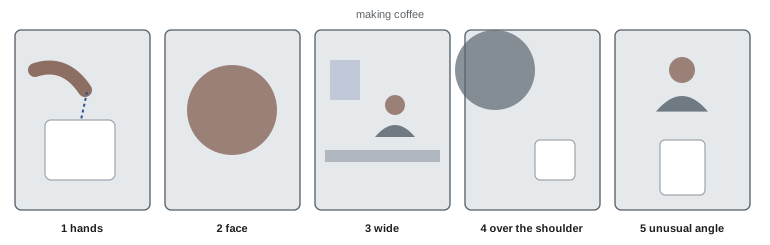
Professional video is built from shots that cut together. A sequence is a group of shots that shows an action or idea, such as making coffee, assembling furniture or arriving at a hotel. Instead of recording one continuous take of the whole action from one position, film it in several shots of different sizes and angles: a wide shot to establish the scene, medium shots of the person working, close-ups of hands and details, and a reaction or result shot. Editors can then cut between them to compress time, emphasize details and keep viewers engaged. A common pattern is the five-shot sequence: a close-up of the hands, a close-up of the face, a wide shot, an over-the-shoulder shot and an unusual angle, which together cover any simple action.
B-roll and coverage
A-roll is the main footage, often a person speaking to camera or an interview. B-roll is supporting footage that illustrates what is being said, shows the environment, hides cuts and keeps the visuals varied: products in use, locations, hands demonstrating steps, people walking, details and textures. Without B-roll, a talking-head video becomes static, and cutting out mistakes produces jarring jump cuts. With plenty of B-roll, editors can cover edits, illustrate points and pace the video. Coverage is the total collection of shots available for a scene; good coverage gives the editor choices.
Practical B-roll habits include filming more than you think you need, holding each shot for at least five to ten seconds, filming each subject from several sizes and angles, capturing movement within the shot, such as steam rising or hands working, and filming a few seconds of ambient sound and room tone for editing (Lesson 8). Short-form creators often film B-roll in batches, for example capturing a week's worth of desk, kitchen or outdoor clips in one session to reuse across several videos.
Continuity
When shots of the same action are filmed separately and cut together, details must match. If a cup is full in a wide shot and empty in the close-up that follows, or a sleeve is rolled up in one shot and down in the next, viewers notice. Continuity applies to objects, clothing, hair, lighting, the direction subjects move and look, and even the position of hands. To maintain continuity, repeat actions the same way in each take, photograph the setup before changing anything, overlap actions between shots so that cuts can be made in the middle of a movement, and keep subjects moving in a consistent direction across the frame. The 180-degree rule of screen direction, distinct from the shutter rule, says that the camera should stay on one side of an imaginary line between two people in conversation, so that their eye lines and positions remain consistent.
Planning a shoot: shot lists and storyboards
A shot list is a written list of every shot needed for a video, with a description, shot size, angle, movement, location and any notes. It turns a vague idea into a practical plan, ensures that nothing important is forgotten, and allows efficient scheduling, for example filming all shots in one location or one lighting setup together, even if they appear at different points in the final video. A storyboard is a series of simple sketches or reference images showing each shot, useful for complex sequences, client approvals and teams. Many creators combine their script (CRE-120) with a shot list in a two-column format: what is said on the left and what is seen on the right.
Worked problem
A shot list for a short recipe video
A creator plans a 45-second vertical video showing how to make a smoothie bowl. What might the shot list include?
Show solution
- 1. Hook: overhead close-up of the finished bowl being decorated, 3 s.
- 2. Medium shot of the creator holding up ingredients, speaking the hook, 3 s.
- 3. Overhead shots of each ingredient going into the blender, 1–2 s each.
- 4. Close-up of the blender running, slow motion of the mix, 3 s.
- 5. Pour into the bowl, side angle, 3 s; overhead topping placement, several 1–2 s shots.
- 6. Close-up of a spoonful being lifted, reaction shot, end card with the full recipe prompt, 5 s.
Answer: Roughly 15 short shots grouped by angle: overhead ingredient and topping shots, side pours, close-ups and creator shots, filmed in batches by setup.
Directing yourself and others
Many phone creators are both director and subject. Useful habits include marking your position on the floor so that you stay in frame and in focus; checking framing with the front camera or a monitor app before recording with the better rear camera; recording a short test clip and watching it with sound before the full take; filming several takes of each line and choosing the best in editing; and pausing for a beat before and after speaking to give clean edit points. When directing others, explain what you are filming and why, give simple, specific instructions such as "walk from the door to the window and look out", and encourage natural behaviour by keeping the camera rolling between takes, when people often relax.
Technical habits on set
Before each shoot, clear storage and charge batteries; turn on airplane or do-not-disturb mode so that calls and notifications do not interrupt recording or ruin audio; clean the lens; check settings; and test the microphone. During the shoot, review clips periodically for focus, exposure, framing and sound, and back up footage at breaks if you are filming a lot. Phones may overheat during long 4K sessions, especially outdoors or while charging; removing the case, shading the phone and recording in shorter clips helps. After the shoot, copy footage to a computer or cloud storage before deleting it from the phone (Lesson 12).
Common mistakes
MistakeRecording one long take of everything.
InsteadFilm shots of different sizes and angles for a sequence.
MistakeLeaving focus and exposure on auto while people move.
InsteadLock them before recording.
MistakeIgnoring very fast shutter speeds in bright sun.
InsteadUse an ND filter for natural motion blur when it matters.
MistakeFilming no B-roll.
InsteadCapture plenty of supporting shots to cover cuts.
MistakeMixing frame rates.
InsteadChoose a base rate and use multiples for slow motion.
Summary and key terms
- 24 fps looks cinematic, 30 fps is the North American default, 60 fps and up allow slow motion.
- A shutter speed of about double the frame rate gives natural motion blur.
- ND filters allow slower shutter speeds in bright light.
- Lock exposure, focus and white balance for consistent clips.
- Avoid flicker with shutter speeds matched to the mains frequency.
- Build sequences with varied shots, plenty of B-roll and continuity.
- Shot lists and storyboards make shoots efficient.
- 180-degree shutter rule
- Shutter speed about double the frame rate.
- Motion blur
- Blur of moving subjects within each frame.
- ND filter
- Neutral density filter that reduces light.
- Flicker
- Brightness variation from artificial lights in video.
- Sequence
- Group of shots showing an action or idea.
- A-roll
- Main footage, such as a person speaking.
- B-roll
- Supporting footage illustrating the main content.
- Coverage
- All shots available for a scene.
- Continuity
- Consistency of details between shots.
- Shot list
- Written plan of every shot needed.
Practice problems
Work each problem on paper first, then reveal the answer to check.
Which frame rate suits a cinematic look?
Show answer
24 fps.
180-degree shutter speed at 30 fps?
Show answer
1/60 s.
On-screen length of 3 s recorded at 120 fps in a 30 fps timeline?
Show answer
12 s.
Why use an ND filter?
Show answer
To allow slower shutter speeds in bright light.
How many stops does an ND8 filter reduce?
Show answer
3 stops.
Why lock white balance in video?
Show answer
To prevent colour shifts during a shot.
Shutter speeds that avoid flicker in North America?
Show answer
1/60 s or 1/120 s.
Name the five shots in the five-shot sequence.
Show answer
Hands, face, wide, over the shoulder, unusual angle.
What is B-roll for?
Show answer
Illustrating, covering cuts and adding variety.
What is a shot list?
Show answer
A written plan of every shot needed.
Lesson quiz · 5 questions
Score 60% or more to complete this lesson.
Create a free account to save your progress, take quizzes and earn a certificate.