
CRE-130 · Lesson 3 of 12 · 24 min
Framing and composition for vertical and horizontal
Composition decides what viewers see, what they notice first and how they feel about it. The principles taught in PHOT-101, such as the rule of thirds, leading lines, simplicity and balance, apply fully to phone content, but creators face an extra challenge: the same idea may need to work as a vertical video on TikTok or Reels, a 4:5 or 3:4 image in a feed, a square thumbnail, and a horizontal YouTube video. Platform interfaces also cover parts of the frame with buttons, captions and usernames. This lesson covers aspect ratios and where each is used, composing for vertical frames, safe zones, shot sizes and angles, the rule of thirds and other guides, backgrounds, headroom and eye lines, perspective with different phone cameras, and shooting so that content can be adapted to several formats.
Aspect ratios and where they are used
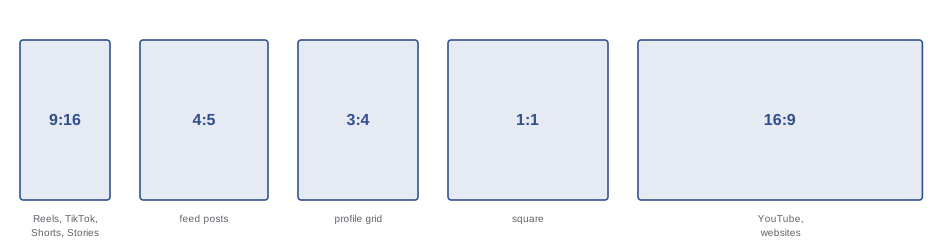
The aspect ratio is the ratio of a frame's width to its height. Different platforms and placements favour different ratios, and choosing the right one before shooting saves awkward cropping later:
- 9:16 vertical: full-screen short-form video on TikTok, Instagram Reels and Stories, YouTube Shorts and Snapchat, displayed at 1080 × 1920 pixels.
- 4:5 and 3:4 portrait: feed photos and videos on Instagram and Facebook, where taller images take up more screen space than square or horizontal ones. Instagram's profile grid has shifted toward a 3:4 preview in recent years, so check how images crop on your profile.
- 1:1 square: some feed posts, carousels, profile images and thumbnails in certain contexts.
- 16:9 horizontal: YouTube long-form videos, television, presentations and most websites; displayed at 1920 × 1080 or 3840 × 2160 pixels.
- 2:3 and 4:3: the native ratios of many camera and phone photo sensors respectively, used for prints and general photography.
Platform specifications change frequently, so check each platform's current recommendations before a campaign. The phone's photo sensors are usually 4:3, so a 9:16 or 16:9 photo is cropped from the full sensor, while video is recorded at 16:9 and appears vertical when the phone is held upright.
Composing for vertical frames
Vertical video changed composition. A 9:16 frame is tall and narrow, matching the shape of a person standing or a phone held naturally, and it suits single subjects: a person talking to camera, a product, a recipe seen from above, a tall building or a waterfall. It struggles with wide scenes, groups and side-by-side action, which must be shown in several shots or with movement. Vertical framing places more emphasis on height and on the relationship between foreground and background, and it brings faces closer to the viewer, creating intimacy that creators use effectively.
Guidelines for strong vertical compositions include:
- Fill the frame with the subject, moving closer rather than leaving empty space at the sides.
- Use vertical lines and layers: a path leading up the frame, a staircase, trees, or a foreground object at the bottom with the subject in the middle and sky at the top.
- Place a talking subject's eyes roughly a third of the way down the frame, leaving room below for captions and interface elements.
- Frame hands, tools and products in the middle third, where viewers' attention naturally sits and interface overlays do not interfere.
- For movement, have subjects move toward or away from the camera, or up and down the frame, rather than across it.
Safe zones
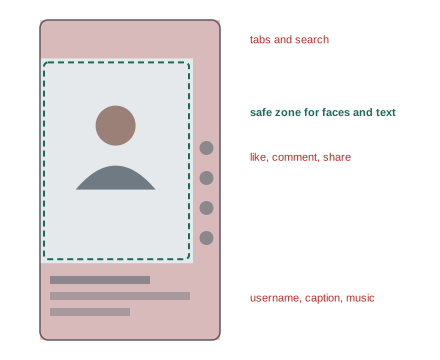
On full-screen vertical platforms, the app's interface covers parts of the video: the username, caption and music information at the bottom; like, comment, share and profile buttons along the right side; and sometimes a search bar or tabs at the top. Anything important placed under these elements will be hidden or hard to read. Creators therefore keep faces, text and key actions within a central safe zone. As a rough guide for 9:16 video, keep essential content away from the bottom 20 to 25 % of the frame, the right-hand 15 % and the top 10 to 15 %. Each platform's interface is slightly different and changes over time, so many creators use template overlays in their editing apps, or test-publish privately to check that text and faces are clear. Safe zones apply to thumbnails and covers too: Reels covers, for example, may appear cropped to 3:4 or 1:1 on profile grids.
Horizontal framing
Horizontal 16:9 framing remains standard for YouTube videos, tutorials, interviews, documentaries and anything viewed on televisions or computers. It suits wide scenes, two people in conversation, side-by-side comparisons, and screens or desks with several elements. When filming yourself horizontally, place your eyes on the upper third line and position yourself slightly to one side, using the other side for a background with depth or for graphics added in editing. Horizontal phone footage should be recorded with the phone held sideways; recording vertically and then posting to a horizontal platform produces black bars and wastes most of the screen. Many viewers now watch YouTube on phones held vertically, so large, clear subjects and bold text help.
Shot sizes and angles
Shot sizes describe how much of a subject fills the frame, and varying them keeps content visually interesting:
- Wide or establishing shot: shows the whole setting and where the subject is.
- Medium shot: shows a person from about the waist up; the standard for talking to camera.
- Close-up: a face or a product filling most of the frame, for emotion and detail.
- Extreme close-up or detail shot: eyes, hands, texture, ingredients or a product feature.
- Over-the-shoulder and point-of-view shots: show what a person sees or does, common in tutorials.
Camera angle changes how subjects appear. Eye level feels neutral and conversational. A slightly high angle, looking down, can feel intimate or make subjects look smaller; a low angle, looking up, makes them look powerful or dramatic. Straight-down overhead shots, sometimes called top shots or flat lays, suit food, crafts, unboxings, writing and products on a table (Lesson 9). Phones make unusual angles easy: placing the phone on the ground, inside an object or very close to the subject can produce striking perspectives, but use them deliberately rather than for their own sake.
| Shot size | What it shows | Typical use |
|---|---|---|
| Wide | Whole setting and subject | Establishing location, scale, movement |
| Medium | Waist or chest up | Talking to camera, interviews |
| Close-up | Face or object fills the frame | Emotion, reactions, products |
| Detail | Small part of the subject | Texture, steps in a process, cutaways |
| Overhead | View straight down | Food, crafts, unboxing, desks |
The rule of thirds and other guides
The rule of thirds divides the frame into a three-by-three grid and suggests placing important elements along the lines or at their intersections, which usually creates more dynamic compositions than placing everything in the centre. Turn on the camera grid to make this easy. Centred, symmetrical compositions also work well, especially for architecture, reflections, products presented formally and talking-head videos where the subject addresses the viewer directly; vertical video in particular often centres subjects. Leading lines, such as roads, railings, shelves and table edges, guide the viewer's eye to the subject. Framing within the frame, using doorways, windows or foliage, adds depth. Negative space, empty areas around a subject, can create calm and leave room for text. These are guides rather than rules; use the grid to make deliberate choices.
Backgrounds, headroom and eye lines
Backgrounds often make or break phone content because phones keep almost everything sharp. Before recording, look at everything in the frame behind the subject: clutter, bright windows, distracting signs, people walking past, lines that appear to grow out of someone's head, and anything private, such as mail with your address. Simplify by moving the subject, changing the camera angle, tidying, or choosing a plain wall or an attractive, intentional background such as shelves with a few objects, plants or soft lights. Moving the subject away from the background, and using the telephoto camera, makes the background less prominent.
Headroom is the space between the top of the subject's head and the top of the frame. Too much makes the subject look small and sunk; too little feels cramped, although close-ups often crop the top of the head deliberately. Lead room or look room is space in front of a subject who is looking or moving to one side; give them more space in the direction they face. When filming yourself, look into the lens rather than at your own image on the screen; looking at the screen makes your eyes appear to look slightly downward. Place the phone at eye level to avoid unflattering low angles, using a tripod, a stack of books or a shelf.
Worked problem
Fixing a cluttered talking-head frame
A creator films a vertical tip video sitting at a desk, with the phone on the desk below eye level. The frame shows a bright window behind them, a messy bookshelf and a ceiling light above their head. How can the frame be improved?
Show solution
- Raise the phone to eye level with a tripod or stack of books, so the creator is not seen from below.
- Turn the desk or chair so that the window is to the side or in front, lighting the face rather than silhouetting it.
- Tidy the bookshelf or choose a simpler background, and leave some distance between the creator and the wall.
- Frame the face in the upper part of the safe zone with modest headroom, keeping the bottom quarter clear for captions.
Answer: Raise the phone to eye level, turn so that the window lights the face, simplify the background and frame within the safe zone.
Perspective with different cameras
Each phone camera produces a different perspective, determined by where you stand. The ultra-wide camera, used close to a subject, exaggerates the size of nearby objects and stretches the edges of the frame, which can make rooms look spacious and products look dramatic, but distorts faces and makes people near the edges look wider. Avoid placing faces near the edges of ultra-wide frames. The main camera gives a natural perspective for most scenes, though at arm's length it can still enlarge noses and foreheads slightly. The telephoto camera, used from farther away, flattens perspective, giving flattering portraits, compressing backgrounds so that they appear closer and larger behind the subject, and isolating subjects from busy surroundings. For portraits and talking heads, stand farther back and use a 2× or longer view where light allows.
Shooting for several formats
Creators often need the same content in several aspect ratios. Approaches include:
- Shoot separately for each format, the best quality but the most time-consuming.
- Shoot horizontally in 4K and crop a vertical 1080 × 1920 frame from it. A 3840 × 2160 frame contains a vertical slice of 1215 × 2160 pixels, enough for 1080 × 1920 output, but the subject must stay within the central area.
- Shoot vertically and crop to 4:5 or 1:1, which works well if you leave space above and below the subject.
- Use phones that record wide-sensor or open-gate modes, or a second phone, to capture horizontal and vertical simultaneously.
When planning to crop, keep the subject centred, avoid important action near the edges, and check framing guides in the camera or third-party apps that show multiple aspect ratios at once. Lesson 11 covers reframing in editing apps.
Common mistakes
MistakePlacing text or faces under platform buttons.
InsteadKeep key content inside the safe zone.
MistakeShooting vertical video for horizontal platforms.
InsteadMatch orientation to the destination.
MistakeIgnoring the background.
InsteadCheck and simplify everything behind the subject.
MistakeFilming yourself from below.
InsteadRaise the phone to eye level.
MistakeUsing the ultra-wide close to faces.
InsteadStep back and use the main or telephoto camera.
Summary and key terms
- 9:16 suits short-form video, 4:5 and 3:4 suit feeds, and 16:9 suits YouTube.
- Vertical frames favour single subjects, layers and movement toward the camera.
- Platform interfaces cover parts of the frame, so respect safe zones.
- Vary shot sizes and choose angles deliberately.
- Use the grid, leading lines and negative space as guides.
- Simplify backgrounds, manage headroom and look into the lens.
- Choose cameras for perspective and plan for cropping to several formats.
- Aspect ratio
- Ratio of frame width to height.
- 9:16
- Full-screen vertical video format.
- Safe zone
- Area not covered by platform interface elements.
- Shot size
- How much of the subject fills the frame.
- Medium shot
- A person framed from about the waist up.
- Overhead shot
- A view straight down on a subject.
- Rule of thirds
- Placing elements on a three-by-three grid.
- Headroom
- Space above the subject's head.
- Lead room
- Space in the direction a subject faces or moves.
- Perspective compression
- Flattened depth from a distant viewpoint with a long lens.
Practice problems
Work each problem on paper first, then reveal the answer to check.
Which aspect ratio suits Reels and TikTok?
Show answer
9:16.
Why do 4:5 images suit feeds?
Show answer
They take up more screen space.
Name two kinds of subject that suit vertical frames.
Show answer
A person talking, a product, overhead recipes, tall buildings.
Which areas of a vertical video are usually covered?
Show answer
Bottom, right side and top.
What shot size is standard for talking to camera?
Show answer
Medium shot.
What does a low angle suggest?
Show answer
Power or drama.
Why look into the lens when filming yourself?
Show answer
So your eyes meet the viewer's.
What does the ultra-wide do to nearby faces?
Show answer
Distorts and enlarges them.
How wide is a vertical slice of 4K with full height at 9:16?
Show answer
About 1215 pixels.
Name one way to deliver several formats.
Show answer
Shoot separately, crop from 4K, or record two orientations.
Lesson quiz · 5 questions
Score 60% or more to complete this lesson.
Create a free account to save your progress, take quizzes and earn a certificate.