
CRE-301 · Lesson 10 of 12 · 25 min
Moderation systems and moderator teams
Moderation is the work of keeping a community safe, on-purpose and welcoming. Every community that allows members to post needs it: without moderation, spam, harassment and off-topic conflict drive away the members a community most wants to keep. Good moderation is mostly invisible, shaping norms through clear guidelines, thoughtful design and consistent, fair responses. This lesson covers the goals of moderation, the layers of a moderation system, automated tools and their limits, enforcement ladders and proportionate responses, documenting decisions and handling appeals, recruiting, training and supporting volunteer moderators, safety issues that require escalation, moderating live spaces, and measuring moderation.
Goals of moderation
Moderation serves several goals at once:
- Safety: protecting members from harassment, threats, exploitation, doxxing and illegal content.
- Purpose: keeping discussions relevant so that the community remains useful.
- Fairness: applying rules consistently so that members trust the system.
- Culture: reinforcing the norms that make the community welcoming.
- Compliance: meeting platform rules and legal obligations.
Moderation is not about silencing disagreement or criticism of the creator. Communities that remove honest criticism lose trust; communities that tolerate abuse lose members. The skill lies in distinguishing respectful disagreement from conduct that harms people or the community's purpose.
Layers of a moderation system
Effective moderation uses several layers, from prevention to response:
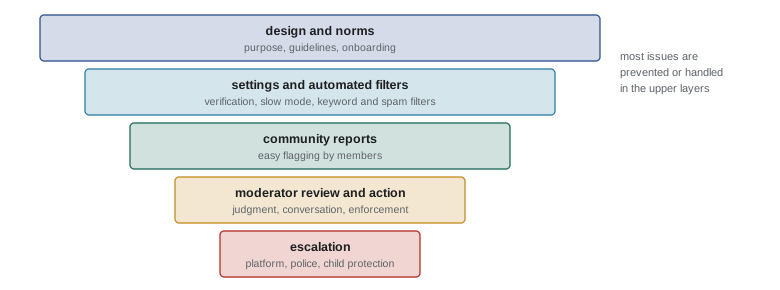
- Design and norms: clear purpose and guidelines, onboarding that teaches norms, structure that separates topics, and the creator's example (Lesson 9).
- Platform settings: verification levels, slow mode, account-age requirements, link restrictions and permissions that limit what new or unverified accounts can do.
- Automated filters: keyword and phrase filters, spam and raid detection, link and image scanning.
- Community reporting: easy ways for members to flag problems to moderators.
- Human moderators: reviewing reports, making judgments, talking to members and taking action.
- Escalation: reporting serious issues to platforms, and in some cases to law enforcement or child protection organizations.
Automated tools and their limits
Platforms provide automated moderation tools, such as Discord's AutoMod, YouTube's held-for-review comments and blocked words, and Twitch's AutoMod levels, and many communities add moderation bots. Automation catches spam, slurs, scam links and raids quickly, at any hour. But automated tools make mistakes: they may block innocent words that contain filtered strings, miss coded language and context-dependent harassment, and treat reclaimed or community-specific language unfairly. They can also be biased against certain dialects or groups. Use automation for clear-cut cases and to hold borderline content for human review rather than removing it automatically, review filter lists regularly, and tell members how to appeal.
Worked problem
Tuning a keyword filter
A filter flagged 500 messages in a week. Moderators reviewed them: 380 were genuine violations and 120 were false positives. Separately, members reported 60 violations the filter missed. Calculate the filter's precision and recall.
Show solution
- Precision: genuine violations among flagged messages = 380 / 500 = 76 %.
- Total violations: 380 caught + 60 missed = 440.
- Recall: violations caught out of all violations = 380 / 440 ≈ 86 %.
- Interpretation: about one flag in four is a false positive, and about one violation in seven is missed; holding flagged messages for review rather than deleting them avoids punishing innocent members.
Answer: Precision is 76 % and recall about 86 %; reviewing false positives may reveal terms to refine, while missed violations may suggest coded language to add.
Enforcement ladders
Responses should be proportionate to the harm, consistent across members and focused on changing behaviour. Many communities use an enforcement ladder:
| Step | Typical use | Example |
|---|---|---|
| Gentle reminder | Minor, likely unintentional | Moving an off-topic post with a friendly note |
| Formal warning | Clear rule break | Private message citing the guideline |
| Content removal | Harmful or rule-breaking post | Deleting a post with personal information |
| Temporary mute or suspension | Repeated or serious issues | A 24-hour or 7-day timeout |
| Permanent ban | Severe harm or persistent violations | Threats, hate, exploitation, ban evasion |
Severe violations, such as threats of violence, sharing intimate images without consent, doxxing or anything involving the exploitation of minors, warrant immediate removal and a ban without going through each step. When enforcing, address the behaviour rather than the person, explain which guideline was broken, and keep public enforcement minimal to avoid shaming; a quiet private message often resolves minor issues best.
Documentation and appeals
Keep records of moderation actions: who acted, when, what was done, which guideline applied and any evidence such as screenshots. Records help moderators stay consistent, spot repeat offenders, coordinate across time zones and respond to appeals or platform reports. Store records securely and limit access, since they contain personal information. Offer an appeal process: a way for members to ask for a decision to be reviewed, ideally by a different moderator. Appeals catch mistakes, build trust and show members that moderation is fair. Publishing occasional anonymized summaries of moderation activity can increase transparency in larger communities.
Volunteer moderator teams
Most creator communities rely on volunteer moderators, often long-time members who care about the community. Building a good team involves:
- Recruiting for judgment and temperament rather than enthusiasm alone: look for members who are fair, calm, respected and reliable, and who represent the community's diversity and time zones.
- Clear expectations: written responsibilities, time commitments, decision-making authority and a code of conduct for moderators.
- Training: guidelines and their intent, tools, the enforcement ladder, documentation, de-escalation, privacy and when to escalate.
- Private coordination space: a moderators' channel for discussing cases, with norms of confidentiality.
- Limited permissions: give moderators only the powers they need, and protect administrator accounts with strong authentication.
- Recognition and support: thanking moderators, involving them in decisions and, where possible, compensating them through pay, free memberships or other benefits.
Moderation can be emotionally draining, especially when dealing with abuse, distressing content or members in crisis. Encourage breaks, rotate difficult duties, debrief after serious incidents and make clear that moderators can step back at any time. Volunteer moderators are not employees, but if you pay them or direct their work closely, employment and contractor rules may apply (CRE-302).
Safety issues and escalation
Some situations require more than community moderation. Moderators should know how to respond to:
- Members expressing intent to harm themselves: respond with care, share crisis resources such as 9-8-8, the Suicide Crisis Helpline in Canada, or 988, the Suicide and Crisis Lifeline in the United States, and contact emergency services if there is an immediate risk.
- Threats of violence against people or places: preserve evidence, remove content and report to the platform and to police where there is a credible threat.
- Child sexual exploitation: never download or share material; report to the platform and to Cybertip.ca in Canada or the National Center for Missing and Exploited Children's CyberTipline in the United States.
- Doxxing and non-consensual intimate images: remove immediately, ban, report to the platform, and support the affected person.
- Coordinated harassment or raids: lock down settings, remove participants and document the incident.
Prepare a short escalation guide in advance, so that moderators know what to do under pressure.
Moderating live spaces
Live streams, voice channels and live events move quickly, so moderation must be fast and prepared. Practices include using slow mode, follower-only or subscriber-only chat during busy moments, setting up AutoMod at an appropriate level, assigning moderators to each stream with clear roles, preparing commands or quick responses for common situations, and agreeing in advance how the creator will respond to disruptions on camera. Raids, where a large group floods a stream or server with abuse, can be mitigated with verification requirements, shield or lockdown modes, and quick bans. After a live incident, review what happened and update procedures.
Measuring moderation
Moderation metrics help you see whether the system is working. Useful measures include reports received and response times, actions taken by type, repeat offender rates, appeal rates and outcomes, the share of automated flags that are false positives, and members' perceptions of safety and fairness from surveys. A rising volume of reports may signal growth, a new problem or improved reporting tools, so interpret metrics in context. Aim for quick responses to serious reports and consistent outcomes rather than a target number of actions.
Writing a moderation handbook
A moderation handbook gives moderators a shared reference. It usually includes the community's purpose and guidelines with explanations of their intent; the enforcement ladder with examples of typical cases; how to use the platform's moderation tools and bots; how to document actions; templates for common messages such as warnings and explanations; the appeal process; the escalation guide for serious issues; privacy rules for handling member information; and contact details for the creator and lead moderators. Keep the handbook in a private, shared document that moderators can search quickly, update it after difficult cases, and review it with new moderators as part of training.
Consistency and bias
Members judge moderation by its fairness. Inconsistent decisions, such as removing a newcomer's post while ignoring the same behaviour from a popular member, damage trust quickly. Moderators can reduce inconsistency by discussing borderline cases together, referring to the handbook, documenting reasons, and asking a second moderator to review significant actions. They should also be aware of their own biases: everyone tends to judge friends more gently, and some groups are more often perceived as hostile for the same words. Regularly reviewing a sample of decisions as a team, and inviting feedback from members, helps catch patterns of bias.
The creator's role in moderation
Even with a moderator team, the creator remains responsible for the community's rules and culture. Creators should support moderators publicly, avoid overturning their decisions in public, and handle disagreements privately. They should also avoid using moderation to suppress criticism of themselves, which moderators may feel pressured to do. When serious issues involve the creator personally, such as a dispute with a member or allegations against the creator, an independent moderator or outside adviser should handle them to avoid conflicts of interest.
Transparency with members
Members trust moderation more when they understand it. Publish your guidelines and enforcement ladder, explain major changes before they take effect, and tell members how to report problems and appeal decisions. When an incident affects the whole community, such as a raid or a moderator's removal, share an appropriate summary without exposing private details. Transparency does not mean debating every decision in public; it means making the system understandable and fair.
Moderating comments on your own content
Comment sections under videos, posts and newsletters also need moderation. Platforms offer tools to hold comments containing certain words for review, block links, hide comments from specific users, restrict comments to subscribers or followers, and turn off comments on particular pieces. Many creators hide abusive comments rather than deleting them, which prevents the commenter from noticing and escalating. Pinning a thoughtful comment near the top sets the tone for the discussion that follows. Creators with large channels often delegate comment moderation to trusted team members or volunteers, giving them clear guidelines and access only to the tools they need. Content about sensitive topics, such as health, identity or current events, may need closer moderation or comments limited to subscribers.
When to close or pause a space
Sometimes the right decision is to pause or close a community space: when moderation demands exceed the team's capacity, when a space has been overrun by harassment, or when the creator can no longer sustain it. Pausing, archiving or closing a space with clear notice is better than leaving it unmoderated. Explain the decision, point members to other spaces such as your newsletter, and preserve useful resources where possible.
Learning from incidents
After any significant incident, such as a raid, a serious harassment case or a controversial decision, hold a short review with the moderator team. Ask what happened, what worked, what did not and what should change in settings, guidelines, training or the handbook. Focus on improving the system rather than blaming individuals. Brief, regular reviews turn difficult moments into lasting improvements and help moderators feel supported rather than isolated.
Common mistakes
MistakeRemoving honest criticism of the creator.
InsteadDistinguish respectful disagreement from harmful conduct.
MistakeLetting automation delete borderline content.
InsteadHold borderline content for human review.
MistakePunishing every issue with bans.
InsteadUse a proportionate enforcement ladder.
MistakeRecruiting moderators for enthusiasm alone.
InsteadRecruit for judgment, fairness and reliability, then train.
MistakeImprovising responses to serious threats.
InsteadPrepare an escalation guide in advance.
Summary and key terms
- Moderation protects safety, purpose, fairness, culture and compliance.
- Layers run from design and settings to automation, reports, moderators and escalation.
- Automated tools are fast but imperfect; measure precision and recall.
- Enforcement ladders give proportionate, consistent responses.
- Documentation and appeals build fairness and trust.
- Volunteer moderators need careful recruitment, training, limited permissions and support.
- Serious safety issues require prepared escalation to platforms or authorities.
- Moderation
- Work of keeping a community safe and on-purpose.
- AutoMod
- Automated moderation tools on platforms.
- False positive
- Innocent content wrongly flagged.
- Precision
- Share of flagged items that are genuine violations.
- Recall
- Share of all violations that are flagged.
- Enforcement ladder
- Escalating sequence of moderation responses.
- Appeal
- Request to review a moderation decision.
- Doxxing
- Publishing someone's private information to harm them.
- Raid
- Coordinated flood of disruptive users.
- Slow mode
- Setting limiting how often members can post.
Practice problems
Work each problem on paper first, then reveal the answer to check.
Name four goals of moderation.
Show answer
Safety, purpose, fairness, culture, compliance.
Name the layers of a moderation system.
Show answer
Design, settings, automation, reports, moderators, escalation.
Precision for 90 genuine among 120 flagged?
Show answer
75 %.
Recall for 90 caught and 30 missed?
Show answer
75 %.
Why hold borderline content rather than delete it?
Show answer
Automation makes mistakes; humans can judge context.
Name three steps of an enforcement ladder.
Show answer
Reminder, warning, removal, mute, ban.
Which violations warrant an immediate ban?
Show answer
Threats, doxxing, non-consensual images, exploitation of minors.
Why keep moderation records?
Show answer
Consistency, repeat offenders, coordination, appeals.
What qualities matter most in moderators?
Show answer
Judgment, fairness, calm, reliability.
Where are child exploitation reports sent in Canada?
Show answer
To the platform and Cybertip.ca.
Lesson quiz · 5 questions
Score 60% or more to complete this lesson.
Create a free account to save your progress, take quizzes and earn a certificate.