
CRE-301 · Lesson 8 of 12 · 25 min
Community spaces: platforms, memberships and member privacy
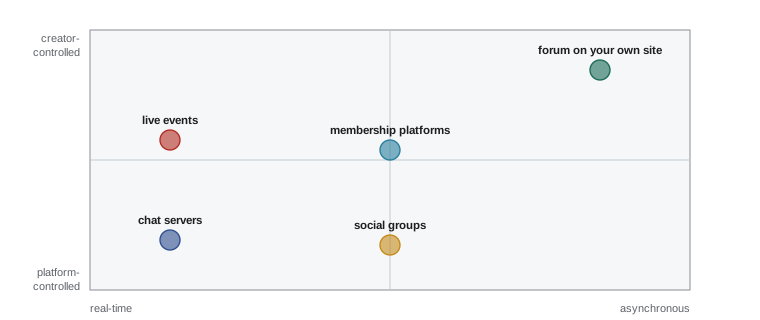
Comments sections and follower counts are not communities in themselves. A community needs a place where members can talk to each other, not only to the creator, and where relationships can develop over time. Creators host communities on chat servers, forums, membership platforms, social groups, live streams and in person. Each space shapes how members interact, how discoverable the community is, how it can be funded and how much control the creator has. This lesson compares the main types of community space, explains how to choose and set one up, covers paid memberships and their economics, and sets out the privacy obligations that come with holding member data in Canada and the United States, including special rules for young members.
Types of community space
Community spaces differ in their rhythm and structure:
- Real-time chat servers, such as Discord, organize conversations into channels and voice rooms. They feel lively and immediate, suit gaming, creative and hobby communities, and support roles, bots and events, but fast-moving chat can overwhelm newcomers and bury useful information.
- Forums and discussion platforms, such as Discourse, Circle or a forum on your own site, organize conversations into threads that persist and can be searched. They suit learning communities, technical help and thoughtful discussion, and conversations remain useful for years.
- Membership platforms, such as Patreon, Ko-fi, YouTube channel memberships and Twitch subscriptions, combine payment with access to exclusive posts, chats and perks.
- Social groups and channels on large platforms, such as Facebook Groups, Reddit communities, WhatsApp or Telegram channels and broadcast channels, offer easy access for members already on those platforms but give the creator little control or data.
- Live spaces, such as recurring live streams, watch parties and in-person meet-ups, create shared moments that deepen bonds.
Many creators combine spaces: a public social presence for discovery, a free chat server or forum for the community, and a paid membership tier for deeper support.
| Space | Rhythm | Strengths | Limitations |
|---|---|---|---|
| Chat server (Discord) | Real-time | Lively, roles, voice, events | Fast-moving, hard to search, platform-owned |
| Forum (Discourse, Circle) | Asynchronous | Searchable, lasting, organized | Slower, needs seeding to feel active |
| Membership platform (Patreon) | Posts and perks | Built-in payments | Fees, limited discussion tools on some |
| Social groups (Facebook, Reddit) | Feed-based | Easy to join, discoverable | Little control or data |
| Live and in person | Scheduled | Strong shared moments | Time zones, cost, logistics |
Choosing a space
Choose a space by asking what your members need to do together and where they already are. Questions to consider:
- Interaction style: do members want quick chat, deep discussion, collaboration on projects, or occasional events?
- Audience habits: are your members comfortable with chat servers, or do they prefer email, forums or familiar social apps? Older or professional audiences may find gaming-style servers confusing.
- Control and data: can you export member lists and content, set your own rules and moderate effectively?
- Discovery: will the space help new members find you, or only serve existing fans?
- Moderation capacity: real-time spaces need more active moderation than slower forums (Lesson 10).
- Cost and monetization: free tiers, paid plans, and support for paid access.
Start with one space you can sustain. A small, active community in one place is better than several empty ones.
Setting up a space
A well-prepared space helps members feel welcome from the first visit. Before opening:
- Write a short purpose statement and a set of community guidelines (Lesson 9 and Lesson 10).
- Keep the structure simple: a few channels or categories, clearly named, with a welcome area and a place for introductions. Add more only when conversations need them.
- Seed the space with useful content and starter conversations so that the first members do not arrive to empty rooms.
- Recruit a small founding group of engaged fans or collaborators to set the tone.
- Configure roles and permissions, verification levels and moderation tools before inviting the public.
- Prepare onboarding: what members see first, how they introduce themselves, and where to start.
Paid memberships
Paid memberships let supporters fund your work in exchange for access, recognition or perks. Common offerings include early or ad-free access, exclusive posts or episodes, behind-the-scenes updates, members-only chats, live sessions, discounts and credits. Successful memberships usually emphasize belonging and supporting the creator's work rather than a long list of perks that becomes hard to deliver. Tiers can offer different levels of access, but too many tiers confuse supporters and add work. Promise only what you can deliver consistently for years, since disappointed members cancel and talk about it.
Platform fees affect membership economics. On Patreon, creators who launched after August 4, 2025 pay a standard platform fee of 10 % of earnings, while many earlier creators keep their legacy rates; payment processing fees are charged on top, for example 2.9 % plus $0.30 per card payment in the United States, with higher rates for some methods and currencies. YouTube channel memberships and Twitch subscriptions take larger shares, and app store purchases may involve additional fees. Fees change, so check current terms before choosing.
Worked problem
Net income from a membership
A creator has 400 members paying $5 a month on a platform charging a 10 % platform fee and processing fees of 2.9 % plus $0.30 per payment. What is the monthly net income, and what share of gross revenue is lost to fees?
Show solution
- Gross: 400 × $5 = $2,000.
- Platform fee: 10 % × $2,000 = $200.
- Processing: 2.9 % × $2,000 = $58, plus 400 × $0.30 = $120, total $178.
- Net: $2,000 − $200 − $178 = $1,622.
- Fees as a share of gross: $378 / $2,000 = 18.9 %.
Answer: About $1,622 a month; nearly 19 % goes to fees, largely because the fixed $0.30 fee is 6 % of a $5 payment. Higher prices or annual billing reduce this share.
In this formula, \(n\) is the number of members, \(p\) the price, \(f\) the platform fee rate, \(q\) the percentage processing rate and \(b\) the fixed fee per payment. Taxes on membership income, including sales tax collection in some situations, should be discussed with an accountant (CRE-302).
Member churn and retention
Memberships churn: people cancel because of budget changes, lost interest or unmet expectations. Monthly churn of 5 % to 10 % is common for creator memberships, which means a creator must keep attracting new members simply to stay level (Lesson 2). Reducing churn often matters more than recruiting: deliver what you promise on schedule, make members feel seen with welcomes and acknowledgement, create regular rituals such as monthly live sessions, and ask departing members why they left. Offering annual plans at a discount can also reduce churn and processing costs.
Owning member relationships
When your community lives on another company's platform, the platform controls access. A server can be deleted, a group restricted, or a membership platform can change fees or policies. Reduce this risk by encouraging members to join your email list, choosing platforms that let you export member emails where members have consented, keeping backups of important community resources such as guides and archives, and having a plan to tell members where to go if a space becomes unavailable.
Privacy obligations for member data
Running a community means collecting personal information: names, email addresses, payment details, messages, and sometimes sensitive information members share about health, identity or personal struggles. Privacy laws require care with this data.
In Canada, the Personal Information Protection and Electronic Documents Act (PIPEDA) applies to private-sector organizations, including creators running businesses, that collect, use or disclose personal information in commercial activities, except in provinces with substantially similar laws. Alberta and British Columbia have their own Personal Information Protection Acts, and Quebec's private-sector privacy law has been strengthened by Law 25, whose requirements took effect between 2022 and 2024. Law 25 requires a person in charge of protecting personal information, privacy impact assessments for certain projects, privacy policies in clear language, privacy-protective default settings, consent for cookies and tracking technologies that identify or profile people, notification of confidentiality incidents that present a risk of serious injury, and gives the regulator, the Commission d'accès à l'information, power to impose administrative penalties of up to $10 million or 2 % of worldwide turnover, with higher penal fines. Under PIPEDA, you must obtain meaningful consent, limit collection to what you need, protect data with appropriate safeguards, let people access their information, and report breaches that create a real risk of significant harm to the Office of the Privacy Commissioner and to affected people, keeping records of all breaches.
Practical steps apply in both countries: collect only what you need, explain in plain language what you collect and why, secure accounts and tools with strong authentication, limit moderator access to what their role requires, never share members' personal information or private messages publicly, and have a plan for responding to breaches.
Young members
Many creator communities attract teenagers and sometimes children, which brings additional responsibilities. Most platforms set a minimum age of 13 in their terms, partly because of the US Children's Online Privacy Protection Act (COPPA), which requires verifiable parental consent before collecting personal information from children under 13 on services directed at children or where operators know they are collecting it. The FTC finalized amendments to the COPPA Rule in 2025 that tighten requirements, including separate consent for disclosing children's data to third parties. Canadian privacy regulators consider children's information sensitive, and Quebec's law requires parental consent for collecting information from children under 14. Beyond legal rules, communities with young members need strong safeguarding: clear rules against private contact between adults and minors, age-appropriate spaces, moderators trained to recognize grooming and exploitation, and procedures for reporting concerns to platforms and authorities. If your community is aimed at adults, state a minimum age and enforce it; if it welcomes young people, design for their safety from the start.
Choosing between free and paid communities
Free communities lower the barrier to joining and can grow large, but they may attract more casual members and need more moderation. Paid communities filter for commitment, fund the creator's time and often have calmer, more engaged conversations, but they grow more slowly and create expectations of value. Many creators use both: a free space for the wider community and a paid tier that offers deeper access, such as live workshops, feedback or smaller groups. Be careful that the paid tier does not make the free community feel second-class, and that paying members do not expect the creator to be on call. Clear descriptions of what each tier includes help members choose and prevent disappointment.
Running community events
Events bring communities to life. Online events include live streams with chat, voice-channel hangouts, workshops, watch parties, game nights, challenges and question-and-answer sessions. In-person meet-ups, from casual gatherings to conferences, deepen relationships in ways online spaces cannot. Plan events with time zones in mind, announce them well in advance, record them where appropriate for members who cannot attend, and prepare moderation for live chat. For in-person events, consider venue accessibility, safety, insurance and codes of conduct.
Platform terms and member safety
Every community platform has its own terms of service and community guidelines, which apply in addition to your own rules. Creators who host spaces on these platforms must enforce platform rules, such as age limits and prohibitions on certain content, or risk losing the space. Familiarize yourself with the reporting tools each platform offers, since serious issues may need to be reported to the platform as well as handled by your moderators.
Finally, keep your own copies of guidelines, onboarding messages, event schedules and key resources outside the platform, so that you can rebuild quickly if a space is lost or you decide to move.
Common mistakes
MistakeOpening several community spaces at once.
InsteadStart with one space you can sustain and make active.
MistakeOpening an empty space to the public.
InsteadSeed content and recruit a founding group first.
MistakePromising many perks for a membership.
InsteadEmphasize belonging and promise only what you can sustain.
MistakeIgnoring processing fees on small payments.
InsteadAccount for fixed fees and consider annual plans.
MistakeTreating member data casually.
InsteadCollect minimally, disclose clearly and protect it.
Summary and key terms
- Communities need spaces where members can talk to each other.
- Chat servers, forums, memberships, social groups and live events each have strengths.
- Choose by interaction style, audience habits, control, discovery and moderation capacity.
- Prepare guidelines, structure, seed content and a founding group before opening.
- Membership net income depends on platform and processing fees and on churn.
- Privacy laws in both countries require consent, minimal collection, safeguards and breach response.
- Young members require legal compliance and strong safeguarding.
- Chat server
- Real-time community space organized into channels.
- Forum
- Threaded, searchable discussion space.
- Membership platform
- Service combining payments with exclusive access.
- Tier
- Membership level with defined price and benefits.
- Processing fee
- Charge for handling a payment.
- Member churn
- Share of members cancelling in a period.
- PIPEDA
- Canada's federal private-sector privacy law.
- Law 25
- Quebec law modernizing privacy protection.
- COPPA
- US law protecting personal information of children under 13.
- Safeguarding
- Measures to protect vulnerable members from harm.
Practice problems
Work each problem on paper first, then reveal the answer to check.
What distinguishes a community from an audience?
Show answer
Members interact with each other, not only the creator.
Name one strength and one limitation of chat servers.
Show answer
Lively and real-time; fast-moving and hard to search.
Why might a forum suit a learning community?
Show answer
Threads persist and can be searched.
Name three steps before opening a space.
Show answer
Guidelines, structure, seed content, founding group, roles, onboarding.
Net for 200 members at $10 with 10 % fee, 2.9 % + $0.30?
Show answer
$2,000 − $200 − $58 − $60 = $1,682.
Why do fixed fees matter more for low prices?
Show answer
They are a larger percentage of each payment.
Name two ways to reduce member churn.
Show answer
Deliver consistently, welcome members, rituals, exit surveys, annual plans.
Under PIPEDA, when must breaches be reported?
Show answer
When they create a real risk of significant harm.
What does COPPA require for children under 13?
Show answer
Verifiable parental consent before collecting personal information.
Name two safeguarding measures for young members.
Show answer
Rules against private adult-minor contact, age-appropriate spaces, trained moderators, reporting procedures.
Lesson quiz · 5 questions
Score 60% or more to complete this lesson.
Create a free account to save your progress, take quizzes and earn a certificate.