
CRE-401 · Lesson 7 of 12 · 32 min
Production systems and workflows at scale
A solo creator can keep a production process in their head. A team of ten making several videos a week cannot. Without systems, deadlines slip, files go missing, quality varies and the founder is pulled into every small decision. This lesson covers how to turn ad hoc production into a reliable pipeline: mapping the workflow, writing standard operating procedures, choosing tools, managing files and assets, building quality checks and measuring the system so it can improve.
From craft to pipeline
A production pipeline is the sequence of stages that turns an idea into a published piece of content. A typical pipeline for a long-form video looks like this: idea, research and outline, script, pre-production (booking guests, locations, props), filming, ingest and backup, editing, review and revisions, packaging (title, thumbnail, description, captions), scheduling, publishing and post-publication review. Shorts, podcasts and newsletters have their own pipelines, often sharing stages.
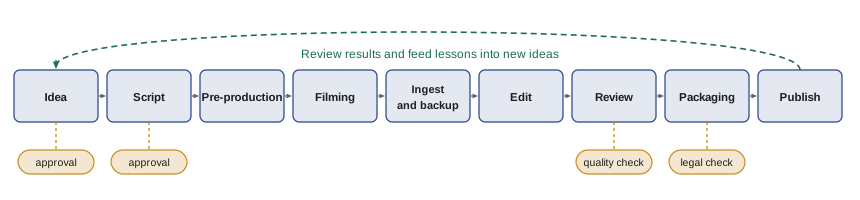
Mapping the pipeline helps in three ways. It shows everyone where their work fits, it reveals bottlenecks and waiting time, and it identifies decision points, often called gates, where work must be approved before moving on. Typical gates include approving an idea, approving a script, approving a rough cut and approving the final package, plus checks for sponsorship disclosure and legal issues where relevant.
Standard operating procedures
A standard operating procedure (SOP) is a written description of how a recurring task is done. SOPs are the backbone of a scalable creator company. Good SOPs are short, specific and easy to follow: a checklist, a short video walkthrough or a template is often better than a long document. Typical SOPs include ingesting and backing up footage, exporting finished videos, writing descriptions and chapters, adding captions, preparing sponsor deliverables, publishing on each platform and responding to comments in the first hour.
Write SOPs with the people who do the work, test them with a new team member, and update them when the process changes. Give each SOP an owner and a review date. An SOP that nobody updates becomes misleading and is worse than no SOP at all.
Worked problem
Time saved by a checklist
Before writing an export and upload SOP, about 1 in 8 videos needed re-uploading because of mistakes (wrong file, missing captions, wrong thumbnail), each costing about 1.5 hours of fixes. The company publishes 20 videos a month. After the SOP, errors fall to 1 in 40. How many hours a month are saved?
Show solution
- Before: 20 ÷ 8 = 2.5 errors a month × 1.5 hours = 3.75 hours.
- After: 20 ÷ 40 = 0.5 errors a month × 1.5 hours = 0.75 hours.
- Saving: 3.75 − 0.75 = 3 hours a month.
Answer: About 3 hours a month, plus fewer public mistakes that can hurt a video's first hours of performance.
Project management tools and status
Most creator companies track work on a shared board, often called a kanban board, with columns for each pipeline stage and a card for each piece of content. Each card holds the brief, script, deadlines, owner, files and comments. Common tools include general-purpose project management software, spreadsheets and specialized media production platforms. The best tool is the one the team actually keeps up to date.
Useful conventions include a single owner for each card, due dates for each stage rather than only the publish date, a work-in-progress limit for each column so people finish work before starting more, and a clear definition of done for each stage.
| Column | Definition of done | Owner |
|---|---|---|
| Idea | One-paragraph pitch with target audience and hook | Anyone |
| Scripted | Script approved by showrunner, sponsor segment drafted | Writer |
| Filmed | All footage ingested, backed up twice, logged | Producer |
| Rough cut | Full story assembled, placeholder graphics | Editor |
| Final | Revisions done, captions checked, quality checklist passed | Editor |
| Packaged | Title, thumbnail, description and chapters approved | Growth manager |
| Published | Live on all platforms, sponsor notified, links checked | Operations |
Scheduling backwards from publish dates
Teams often plan by working backwards from a publish date, giving each stage a realistic duration and adding buffer for revisions and surprises. This makes deadlines for each person visible early and shows when a schedule is impossible before it is too late.
Worked problem
Backward schedule
A sponsored video must go live on Friday 20 March. Stages need: packaging 1 day, review and revisions 3 days, editing 5 days, ingest 1 day, filming 2 days and pre-production 4 days, all in working days. The sponsor needs 2 working days to review the final cut before packaging. When must pre-production start?
Show solution
- Total working days: 1 + 2 + 3 + 5 + 1 + 2 + 4 = 18.
- Counting back 18 working days from Friday 20 March, skipping weekends, gives Tuesday 24 February as the first day of work (finishing by Thursday 19 March, with Friday 20 March as the publish day).
Answer: Pre-production must start by Tuesday 24 February; adding a few buffer days would mean starting the week before.
Files, assets and backups
Video production creates large amounts of data. Losing footage can mean reshooting or missing a sponsor deadline. Good asset management includes a consistent folder structure and naming convention, a single source of truth for project files, and a backup rule. A widely used rule is 3-2-1: keep at least three copies of important data, on two different types of storage, with one copy off-site or in the cloud.
Worked problem
Storage planning
A team films about 6 hours of footage a week at an average of 45 gigabytes per hour. They keep all footage for two years and follow the 3-2-1 rule. How much storage do they need across all copies?
Show solution
- Weekly footage: 6 × 45 = 270 GB.
- Two years: 270 × 104 weeks = 28,080 GB, about 28 TB.
- Three copies: about 84 TB in total.
Answer: About 84 terabytes across all copies, which is why many companies archive older raw footage to cheaper, slower storage and keep only finished masters and key raw files long term.
An asset library, sometimes called digital asset management, makes it easy to find and reuse clips, music, graphics, logos and thumbnails. Track licences for music, stock footage and fonts, including where and for how long each may be used, so a re-edit for a new platform does not break a licence.
Quality assurance
Quality assurance means checking work against standards before it reaches the audience. A quality checklist for a video might cover audio levels and clarity, captions and spelling, on-screen text and graphics, correct sponsor disclosure, accurate facts and links, music licences, thumbnail and title consistency, and correct end screens and cards. Checklists catch errors that tired people miss, especially when publishing many pieces a week.
For content with legal or reputational risk, such as reviews of products, claims about health or money, coverage of real people or sponsored content, build in a further review step. CRE-320 covered disclosure and advertising law; the production system is where those rules become routine.
Measuring the system
To improve a pipeline, measure it. Useful operational measures include:
- Throughput: how many pieces of content are finished each week or month.
- Cycle time: how long a piece takes from start of work to publication.
- On-time rate: the share of content published on the planned date.
- Rework rate: the share of pieces that need major revisions after review.
- Cost per piece: total production cost divided by pieces published.
A useful relationship from operations management, known as Little's law, links work in progress, throughput and cycle time.
Worked problem
Using Little's law
On average, 18 videos are in progress at any time, and the team finishes 6 videos a week. What is the average cycle time? If the team limits work in progress to 12 videos without changing throughput, what happens?
Show solution
- Current cycle time: 18 ÷ 6 = 3 weeks.
- With 12 in progress: 12 ÷ 6 = 2 weeks.
Answer: Cutting work in progress from 18 to 12 shortens the average cycle time from three weeks to two, so content reaches the audience faster and is more timely, without anyone working harder.
Automation and AI tools
Many repetitive steps can be automated: transcription and captions, rough cuts from transcripts, thumbnail variations, social clips, metadata, file transfers and notifications. AI tools can speed up research and editing, but they introduce risks: factual errors, copyright and licensing questions, privacy issues and disclosure obligations for AI-generated or altered content. Write rules on which tools may be used for what, who checks the output, and when AI use must be disclosed to audiences or sponsors.
Automation works best on stable, well-documented processes. Automating a messy process usually makes the mess faster, so write and simplify the SOP first.
Templates and reusable assets
Templates save time and keep quality consistent. Useful templates include script outlines for each format, editing project files with standard bins and settings, title and thumbnail layouts, description and chapter formats, sponsor segment structures, export presets and checklists. A shared library of approved intros, outros, lower thirds, music cues and sound effects lets editors work faster and keeps the brand recognizable across many videos and editors.
Handoffs and review
Many delays happen at handoffs, when work passes between people. Make handoffs explicit: what must be delivered, in what format, where it is stored and who is notified. For reviews, give reviewers clear questions and deadlines, collect feedback in one place with timecodes rather than scattered messages, and limit the number of revision rounds. Too many reviewers or vague feedback can add days to every video.
Worked problem
Cost of revision rounds
Each revision round on a video takes the editor about 4 hours and adds 2 days of waiting time. The company averages 3 rounds per video and publishes 12 videos a month. A clearer brief and a single reviewer cut the average to 1.5 rounds. How many editor hours a month are saved?
Show solution
- Rounds saved per video: 3 − 1.5 = 1.5.
- Hours saved per video: 1.5 × 4 = 6.
- Monthly: 6 × 12 = 72 hours.
Answer: About 72 editor hours a month, more than half of one editor's productive time, plus about 3 days less waiting per video.
Security of accounts and files
As more people access channels and files, security matters. Use a password manager with shared vaults, turn on two-factor authentication for every platform account, give each person only the access they need, and remove access promptly when people leave. Channel takeovers by scammers are common, and recovering a hijacked channel can take days or weeks, during which revenue and audience trust suffer.
Finally, review the pipeline itself every few months. Ask the team which steps feel slow, which checks catch real problems and which have become empty rituals. Remove steps that no longer add value, and update SOPs, templates and board columns to match how the work is actually done now, rather than how it was done a year ago.
Common mistakes
MistakeKeeping the process in the founder's head.
InsteadMap the pipeline and write SOPs with the team.
MistakeStarting too many videos at once.
InsteadSet work-in-progress limits and finish before starting more.
MistakePlanning only the publish date.
InsteadSchedule backwards with a deadline for each stage.
MistakeKeeping one copy of footage.
InsteadFollow the 3-2-1 backup rule.
MistakeAutomating a messy process.
InsteadSimplify and document the process before automating it.
Summary and key terms
- A pipeline maps the stages from idea to publication, with approval gates.
- SOPs make recurring tasks repeatable; keep them short, owned and updated.
- Kanban boards with definitions of done and work-in-progress limits keep work visible.
- Backward scheduling from publish dates reveals deadlines and impossible plans early.
- Asset management and the 3-2-1 backup rule protect valuable footage.
- Quality checklists catch errors and make legal and disclosure rules routine.
- Little's law links work in progress, throughput and cycle time.
- Production pipeline
- The sequence of stages that turns an idea into published content.
- Gate
- A point in a pipeline where work must be approved before moving on.
- Kanban board
- A visual board with columns for stages and cards for work items.
- Definition of done
- The criteria a work item must meet to leave a stage.
- Work in progress
- Items that have been started but not finished.
- Cycle time
- The time from starting work on an item to finishing it.
- Throughput
- The number of items finished per period.
- 3-2-1 rule
- Three copies of data on two types of storage with one off-site.
- Digital asset management
- A system for storing, finding and licensing media assets.
- Rework rate
- The share of items needing major revisions after review.
Practice problems
Work each problem on paper first, then reveal the answer to check.
Work in progress 20, throughput 5 a week. Cycle time?
Show answer
4 weeks.
Cycle time 2 weeks, throughput 8 a week. Work in progress?
Show answer
16 items.
4 hours of footage a week at 50 GB an hour for 52 weeks. Storage for one copy?
Show answer
10,400 GB, about 10.4 TB.
How many copies does the 3-2-1 rule require?
Show answer
Three, on two types of storage, one off-site.
30 videos a month with 1 in 10 needing a 2-hour fix. Hours of fixes?
Show answer
6 hours.
Name three pipeline gates.
Show answer
Idea approval, script approval, rough-cut approval, final package, legal check.
What is a definition of done?
Show answer
The criteria an item must meet to leave a stage.
Why set work-in-progress limits?
Show answer
To finish work faster and reduce cycle time.
Name two risks of AI tools in production.
Show answer
Factual errors, copyright, privacy, disclosure obligations.
What should you do before automating a process?
Show answer
Simplify and document it.
Lesson quiz · 5 questions
Score 60% or more to complete this lesson.
Create a free account to save your progress, take quizzes and earn a certificate.