
CRE-460 · Lesson 4 of 12 · 29 min
Subtitles, captions and translation workflows
Subtitles are usually the first and cheapest step into a new language market. A well-made subtitle track lets viewers who do not speak the original language follow a video, improves discovery because platforms can index the text, and serves deaf and hard-of-hearing viewers in the original language. A poor subtitle track does the opposite: it confuses viewers, misrepresents the creator and signals that the market is an afterthought. This lesson covers the difference between captions and subtitles, the technical formats, reading-speed and line-length conventions, and a translation workflow with glossaries, style guides and quality checks. CRE-410 covered the AI tools that transcribe and translate; this lesson focuses on the process and standards that make the output good.
Captions, subtitles and translated metadata
The terms are often used loosely, but the distinctions matter for planning. Captions transcribe the spoken audio in the same language and are designed primarily for viewers who are deaf or hard of hearing; good captions also describe relevant sounds, such as music or laughter, and identify speakers when needed. Subtitles translate the dialogue into another language for viewers who can hear the audio but do not understand it. Subtitles for the deaf and hard of hearing (SDH) combine both: a translation that also includes sound descriptions. Metadata translation covers titles, descriptions, chapter names and tags, which drive discovery in search and recommendations.
| Type | Language | Main audience | Includes sound descriptions? |
|---|---|---|---|
| Captions | Same as audio | Deaf and hard-of-hearing viewers, viewers watching without sound | Yes, ideally |
| Subtitles | Translated | Hearing viewers who do not understand the spoken language | Usually not |
| SDH | Translated or same | Deaf and hard-of-hearing viewers who need a translation or a specific format | Yes |
| Translated metadata | Translated | Viewers searching or browsing in another language | Not applicable |
Translated metadata is often the highest-value, lowest-cost step. A title and description in the viewer's language can make the difference between a video being offered to a viewer at all and being ignored. Platforms such as YouTube let creators add titles and descriptions in many languages, shown automatically to viewers whose interface language matches. Where platforms auto-translate titles, creators can usually replace the machine version with their own, and should, because a machine-translated title can be awkward, misleading or unintentionally funny.
File formats and technical basics
Subtitle files are plain text with timing information. The two most common formats are SubRip (SRT) and WebVTT (VTT). Both list numbered or sequential cues, each with a start time, an end time and one or two lines of text. WebVTT adds options for positioning and styling and is the web standard used by HTML5 video. Most platforms accept both, and editing software can export either. Burned-in (open) subtitles are part of the video image and cannot be turned off; they suit short-form platforms where viewers watch without sound, but they lock a video to one language and are invisible to search indexing.
- Timing: cues should appear when speech starts and disappear shortly after it ends, without flashing on screen too briefly or lingering over the next shot.
- Line breaks: break lines at natural linguistic points, keeping phrases together, rather than wherever the character limit falls.
- Shot changes: avoid cues that cross a cut by a few frames, which viewers notice as flicker.
- Encoding: save files in UTF-8 so accented letters and non-Latin scripts display correctly.
- Positioning: move subtitles when they would cover on-screen text or faces, which WebVTT supports.
Reading speed and line length
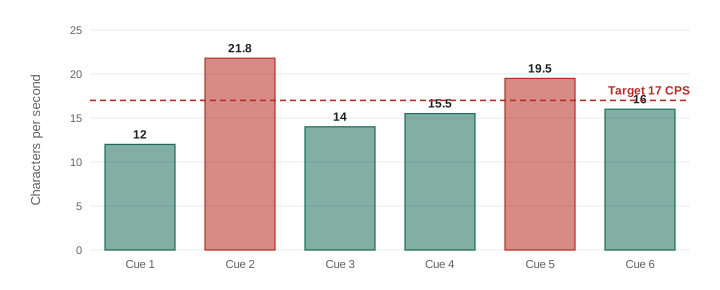
Viewers need time to read. Professional subtitling guidelines express this as characters per second (CPS), counting all characters including spaces and punctuation. Common professional targets for adult content are around 15 to 20 characters per second, with lower limits for children's content; many major streaming services publish style guides with their own limits for each language, and platforms that serve children recommend slower speeds. Line length is typically limited to about 37 to 42 characters for Latin scripts, with no more than two lines per cue. These are conventions, not laws, but following them makes subtitles comfortable to read.
Worked problem
Checking reading speed
A cue reads "If you only remember one thing, measure twice before you cut." It contains 61 characters including spaces and punctuation and is on screen for 2.8 seconds. Is the reading speed within a 17 CPS target? If not, how long should the cue stay on screen, or how short should the text be?
Show solution
- CPS: \( 61 / 2.8 \approx 21.8 \), above 17.
- Duration needed at 17 CPS: \( 61 / 17 \approx 3.6 \) seconds.
- Characters allowed in 2.8 seconds: \( 17 \times 2.8 \approx 47 \).
- A condensed version: "Remember this: measure twice, cut once." has 39 characters.
Answer: The cue runs at about 21.8 CPS, too fast for a 17 CPS target. Either extend it to about 3.6 seconds, if the speech allows, or condense the text to about 47 characters or fewer. Condensing is normal in subtitling: subtitles convey meaning, not every word.
Condensing is the skill that separates professional subtitles from transcripts. Fast speakers can produce 180 words a minute or more, which no one can read in full. A good subtitler keeps the meaning, tone and key words while dropping repetitions, fillers and redundant phrases.
A translation workflow
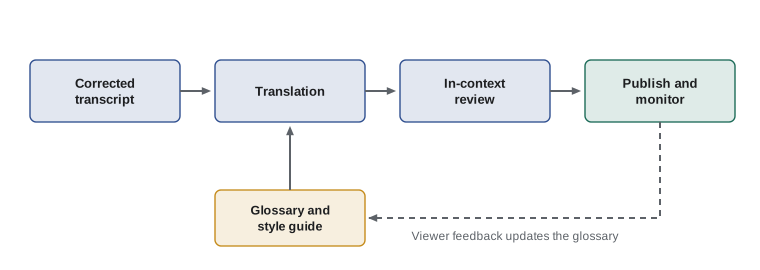
A dependable workflow has five stages, whether the work is done by people, machines or both.
- Source transcript: start from an accurate same-language transcript, corrected by a human, with speaker names, timing and terminology checked. Errors in the source multiply in every translation.
- Translation: translate from the corrected transcript, either by a professional translator, by machine translation followed by human post-editing, or by a bilingual team member.
- Glossary and style guide: give translators a list of key terms and how to render them, plus guidance on tone, formality, names, units and recurring jokes.
- Review: a second fluent person checks meaning, tone and timing in the video, not just in the text file. Watching in context catches errors that reading misses.
- Publish and monitor: upload the files and translated metadata, then watch comments from the target market for confusion or corrections.
Machine translation has become very good for many language pairs, but it still makes errors with idioms, humour, technical terms, names and context. Machine translation plus human post-editing is now common and cost-effective; fully unreviewed machine output is risky for anything that represents your brand. As CRE-410 noted, review effort should match the stakes: a casual vlog subtitle may need a light check, while a sponsored segment, a health claim or a safety instruction needs careful review because errors there can mislead viewers or breach advertising rules in the target market.
Glossaries and style guides
A glossary lists the terms that recur in your content, with an approved translation for each and notes on when not to translate. It typically includes your channel name and catchphrases, product names, technical terms in your niche, names of recurring people, and terms that must stay in the original language. A style guide records decisions about tone, formality, regional variety, numbers and units, and how to treat jokes and wordplay.
| Decision | Example guidance for a Spanish track |
|---|---|
| Regional variety | Neutral Latin American Spanish; avoid terms specific to one country |
| Formality | Use "tú" (informal) to match the creator's friendly tone |
| Units | Give metric first, imperial in brackets where the creator speaks in imperial |
| Brand and catchphrase | Keep the channel name in English; translate the sign-off line using the approved version |
| Jokes and wordplay | Adapt to an equivalent joke if possible; otherwise translate the meaning and drop the pun |
| On-screen text | Subtitle important on-screen text in brackets at the top of the frame |
Regional variety is a real choice. Spanish in Mexico, Argentina and Spain differs in vocabulary, slang and formality; Portuguese in Brazil and Portugal differs noticeably; French in Quebec and France differs in vocabulary and idiom. Choose the variety that matches your primary market, or a neutral variety if you serve several, and record the choice so every translator follows it.
Costs and budgeting
Subtitle costs depend on language, turnaround, quality and method. Human transcription and translation are often priced per minute of video; machine translation with human post-editing costs less; fully automated tracks cost almost nothing but carry quality risk. Prices vary widely by provider and language, so the figures below are illustrative only.
Worked problem
Budgeting subtitles for a year
A creator publishes 2 videos a week, averaging 14 minutes each. Professional translation with review costs (illustratively) $8 per minute per language; machine translation with human post-editing costs $3 per minute. What is the annual cost for one language under each method, and the saving from post-editing?
Show solution
- Minutes per year: \( 2 \times 52 \times 14 = 1{,}456 \).
- Professional: \( 1{,}456 \times 8 = \$11{,}648 \).
- Post-edited machine translation: \( 1{,}456 \times 3 = \$4{,}368 \).
- Saving: \( 11{,}648 - 4{,}368 = \$7{,}280 \).
Answer: For one language, professional translation costs about $11,648 a year and post-edited machine translation about $4,368, saving $7,280. Many creators combine methods: post-editing for routine videos and full professional translation for sponsored content and high-traffic videos.
Worked problem
Review time for in-context checking
A reviewer watches each subtitled video at normal speed and spends an extra 50 % of the running time pausing and correcting. How many review hours does the creator need per week for 2 videos of 14 minutes in one language?
Show solution
- Running time per week: \( 2 \times 14 = 28 \) minutes.
- Review time: \( 28 \times 1.5 = 42 \) minutes.
Answer: About 42 minutes of review a week per language. Small as it is, it should be scheduled; reviews that are skipped when time is tight are where embarrassing errors slip through.
Accessibility as well as reach
Accurate same-language captions are an accessibility measure as well as a growth tactic. Deaf and hard-of-hearing viewers, viewers with auditory processing differences, people learning the language and people watching in quiet places all rely on them. In some contexts captions are a legal requirement, for example for broadcasters and for some public-sector and business content under accessibility laws, as CRE-450 described. Even where they are not required, good captions widen the audience at home and make translation easier, because they provide the corrected source transcript every translation depends on.
Measuring subtitle quality
Quality is easier to manage when it is measured. A simple scorecard for each subtitled video can record the number of meaning errors (mistranslations that change what the speaker said), the number of style errors (awkward phrasing, wrong formality or inconsistent terms), the share of cues above the reading-speed target, and the number of timing problems noticed in review. Tracking these numbers over a few months shows whether a translator, a machine-translation setup or a post-editing workflow is improving or slipping, and gives concrete feedback rather than vague impressions. Many creators set a simple rule, such as no meaning errors in sponsored segments and fewer than one style error per minute elsewhere.
Common mistakes
MistakeTranslating from an uncorrected automatic transcript.
InsteadCorrect the source transcript first; source errors multiply in every language.
MistakePublishing unreviewed machine-translated titles.
InsteadReplace auto-translated titles and descriptions with reviewed versions.
MistakeSubtitling every word of fast speech.
InsteadCondense to meet a reading-speed target while keeping meaning and tone.
MistakeLetting each translator choose terms and tone.
InsteadUse a glossary and style guide so tracks are consistent.
MistakeReviewing subtitle files only as text.
InsteadReview in context against the video to catch timing, tone and on-screen text issues.
Summary and key terms
- Captions transcribe same-language audio for accessibility; subtitles translate; SDH does both; metadata translation drives discovery.
- SRT and WebVTT are the common subtitle formats; burned-in subtitles cannot be turned off or indexed.
- Reading speed is measured in characters per second, with common adult targets around 15 to 20 CPS and lines of about 37 to 42 characters.
- Professional subtitles condense speech to keep meaning within reading limits.
- A reliable workflow runs from corrected transcript to translation, glossary and style guide, in-context review, and monitoring.
- Machine translation with human post-editing is cost-effective, but review effort should match the stakes.
- Good same-language captions support accessibility and provide the source for every translation.
- Captions
- Same-language text of the audio, including relevant sounds, mainly for deaf and hard-of-hearing viewers.
- Subtitles
- Translated text of the dialogue for viewers who do not understand the spoken language.
- SDH
- Subtitles for the deaf and hard of hearing, combining translation or transcription with sound descriptions.
- SRT
- SubRip, a simple subtitle file format of numbered, timed text cues.
- WebVTT
- Web Video Text Tracks, the web standard subtitle format with positioning and styling options.
- Burned-in subtitles
- Subtitles that are part of the video image and cannot be turned off.
- CPS
- Characters per second, a measure of subtitle reading speed.
- Post-editing
- Human correction of machine translation output.
- Glossary
- A list of key terms with approved translations.
- Style guide
- A record of decisions on tone, formality, variety, units and other conventions.
Practice problems
Work each problem on paper first, then reveal the answer to check.
What is the difference between captions and subtitles?
Show answer
Captions transcribe the same language for accessibility; subtitles translate into another language.
Name the two common subtitle file formats.
Show answer
SRT and WebVTT.
A 52-character cue lasts 2.6 s. CPS?
Show answer
20 CPS.
At 17 CPS, how long should a 68-character cue stay on screen?
Show answer
4 seconds.
Why correct the source transcript first?
Show answer
Errors in the source are repeated in every translation.
Name three items for a glossary.
Show answer
Channel name, catchphrases, product names, technical terms, names of recurring people.
Why review subtitles in context?
Show answer
To catch timing, tone and on-screen text problems that reading the file misses.
600 minutes a year at $5 per minute. Cost?
Show answer
$3,000.
When should review be most careful?
Show answer
For sponsored segments, health or safety claims and other high-stakes content.
Why is translated metadata valuable?
Show answer
It drives discovery in search and recommendations at low cost.
Lesson quiz · 5 questions
Score 60% or more to complete this lesson.
Create a free account to save your progress, take quizzes and earn a certificate.