
PHOT-340 · Lesson 11 of 12 · 27 min
Post-production workflow and delivery
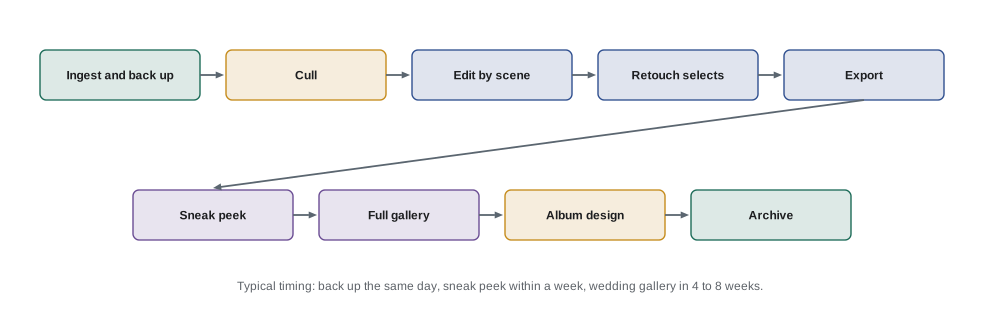
The event ends after a long day, but for the photographer the work has just begun. A wedding may produce 3,000 to 6,000 frames from two photographers, which must be backed up, culled to the best few hundred, edited consistently, delivered beautifully and archived safely, all within the time promised in the contract. Many photographers spend more hours on post-production than on shooting, so an efficient, reliable workflow is essential to profit and to client satisfaction. This lesson covers ingest and backup, culling, editing for consistency, merging two photographers' work, retouching and its limits, sneak peeks, galleries and delivery, albums and prints, archiving and data retention, and managing the post-production calendar. Raw processing basics are in PHOT-201 and colour management is in PHOT-301.
Ingest and backup
Ingest means copying files from memory cards to the computer, usually with software that renames files, adds copyright and contact metadata, applies keywords such as the client's name and event date, and creates previews. Follow the 3-2-1 approach from lesson 4: copy the cards to a working drive, a second drive and a cloud or off-site backup before formatting any card. Keep a consistent folder structure, such as year, then date and client name, so any event can be found years later. If two photographers shot, ingest both sets into the same catalogue with clearly labelled folders.
Culling
Culling means selecting the images that will be delivered and rejecting the rest: blinks, missed focus, duplicates, awkward expressions and frames that add nothing to the story. Culling is the most important editorial step, because a tight selection of strong images looks better than a huge, repetitive one. Good culling:
- tells the story of the day in order, with variety of wide, medium and close images;
- keeps the best frame from each burst rather than several near-identical ones;
- keeps important people, even in imperfect images, when the moment matters;
- removes unflattering images of people, especially guests;
- matches the contract's approximate image count without padding.
Fast culling tools display large previews and let the photographer flag or reject images with single key presses; some use automated face and eye detection to group similar frames and flag closed eyes. Automated tools speed up the first pass, but final choices should be the photographer's.
Worked problem
Delivery volume and culling time
A photographer shoots 8 hours of wedding coverage with a second shooter. Together they produce about 4,200 frames. The photographer aims to deliver about 75 images per hour of coverage. Culling takes about 0.8 seconds per frame for a first pass and another 20 minutes to refine the final selection; editing takes about 1 minute per delivered image. How many images will be delivered, and how many hours will culling and editing take?
Show solution
- Delivered images: \( 75 \times 8 = 600 \).
- First-pass culling: \( 4{,}200 \times 0.8 = 3{,}360 \) seconds, about 56 minutes.
- Refining: 20 minutes, so culling totals about 76 minutes, or 1.3 hours.
- Editing: \( 600 \times 1 = 600 \) minutes, or 10 hours.
- Total: about 11.3 hours, before export, gallery building and album design.
Answer: About 600 images and 11 to 12 hours of culling and editing. Batch editing and presets can cut editing time substantially, which is why consistent technique in the field (lesson 4 and lesson 7) pays off in post-production.
Editing for consistency
Clients judge a gallery as a whole, so consistent editing matters as much as individual images. Most event photographers develop presets or profiles that express their style and apply them as a starting point, then adjust exposure, white balance and crop for each scene. Efficient workflows edit by scene: adjust one image from the ceremony, synchronize the settings to all images from the same light, then fine-tune individual frames. Software increasingly offers machine-learning tools that learn a photographer's past edits, mask subjects and skies, and reduce noise from high-ISO files; these save time but must be checked, because they can make skin look unnatural or misjudge mixed light.
Key elements of consistency include white balance across scenes, especially between daylight portraits and tungsten receptions; skin tones that look natural and match across photographers; exposure and contrast; and a consistent approach to black and white conversions.
Merging two photographers
When two photographers shoot, their images must look like one gallery. Synchronized camera clocks (lesson 10) let the software sort images by capture time. Different camera models render colour differently, so create camera-specific profiles or presets and compare skin tones side by side; a colour checker chart photographed at the start of the day by each camera helps match colour. Remove duplicates where both photographers caught the same moment from similar angles, keeping the better frame.
Retouching and its limits
Most event images need only light correction: exposure, colour, cropping, removing distractions such as exit signs or a stray cup. Portraits chosen for albums or display may receive further retouching: softening temporary blemishes, removing stray hairs, reducing shine. Photographers should set expectations in the contract about the level of retouching included and charge for more. Ethical retouching respects how people look; changing body shapes or features without a client's request can hurt rather than please. For corporate and editorial uses, especially images used as news or to represent real events, keep manipulation minimal and honest, as discussed in PHOT-320.
Sneak peeks and delivery timelines
Many photographers send a small set of sneak peek images within a few days, so the couple can share them while excitement is high and the photographer gains visibility. Full galleries are commonly delivered within four to eight weeks for weddings, and within a day to a week for corporate events. The contract should state the timeline; missing it damages trust and reviews. In peak season, editing queues grow, so plan capacity carefully.
| Deliverable | Typical timeline | Notes |
|---|---|---|
| Same-day selects (corporate) | During the event | Small set for social media |
| Sneak peek (wedding) | 2 to 7 days | 20 to 50 images |
| Full gallery (corporate) | 1 to 7 days | Often faster for press needs |
| Full gallery (wedding) | 4 to 8 weeks | Longer in peak season if stated in contract |
| Album design and printing | 2 to 4 months after selection | Depends on client approvals |
Galleries and delivery formats
Clients usually receive images through an online gallery that displays the story beautifully, allows downloads at different resolutions, offers sharing and favourites, and sells prints and products. Gallery services also handle password protection and expiry dates. Deliver high-resolution files suitable for printing and smaller versions for sharing online. State in the contract and on the gallery how long images will remain available, and encourage clients to download and back up their own copies, because no service lasts forever.
Raw files are rarely delivered: they are unedited, and the photographer's edit is part of the work. If a client asks for raw files, many photographers decline or charge a substantial fee and require the client to acknowledge that the photographer's style will not be applied.
Albums and prints
Albums remain an important product for weddings, with design, printing and binding adding value and income. The process usually involves the client selecting favourites, the photographer designing spreads that tell the story, rounds of revisions and final printing by a professional lab. Prints and wall art are sold through the gallery or directly. Colour management, covered in PHOT-301, matters: calibrated monitors and lab profiles make prints match what clients saw on screen.
Archiving and data retention
Event images must be archived safely, because clients may lose their copies years later and ask for replacements. Typical practice is to keep the delivered edited images and the selected raw files for a number of years, stated in the contract, on at least two storage devices, one off site or in the cloud. Some photographers delete rejected raw files after delivery to save space; others keep everything. Storage costs add up: a busy wedding photographer can generate tens of terabytes over several years.
Worked problem
Annual storage needs
A photographer shoots 25 weddings and 15 corporate events a year. Weddings average 4,200 raw frames at 50 MB, and the photographer keeps only the selected raw files, about 20 percent, plus delivered JPEG images at 15 MB each, about 600 per wedding. Corporate events average 1,500 frames, keeping 25 percent of raws and 300 JPEG images. How much storage is needed per year for one copy, and for the 3-2-1 approach?
Show solution
- Wedding raws kept: \( 4{,}200 \times 0.20 \times 50 = 42{,}000 \) MB = 42 GB; JPEGs: \( 600 \times 15 = 9 \) GB; total 51 GB per wedding.
- 25 weddings: \( 25 \times 51 = 1{,}275 \) GB.
- Corporate raws kept: \( 1{,}500 \times 0.25 \times 50 = 18.75 \) GB; JPEGs: \( 300 \times 15 = 4.5 \) GB; total 23.25 GB per event.
- 15 events: about 349 GB.
- One copy: about 1.6 TB per year; three copies: about 4.9 TB per year.
Answer: About 1.6 TB per year for one archive copy and nearly 5 TB per year across three copies. Over five years that grows to about 25 TB in total, so archiving needs planning and budgeting, as in lesson 12.
Photographs of identifiable people can be personal information under Canadian privacy law. Businesses subject to PIPEDA or provincial private-sector privacy laws should protect client data and images with reasonable security, keep them only as long as needed for the purposes stated, and tell clients how long images will be retained. Quebec's Law 25 adds duties such as a person in charge of personal information and privacy incident reporting.
Managing the post-production calendar
Peak-season weddings can create a backlog of several weeks. Track each event's status from ingest to delivery, schedule editing time in the calendar just as you schedule shoots, and give clients realistic timelines. Some photographers outsource culling or editing to specialized services, providing their presets and style guide; this frees time for shooting and sales but requires quality control and protection of client images under a confidentiality agreement.
Delivering the gallery well
The delivery itself is part of the client experience. Many photographers open the gallery with a short slideshow set to music, include a personal message, explain how to download and share images, and suggest which images might work best for prints or an album. Sequence the gallery chronologically so it tells the story of the day, and group images into sets such as getting ready, ceremony, portraits and reception so clients can find what they want. Follow up a week later to answer questions and invite the client to choose album images or order prints, which keeps the relationship active and often leads to reviews and referrals.
Copyright metadata and image protection
Adding copyright, contact and usage information to file metadata at ingest helps protect images when they are shared online, though some social platforms strip metadata. Visible watermarks are rarely used on client deliveries because they spoil the images, but may be used on low-resolution previews shared with vendors. Keeping records of delivery dates and licences helps if images are later used without permission.
Handling requests after delivery
After delivery, clients sometimes ask for extra edits, more images from the raw files or different crops. State in the contract which requests are included, such as a set number of re-edits, and what extra work costs, so these requests remain a service rather than a source of conflict.
Common mistakes
MistakeDelivering every acceptable frame, including near-duplicates.
InsteadCull to a tight, varied story with the best frame from each moment.
MistakeEditing each image from scratch.
InsteadEdit by scene with presets and synchronized adjustments, then fine-tune.
MistakeLeaving skin tones mismatched between two cameras.
InsteadUse camera-specific profiles and colour checker references.
MistakePromising a two-week turnaround in peak season.
InsteadSet realistic timelines in the contract and schedule editing time.
MistakeRelying on one hard drive to archive years of events.
InsteadFollow 3-2-1 for archives and state retention periods in contracts.
Summary and key terms
- Post-production often takes more time than shooting and needs a reliable, efficient workflow.
- Ingest with metadata and back up following 3-2-1 before formatting cards.
- Cull to a tight, varied story; estimate about 75 images per hour of coverage as one benchmark.
- Edit by scene with presets and keep white balance, skin tones and contrast consistent.
- Merge photographers using synchronized clocks, camera profiles and colour references.
- Deliver sneak peeks quickly, full galleries on time, and albums through a clear process.
- Archive safely, state retention periods and protect personal information.
Practice problems
Work each problem on paper first, then reveal the answer to check.
What should happen before any card is formatted?
Show answer
At least two verified copies of the files should exist.
At 75 images per hour, how many images for 6 hours of coverage?
Show answer
450.
3,000 frames at 1 second each: first-pass culling time?
Show answer
50 minutes.
Why edit by scene?
Show answer
Images in the same light can share adjustments, saving time and keeping consistency.
How can you match skin tones between two cameras?
Show answer
Camera-specific profiles and a colour checker photographed by each camera.
Why are raw files rarely delivered?
Show answer
They are unedited, and the photographer's edit is part of the work.
What is a typical wedding gallery timeline?
Show answer
Four to eight weeks, as stated in the contract.
Each wedding keeps 50 GB; 20 weddings a year need how much for one copy?
Show answer
1 TB.
Why state a retention period in the contract?
Show answer
So clients know how long images are kept, and to meet privacy expectations.
What does outsourcing editing require?
Show answer
Quality control and confidentiality protection for client images.
Lesson quiz · 5 questions
Score 60% or more to complete this lesson.
Create a free account to save your progress, take quizzes and earn a certificate.