
PHOT-401 · Lesson 8 of 12 · 30 min
Critique II: self-critique and editing a series
Most photographers make far more images than they show. Editing, the process of selecting the images that will form a finished series, is where much of the authorship in photography happens. A strong edit can turn a loose collection into a coherent body of work; a weak edit can bury good pictures among repetitive or off-topic ones. Editing is also the most personal form of critique, because you are the first and last critic of your own work. This lesson gives you a method for editing: how to move from hundreds or thousands of frames to a tight series, how to judge your own images with some distance, how to use ratios and simple tracking to stay disciplined, and how to bring others into the process without giving away control.
Editing as authorship
In photography, the act of selection is a creative act. Two photographers given the same contact sheets would make different series, because they would see different relationships and value different qualities. Editing decides what the series is about, what tone it has, how much it explains and how much it leaves open. Many well-known photobooks were shaped by long editing processes in which photographers, editors and designers argued over which images belonged. Treat editing as part of making the work, not as an administrative chore after the shooting is done.
The edit funnel
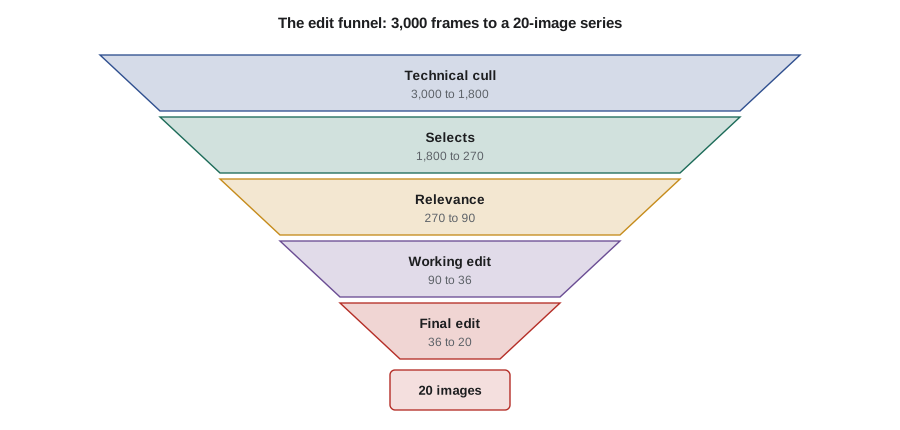
A practical way to think about editing is as a funnel with several passes. Each pass applies a different question and removes a larger share of images.
- Pass 1, technical cull: remove frames that fail technically in ways that do not serve the work, such as missed focus, accidental blur, closed eyes or duplicate frames. Keep the best of near-identical sequences.
- Pass 2, selects: mark images that have energy, surprise or strong visual quality. Be generous but honest.
- Pass 3, relevance: keep images that belong to the project's concept and visual strategy. Strong images that belong to a different project go into a separate folder, not the bin.
- Pass 4, the working edit: assemble a provisional series, usually somewhat larger than the final one, and look at the images together on a wall, a table or a screen.
- Pass 5, the final edit: reduce to the target number by testing each image's contribution to the whole.
Editing ratios
Photographers often talk about editing ratios: the number of frames made for each image used in the final work. Ratios vary widely by genre, method and camera. A large-format photographer making a carefully staged image may expose two or three sheets and use one; a street photographer may make thousands of frames for each image they finally publish. Ratios are not measures of quality, but tracking your own ratios helps you plan shooting time and notice whether you are making enough work, or too much unfocused work.
Worked problem
Computing keep rates through the funnel
Over a project you make 3,000 frames. The technical cull keeps 1,800. Selects keep 270. The relevance pass keeps 90. The working edit has 36 images and the final series has 20. Calculate the keep rate at each pass and the overall ratio.
Show solution
- Technical cull: \( 1800 / 3000 = 0.60 \), or 60%.
- Selects: \( 270 / 1800 = 0.15 \), or 15%.
- Relevance: \( 90 / 270 \approx 0.33 \), or 33%.
- Working edit: \( 36 / 90 = 0.40 \), or 40%.
- Final edit: \( 20 / 36 \approx 0.56 \), or 56%.
- Overall: \( 3000 / 20 = 150 \), so a ratio of 150 to 1, and a keep rate of \( 20 / 3000 \approx 0.67\% \).
Answer: Keep rates are 60%, 15%, 33%, 40% and 56%, with an overall ratio of 150 to 1. The selects pass does most of the cutting, which is typical.
Worked problem
Planning shooting from a known ratio
In your last project, your overall ratio was about 150 to 1. Your new series needs 24 images, and you expect to make about 120 frames per shooting day. How many shooting days should you plan, with a 25% contingency?
Show solution
- Frames needed: \( 24 \times 150 = 3600 \).
- Days at 120 frames: \( 3600 / 120 = 30 \).
- With contingency: \( 30 \times 1.25 = 37.5 \), so about 38 days.
Answer: Plan about 38 shooting days, spread over the project schedule, and revisit the estimate after the first month when you know your actual ratio for this project.
Getting distance from your own work
The central problem in self-critique is that you know too much. You remember how hard an image was to make, how cold it was, who you were with and what you hoped it would mean. Viewers know none of this. Several techniques help you see your images more as a stranger would.
- Time: wait days or weeks between shooting and editing. Images that seemed thrilling on the day often look ordinary later, and quiet images sometimes grow.
- Change of medium: look at small prints on a wall rather than files on a screen; the physical arrangement reveals relationships that a grid of thumbnails hides.
- Change of size: view images very small to judge graphic strength, and full size to judge detail and print quality.
- Inversion and mirroring: turning an image upside down or flipping it reveals compositional weight without the distraction of subject.
- Silent description: describe each image in one sentence, as if to someone who cannot see it. If you cannot say what it contributes, it may not belong.
- Removing your favourites: temporarily remove the images you are most attached to and see whether the series is stronger or weaker without them.
Questions to ask of each image
In the later passes, ask each image to justify its place.
- What does this image contribute that no other image in the series does?
- Does it support the concept, or is it simply a good picture?
- Is it technically resolved to the standard of the others?
- Does it repeat another image so closely that one of them is redundant?
- Would the series lose something specific if it were removed?
- Is there any ethical concern, such as consent or representation, that has not been resolved?
The phrase "kill your darlings," borrowed from advice to writers, captures the difficult part: sometimes your favourite image does not belong, because it pulls the series in a different direction or stands out so much that the others look weak beside it.
| Problem | Symptom | Remedy |
|---|---|---|
| Redundancy | Two or three images do the same job | Keep the strongest; move the others to an archive folder |
| Outlier | One striking image breaks the visual language | Remove it or make more work that supports it |
| Thin middle | Strong opening and ending, weak centre | Shoot more for the middle or shorten the series |
| Over-explanation | Every idea is shown literally | Remove illustrative images and trust ambiguity |
| Inconsistent finish | Colour, tone or print size varies without reason | Standardize processing and printing |
Scoring candidates
Some photographers find it helpful to score candidate images in later passes, especially when choosing between similar frames. Scores should support judgement, not replace it.
Worked problem
Choosing between two portraits with weighted scores
You must choose one of two portraits for the series. You score them out of 5 on three criteria, weighted by importance: fit with the concept (weight 0.5), visual strength (0.3) and technical quality (0.2). Portrait A scores 4, 5 and 3. Portrait B scores 5, 3 and 5. Which scores higher?
Show solution
- Portrait A: \( 0.5 \times 4 + 0.3 \times 5 + 0.2 \times 3 = 2.0 + 1.5 + 0.6 = 4.1 \).
- Portrait B: \( 0.5 \times 5 + 0.3 \times 3 + 0.2 \times 5 = 2.5 + 0.9 + 1.0 = 4.4 \).
Answer: Portrait B scores 4.4 against A's 4.1, mainly because it fits the concept better. If the weights reflect your priorities, B is the stronger choice for this series, though A may belong in a different context.
Tracking the edit
Editing over weeks becomes confusing without a system. Use ratings or colour labels in your cataloguing software to mark each pass, keep a dated folder or collection for each working edit, and record decisions in your journal. A simple log of how many images entered and left each pass helps you see progress and, as the earlier examples showed, gives you ratios for future planning. Always keep the full archive; images cut from one project sometimes become central to another years later.
Bringing others into the edit
Outside eyes are valuable in editing, but timing matters. Show work too early, before you know what the project is, and you may be steered toward someone else's idea. Show it too late, after the series is printed and framed, and useful feedback can no longer be acted on. A common approach is to make your own working edit first, then show a larger pool to one or two trusted readers, ask them to select their own sequence without your guidance, and compare. Where their choices overlap with yours, you can feel more confident; where they differ, ask why. The Critical Response Process from lesson 7 works well for edit reviews.
Worked problem
Comparing your edit with a reader's edit
From a pool of 40 images, you select 20. A trusted reader independently selects 20. Fourteen images appear in both selections. What share of your edit is confirmed, and how might you use the six images only you chose and the six only the reader chose?
Show solution
- Overlap: \( 14 / 20 = 0.70 \), so 70% of your edit is shared.
- Your six unique choices: ask whether they carry personal meaning that viewers will not see, or whether they do something essential the reader missed.
- The reader's six unique choices: look again at images you passed over; they may show strengths you are too close to see.
Answer: Seventy per cent agreement is a solid base. The twelve disputed images are where the most useful conversation and decisions lie.
Knowing when to stop
Editing can go on indefinitely. Deadlines for exhibitions, books and applications help, but even without them you should recognize when changes become sideways moves rather than improvements. Signs that an edit is close to finished include stable selections over several reviews, readers responding consistently, and a clear answer to "what does each image contribute?" At that point, move on to sequencing (lesson 9) and presentation (lesson 10), which will raise their own editing questions.
Common mistakes
MistakeEditing only on a screen as thumbnails
InsteadLook at small prints together on a wall or table as well.
MistakeKeeping images because they were hard to make
InsteadJudge each image by what it contributes to the series, not by its backstory.
MistakeDeleting cut images permanently
InsteadArchive cut images; they may belong to another project later.
MistakeAsking for outside feedback before you know what the project is
InsteadMake your own working edit first, then invite readers.
MistakeLetting two similar images both stay
InsteadKeep the strongest and remove redundancy.
Summary and key terms
- Editing is an act of authorship that shapes what a series means.
- The edit funnel moves through technical cull, selects, relevance, working edit and final edit.
- Editing ratios compare frames made with images kept and help plan shooting time.
- Time, prints, changes of size, inversion and silent description help you see your work freshly.
- Each image should contribute something specific that no other image does.
- Weighted scores can support, but not replace, judgement between candidates.
- Outside readers are most useful once you have your own working edit.
- Edit
- The selection of images that forms a finished series.
- Edit funnel
- A sequence of passes that narrows a large set of images to a final series.
- Technical cull
- Removing frames with unintended technical failures.
- Selects
- Images marked as strong candidates in an early pass.
- Working edit
- A provisional, slightly larger selection used to test the series.
- Editing ratio
- The number of frames made for each image used.
- Keep rate
- The share of images retained at a given pass.
- Redundancy
- Two or more images doing the same job in a series.
- Outlier
- An image that breaks the visual language of a series.
- Kill your darlings
- Removing favourite images that do not serve the whole.
Practice problems
Work each problem on paper first, then reveal the answer to check.
Name the five passes of the edit funnel.
Show answer
Technical cull, selects, relevance, working edit, final edit.
2,400 frames become a 16-image series. What is the overall ratio?
Show answer
\( 2400 / 16 = 150 \), so 150 to 1.
A pass receives 300 images and keeps 45. What is the keep rate?
Show answer
\( 45 / 300 = 15\% \).
Your ratio is 100 to 1 and you need 18 images. How many frames should you expect to make?
Show answer
\( 18 \times 100 = 1800 \).
Name three ways to get distance from your own images.
Show answer
Wait, view small prints, change size, invert images, describe silently, remove favourites.
What question should every image in the final edit answer?
Show answer
What does it contribute that no other image does?
Weights are 0.6, 0.4 and an image scores 5 and 3. What is its weighted score?
Show answer
\( 0.6 \times 5 + 0.4 \times 3 = 4.2 \).
You and a reader each choose 20 and overlap on 15. What is the agreement rate?
Show answer
\( 15 / 20 = 75\% \).
Why archive rather than delete cut images?
Show answer
They may belong to another project later.
Name two signs an edit is nearly finished.
Show answer
Stable selections over several reviews, consistent reader responses, clear contribution for every image.
Lesson quiz · 5 questions
Score 60% or more to complete this lesson.
Create a free account to save your progress, take quizzes and earn a certificate.