
PHOT-499 · Lesson 6 of 12 · 30 min
Editing and sequencing the body of work
Editing decides which images make up the body of work; sequencing decides the order in which they are seen. Together they turn a large set of competent images into a project with a point of view. PHOT-401 lessons 8 and 9 covered self-critique, editing a series and sequencing as an artistic act, and PHOT-430 lesson 2 covered editing and sequencing for particular formats. This lesson applies those methods to the specific job the capstone sets: a final edit that has to work as an exhibition, as a book dummy and as a portfolio section, made in the few weeks between the end of production and the output orders.
The edit funnel
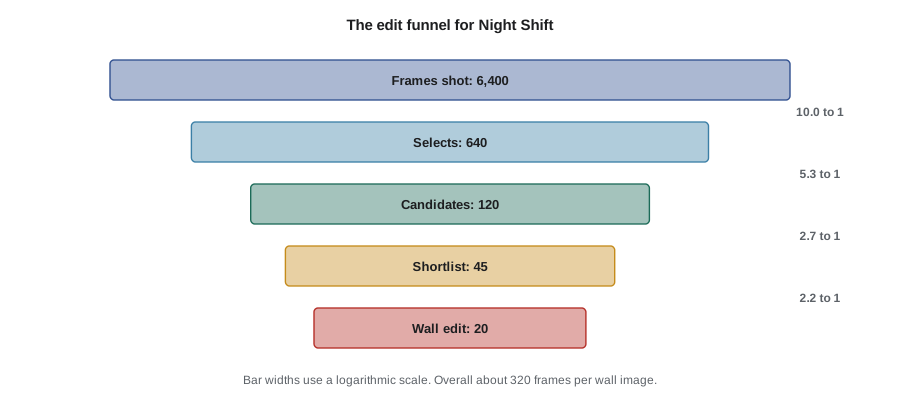
Editing narrows the set in rounds. Each round applies different criteria, and each should be made with fresh eyes, ideally after a break. A typical capstone funnel moves from every frame shot, to selects (technically and expressively strong frames), to candidates (selects that serve the project), to a shortlist (candidates that work with each other), to the final edit for each output. The numbers vary with the kind of work; documentary and street work have far more frames per final image than studio or large-format work.
| Round | Question | Typical criteria |
|---|---|---|
| Frames to selects | Is this frame strong on its own terms? | Focus, exposure, moment, expression, composition |
| Selects to candidates | Does it serve this project? | Fits the question and approach; consented and cleared |
| Candidates to shortlist | Does it work with the others? | Adds something new; not a near-duplicate |
| Shortlist to final edit | Does the set need it in this output? | Sequence, pacing, balance, format limits |
Worked problem
Edit ratios and what they say about a project
Amara shot about 6,400 frames, made 640 selects, kept 120 candidates and a shortlist of 45, and needs 20 for the wall. What are the ratios between stages and overall, and what would a much higher overall ratio suggest?
Show solution
- Frames to selects: \( 6400/640 = 10 \) to 1. Selects to candidates: \( 640/120 \approx 5.3 \) to 1. Candidates to shortlist: \( 120/45 \approx 2.7 \) to 1. Shortlist to wall: \( 45/20 = 2.25 \) to 1.
- Overall: \( 6400/20 = 320 \) frames per final image, or about 0.3 per cent.
- A ratio of several thousand to one for a documentary portrait project would suggest unfocused shooting or that the approach was not working, while a ratio close to the shortlist size would suggest that the edit has not yet been made.
Answer: About 320 to 1 overall, typical of documentary work with people. The ratios are useful mainly for planning the next project: they tell Amara how many frames and shoots her approach needs per finished image.
Making selects and candidates
Make selects quickly with simple tools: a star or flag system in your cataloguing software, applied in one pass per shoot. Do not compare frames from different shoots at this stage; judge each frame against the frames around it. Then make candidates by asking whether each select serves the project. Some excellent frames will not: a beautiful street scene on the way home is not part of a project about workplaces. Put them in a separate collection rather than deleting them; they may belong to another project.
Consent and clearance are part of the candidate criteria. Any image that depends on a release not yet signed, a site review not yet passed, or a person who has withdrawn consent should not move forward, however strong it is. Marking these images clearly in the catalogue prevents them from slipping into the edit later.
From candidates to a shortlist
The shortlist is where the body of work takes shape. Lay out the candidates together, at the same small size, and look at them as a group. Physical work prints on a wall or table are still the most effective tool because they let you move images, see them all at once and step back; a screen grid is a usable substitute. Look for near-duplicates and keep the stronger one; look for images that pull in a different direction from the rest and ask whether they open the project up or fragment it; and look for what is missing.
Expect to lose images you love. Editors call them darlings: images that matter to you because of the effort, the story behind them or the person in them, but that do not do enough for the viewer. A useful test is to ask whether a stranger who knew nothing of the shoot would miss the image if it were removed. If not, it goes.
| Question | What it catches |
|---|---|
| Is this a near-duplicate of a stronger image? | Repetition that weakens both |
| Does it pull the project somewhere else? | Images from a different project |
| Would a stranger miss it? | Darlings kept for the photographer's reasons |
| Is any site, person or image type over-represented? | Imbalance in the series |
| What is missing that the project needs? | Gaps for a final reshoot or a change in sequence |
Pairs, groups and the structure of the set
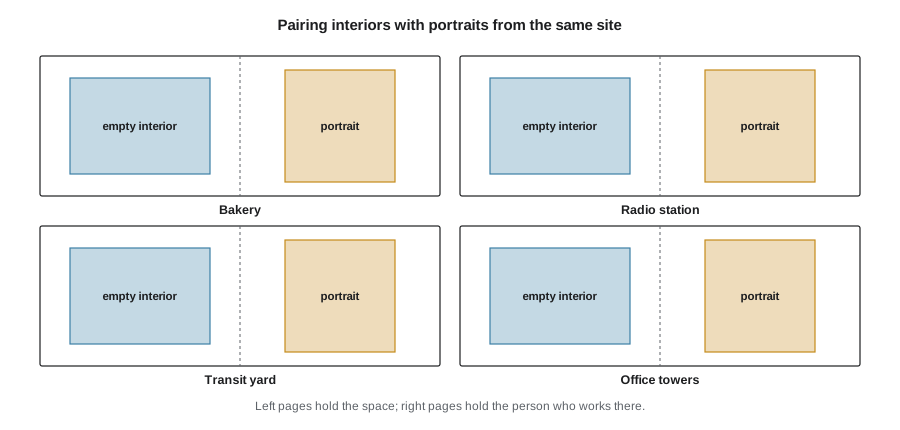
Many bodies of work have an internal structure beyond a simple list. Amara's had two image types, portraits and empty interiors, and her reviewers had suggested leading with interiors. She tested pairing each portrait with an interior from the same site, so that the viewer saw a person and then the space they worked in without them. Pairs can also work by contrast (a crowded image beside an empty one), by echo (a shape or colour repeated) or by narrative (before and after). Groups of three or more can build a small chapter within a larger sequence.
Worked problem
How many pairings are possible?
Amara has 6 strong interiors and 6 strong portraits from the same six sites. If she pairs each interior with a portrait from the same site, how many pairings are possible? If she allowed any interior to pair with any portrait, how many complete sets of six pairs could she make?
Show solution
- Same-site pairing: each site has exactly one interior and one portrait, so there is only 1 complete set of pairs.
- Any pairing: the first interior can take any of 6 portraits, the next any of the remaining 5, and so on, giving \( 6! = 720 \) complete sets.
- Adding order to the sequence of six pairs multiplies by another \( 6! = 720 \).
Answer: One set if pairs must share a site; 720 sets if any pairing is allowed, and over half a million ordered sequences. Rules such as same-site pairing reduce the choices to a manageable number and give the viewer a structure to understand.
Sequencing principles
A sequence has an opening, a development and an ending. The opening image establishes the world, the tone and the approach; it is often not the strongest single image but the one that best invites the viewer in. The ending should feel like a resolution or a deliberate open question rather than simply the last image. Between them, a sequence develops through rhythm (alternating scale, density, light and dark, people and spaces), progression (time, place or emotional intensity) and juxtaposition (what each image adds to its neighbour). PHOT-401 lesson 9 discusses these in depth with examples from photobook history.
Amara's draft sequence followed the night: arrival at dusk at the transit yard, the bakery's ovens around midnight, the radio station in the small hours, cleaners in the office towers before dawn, the taxi stand as the first buses run, and a final interior of the bakery's front window with bread on the shelves and the street lightening outside. The time structure gave the viewer something to hold onto, and the final image closed the night without people, which suited the project's interest in labour that disappears from view.
seq = [  # (image, type, scale, tone) for a draft wall sequence
    ('yard dusk', 'interior', 'wide', 'dark'), ('mechanic', 'portrait', 'medium', 'dark'),
    ('ovens', 'interior', 'medium', 'light'), ('owner', 'portrait', 'medium', 'light'),
    ('apprentice', 'portrait', 'medium', 'light'), ('radio desk', 'interior', 'close', 'dark'),
    ('host', 'portrait', 'medium', 'dark'), ('stairwell', 'interior', 'wide', 'light'),
    ('cleaner', 'portrait', 'medium', 'light'), ('taxi rank', 'interior', 'wide', 'dark'),
    ('driver', 'portrait', 'close', 'dark'), ('front window', 'interior', 'medium', 'light')]
for k, name in [(1, 'type'), (2, 'scale'), (3, 'tone')]:
    runs, longest, cur = 0, 1, 1
    for a, b in zip(seq, seq[1:]):
        if a[k] == b[k]:
            cur += 1; runs += 1; longest = max(longest, cur)
        else:
            cur = 1
    print(f'{name:5s}: {runs} repeated adjacent pairs, longest run {longest}')
mediums = sum(1 for s in seq if s[2] == 'medium')
print(f'medium scale images: {mediums} of {len(seq)}')type : 1 repeated adjacent pairs, longest run 2 scale: 3 repeated adjacent pairs, longest run 4 tone : 6 repeated adjacent pairs, longest run 3 medium scale images: 7 of 12
The check is crude, but it shows patterns that are hard to see when you are close to the work: in this draft, two portraits sit side by side at the bakery, and seven of the twelve images are medium scale, including a run of four in a row. Amara moves the apprentice portrait to the book only, and replaces one medium interior with a close detail of flour on a work glove, which breaks the run of medium shots.
One body of work, several outputs
The capstone usually needs more than one edit from the same body of work. The wall might take 15 to 20 images; a book can carry 30 to 40 because pages allow pacing and small images; a portfolio section might use 8 to 12; a social media launch might use 5 or 6. These are not simply shorter or longer versions of one list. Each format has its own logic: a wall is seen in space and often out of order, a book is seen page by page in a fixed order, a portfolio is skimmed by busy reviewers, and social posts are seen one at a time among other content. PHOT-430 lessons 2 and 3 cover format-specific editing in detail.
| Output | Images | Logic |
|---|---|---|
| Exhibition wall | 18 | Pairs along one wall, singles on the end wall, night order left to right |
| Book dummy | 34 on 40 pages | Night order; pairs on spreads; small details as chapter breaks |
| Portfolio section | 10 | Strongest portraits first, two interiors, one pair |
| Social launch | 6 | One image per site plus the closing window |
Worked problem
Checking the book's page count
Amara's 40-page book dummy needs a title page, a half-title, a contents page, a two-page text, a one-page captions list at the back and a colophon, each on its own page, and two blank endpapers inside the covers that do not count as pages. How many pages are left for images, and can she fit 34 images if 16 appear as facing-page pairs and the rest are one per page?
Show solution
- Non-image pages: \( 1 + 1 + 1 + 2 + 1 + 1 = 7 \), leaving \( 40 - 7 = 33 \) pages.
- Sixteen images as pairs use 16 pages (8 spreads); 18 single images use 18 pages; total \( 16 + 18 = 34 \) pages.
- That is one page more than the 33 available, and odd-even page positions would also need checking so that pairs fall on spreads.
Answer: Not quite. She can drop one single image, merge the contents into the half-title, or move to 44 pages; she chooses to drop the contents page, which a short book does not need, and checks the spread positions on a flatplan as described in PHOT-430 lesson 3.
Testing the edit with viewers
Before fixing the edit, show it to people who have not seen the work. Watch rather than ask: where do they slow down, where do they skip, what do they say unprompted? Then ask open questions about what they think the project is about and which images stayed with them. Compare their answers with your statement of intent. If viewers consistently describe a different project from the one you intended, either the edit or the statement needs to change. Show the edit to some of the people in the work as well, especially where the agreement included review; their responses test representation as well as clarity.
Fixing the edit
Set a date to fix the edit for each output, and keep it. For Amara, the wall and book edits were fixed at the end of week 9 so that post-production could start; the portfolio and social edits could follow later because they had no external lead times. Record the final edits with file names and order in the process log and export small reference sheets. After the edit is fixed, changes should be rare and justified, because each change ripples into post-production, captions, the flatplan and the print order.
Common mistakes
MistakeMaking one edit and cutting it down for every output
InsteadMake a separate edit for each output, following that format's logic.
MistakeKeeping images because of the effort behind them
InsteadAsk whether a stranger would miss the image; if not, remove it.
MistakeComparing frames across shoots during the first selects pass
InsteadJudge frames against adjacent frames first, then compare across shoots at the shortlist stage.
MistakeLetting uncleared images into the shortlist
InsteadMark images that lack releases or reviews and keep them out until cleared.
MistakeTesting the edit only with people who know the project
InsteadShow it to new viewers and to people in the work, and compare their readings with your intent.
Summary and key terms
- Edit in rounds: frames to selects, candidates, shortlist and final edits.
- Edit ratios help plan future shoots and reveal unfocused shooting or an unmade edit.
- Consent and clearance are candidate criteria, not afterthoughts.
- Work prints laid out together reveal near-duplicates, outliers and gaps.
- Pairs and groups give a body of work structure; rules keep choices manageable.
- Sequences need an inviting opening, rhythm, progression and a deliberate ending.
- Make a separate edit for each output and fix the edit dates before post-production.
- Edit
- The selection of images that make up a body of work or output.
- Sequence
- The order in which images are seen.
- Select
- A frame that is strong on its own terms.
- Candidate
- A select that serves the project and is cleared.
- Shortlist
- Candidates that work together as a set.
- Darling
- An image kept for the photographer's reasons rather than the viewer's.
- Pairing
- Placing two images together so each changes the reading of the other.
- Rhythm
- Alternation of scale, density, tone or subject through a sequence.
- Flatplan
- A page-by-page plan of a book.
- Edit ratio
- The number of frames shot per image in the final edit.
Practice problems
Work each problem on paper first, then reveal the answer to check.
4,800 frames give 16 final images. What is the overall edit ratio?
Show answer
300 to 1.
How many ways can five interiors be paired with five portraits if any pairing is allowed?
Show answer
\( 5! = 120 \).
What is the test for a darling?
Show answer
Whether a stranger who knew nothing of the shoot would miss it.
Why are uncleared images kept out of the shortlist?
Show answer
They may not be usable, and they distort the edit if removed late.
Name three sources of rhythm in a sequence.
Show answer
Scale, density, light and dark, and people versus spaces.
A 32-page book has 6 non-image pages. How many single-image pages remain?
Show answer
26.
Why is a wall edit different from a book edit?
Show answer
A wall is seen in space and often out of order; a book is seen page by page in a fixed order.
What should viewers be asked after watching them look at the edit?
Show answer
Open questions about what the project is about and which images stayed with them.
What tool is most effective for shortlisting?
Show answer
Work prints laid out together where they can be moved and seen at once.
Why fix edit dates before post-production?
Show answer
Later changes ripple into post-production, captions, flatplans and print orders.
Lesson quiz · 5 questions
Score 60% or more to complete this lesson.
Create a free account to save your progress, take quizzes and earn a certificate.