
PHOT-499 · Lesson 7 of 12 · 29 min
Post-production, provenance and archiving
Post-production turns selected raw files into finished masters ready for print, book and screen. In a capstone it also has to do three less visible jobs: keep the series consistent, keep an honest record of how each image was made, and keep every file safe and findable long after the term ends. The editing and retouching tools were taught in PHOT-202, colour management and fine printing in PHOT-301, and content credentials, detection and AI disclosure in PHOT-420 lessons 10 and 11. This lesson is about the workflow that holds them together across a whole body of work.
A post-production workflow for a body of work
Work in a fixed order so that changes upstream do not undo work downstream. A reliable order is: ingest and back up, cull and rate (lesson 6), apply a base adjustment to the whole set, make global corrections per image, make local corrections and retouching, check consistency across the set, proof for each output, export masters, and then make output files from the masters. Keep raw files untouched and work non-destructively in a cataloguing application or with layered files, so that any decision can be revisited.
Consistency across the series
A series looks unfinished when its images disagree in colour, contrast or density for no reason. Choose a reference image for each image type, finish it carefully, and match the others to it. Cataloguing software lets you copy settings across images as a starting point, but images made in different light need individual adjustment to look the same; identical settings rarely produce identical results. Review the whole set at small size side by side, then at print size, and look for outliers in white balance, skin tones, shadow density and highlight brightness.
Amara's portraits were shot under mixed night light, and her decision in lesson 4 was to keep the ambient colour casts while making skin tones look natural. She finished one portrait from each site as a reference, built a base profile and a skin tone adjustment, and then matched the others. Her interiors used a different base with slightly lower contrast to keep shadow detail in long exposures. A final pass with all eighteen wall images on screen at the same size showed that the radio station images were warmer than the rest, which she corrected toward the series average without removing the station's character.
| Check | How | Common fix |
|---|---|---|
| White balance and colour cast | Side-by-side grid; neutral sampler on grey objects | Adjust temperature and tint toward the reference |
| Skin tone | Vectorscope-style or hue readout on skin | Hue and saturation adjustment on skin only |
| Shadow density | Compare darkest areas at print size | Black point and shadow curve |
| Highlight brightness | Compare brightest areas | Highlight recovery and white point |
| Noise and grain | Inspect at 100 per cent | Consistent denoising settings by ISO band |
| Sharpening | Inspect at print size, not screen size | Output sharpening per medium |
Honest post-production
What counts as acceptable post-production depends on the genre and the claims made about the images. For documentary and journalistic work, the widely accepted standard, discussed in PHOT-320 lesson 9, permits adjustments to tone, colour and contrast that correspond to what was seen, plus removal of sensor dust, but not adding, removing or moving elements in the scene. Fine art and commercial work may allow much more, provided viewers are not misled about the nature of the image. A capstone that presents documentary images must follow documentary standards, and any departure, such as a composite or a staged scene, must be disclosed in captions or the project text.
Generative tools raise the same question with higher stakes. If you use generative fill, AI expansion, AI relighting or AI upscaling on any image, record it, and follow your school's policy and the disclosure practices in PHOT-420 lesson 10. For a documentary capstone the safest practice is not to use generative editing on content at all, and to limit AI tools to tasks such as noise reduction and masking that do not change what the image shows. Write a short post-production statement for the project that says what was and was not done; it will be part of your defence.
| Adjustment | Documentary capstone | Fine art capstone | Commercial capstone |
|---|---|---|---|
| Tone, colour, contrast | Yes, faithful to the scene | Yes | Yes |
| Dust and sensor spot removal | Yes | Yes | Yes |
| Removing or adding objects | No | Yes, if disclosed where relevant | Yes, within the brief and the law |
| Compositing several frames | No, unless disclosed as composite | Yes | Yes |
| Generative fill or expansion | No | Disclose | Disclose as the client and law require |
| AI denoising and masking | Yes, if appearance is unchanged | Yes | Yes |
Provenance and content credentials
Provenance is the documented history of an image: who made it, when, where, with what equipment and what was done to it afterward. In practice it lives in three places: the raw files and their capture metadata, the edit history in your catalogue, and embedded metadata or content credentials in the files you deliver. PHOT-420 lesson 11 explained how C2PA content credentials record capture and edit history in a signed manifest that later viewers can inspect. If your camera or software supports content credentials, consider enabling them for the capstone; they show viewers and juries that the work is what it claims to be, and they are increasingly expected for documentary submissions. Keep the raw files regardless; they are the strongest evidence of authenticity.
Metadata
Metadata makes files findable and carries rights and caption information with the image. The IPTC Photo Metadata Standard, supported by most cataloguing software, defines fields for the creator, copyright notice, credit line, contact details, caption, headline, keywords, location, date created and, in recent versions, a digital source type that indicates whether an image was captured by a camera, edited, composited or generated. The PLUS fields add model and property release status. Fill the creator and rights fields at ingest with a template; add captions, keywords and release status during the edit using your field notes from lesson 4.
| Field | Example | Why it matters |
|---|---|---|
| Creator | Amara (photographer) | Credit and contact |
| Copyright notice | Copyright 2026 Amara. All rights reserved | Rights information travels with the file |
| Caption | Apprentice baker shapes loaves at 02:40, bakery ovens room | Accuracy and accessibility |
| Keywords | night work, bakery, portrait, Night Shift | Finding images later |
| Location | City and site name, or general area if requested | Context; some sites ask for discretion |
| Model release status | Released, limited (no social media) | Prevents misuse later |
| Digital source type | Digital capture; edited | Provenance |
| Job or project identifier | PHOT-499 Night Shift | Groups files across folders |
Some subjects or sites may ask that names or exact locations not be published. Respect that in public captions and file metadata exports, while keeping the full information in your private catalogue and field notes. Strip GPS data from public web files when location could put someone at risk, as the security practices in PHOT-410 lesson 10 suggest.
File naming and versions
Consistent file names prevent confusion when hundreds of files move between applications, labs and people. A good scheme includes a date, a project code and a sequence number, and avoids spaces and special characters: for example 2026-10-08_NS_4120.CR3 for a raw file. Masters and output files add a version and purpose: NS_4120_master_v2.tif, NS_4120_print_40x50.tif, NS_4120_web_2000.jpg. Never overwrite a master with an output file, and never rely on "final", "final2" and "final-really" as version names.
Worked problem
Calculating print and web pixel dimensions
Amara's wall prints are 40 by 50 cm, printed by a lab at 300 pixels per inch. Her camera produces 6,000 by 4,000 pixel files and she has cropped portraits to 4:5. What pixel dimensions does each print need, how much of her crop does that use, and what size should web files be for a 2,000-pixel long edge?
Show solution
- 40 cm is \( 40/2.54 \approx 15.75 \) in and 50 cm is \( 50/2.54 \approx 19.69 \) in. At 300 ppi: \( 15.75 \times 300 \approx 4724 \) by \( 19.69 \times 300 \approx 5906 \) pixels.
- A 4:5 crop from a 6,000 by 4,000 frame used in portrait orientation is 4,000 pixels wide by 5,000 pixels tall.
- The crop provides 4,000 by 5,000 against 4,724 by 5,906 needed, about 85 per cent of 300 ppi, or about 254 ppi at print size. Labs generally accept 240 ppi and above for prints viewed at normal distance; slight upsampling in the lab's software or a careful resample is acceptable.
- Web files at a 2,000-pixel long edge: 1,600 by 2,000 pixels for the 4:5 portraits.
Answer: Each print needs about 4,724 by 5,906 pixels; the crop gives about 254 ppi at size, which is adequate. Amara exports masters at native resolution, lets the print output step resample to the lab's requirement, and exports 1,600 by 2,000 pixel web files.
Backups: the 3-2-1 rule
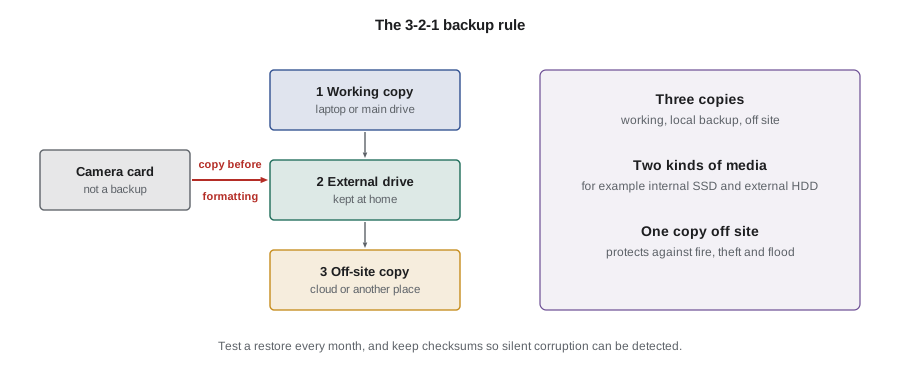
Losing raw files during a capstone is a disaster that is almost entirely preventable. The 3-2-1 rule says to keep at least three copies of every file, on at least two different kinds of media or devices, with at least one copy off site. For a student, that usually means the working copy on a laptop or main drive, a second copy on an external drive kept at home, and a third copy in a cloud service or on a drive kept somewhere else. Back up immediately after every shoot, before formatting cards; cards are not backups. Test restoring a few files once a month so you know the backup works.
raw_mb, frames = 45, 6400          # average raw file size and frames shot
masters, master_mb = 60, 180       # layered 16-bit masters
outputs_gb = 12                    # prints, book files, web files
catalog_gb = 8                     # catalog and previews
raw_gb = raw_mb * frames / 1000
total = raw_gb + masters * master_mb / 1000 + outputs_gb + catalog_gb
print(f'raw {raw_gb:.0f} GB, total project {total:.0f} GB')
headroom = 1.5                     # growth and versions
need = total * headroom
for drive in (1, 2, 4):
    print(f'{drive} TB drive: {"enough" if drive * 1000 >= need else "too small"} for {need:.0f} GB with headroom')
copies = 3
print(f'storage across all copies: {need * copies / 1000:.2f} TB')raw 288 GB, total project 319 GB 1 TB drive: enough for 478 GB with headroom 2 TB drive: enough for 478 GB with headroom 4 TB drive: enough for 478 GB with headroom storage across all copies: 1.43 TB
The project needs about 320 GB, or about 480 GB with headroom for versions and growth, so a 1 TB drive per copy is enough for this capstone alone. Students working with video, high-resolution or multi-frame techniques from PHOT-420 should rerun the numbers with their own file sizes, which can be several times larger.
Checksums and archiving
At the end of the term, make an archive of the project that will still be usable in ten years. An archive is not just a copy of your working folder. It should contain the raw files, the catalogue or the edit settings, the masters in an open, widely supported format such as TIFF, the final output files, the field notes, releases and agreements (scanned), the process log, the project texts and a short read-me file explaining the folder structure and software versions. Generate checksums, numeric fingerprints of each file, when you create the archive; comparing checksums later proves that files have not been corrupted. Many backup tools do this automatically.
| Folder | Contents |
|---|---|
| 01_raw | All raw files, renamed with the project scheme |
| 02_catalogue | Catalogue file or exported edit settings |
| 03_masters | Finished masters as TIFF with embedded metadata |
| 04_outputs | Print, book and web files as delivered |
| 05_documents | Proposal, plans, logs, releases, agreements, texts |
| 06_checksums | Checksum list for every file |
| README.txt | Structure, software versions, contact, rights summary |
Worked problem
Planning archive refresh
Amara stores her archive on two external drives and a cloud service. She plans to check the drives every year and replace them every five years. If a drive has an annual failure probability of about 2 per cent (illustrative), what is the chance that both drives fail in the same year, assuming independence, and why does she still check every year?
Show solution
- Both fail in the same year: \( 0.02 \times 0.02 = 0.0004 \), or 0.04 per cent.
- With a cloud copy as well, losing all three in one year is far less likely still.
- Independence is an assumption that fails when drives are stored together and share risks such as fire, theft or a faulty power supply, or when silent corruption is copied from one drive to the other.
Answer: About 0.04 per cent for two independent drives, but annual checks with checksums catch silent corruption and shared risks that the simple calculation ignores, and refreshing media avoids drives aging past their reliable life.
Handing over files
Some capstone outputs leave your control: prints go to a lab and framer, book files to a printer, images to site partners and subjects. Send only what each party needs, in the format they need, with names and metadata in place. Agree in writing what partners may do with images you give them, following the uses in your access agreements, and keep a record of what was sent to whom and when.
Common mistakes
MistakeCopying identical settings across a series and assuming the results will match
InsteadMatch images to a reference visually, adjusting each for its own light.
MistakeUsing generative editing on documentary images without disclosure
InsteadFollow documentary standards and disclose any departure, or avoid generative editing on content.
MistakeTreating memory cards as a backup
InsteadBack up to three copies on two kinds of media with one off site before formatting cards.
MistakeNaming files final, final2 and final-really
InsteadUse a naming scheme with date, project code, number, version and purpose.
MistakeArchiving only the finished images
InsteadArchive raw files, settings, masters, outputs, documents and checksums with a read-me.
Summary and key terms
- Work in a fixed, non-destructive order from ingest to output files.
- Match each image to a reference for its type and check the whole set side by side.
- Documentary capstones follow documentary standards; disclose any composite, staging or generative editing.
- Provenance lives in raw files, edit histories and embedded metadata or content credentials.
- Fill IPTC creator, rights, caption, keyword and release fields from field notes.
- Follow the 3-2-1 rule from the first shoot and test restores.
- Make a documented archive with checksums and plan to check and refresh it.
- Post-production
- Work that turns selected raw files into finished masters and outputs.
- Non-destructive editing
- Editing that leaves original files unchanged so decisions can be revisited.
- Reference image
- A finished image used as the standard for matching a series.
- Provenance
- The documented history of how an image was made and changed.
- Content credentials
- Signed records of an image's capture and edit history under the C2PA standard.
- IPTC metadata
- Standard fields for creator, rights, caption and other information embedded in image files.
- Digital source type
- A metadata value indicating whether an image was captured, edited, composited or generated.
- 3-2-1 rule
- Three copies on two kinds of media with one off site.
- Checksum
- A numeric fingerprint used to verify that a file has not changed.
- Master file
- The finished, full-quality file from which outputs are made.
Practice problems
Work each problem on paper first, then reveal the answer to check.
What does the 3-2-1 rule require?
Show answer
Three copies, two kinds of media, one off site.
How many pixels does a 30 cm print side need at 300 ppi?
Show answer
\( 30/2.54 \times 300 \approx 3543 \) pixels.
A 4,000-pixel side is printed at 20 in. What is the effective resolution?
Show answer
200 ppi.
Name two adjustments documentary standards accept.
Show answer
Tone and colour faithful to the scene, and dust removal.
Which IPTC field indicates whether an image was generated or captured?
Show answer
Digital source type.
5,000 raw files at 50 MB each occupy how much space?
Show answer
250 GB.
Two independent drives each have a 3 per cent annual failure chance. What is the chance both fail in one year?
Show answer
0.09 per cent.
What should a capstone archive read-me file explain?
Show answer
The folder structure, software versions, contact and rights summary.
Why keep raw files after delivering masters?
Show answer
They are the strongest evidence of authenticity and allow re-editing.
What should you record when you send files to partners?
Show answer
What was sent, to whom, when and the agreed uses.
Lesson quiz · 5 questions
Score 60% or more to complete this lesson.
Create a free account to save your progress, take quizzes and earn a certificate.