
PYTH-101 · Lesson 1 of 12 · 34 min
Programs, Python and your first script
▶ Video coming soon A video version of this lesson is on the way.
Every useful tool on a computer, from a spreadsheet to a point-of-sale till, is a program: a precise list of instructions that a computer follows to turn input into output. Learning to program means learning to write those instructions yourself, so that instead of waiting for someone else to build the tool you need, you can build it. This course teaches programming with Python, one of the most widely used languages in the world, and it does so through one small business. Ridgeline Coffee Roasters roasts coffee in small batches, runs one café and ships beans through an online shop. Jordan Reyes, a barista there, has started learning Python to replace a tangle of paper lists and copied spreadsheets with small programs. Over the twelve lessons you will build those programs with Jordan, ending with a complete command-line tool for tracking stock and sales.
This first lesson explains what a program is, why Python is a good first language, how Python runs your code, and how to write, save and run a first script. It also introduces the habits that make the rest of the course easier: reading error messages calmly, working in small steps and checking each step before moving on.
What a program is
A program is a sequence of instructions written in a language a computer can carry out. The instructions must be exact. A person asked to 'add up today's sales' knows to skip the crossed-out line and to treat a smudged 7 as a 7. A computer knows nothing of the sort: it does exactly what the instructions say, no more and no less. That strictness is the hardest part of programming at first and the most valuable part later, because a program that is correct once is correct every time it runs, at any speed and on any amount of data.
Most programs follow the same broad shape. They take input, which might be typed by a person, read from a file, received from a network or measured by a sensor. They process it by calculating, comparing, sorting or searching. They produce output, such as text on a screen, a saved file, a message to another program or a signal to a machine. Keeping this input, process, output shape in mind helps you plan any program before you write a line of it.
| Ridgeline task | Input | Processing | Output |
|---|---|---|---|
| Daily sales total | Every sale from the till | Add the amounts | One total for the bookkeeper |
| Low-stock alert | Bags in stock for each coffee | Compare with the reorder point | A list of coffees to roast |
| Roast yield | Green and roasted weights | Divide and convert to a rate | Weight loss for each batch |
| Loyalty points | A customer purchase | Count whole dollars spent | Points added to the account |
Each task in the table could be done by hand, and at Ridgeline it was. The trouble is that hand methods are slow, they invite small mistakes, and they do not scale: adding forty sales on a calculator is fine, but adding forty thousand is not. A short program does the same work in a fraction of a second, and once it has been checked it does not tire or skip a line.
Why Python
Hundreds of programming languages exist. They differ in how close they are to the machine, how much they check your work before it runs, and what kinds of program they make easy. Python is a high-level, general-purpose language: high-level because it hides the details of memory and processor instructions, and general-purpose because it is used for almost everything, including websites, data analysis, scientific computing, automation, artificial intelligence and teaching.
Guido van Rossum began Python as a personal project in the late 1980s and released it publicly in 1991. Its design puts readability first. Python code uses plain English keywords such as if, for, while and return, and it uses indentation, rather than braces or end markers, to show which lines belong together. The result is that Python programs often read almost like careful pseudocode, which makes them easier to learn, easier to review and easier to fix.
Python changed significantly with Python 3.0 in December 2008, which cleaned up inconsistencies at the cost of breaking some older code. The older Python 2 reached its end of life on 1 January 2020 and no longer receives fixes, so everything in this course uses Python 3. The Python Software Foundation, a non-profit organization, manages the language, and a new feature version is released every October. Python 3.15, released in October 2026, is current as this course is written; the code here runs on any version from 3.10 onward.
Two more features explain Python's popularity. First, it comes with a large standard library: modules for dates, files, mathematics, random numbers, text, networking and much more are installed with Python itself, so a lot can be done without installing anything else. Every example in this course uses only the standard library. Second, a huge collection of free third-party packages extends Python into every specialty, from web frameworks to machine learning. Later courses in this program use some of them.
How Python runs your code
A processor understands only machine code, long sequences of numbers that select simple operations. Languages such as C are usually compiled: a program called a compiler translates the whole source file into machine code ahead of time, and you run the result. Python takes a different route. The Python interpreter reads your source code, translates it into a compact intermediate form called bytecode, and then runs that bytecode immediately in a program called the Python virtual machine. You never see the bytecode; you write source code, and the interpreter runs it.
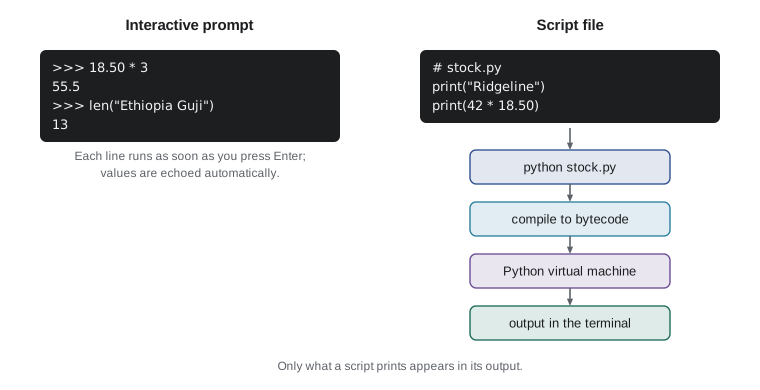
Because the interpreter runs code directly, Python gives you two ways to work. In interactive mode, you type one statement at a prompt, shown as three greater-than signs, and Python runs it and shows the result straight away. Interactive mode is ideal for trying things out: checking what an expression gives, testing a function or exploring a module. In script mode, you save a series of statements in a text file whose name ends in .py, and Python runs the whole file from top to bottom. Scripts are how real programs are kept, shared and run again.
>>> 18.50 * 3
55.5
>>> "Sunrise" + " Blend"
'Sunrise Blend'
>>> len("Ethiopia Guji")
13
>>> exit()
In the interactive session, Python echoes the value of each expression. That echo is a convenience of the prompt only. In a script, a line such as 18.50 * 3 calculates the value and then quietly throws it away; to see anything, a script must say so, usually with the print function. This difference catches many beginners, so remember it: at the prompt, values are shown automatically; in a script, only what you print appears.
Getting set up
To follow the course you need Python 3 and a place to write code. On Windows and macOS, install Python from python.org; on Windows, tick the option that adds Python to the PATH, and use the py launcher command if python is not found. Most Linux distributions already include Python 3, run with the command python3. Python's own installer includes IDLE, a simple editor with an interactive shell, which is enough for this course. Many programmers use Visual Studio Code with its Python extension, and Thonny is a friendly editor designed for beginners. Any of them works, as long as files are saved as plain text with a .py extension.
> python --version
Python 3.15.0
> python
>>> print("ready")
ready
>>> exit()
> python first_script.py
Ridgeline Coffee Roasters
Stock check program, version 1
The lines that begin with a single greater-than sign stand for commands typed in a terminal, sometimes called a command prompt or shell; you type the part after the sign. The three greater-than signs that follow are Python's own prompt, which appears once Python is running. A terminal is a text window for giving the computer commands, and PYTH-110 covers it properly. For now you need only two commands: one to start Python, and one to run a script file that is saved in the folder the terminal is working in.
Your first script
Jordan's first program is modest: it prints a heading for the stock report and the shop's opening hours. Open your editor, create a new file, type the lines below and save the file as first_script.py. Then run it, either with your editor's run command or by typing python first_script.py in a terminal opened in the same folder.
# first_script.py: Jordan's first program for Ridgeline Coffee Roasters
print("Ridgeline Coffee Roasters")
print("Stock check program, version 1")
print()
print("Cafe hours: 7:00 to 17:00, Monday to Saturday")
print("Roastery tours on Fridays at 10:00")Ridgeline Coffee Roasters Stock check program, version 1 Cafe hours: 7:00 to 17:00, Monday to Saturday Roastery tours on Fridays at 10:00
Every runnable listing in this course has an Edit and run button. Press it and the listing turns into an editor with Python running right in your browser, so you can change a line, run it again and see what happens. Try it now: change the opening hours, add a third line of your own, or delete a quotation mark to see what an error looks like. Nothing you type here can harm your computer or the site, and the Reset button brings back the original code.
Each line that starts with print is a statement, a complete instruction. Python runs the statements in order from top to bottom, which is called sequential execution. The text inside the quotation marks is a string, Python's name for a piece of text. Calling print with a string displays it and then moves to a new line; calling print with nothing inside the parentheses prints an empty line, which is handy for spacing out output.
The first line begins with a hash sign. Everything from a hash sign to the end of the line is a comment, which Python ignores. Comments are notes for people who read the code, including you in six months. Good comments explain why the code does something or what a section is for, rather than repeating what each line plainly says. A comment at the top of a file naming the program and its purpose is a habit worth starting now.
The print function can display several values at once. Give it several items separated by commas and it prints them with a single space between each. Numbers can be printed as easily as text, and Python can do arithmetic inside the call, so print is already enough for a simple calculator.
print("Bags of Sunrise Blend:", 42)
print("Bags of Ethiopia Guji:", 15)
print("Total bags of these two:", 42 + 15)
print("Value of the Sunrise stock:", 42 * 18.50)
print("Coffee", "beans", "in", "stock", sep="-")Bags of Sunrise Blend: 42 Bags of Ethiopia Guji: 15 Total bags of these two: 57 Value of the Sunrise stock: 777.0 Coffee-beans-in-stock
Try it yourself
Print the cafe sign
Mei wants a sign for the cafe counter printed by a program. Write a script that prints exactly these three lines, in this order: Ridgeline Coffee Roasters, then Fresh roasts every Friday, then Ask about our loyalty card.
Press Run to see your output, then Check my code to have it marked.
# Print the three lines of the sign
print("Ridgeline Coffee Roasters")
The last line uses an optional setting called sep, short for separator, to join the items with a hyphen instead of a space. Settings like this, given by name inside a function call, are called keyword arguments. Lesson 7 explains functions and arguments in detail; for now it is enough to know that print accepts a few of them, including end, which replaces the new line that normally follows the output.
When things go wrong
Programs rarely work the first time, and that is normal for programmers at every level. What matters is reading the message Python gives you. There are three broad kinds of error. A syntax error means the code breaks the rules of the language, such as a missing quotation mark or bracket, so Python cannot even begin to run it. A runtime error happens while the program is running, when an instruction cannot be carried out, such as dividing by zero or using a name that does not exist. A logic error is the sneakiest: the program runs without complaint but gives the wrong answer, because the instructions themselves are wrong.
print("Sunrise Blend has", 42, "bags)
  File "stock.py", line 1
    print("Sunrise Blend has", 42, "bags)
                                   ^
SyntaxError: unterminated string literal (detected at line 1)
Python reports an error with a traceback, a short report that names the file and line, shows the offending line, often marks the spot with a caret, and ends with the error's type and a description. Read a traceback from the bottom up: the last line says what went wrong, and the lines above say where. The line number is where Python noticed the problem, which is usually where it is, but sometimes the real mistake is on the line before, such as a bracket that was opened and never closed.
bags = 42
print("Value:", bags * 18.50)
print("Per bag:", 18.50 / bgs)
Traceback (most recent call last):
  File "stock.py", line 3, in <module>
    print("Per bag:", 18.50 / bgs)
                              ^^^
NameError: name 'bgs' is not defined. Did you mean: 'bags'?
In the second example the first two lines ran successfully, and the program stopped at line 3 because of a typing mistake in a name. Modern versions of Python even suggest the name you probably meant. A logic error gives no message at all. If Jordan had written 42 + 18.50 instead of 42 * 18.50 to find the stock value, Python would happily print 60.5. The only defence against logic errors is to know what answer to expect, at least roughly, and to check the program's output against it.
Worked problem
Planning a first program
Theo wants a script that prints the value of the stock of two coffees: 42 bags of Sunrise Blend at 18.50 and 27 bags of Colombia Huila at 19.75, and the total. Plan it, write it and decide how to check it.
Show solution
- Input: the four numbers are known, so they can be written into the script for now.
- Processing: multiply bags by price for each coffee, then add the two values.
- Output: three labelled lines, one per coffee and one for the total.
- Code: print('Sunrise:', 42 * 18.50), print('Colombia:', 27 * 19.75) and print('Total:', 42 * 18.50 + 27 * 19.75).
- Check: 42 * 18.50 is 777.0 and 27 * 19.75 is 533.25, so the total should be 1310.25; a rough estimate of 40 * 20 + 30 * 20 = 1400 confirms the size.
Answer: The script prints 777.0, 533.25 and 1310.25, matching the hand check.
print("Sunrise Blend stock value:", 42 * 18.50)
print("Colombia Huila stock value:", 27 * 19.75)
print("Total:", 42 * 18.50 + 27 * 19.75)Sunrise Blend stock value: 777.0 Colombia Huila stock value: 533.25 Total: 1310.25
Try it yourself
Value of the Espresso Ridge stock
Ridgeline has 30 bags of Espresso Ridge at 21.50 each. Print the label Espresso Ridge stock value: followed by the value, letting Python do the multiplication. The output should be Espresso Ridge stock value: 645.0.
# Let Python multiply the bags by the price
print("Espresso Ridge stock value:")
Try it yourself
Fix the broken script
This script should print the number of bags of two coffees and their total, but it has two mistakes: one stops it from running and one gives a wrong total. Run it, read the error, fix both mistakes and check your work.
The correct output is three lines: Sunrise Blend: 42, Colombia Huila: 27 and Total bags: 69.
print("Sunrise Blend:", 42)
print("Colombia Huila:, 27)
print("Total bags:", 42 - 27)
Working habits that pay off
Experienced programmers work in small steps. Write a few lines, run them, check the output, then add a few more. When something breaks, you then know it was caused by the last small change, which makes it quick to find. Writing a hundred lines before running anything is the surest way to spend an evening hunting for one mistake among many.
Keep your files organized from the start. Make one folder for this course and keep each script in it with a name that says what it does, such as stock_value.py rather than test2.py. Use lowercase letters, digits and underscores in file names, and avoid spaces; Python's own naming rules, covered in lesson 2, follow the same pattern, and a script name that clashes with a standard module, such as random.py or csv.py, can stop that module from importing correctly.
Finally, learn to use the documentation. The official Python documentation at docs.python.org includes a tutorial, a reference for every built-in function and a guide to the standard library. Interactive help is also built in: help(print) at the prompt describes the print function and its settings. Searching the web and asking an AI assistant can help too, but treat any code you did not write as something to read, run and understand before you rely on it, and follow any rules your course or workplace sets about such tools.
# How many 340 g bags does one roast batch make?
green_kg = 12          # green (unroasted) coffee in one batch
roasted_kg = 10.2      # weight after roasting
print("Weight lost in roasting (kg):", green_kg - roasted_kg)
print("Grams of roasted coffee:", roasted_kg * 1000)
print("Full 340 g bags:", roasted_kg * 1000 // 340)
print("Grams left over:", roasted_kg * 1000 % 340)Weight lost in roasting (kg): 1.8000000000000007 Grams of roasted coffee: 10200.0 Full 340 g bags: 30.0 Grams left over: 0.0
This last script previews the next lesson. Instead of writing 12 and 10.2 directly into every calculation, it gives them names, green_kg and roasted_kg, and uses the names. The two new operators, // and %, give the number of whole bags and the grams left over; lesson 3 explains them. Kai, the head roaster, can now change one number at the top and rerun the script for any batch.
Common mistakes
MistakeExpecting a script to show the value of a bare expression, as the prompt does.
InsteadUse print to display anything a script should show.
MistakeTyping curly quotation marks copied from a word processor.
InsteadUse the plain straight quotation marks your code editor types.
MistakeWriting many lines before running any of them.
InsteadWork in small steps: write a little, run it, check it, repeat.
MistakeReading only the top of a traceback.
InsteadStart at the last line, which names the error, then look at the line it points to.
MistakeTrusting output because no error appeared.
InsteadWork out roughly what the answer should be and compare.
MistakeSaving a script as random.py or csv.py.
InsteadChoose names that do not clash with standard modules.
Summary and key terms
- A program is an exact sequence of instructions that turns input into output.
- Python is a readable, high-level, general-purpose language with a large standard library; this course uses Python 3.
- The interpreter translates source code to bytecode and runs it at once, in interactive mode or from a script file.
- At the prompt, values are shown automatically; in a script, only what you print appears.
- Statements run in order from top to bottom; comments start with a hash sign and are ignored by Python.
- Syntax errors stop a program before it runs, runtime errors stop it partway, and logic errors give wrong answers silently.
- Work in small steps, read tracebacks from the bottom up and always check output against an expected answer.
- Program
- An exact set of instructions a computer can carry out.
- Interpreter
- The program that reads Python source code and runs it.
- Bytecode
- The intermediate form Python translates source code into before running it.
- Interactive mode
- Working at the Python prompt, where each statement runs as soon as it is entered.
- Script
- A file of Python statements, saved with a .py extension, run from top to bottom.
- Statement
- One complete instruction in a program.
- String
- A piece of text in a program, written inside quotation marks.
- Comment
- Text after a hash sign that Python ignores; a note for human readers.
- Traceback
- The report Python prints when a runtime error stops a program.
- Logic error
- A mistake that makes a program give wrong results without any error message.
Practice problems
Work each problem on paper first, then reveal the answer to check.
Describe a program that tells Mei which café items sold fewer than ten times today, in terms of input, processing and output.
Show answer
Input: the day's sales; processing: count the sales of each item and compare each count with 10; output: the list of items below 10.
What does the line 5.25 * 4 show at the interactive prompt, and what does it show in a script?
Show answer
At the prompt it shows 21.0; in a script it shows nothing, because the value is not printed.
Write a script that prints the café's name on one line and its phone extension, 204, on the next.
Show answer
print('Ridgeline Coffee Roasters') then print('Extension:', 204)
What does print('a', 'b', 'c', sep='') display?
Show answer
abc, with no spaces, because the separator is an empty string.
A script stops with NameError: name 'pirce' is not defined. What kind of error is it and what is the likely fix?
Show answer
A runtime error caused by a misspelled name; correct it to price.
A script that should add 3 lattes at 5.25 prints 8.25. What kind of error is this?
Show answer
A logic error: it added 3 + 5.25 instead of multiplying.
Why is it better to name a file stock_report.py than stock report final 2.py?
Show answer
Names without spaces are easier to run from a terminal and follow Python's naming style; descriptive names say what the script does.
Where should you start reading a traceback?
Show answer
At the last line, which names the type of error and describes it.
Estimate the value of 31 bags at 19.75 before calculating it.
Show answer
About 30 * 20 = 600; the exact value is 612.25.
Name two places to look up how a built-in function works.
Show answer
The official documentation at docs.python.org, and help() at the interactive prompt.
Lesson quiz · 5 questions
Score 60% or more to complete this lesson.
Create a free account to save your progress, take quizzes and earn a certificate.