
PYTH-101 · Lesson 7 of 12 · 24 min
Functions
▶ Video coming soon A video version of this lesson is on the way.
As Jordan's scripts grow, the same calculations start appearing in several places: the value of a coffee's stock, the loyalty tier for a number of points, the tax on a cafe bill. Copying code is risky, because a fix made in one copy is easily forgotten in the others. Functions solve this. A function is a named block of code that does one job; you define it once and call it whenever you need that job done. Functions are the main tool for organizing programs, and from this lesson on, Ridgeline's code will be built from them.
This lesson shows how to define functions, pass information in through parameters and get results back with return, how default and keyword arguments work, what scope means for the variables inside a function, and how to document and test functions so that you, and others, can trust them.
Defining and calling a function
A function definition starts with the keyword def, then the function's name, a pair of parentheses holding the names of its parameters, and a colon. The indented body below is the code that runs when the function is called. Defining a function does not run it; it only creates it. The body runs each time the function is called, by writing its name followed by parentheses with the arguments inside.
def stock_value(bags, price):
    """Return the value of a number of bags at a given price."""
    value = bags * price
    return value

print(stock_value(42, 18.50))
print(stock_value(15, 22.00))
total = stock_value(42, 18.50) + stock_value(15, 22.00)
print("Together:", total)777.0 330.0 Together: 1107.0
The names in the definition, bags and price, are parameters: placeholders for values that will be supplied later. The values in a call, such as 42 and 18.50, are arguments. When the function is called, Python matches the arguments to the parameters in order, runs the body, and the return statement sends a value back to the place where the function was called. That returned value can be printed, stored in a variable or used inside a bigger expression, exactly like any other value.
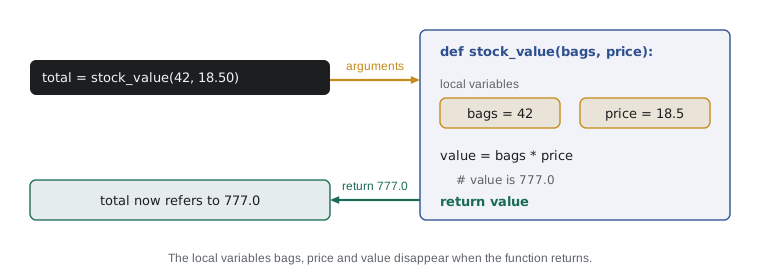
The line in triple quotes just under the def line is a docstring, a short description of what the function does. Python stores it, and help(stock_value) displays it. Writing a one-line docstring for every function, saying what it returns or does, is a professional habit that costs seconds and saves confusion.
A function name follows the same rules as a variable name, and PEP 8 recommends the same snake_case style. Because a function does something, a verb or a phrase describing the result makes a good name: stock_value, loyalty_tier, format_price, print_report. A function must be defined before the line that calls it runs, which is why definitions usually go at the top of a script.
return versus print
Beginners often confuse returning a value with printing it. print shows a value on the screen and gives nothing back to the program. return gives a value back to the caller and shows nothing. A function that prints its result can be looked at but not used in further calculations; a function that returns its result can be used anywhere. As a rule, functions that calculate something should return it, and the decision to print should be made by the code that calls them.
def value_printed(bags, price):
    print(bags * price)

def value_returned(bags, price):
    return bags * price

a = value_printed(9, 20.25)
b = value_returned(9, 20.25)
print("a is", a)
print("b is", b)182.25 a is None b is 182.25
The first function prints 182.25, but a ends up as None, because a function that reaches the end of its body without a return statement returns None automatically. Trying to add None to a number raises a TypeError, which is often how this mix-up shows itself. The second function prints nothing, but b holds the value, ready for use.
A return statement ends the function immediately, even if there are more lines below it. That makes it useful for handling special cases first: check for a problem, return early, and let the rest of the function deal with the normal case. A function can contain several return statements in different branches, and each path through the function should return a value of the same kind.
def loyalty_tier(points):
    """Return the loyalty tier name for a number of points."""
    if points < 0:
        return "Invalid"
    if points >= 300:
        return "Reserve"
    if points >= 100:
        return "Roast"
    return "Bean"

for p in (-5, 0, 99, 100, 299, 300, 1250):
print(p, loyalty_tier(p))-5 Invalid 0 Bean 99 Bean 100 Roast 299 Roast 300 Reserve 1250 Reserve
Try it yourself
Loyalty points
Customers earn one loyalty point for each whole dollar they spend. Write a function points_earned(amount) that returns the number of points for a purchase of amount dollars. A purchase of 14.85 earns 14 points, and one of 0.99 earns 0.
The checker calls your function with several amounts, so make sure it returns the value rather than printing it.
def points_earned(amount):
    pass

print(points_earned(14.85))
Parameters and arguments in more detail
Arguments can be given by position, matched to parameters in order, or by keyword, using the parameter's name. Keyword arguments make calls easier to read when a function has several parameters, and they can be given in any order. Positional arguments must come before keyword arguments in a call.
def describe(name, bags, price):
    return f"{name}: {bags} bags at {price:.2f}"

print(describe("Sumatra Dark", 9, 20.25))
print(describe(name="Decaf Swiss Water", price=19.00, bags=12))
print(describe("Espresso Ridge", price=21.50, bags=30))Sumatra Dark: 9 bags at 20.25 Decaf Swiss Water: 12 bags at 19.00 Espresso Ridge: 30 bags at 21.50
A parameter can have a default value, written with an equals sign in the definition. If the caller leaves that argument out, the default is used. Defaults are perfect for settings that are usually the same, such as Ridgeline's standard 340-gram bag size or a tax rate. Parameters with defaults must come after those without.
def bags_from_batch(roasted_kg, bag_g=340):
    """Return the number of full bags from a roasted weight."""
    return int(roasted_kg * 1000 // bag_g)

print(bags_from_batch(10.2))            # standard 340 g bags
print(bags_from_batch(10.2, 1000))      # 1 kg wholesale bags
print(bags_from_batch(10.2, bag_g=250)) # small gift bags30 10 40
You have already used keyword arguments and defaults with print: sep and end are parameters with defaults of a space and a new line. Many built-in functions work this way, and reading their documentation will now make more sense. One caution for later: never use a list or dictionary as a default value, because the same object is shared between calls; PYTH-102 explains this well-known trap.
Scope: local and global variables
Variables created inside a function, including its parameters, are local: they exist only while the function is running and cannot be seen from outside. When the function returns, they disappear. This isolation is a feature, not a limitation. It means you can use a name such as value or total inside one function without worrying that another part of the program uses the same name for something else.
tax_rate = 0.05          # a global variable

def add_tax(amount):
    tax = amount * tax_rate   # tax is local; tax_rate is read from outside
    return round(amount + tax, 2)

print(add_tax(9.00))
print(tax_rate)
# print(tax) here would fail with NameError: tax only existed inside add_tax9.45 0.05
A function can read a global variable, one defined at the top level of the script, as add_tax reads tax_rate. If a function assigns to a name, though, Python treats that name as local to the function, even if a global with the same name exists. The global keyword can override this, but relying on globals that functions change makes programs hard to understand and test. The better pattern is to pass values in as arguments and get results back with return, so that each function's inputs and outputs are visible in its definition.
Constants are the exception that proves the rule. A value such as REORDER_POINT = 10 at the top of a script, written in capitals and never reassigned, is perfectly fine to read inside functions. It is changing global variables from inside functions that causes trouble.
Functions that use other functions
Functions become powerful when they are combined. A small function that does one thing well can be used by another, which is used by another, building up a program from tested pieces. Each function can be understood on its own, and a change to how one job is done needs to be made in only one place.
REORDER_POINT = 10

def is_low(stock):
    return stock < REORDER_POINT

def stock_line(name, stock, price):
    flag = "  LOW" if is_low(stock) else ""
    return f"{name:<18}{stock:>4}{stock * price:>10.2f}{flag}"

print(stock_line("Sunrise Blend", 42, 18.50))
print(stock_line("Sumatra Dark", 9, 20.25))
print(stock_line("Decaf Swiss Water", 12, 19.00))Sunrise Blend 42 777.00 Sumatra Dark 9 182.25 LOW Decaf Swiss Water 12 228.00
A function can return several values by separating them with commas; Python packs them into a tuple, and the caller can unpack them into separate variables with a multiple assignment. This is the natural way to return pairs of related results, such as the bags and the leftover grams from a batch.
def split_batch(roasted_g, bag_g=340):
    """Return (full_bags, grams_left) for a roasted weight in grams."""
    return roasted_g // bag_g, roasted_g % bag_g

bags, left = split_batch(10250)
print(bags, "bags and", left, "g left over")30 bags and 50 g left over
Testing functions
Because a function has clear inputs and a clear output, it is easy to test: call it with known inputs and check the result against the answer you expect. Python's assert statement does exactly that. assert condition does nothing if the condition is true and stops the program with an AssertionError if it is false. A few asserts below a function act as a small, automatic test suite that you can rerun after every change. This is also how the exercises on this site check your work.
def loyalty_tier(points):
    if points >= 300:
        return "Reserve"
    if points >= 100:
        return "Roast"
    return "Bean"

assert loyalty_tier(0) == "Bean"
assert loyalty_tier(99) == "Bean"
assert loyalty_tier(100) == "Roast"
assert loyalty_tier(299) == "Roast"
assert loyalty_tier(300) == "Reserve"
print("All loyalty_tier tests passed")All loyalty_tier tests passed
Try breaking the function on purpose: change points >= 100 to points > 100 and run it again. The assert for exactly 100 fails and points straight at the bug. Writing tests like these is a cornerstone of professional programming, and PYTH-230 covers testing tools such as pytest that do the same thing on a larger scale.
Worked problem
Designing a function for the cafe bill
Mei wants a function that takes the subtotal of a cafe order and returns the total with tax, rounded to the cent. Canada uses 5% GST on cafe drinks in these examples, and the United States examples use Idaho sales tax of 6%. Design the function so the rate can change.
Show solution
- Name and job: total_with_tax(subtotal, rate) returns a float rounded to 2 places.
- Parameters: subtotal is required; rate gets a default suited to the country, written as a fraction such as 0.05 or 0.06.
- Body: one line, return round(subtotal * (1 + rate), 2).
- Tests: a subtotal of 0 gives 0; a subtotal of 10.00 gives 10.50 at 0.05 and 10.60 at 0.06; a subtotal of 9.00 gives 9.45 at 0.05.
- Use: the till code calls total_with_tax(order_subtotal) and prints the result; the function itself never prints.
Answer: A two-parameter function with a default rate, one return line and four tests.
def total_with_tax(subtotal, rate=0.05):
    """Return the total including GST (5% by default), rounded to the cent."""
    return round(subtotal * (1 + rate), 2)

assert total_with_tax(0) == 0
assert total_with_tax(10.00) == 10.50
assert total_with_tax(9.00) == 9.45
print(total_with_tax(5.25 + 3.75))9.45
Try it yourself
Bags from a batch, as a function
Write a function full_bags(roasted_kg, bag_g=340) that returns how many full bags of bag_g grams a roasted weight in kilograms fills, as a whole number. full_bags(10.2) returns 30, full_bags(10.2, 1000) returns 10 and full_bags(0.3) returns 0.
def full_bags(roasted_kg, bag_g=340):
    return roasted_kg / bag_g

print(full_bags(10.2))
Try it yourself
Change in cents
Write a function change_due(total, paid) that returns the change in whole cents as an int, or -1 if the customer has not paid enough. change_due(9.00, 20.00) returns 1100, change_due(14.85, 15) returns 15, and change_due(5.25, 5.00) returns -1. Work in cents and round, so that float errors do not creep in.
def change_due(total, paid):
    return paid - total

print(change_due(9.00, 20.00))
Common mistakes
MistakePrinting a result inside a function instead of returning it.
InsteadReturn the value and let the caller decide whether to print it.
MistakeForgetting return, so the function gives back None.
InsteadCheck that every path through a calculating function ends with return.
MistakeCalling a function without parentheses, as in total = stock_value.
InsteadWrite stock_value(42, 18.50); without parentheses you refer to the function itself.
MistakeExpecting a variable created inside a function to exist outside it.
InsteadReturn the value and assign it at the call: value = stock_value(...).
MistakeChanging global variables from inside functions.
InsteadPass values in as parameters and return results.
MistakeWriting one long function that does everything.
InsteadSplit it into small functions that each do one job and can be tested alone.
Summary and key terms
- def name(parameters): defines a function; its body runs only when the function is called.
- Arguments are matched to parameters by position or by keyword; parameters can have default values.
- return sends a value back to the caller and ends the function; with no return, a function returns None.
- Calculating functions should return results, not print them.
- Variables inside a function are local; pass data in with parameters and out with return.
- Functions can call other functions, and can return several values as a tuple.
- Docstrings document functions; assert statements test them.
- function
- A named block of code that does one job and can be called repeatedly.
- parameter
- A name in a function definition that receives an argument.
- argument
- A value passed to a function in a call.
- return value
- The value a function sends back to its caller.
- default value
- A value a parameter takes when the caller leaves the argument out.
- keyword argument
- An argument passed by naming the parameter, as in bag_g=250.
- local variable
- A variable that exists only inside the function where it is created.
- global variable
- A variable defined at the top level of a script.
- docstring
- A string at the start of a function that documents it.
- assert
- A statement that stops the program with an error if its condition is false.
Practice problems
Work each problem on paper first, then reveal the answer to check.
What does f() return if its body is just print("hi")?
Show answer
None, after printing hi.
Write a function square(n) that returns n squared, and an assert that tests it.
Show answer
def square(n): return n * n; assert square(4) == 16
def area(w, h=2): return w * h. What is area(3)? area(3, 5)? area(h=1, w=7)?
Show answer
6, 15 and 7.
Why does print(total) fail after a function that sets total = 5 inside it?
Show answer
total is local to the function and disappears when it returns.
Write a function is_free_drink(n) that returns True for every tenth drink.
Show answer
def is_free_drink(n): return n % 10 == 0
What is the difference between a parameter and an argument?
Show answer
A parameter is the name in the definition; an argument is the value supplied in a call.
Lesson quiz · 5 questions
Score 60% or more to complete this lesson.
Create a free account to save your progress, take quizzes and earn a certificate.