
PYTH-101 · Lesson 12 of 12 · 32 min
Capstone: a small command-line application
▶ Video coming soon A video version of this lesson is on the way.
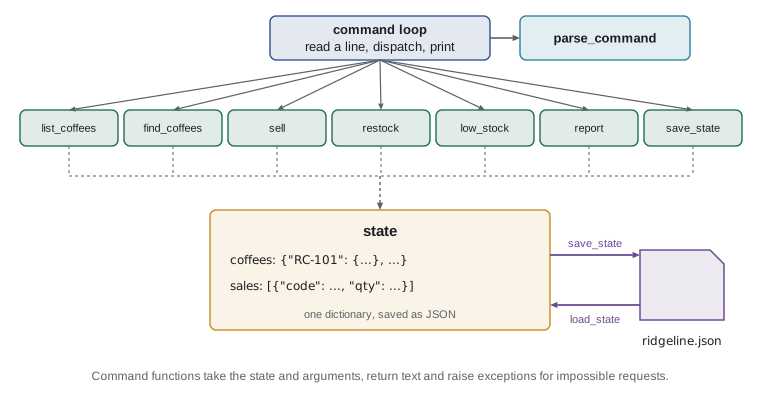
Eleven lessons have given you the parts of a programming language: values and variables, expressions, strings, decisions, loops, functions, lists and tuples, dictionaries and sets, files and exceptions. This capstone puts every one of them to work in a single program. Ridgeline needs a small tool that Theo, Mei and Kai can use at the counter to check stock, record sales and roasts, see what is running low, and keep everything saved between days. Jordan will build it, and you will build it with Jordan, as ridgeline.py, a menu-driven command-line application.
The lesson follows the way a real program comes together: write down what it must do, design the data, break the work into functions, build and test those functions one at a time, connect them with a command loop, and finally review the result. Several pieces are left for you to write as exercises, and the complete program at the end runs right here in the page.
Requirements
Jordan starts by talking to the people who will use the tool and writing down, in plain language, what it must do. A short list of requirements like this is the most useful document in a small project, because every later decision can be checked against it.
| Command | Example | What it does |
|---|---|---|
| list | list | Show every coffee with its code, name, price, stock and a LOW flag |
| find | find guji | Show coffees whose name contains the text, ignoring case |
| sell | sell RC-104 2 | Record a sale of bags and reduce the stock |
| restock | restock RC-104 30 | Add bags from a roast to the stock |
| low | low | List the coffees at or below the reorder point |
| report | report | Show today's bags sold, revenue and the stock value |
| save | save | Save the coffees and sales to ridgeline.json |
| help | help | List the commands |
| quit | quit | Save and leave the program |
Beyond the commands there are some general requirements. The program must never crash on bad input: an unknown command, a missing or unknown code, or a quantity that is not a positive whole number should each get a clear message. Stock must never go below zero. The data must survive between runs, and if there is no save file yet the program should start from the coffee list everyone knows. Finally, the code must be organized into small, tested functions, so that PYTH-102 can grow it into a larger program.
Designing the data
The central data structure is a dictionary of coffee records keyed by stock code, exactly as in lesson 9: each record is a dictionary with name, price and stock. Sales are a list of small dictionaries, one per sale, with the code, the quantity and the price at the time of sale, so that a later price change does not rewrite history. Both go into one dictionary, the state, which is what gets saved to ridgeline.json as JSON.
DEFAULT_COFFEES = {
    "RC-101": {"name": "Sunrise Blend", "price": 18.50, "stock": 42},
    "RC-102": {"name": "Ethiopia Guji", "price": 22.00, "stock": 15},
    "RC-103": {"name": "Colombia Huila", "price": 19.75, "stock": 27},
    "RC-104": {"name": "Sumatra Dark", "price": 20.25, "stock": 9},
    "RC-105": {"name": "Decaf Swiss Water", "price": 19.00, "stock": 12},
    "RC-106": {"name": "Espresso Ridge", "price": 21.50, "stock": 30},
}
REORDER_POINT = 10

def new_state():
    """Return a fresh state: a copy of the default coffees and no sales."""
    coffees = {code: dict(rec) for code, rec in DEFAULT_COFFEES.items()}
    return {"coffees": coffees, "sales": []}

state = new_state()
print(state["coffees"]["RC-104"])
print(len(state["coffees"]), "coffees,", len(state["sales"]), "sales"){'name': 'Sumatra Dark', 'price': 20.25, 'stock': 9}
6 coffees, 0 salesnew_state copies each default record with dict(rec). Without the copies, the state would hold the same inner dictionaries as DEFAULT_COFFEES, and selling a bag would quietly change the defaults too: the aliasing trap from lesson 8, one level down. Spotting places where shared data could be changed by accident is part of designing any program.
Parsing commands
Every command is a line of text such as sell RC-104 2. The first job is to split it into the command word and its arguments, normalizing case and spacing so that 'SELL rc-104 2' and ' sell RC-104 2 ' work the same way. A small function that does only this is easy to test on its own, and it keeps the main loop short.
def parse_command(line):
    """Split a typed line into (command, args), with the command in lower case."""
    words = line.strip().split()
    if not words:
        return "", []
    return words[0].lower(), words[1:]

for line in ["sell RC-104 2", "  LIST ", "", "find  guji"]:
print(repr(line), "->", parse_command(line))'sell RC-104 2' -> ('sell', ['RC-104', '2'])
' LIST ' -> ('list', [])
'' -> ('', [])
'find guji' -> ('find', ['guji'])Stock codes typed by staff need the same care. A helper, clean_code, strips spaces and converts to upper case, so rc-104 becomes RC-104. Another helper, parse_qty, turns the quantity text into a positive whole number or raises ValueError with a helpful message, following the advice of lesson 11 to detect problems in functions and report them in the caller.
def clean_code(text):
    return text.strip().upper()

def parse_qty(text):
    """Return text as a whole number of at least 1, or raise ValueError."""
    try:
        qty = int(text)
    except ValueError:
        raise ValueError(f"'{text}' is not a whole number") from None
    if qty < 1:
        raise ValueError("the quantity must be at least 1")
    return qty

print(clean_code(" rc-104 "))
for t in ["2", "zero", "0"]:
    try:
        print(t, "->", parse_qty(t))
    except ValueError as err:
print(t, "->", "error:", err)RC-104 2 -> 2 zero -> error: 'zero' is not a whole number 0 -> error: the quantity must be at least 1
The phrase from None at the end of the inner raise tells Python not to attach the original conversion error to the new one, which keeps the message short; it is a small detail, and you will see it in other people's code.
Try it yourself
Parse a quantity
Write your own version of parse_qty(text): it returns the text as an int when it is a whole number of at least 1, and otherwise raises ValueError. parse_qty("3") returns 3, while parse_qty("0"), parse_qty("-2") and parse_qty("two") all raise ValueError.
The checker calls your function inside try statements to make sure it raises in the right cases.
def parse_qty(text):
    return int(text)

print(parse_qty("3"))
The command functions
Each command gets its own function that takes the state and the arguments, does its job and returns a string to display. Returning text instead of printing it is the same principle as in lesson 7: it makes every command easy to test with assert, and it would let the same functions serve a web page later. The sell and restock functions raise exceptions for impossible requests; the loop will catch them.
# Definitions from the earlier listings, so this one runs on its own
REORDER_POINT = 10
DEFAULT_COFFEES = {
    "RC-101": {"name": "Sunrise Blend", "price": 18.50, "stock": 42},
    "RC-104": {"name": "Sumatra Dark", "price": 20.25, "stock": 9},
    "RC-106": {"name": "Espresso Ridge", "price": 21.50, "stock": 30},
}
def new_state():
    return {"coffees": {c: dict(r) for c, r in DEFAULT_COFFEES.items()}, "sales": []}
def clean_code(text):
    return text.strip().upper()
def parse_qty(text):
    qty = int(text)
    if qty < 1:
        raise ValueError("the quantity must be at least 1")
    return qty

def stock_line(code, rec):
    flag = "  LOW" if rec["stock"] <= REORDER_POINT else ""
    return f"{code}  {rec['name']:<18}{rec['price']:>7.2f}{rec['stock']:>5}{flag}"

def list_coffees(state, args):
    lines = [f"{'Code':<8}{'Coffee':<18}{'Price':>7}{'Bags':>5}"]
    for code, rec in state["coffees"].items():
        lines.append(stock_line(code, rec))
    return "\n".join(lines)

def sell(state, args):
    if len(args) != 2:
        raise ValueError("use: sell CODE QTY, for example sell RC-104 2")
    code, qty = clean_code(args[0]), parse_qty(args[1])
    if code not in state["coffees"]:
        raise KeyError(code)
    rec = state["coffees"][code]
    if qty > rec["stock"]:
        raise ValueError(f"only {rec['stock']} bags of {rec['name']} in stock")
    rec["stock"] -= qty
    state["sales"].append({"code": code, "qty": qty, "price": rec["price"]})
    return f"Sold {qty} x {rec['name']} for {qty * rec['price']:.2f}; {rec['stock']} left"

state = new_state()
print(sell(state, ["rc-104", "2"]))
print(list_coffees(state, []))Sold 2 x Sumatra Dark for 40.50; 7 left Code Coffee Price Bags RC-101 Sunrise Blend 18.50 42 RC-104 Sumatra Dark 20.25 7 LOW RC-106 Espresso Ridge 21.50 30
restock mirrors sell, adding bags instead of removing them and recording nothing in the sales list. low and find each filter the coffees, and report adds up the sales list. Two of those are yours to write in the exercises below; the complete program at the end includes Jordan's versions, so compare them with yours afterwards.
Try it yourself
The find command
Write find_coffees(state, args). It joins the arguments into one search text, and returns a string with one stock_line for each coffee whose name contains that text, ignoring case, separated by new lines. If nothing matches, it returns No coffee matches followed by the search text in quotes, for example No coffee matches 'kenya'. If no search text is given, it returns use: find TEXT.
The helper functions and a fresh state are set up for you before your code runs.
def find_coffees(state, args):
    text = " ".join(args)
    return "No coffee matches"

print(find_coffees(state, ["guji"]))
Try it yourself
The report command
Write report(state, args), which returns a single line in the form Bags sold: 5 Revenue: 96.00 Stock value: 2,599.50: the total bags in state["sales"], the revenue (quantity times price for each sale) with two decimal places, and the value of the current stock (price times stock for every coffee) with a thousands separator and two decimal places. Separate the three parts with two spaces.
Before your code runs, the setup records sales of 2 bags of RC-104 and 3 of RC-101, so for this state the line is exactly the example above.
def report(state, args):
    bags = len(state["sales"])
    return f"Bags sold: {bags}"

print(report(state, []))
The command loop
The main loop ties everything together. It reads a line, parses it, looks up the command in a dictionary that maps command words to functions, calls the function and prints the result. A dictionary of functions is a neat alternative to a long if and elif chain: adding a command means writing a function and adding one entry. The loop catches the exceptions the commands raise and turns them into messages, so no typing mistake can crash the program, and it ends when the command is quit.
For the listings on this page, the loop takes an optional list of commands, called a script, and works through it instead of waiting for typing. When the program runs for real in a terminal, the script is left out and the loop calls input. Driving a program from a scripted list of inputs is also how professional programmers test interactive programs automatically.
import json

DEFAULT_COFFEES = {
    "RC-101": {"name": "Sunrise Blend", "price": 18.50, "stock": 42},
    "RC-102": {"name": "Ethiopia Guji", "price": 22.00, "stock": 15},
    "RC-103": {"name": "Colombia Huila", "price": 19.75, "stock": 27},
    "RC-104": {"name": "Sumatra Dark", "price": 20.25, "stock": 9},
    "RC-105": {"name": "Decaf Swiss Water", "price": 19.00, "stock": 12},
    "RC-106": {"name": "Espresso Ridge", "price": 21.50, "stock": 30},
}
REORDER_POINT = 10
SAVE_FILE = "ridgeline.json"

def new_state():
    return {"coffees": {c: dict(r) for c, r in DEFAULT_COFFEES.items()}, "sales": []}

def load_state(path=SAVE_FILE):
    try:
        with open(path, encoding="utf-8") as f:
            data = json.load(f)
    except (FileNotFoundError, json.JSONDecodeError):
        return new_state()
    if not isinstance(data, dict) or "coffees" not in data or "sales" not in data:
        return new_state()          # some other file with the same name
    return data

def save_state(state, args=None, path=SAVE_FILE):
    with open(path, "w", encoding="utf-8") as f:
        json.dump(state, f, indent=2)
    n = len(state["sales"])
    return f"Saved {len(state['coffees'])} coffees and {n} sale{'' if n == 1 else 's'}"

def parse_command(line):
    words = line.strip().split()
    return (words[0].lower(), words[1:]) if words else ("", [])

def clean_code(text):
    return text.strip().upper()

def parse_qty(text):
    try:
        qty = int(text)
    except ValueError:
        raise ValueError(f"'{text}' is not a whole number") from None
    if qty < 1:
        raise ValueError("the quantity must be at least 1")
    return qty

def stock_line(code, rec):
    flag = "  LOW" if rec["stock"] <= REORDER_POINT else ""
    return f"{code}  {rec['name']:<18}{rec['price']:>7.2f}{rec['stock']:>5}{flag}"

def get_coffee(state, args, usage):
    if len(args) != 2:
        raise ValueError("use: " + usage)
    code = clean_code(args[0])
    if code not in state["coffees"]:
        raise KeyError(code)
    return code, state["coffees"][code], parse_qty(args[1])

def list_coffees(state, args):
    lines = [f"{'Code':<8}{'Coffee':<18}{'Price':>7}{'Bags':>5}"]
    lines += [stock_line(c, r) for c, r in state["coffees"].items()]
    return "\n".join(lines)

def find_coffees(state, args):
    text = " ".join(args).strip()
    if not text:
        return "use: find TEXT"
    lines = [stock_line(c, r) for c, r in state["coffees"].items()
             if text.lower() in r["name"].lower()]
    return "\n".join(lines) if lines else f"No coffee matches '{text}'"

def sell(state, args):
    code, rec, qty = get_coffee(state, args, "sell CODE QTY")
    if qty > rec["stock"]:
        raise ValueError(f"only {rec['stock']} bags of {rec['name']} in stock")
    rec["stock"] -= qty
    state["sales"].append({"code": code, "qty": qty, "price": rec["price"]})
    return f"Sold {qty} x {rec['name']} for {qty * rec['price']:.2f}; {rec['stock']} left"

def restock(state, args):
    code, rec, qty = get_coffee(state, args, "restock CODE QTY")
    rec["stock"] += qty
    return f"Added {qty} bags of {rec['name']}; {rec['stock']} in stock"

def low_stock(state, args):
    low = [stock_line(c, r) for c, r in state["coffees"].items() if r["stock"] <= REORDER_POINT]
    return "\n".join(low) if low else "Nothing is at or below the reorder point"

def report(state, args):
    bags = sum(s["qty"] for s in state["sales"])
    revenue = sum(s["qty"] * s["price"] for s in state["sales"])
    value = sum(r["price"] * r["stock"] for r in state["coffees"].values())
    return f"Bags sold: {bags}  Revenue: {revenue:.2f}  Stock value: {value:,.2f}"

COMMANDS = {"list": list_coffees, "find": find_coffees, "sell": sell, "restock": restock,
            "low": low_stock, "report": report, "save": save_state}

def help_text():
    return "Commands: " + ", ".join(sorted(COMMANDS)) + ", help, quit"

def main(script=None):
    state = load_state()
    lines = iter(script) if script is not None else None
    print("Ridgeline stock tool. Type help for the commands.")
    while True:
        line = next(lines, "quit") if lines else input("> ")
        if lines:
            print(">", line)
        command, args = parse_command(line)
        if command == "":
            continue
        if command in ("quit", "exit"):
            print(save_state(state))
            print("Goodbye")
            break
        if command == "help":
            print(help_text())
            continue
        action = COMMANDS.get(command)
        if action is None:
            print(f"Unknown command '{command}'. {help_text()}")
            continue
        try:
            print(action(state, args))
        except KeyError as err:
            print(f"No coffee with code {err}")
        except ValueError as err:
            print("Problem:", err)

main(["low", "sell rc-104 2", "sell RC-104 20", "sell RC-999 1", "sell RC-101 two",
"restock RC-104 30", "find dark", "brew", "report", "quit"])Ridgeline stock tool. Type help for the commands. > low RC-104 Sumatra Dark 20.25 9 LOW > sell rc-104 2 Sold 2 x Sumatra Dark for 40.50; 7 left > sell RC-104 20 Problem: only 7 bags of Sumatra Dark in stock > sell RC-999 1 No coffee with code 'RC-999' > sell RC-101 two Problem: 'two' is not a whole number > restock RC-104 30 Added 30 bags of Sumatra Dark; 37 in stock > find dark RC-104 Sumatra Dark 20.25 37 > brew Unknown command 'brew'. Commands: find, list, low, report, restock, save, sell, help, quit > report Bags sold: 2 Revenue: 40.50 Stock value: 3,262.50 > quit Saved 6 coffees and 1 sale Goodbye
Note that load_state checks the shape of what it loads as well as catching a missing or damaged file: a file called ridgeline.json written by some other program, without coffees and sales, would otherwise make every command fail. Read the output alongside the script. The low command flags Sumatra Dark; the first sale works; the next three sales fail with three different, clear messages: too few bags, an unknown code and a quantity that is not a number. The restock brings Sumatra Dark back up, find shows it, the unknown command brew gets a helpful reply, and quit saves the state. Press Edit and run, then change the script: add your own sales, try help, or add a line such as 'restock RC-102 30' and check that the report changes as you expect. The page keeps a small temporary file system while it is open, so the save file written by one run is loaded by the next, just as it would be in a terminal; reload the page to start again from the default coffee list.
Testing the whole program
Each function has been tested on its own, but the pieces also need testing together. Scripted runs are one way: the listing above is a test that exercises every command and every error message. Another is a set of asserts on the command functions with a fresh state, which you can rerun after every change to catch regressions, bugs that creep back into code that used to work.
def check(state_fn, sell_fn, restock_fn, report_fn):
    s = state_fn()
    assert sell_fn(s, ["RC-104", "2"]).startswith("Sold 2")
    assert s["coffees"]["RC-104"]["stock"] == 7
    assert s["sales"] == [{"code": "RC-104", "qty": 2, "price": 20.25}]
    restock_fn(s, ["rc-104", "30"])
    assert s["coffees"]["RC-104"]["stock"] == 37
    for bad in (["RC-104"], ["RC-104", "0"], ["RC-104", "99"]):
        try:
            sell_fn(s, bad)
            raise AssertionError(f"sell should have refused {bad}")
        except ValueError:
            pass
    assert report_fn(s, []).startswith("Bags sold: 2  Revenue: 40.50")
    return "All integration checks passed"

REORDER_POINT = 10
DEFAULT = {"RC-104": {"name": "Sumatra Dark", "price": 20.25, "stock": 9}}
def fresh():
    return {"coffees": {c: dict(r) for c, r in DEFAULT.items()}, "sales": []}
def sell(state, args):
    if len(args) != 2:
        raise ValueError("use: sell CODE QTY")
    code, qty = args[0].upper(), int(args[1])
    rec = state["coffees"][code]
    if qty < 1 or qty > rec["stock"]:
        raise ValueError("bad quantity")
    rec["stock"] -= qty
    state["sales"].append({"code": code, "qty": qty, "price": rec["price"]})
    return f"Sold {qty}"
def restock(state, args):
    state["coffees"][args[0].upper()]["stock"] += int(args[1])
def report(state, args):
    bags = sum(x["qty"] for x in state["sales"])
    rev = sum(x["qty"] * x["price"] for x in state["sales"])
    return f"Bags sold: {bags}  Revenue: {rev:.2f}"
print(check(fresh, sell, restock, report))All integration checks passed
Writing tests feels like extra work at first. It pays back the first time you change a function and a test immediately tells you that something else broke. In PYTH-102 the program will be split into modules with a proper test file, and PYTH-230 introduces pytest, which turns checks like these into a fast, automatic test suite.
Reviewing the design
With the program working, Jordan reviews it against the requirements, item by item. Every command exists; bad input produces messages rather than crashes; stock cannot go negative because sell checks before subtracting; data survives because quit saves and the next run loads. The functions are short, each does one job, and the command functions return strings instead of printing, so they can be tested and reused.
A review also lists what could be better, which becomes the plan for the next version. Money is stored as floats, which is acceptable for a small shop tool but not for accounting, and the decimal module would fix it. The save file is rewritten on every quit, so a crash in the middle of a sale loses the unsaved sales; saving after each change would help. Sales have no dates, so the report covers everything since the file was created. And the whole program is one file, which is fine at this size but will not be as it grows. PYTH-102 addresses these by splitting the code into modules and classes, adding dates and stronger validation, and introducing proper tests.
Worked problem
Adding a command
Kai asks for a value command that shows the stock value of one coffee, as in value RC-104. Plan the change.
Show solution
- Write a function value(state, args) that checks there is exactly one argument, cleans the code and raises KeyError if the code is unknown.
- Return a string such as f"{rec['name']}: {rec['stock']} bags worth {rec['stock'] * rec['price']:,.2f}".
- Add "value": value to the COMMANDS dictionary; help_text picks it up automatically, because it lists the dictionary keys.
- Test: value RC-104 with 9 bags at 20.25 should say 182.25; value with no code and value RC-999 should give messages, not crashes.
- Run the scripted check again to make sure nothing else changed.
Answer: One new function and one dictionary entry add the command, with no change to the loop.
Where to go from here
You have now written a complete, useful program from nothing, using the core of Python. That core is the same whether Python is running a café's stock tool, a scientist's data analysis or a large company's web service. The next courses in the program build directly on it: PYTH-102 covers modules, classes and objects and more advanced functions; PYTH-110 the developer tools, such as Git and virtual environments, that professionals use every day; PYTH-120 scripting and automation; and PYTH-201 the data structures and algorithms that make programs fast. Keep ridgeline.py: it will grow with you.
Common mistakes
MistakeWriting the whole program before running any of it.
InsteadBuild and test one function at a time, then connect them.
MistakePrinting inside command functions, which makes them hard to test.
InsteadReturn strings and let the loop print them.
MistakeLetting a typing mistake crash the program.
InsteadValidate input in helpers that raise, and catch the exceptions in the loop.
MistakeCopying the default data by assignment, so changes leak into the defaults.
InsteadCopy records with dict(rec), or build fresh data in a function.
MistakeUsing a long if and elif chain for every command.
InsteadMap command words to functions in a dictionary.
MistakeSkipping the review because the program works.
InsteadCheck every requirement and list what the next version should improve.
Summary and key terms
- Start a program with a short list of requirements written in plain language.
- Design the data first: here, a state dictionary holding coffee records keyed by code and a list of sales.
- Break the work into small functions: parsing, validation, one function per command, loading and saving.
- Command functions take the state and arguments, return text and raise exceptions for impossible requests.
- A dictionary of functions dispatches commands; the loop catches exceptions so input mistakes never crash the program.
- A scripted list of commands lets you run and test an interactive program automatically.
- Review the finished program against the requirements and plan the next version.
- requirements
- A plain statement of what a program must do.
- command-line application
- A program used by typing commands in a text window.
- command loop
- A loop that repeatedly reads, interprets and carries out commands.
- parsing
- Breaking input text into meaningful parts.
- dispatch table
- A dictionary that maps names to the functions that handle them.
- state
- All the data a program keeps while it runs.
- persistence
- Keeping data between runs by saving it, for example to a file.
- integration test
- A test that checks that several parts work correctly together.
- regression
- A bug that reappears in code that used to work.
- refactoring
- Improving the structure of code without changing what it does.
Practice problems
Work each problem on paper first, then reveal the answer to check.
Why does each command function return a string instead of printing?
Show answer
So that it can be tested with assert and reused in other programs, such as a web page.
What happens if the user types SELL rc-104 2?
Show answer
parse_command lowers the command and clean_code upper-cases the code, so the sale is recorded normally.
How would you add a command called stock that shows one coffee?
Show answer
Write a function stock(state, args) and add "stock": stock to COMMANDS.
Why does new_state copy each record with dict(rec)?
Show answer
To avoid aliasing: otherwise sales would change the shared DEFAULT_COFFEES records.
What does the program do on its first run, before ridgeline.json exists?
Show answer
load_state catches FileNotFoundError and returns a fresh state.
Name one weakness of version 1 and how to fix it.
Show answer
Money is stored as floats; using whole cents or the decimal module would make it exact.
Lesson quiz · 5 questions
Score 60% or more to complete this lesson.
Create a free account to save your progress, take quizzes and earn a certificate.