
SLS-212 · Lesson 4 of 12 · 18 min
Product demonstrations
▶ Video coming soon A video version of this lesson is on the way.
On Thursday, October 8, 2026, Maya Chen and Ridgeline's installation lead set up two RoomFlow booking panels outside the meeting rooms at Keystone Grain Equipment, plugged a laptop into the boardroom screen and waited for Dale Petrie and Linda Sorensen. Maya had rehearsed the demonstration three times at the Friday lab. The rehearsals had taught her two things. The first was that the most persuasive minute of the whole demonstration was not any feature of RoomFlow. It was the moment when Linda tried to book the training room over an existing safety course and the panel outside the door turned red. The second was that the demonstration had to be built around that moment, not around the software's menu.
A product demonstration is a presentation in which the customer sees the product working, ideally doing what the customer needs it to do. Demonstrations are powerful because they replace a claim with an experience: instead of telling customers that something works, the seller shows them. They are also risky, because a product that fails, confuses or bores in front of the customer is worse than no demonstration at all.
Why demonstrations persuade
Seeing is more convincing than hearing for several reasons. A demonstration makes abstract benefits concrete. It lets customers judge ease of use for themselves. It lets them imagine their own staff using the product. And, when customers are invited to try the product themselves, it engages them actively, which tends to increase both understanding and commitment. Research on the so-called IKEA effect by Michael Norton, Daniel Mochon and Dan Ariely (2012) found that people value things more when they have helped build or assemble them; the same idea suggests that customers who try a product themselves during a demonstration may feel more ownership of the result, though that extension is a reasonable inference rather than a tested finding about sales demos.
Demonstrations also carry information that slides cannot. Customers see how fast the product responds, how many steps a task takes, and whether the seller knows the product. A seller who has to hunt for a menu loses credibility; a seller who moves smoothly through a task the customer cares about gains it.
Demonstrate the customer's story, not the product's menu
The most common demonstration mistake is the feature tour: walking through a product screen by screen, showing everything it can do in the order the menus are arranged. Feature tours are easy to prepare, because the product supplies the structure, and they are almost always too long and too general. Customers stop seeing their own problem and start seeing a list.
A better approach is to build the demonstration around a few scenarios drawn from discovery, each showing how the product handles a task the customer described. Peter Cohan's book *Great Demo!* (first published in 2003) popularized a version of this approach in software sales: start by showing the most valuable result, then show how it is achieved, and only then answer questions about other features. Cohan called this "doing the last thing first".
| Feature tour | Scenario-based demonstration |
|---|---|
| Follows the product's menu order | Follows the customer's tasks, in order of importance |
| Shows everything the product can do | Shows what this customer needs |
| Uses generic sample data | Uses data that looks like the customer's |
| Seller does all the clicking | Customer tries key tasks |
| Ends when the features run out | Ends with the customer confirming the scenario solves their problem |
For Keystone, Maya chose three scenarios, one for each concern she had heard in discovery: a dealer visit booked weeks ahead and protected, a training session booked by Linda and kept safe from being overwritten, and a last-minute room change made from a phone. Everything else RoomFlow could do, including reports, visitor badges and catering requests, she left for questions.
Preparing a demonstration
Good demonstrations look effortless because the preparation is thorough. Farida's preparation checklist had four parts.
| Area | What to prepare |
|---|---|
| Scenarios | Two to four tasks from discovery, in order of importance, each with a clear "before" and "after" |
| Data | Realistic sample data: the customer's room names, plausible meeting titles, invented people's names |
| Environment | A tested device, a working network or offline mode, a backup screen recording, charged batteries |
| People | Who demonstrates, who answers technical questions, who watches the audience |
Sample data deserves care. Demonstrations that show the customer's own room names and realistic meetings help the audience imagine the product in use. But demonstrations must never use real personal information about the customer's staff or other customers without consent. Under PIPEDA, using another customer's real data in a demo can be a breach of privacy and of confidentiality obligations, quite apart from being a bad look. Maya's demonstration used Keystone's real room names, "Boardroom" and "Training Room", with invented meeting titles and invented staff names.
Technical failure is the risk everyone fears. Ridgeline's installation lead brought a mobile hotspot in case Keystone's guest network blocked the panels, and Maya had a three-minute screen recording of the main scenario on her laptop in case everything failed. She never needed either, but she told the group afterward that knowing they were there made her calmer.
Worked problem
Planning the time in a demonstration
Maya has 25 minutes for the RoomFlow demonstration within her 45-minute meeting. She wants to show three scenarios with weights matching their importance to Keystone: dealer visits 3, training bookings 2, last-minute changes 1. She also wants 4 minutes for Dale and Linda to try a booking themselves. How long should each scenario take?
Show solution
- Time for the scenarios: 25 − 4 = 21 minutes.
- Total weight: 3 + 2 + 1 = 6, so one weight unit is 21 ÷ 6 = 3.5 minutes.
- Dealer visits: 3 × 3.5 = 10.5 minutes. Training bookings: 2 × 3.5 = 7 minutes. Last-minute changes: 1 × 3.5 = 3.5 minutes.
- Check: 10.5 + 7 + 3.5 + 4 = 25 minutes.
Answer: About 10 to 11 minutes for dealer visits, 7 for training and 3 to 4 for last-minute changes, plus 4 minutes of hands-on time. In practice Maya rounded to 10, 7 and 4.
Running the demonstration
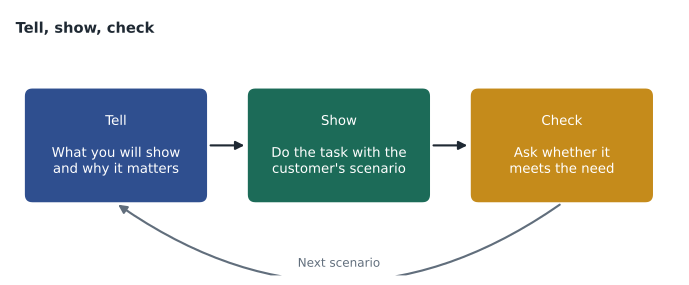
A well-run demonstration has a rhythm: say what you are about to show and why it matters to the customer, show it, then confirm that it does what they need. Farida called this tell, show, check. Without the first step, the audience does not know what to watch for. Without the last, the seller does not know whether the point landed.
| Step | What Maya said or did at Keystone |
|---|---|
| Tell | "Dale, you said the worst moment was dealers arriving to find the boardroom taken. Here's how a dealer visit gets protected." |
| Show | Booked the boardroom for a dealer visit on November 19 and marked it as a protected booking that only Dale could change |
| Check | "If Linda now tries to book the boardroom that afternoon, it will refuse and suggest the training room. Would that have prevented the problem you had in the spring?" |
The hands-on moment is often the most valuable part. When Linda took the tablet and tried to overwrite a safety course, and the panel outside the training room turned red, she laughed and said, "That's exactly what I needed last March." No slide could have done that.
Several smaller habits make demonstrations clearer. Move the mouse slowly and pause on the result. Zoom in on small text. Narrate what you are clicking and why, in the customer's words. Avoid showing settings screens unless asked; they make simple products look complicated. And keep an eye on the audience, not the screen. A second person from the seller's side who watches faces and notes questions is valuable in larger meetings.
When things go wrong
Things do go wrong in demonstrations: a panel fails to connect, a page loads slowly, a feature behaves differently from the rehearsal. How the seller responds matters more than the fault. Customers know that technology fails. What they are judging is whether the seller is honest and in control.
| Problem | Good response | Poor response |
|---|---|---|
| A feature fails | Say what happened, switch to the backup recording, offer to follow up with a working version | Blaming the customer's network or pretending nothing happened |
| A question about a feature the product lacks | Say plainly that it does not do that, and explain any workaround or roadmap carefully | Implying it will be available soon without confirmation |
| The demonstration runs long | Skip the lowest-priority scenario and protect the next-step discussion | Rushing every scenario at double speed |
| A person in the audience disengages | Ask them a direct question about their part of the problem | Carrying on as if nothing has changed |
The question about a missing feature needs special care. Dale asked whether RoomFlow could show the cafeteria's lunch menu on the panels. It could not. Maya said so, and said that the panels could show a short custom message set by an administrator, which might do for a daily note. She did not say that menus were "coming in the next release", because she did not know that, and statements about future features can become misrepresentations if they influence a decision and turn out to be untrue.
Demonstrating physical products
Not all demonstrations involve software. Ridgeline also demonstrates printers, furniture and meeting-room hardware, and the same principles apply. For a multifunction printer, the scenario might be a teacher printing thirty copies of a worksheet from a laptop, releasing them with a badge and finding them stapled. For an office chair, it might be adjusting the chair to two very different people in under a minute. In retail, SLS-250 covers demonstrations on the sales floor, where letting the customer try the product is often the whole sale.
Physical demonstrations raise practical questions that software demos do not: transport, setup time, safety and what happens to the demonstration unit afterward. A loaned demonstration unit should be covered by a short written agreement setting out who is responsible for damage and when it will be collected. Leah Marchand, Ridgeline's contracts manager, had a one-page form for this.
After the demonstration
A demonstration is not finished when the screen goes dark. The seller should confirm what the customer saw and agreed, answer any questions left open, and agree the next step. Maya ended the Keystone meeting by summarizing the three scenarios, asking Dale and Linda whether RoomFlow solved each one, and proposing a two-room pilot followed by a quote for the full installation. Dale agreed to the pilot and asked for the quote within a week. Her follow-up email that afternoon listed the three scenarios, the one open question about lunch menus with her answer, and the proposed pilot dates.
The pilot led to the quote of 21,900 dollars that SLS-213 describes, and to the agreement Keystone signed on October 30. The demonstration did not close the deal on its own, but it removed the doubt that RoomFlow would solve the double-booking problem, which left price and Dale's approval limit as the only issues to negotiate.
A last check before any demonstration is to run it once, start to finish, on the device and network that will be used on the day, at the time of day it will be given. Software that ran well on the office network in the evening may be slow on a customer's guest network at ten in the morning, when the whole building is online. Arriving early enough to test in the customer's room, and agreeing with the customer in advance which network and screen will be used, removes most of the surprises that make demonstrations go wrong.
Common mistakes
MistakeGiving a feature tour in menu order.
InsteadBuild the demonstration around two to four scenarios from discovery, most important first.
MistakeUsing real data about other customers or the customer's staff.
InsteadUse realistic invented data with the customer's room or product names.
MistakeShowing without telling the audience what to look for.
InsteadUse tell, show, check for every scenario.
MistakePromising features that might come in a future release.
InsteadSay plainly what the product does not do, and only describe roadmap items that are confirmed.
MistakeHaving no plan for technical failure.
InsteadTest the environment and bring a backup, such as a short screen recording.
Summary and key terms
- A product demonstration lets the customer see the product working on their own problem, which replaces a claim with an experience.
- Avoid the feature tour; build the demonstration around two to four scenarios from discovery, starting with the most valuable result.
- Prepare scenarios, realistic invented data, a tested environment with a backup, and clear roles.
- Use tell, show, check for each scenario and give the customer a chance to try key tasks.
- When something fails, be honest and switch to the backup.
- Never imply that missing features are coming unless that is confirmed.
- Physical demonstrations follow the same principles, with extra planning for transport, setup, safety and loan agreements.
- End by confirming what the customer saw and agreeing the next step in writing.
- Product demonstration
- A presentation in which the customer sees the product working on tasks they care about.
- Feature tour
- A demonstration that walks through a product's screens or features in menu order rather than the customer's priorities.
- Scenario
- A task drawn from discovery that the demonstration shows the product handling.
- Tell, show, check
- The rhythm of saying what you will show and why, showing it, then confirming it meets the need.
- Do the last thing first
- Cohan's advice to show the most valuable result before showing how it is achieved.
- IKEA effect
- The finding that people value things more when they have helped build or assemble them.
Practice problems
Work each problem on paper first, then reveal the answer to check.
A 30-minute demonstration includes 6 minutes of hands-on time and two scenarios weighted 2 and 1. How long should each scenario take?
Show answer
Scenario time is 24 minutes; one weight unit is 8 minutes; so 16 and 8 minutes.
A customer asks whether the product does something it does not do. What should you say?
Show answer
Say plainly that it does not, then describe any genuine workaround; do not imply a future release unless it is confirmed.
Why should demonstration data use invented names?
Show answer
Using real personal information about staff or other customers without consent can breach privacy and confidentiality obligations.
Lesson quiz · 5 questions
Score 60% or more to complete this lesson.
Create a free account to save your progress, take quizzes and earn a certificate.