
CISSP-111 · Lesson 5 of 12 · 26 min
Secure provisioning and asset life cycle management
Sub-domain 2.3 of the 2024 outline asks you to provision information and assets securely, and sub-domain 2.5 asks you to ensure appropriate asset retention, including end of life and end of support. Together they cover the hardware and software life cycle: how assets are requested, approved, acquired, configured, handed to users, maintained, and finally retired. Done well, provisioning gives every new asset a known owner, a secure configuration and a place in the inventory from day one. Done badly, it produces unmanaged devices, unlicensed software, default passwords and systems that run years past the vendor's last security patch. This lesson walks through the life cycle and the controls at each stage.
The asset life cycle
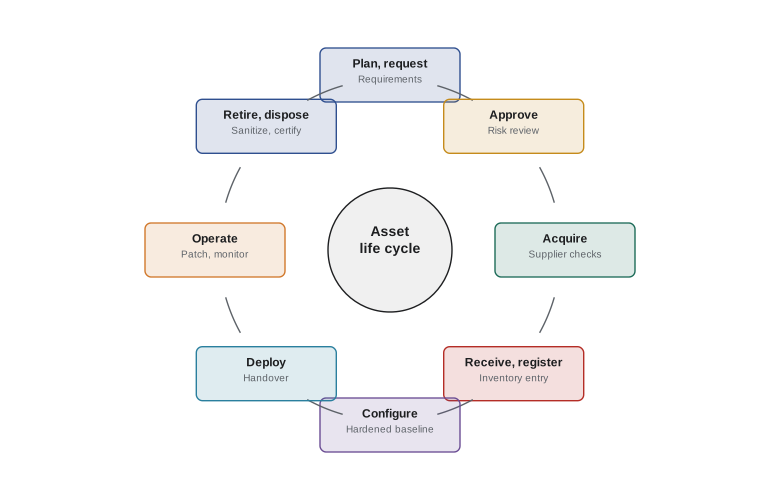
Most frameworks describe a similar sequence: plan and request, approve, acquire, receive and register, configure and harden, deploy, operate and maintain, and retire and dispose. IT asset management (ITAM) is the discipline that manages this life cycle for hardware and software, usually linked to the configuration management database described in lesson 1. Security has a role at every step, and the earlier it is involved, the cheaper the controls. Requirements written into a purchase are far easier to meet than controls bolted on after deployment.
Requesting and approving
Every asset should begin with a request that states the business need, the owner, the data the asset will hold or process and its expected classification. Approval should consider security and privacy as well as budget: does the organization already have a tool that does this, does the new asset introduce new risks, and does it need a security or privacy impact assessment? For cloud services and software, this is the point to check whether the service will hold personal information, where the data will be stored, and whether the supplier meets the organization's requirements. Lightweight, fast approval paths for low-risk requests reduce the temptation to bypass the process entirely.
Acquisition and supply chain
Acquisition is where supply chain risk, introduced in Domain 1, becomes concrete. Hardware should come from authorized channels, because gray-market and counterfeit equipment may be tampered with, may lack warranty and updates, or may simply fail early. Software should be obtained from the vendor or an approved repository and verified using signatures or hashes. Contracts should include security requirements: vulnerability disclosure and patching commitments, support periods, data protection terms, breach notification, audit rights and, for software, a software bill of materials.
A software bill of materials (SBOM) is a machine-readable list of the components, libraries and dependencies inside a piece of software, with their versions and suppliers. When a vulnerability is announced in a widely used library, as happened with Log4Shell in December 2021, organizations with SBOMs and a good inventory can find affected software in hours rather than weeks. Common SBOM formats include SPDX and CycloneDX. US federal policy has pushed SBOM adoption since Executive Order 14028 in 2021, and many Canadian organizations now request SBOMs from suppliers as well. An SBOM does not make software secure on its own, but it makes the asset inventory meaningful at the component level.
Receiving, registering and configuring
When an asset arrives, it should be checked against the order, inspected for tampering where appropriate, and registered in the inventory before it is deployed, with its owner, location, serial number and classification. Registration first means that nothing reaches the network unrecorded.
Configuration is the next critical step. New hardware and software usually ship with default settings designed for convenience, not security: default administrator passwords, unnecessary services enabled, sample accounts and permissive sharing. Secure provisioning applies a hardened baseline before deployment. Baselines are documented, approved configurations, often based on the Center for Internet Security Benchmarks, vendor security guides, or government guidance such as the US Defense Information Systems Agency Security Technical Implementation Guides and the Canadian Center for Cyber Security's guidance. Automated tools and gold images apply the baseline consistently and detect drift later. Lesson 11 covers how baselines are scoped and tailored.
Worked problem
The cost of fixing late
An organization deploys 600 laptops a year. Applying the hardened baseline during provisioning takes 15 minutes per device. Fixing a missed baseline after deployment takes about 1.5 hours per device, including remote troubleshooting and user disruption, and audits find that 20 percent of devices deployed without the baseline when it is not part of provisioning. At $60 an hour, compare the annual cost of each approach.
Show solution
- Provisioning: 600 × 0.25 h × $60 = $9,000.
- Late fixes: 20 % of 600 = 120 devices; 120 × 1.5 h × $60 = $10,800, plus the risk while the devices were exposed.
- Building the baseline into provisioning costs less and removes the exposure window.
Answer: About $9,000 for baseline at provisioning against about $10,800 in late fixes plus exposure. The numbers are illustrative, but the pattern of cheaper early controls is general.
Deploying and handing over
Handover to a user should include acceptance of the acceptable use policy, enrollment in device management, multi-factor authentication setup, and a record of who holds the asset. For shared assets, the custodian and owner should be recorded. Access to information should be provisioned through role-based groups approved by the data owner, as lesson 3 described, not by copying another user's permissions, a practice that spreads excessive access across the organization. Provisioning of access should be paired with deprovisioning: when people change roles or leave, their access and their assets must be recovered promptly.
Operating and maintaining
During operation, assets need patching, monitoring, configuration management, periodic access review and physical care. Software assets need license compliance as well as security. Running unlicensed software is a legal and financial risk, since audits by vendors or industry groups can lead to large settlements, and it is often a security risk, because pirated software is a common malware carrier and unlicensed copies may not receive updates. Software asset management tools compare installed software with entitlements, and application allowlisting prevents unapproved software from running at all.
Licenses also affect security in less obvious ways. Open source components come with licenses such as MIT, Apache 2.0 or the GNU General Public License, each with different obligations. An SBOM and a software composition analysis tool help track both vulnerabilities and license obligations. Cloud subscriptions are assets too: unused accounts and forgotten tenancies cost money and widen the attack surface, so they should be reviewed and closed through the same life cycle.
End of life and end of support
Every product eventually reaches end of life (EOL), when the vendor stops selling it, and end of support (EOS), sometimes called end of service life, when the vendor stops providing updates, including security patches. After end of support, newly discovered vulnerabilities stay unpatched forever. Windows 10, for example, reached end of support on 14 October 2025, with paid extended security updates available for a limited period. Industrial controllers, medical devices and building systems often outlive their support by many years because they are expensive to replace and embedded in critical processes.
Managing EOS starts with knowing support dates: the inventory should record them, and reports should show what will lose support in the next 12 to 24 months, so that replacements can be budgeted. When replacement is not possible in time, options include buying extended support, isolating the system on a segmented network with tightly controlled access, removing unnecessary functions, adding compensating monitoring, and formally accepting the residual risk at the owner's level, with a review date. What is not acceptable is letting unsupported systems drift on without anyone deciding.
| Option for an unsupported system | When it fits | Main limitation |
|---|---|---|
| Replace or upgrade | Budget and time allow | Cost and disruption |
| Buy extended support | Vendor offers it and replacement is planned | Expensive and time-limited |
| Isolate and harden | System must keep running, e.g. industrial or medical | Vulnerabilities remain; isolation must be maintained |
| Compensating monitoring | Alongside isolation | Detects rather than prevents |
| Formal risk acceptance | Short-term, with owner sign-off and review date | Does not reduce risk by itself |
Worked problem
Planning for end of support
An inventory report shows 140 servers whose operating system loses support in 14 months. Replacement takes about 3 server migrations per week once a project starts, and procurement and planning take 3 months. Can the organization finish in time, and if not, what should it plan?
Show solution
- Time available for migration after planning: 14 − 3 = 11 months, roughly 47 weeks.
- Capacity: 47 weeks × 3 servers = 141 servers.
- This leaves essentially no margin for delays, holidays or problem systems.
- Plan: increase migration capacity, prioritize internet-facing and high-classification servers first, and budget extended support or isolation for any stragglers.
Answer: Barely, with no margin. Start now, raise capacity, prioritize by exposure and classification, and prepare extended support or isolation as a fallback.
Retirement and disposal
Retirement brings the asset life cycle together with the data life cycle. Before an asset leaves the organization, its data must either be moved to a successor system, retained according to the records schedule, or destroyed. Storage media must be sanitized using a method appropriate to its classification and type, with evidence, as lesson 8 explains in detail. Licenses should be reclaimed, accounts and certificates revoked, and the inventory updated to show the disposal, including who sanitized the media and how. Disposal through recyclers or resellers should use vendors contracted to meet security requirements, with certificates of sanitization or destruction for each device.
Retirement is also where retention requirements apply to assets themselves. Sub-domain 2.5 includes ensuring appropriate asset retention: some hardware must be kept because it holds records under legal hold, because it is needed to read old formats, or because it is evidence in an investigation. A litigation hold on a former employee's laptop means it must not be wiped and reissued until legal counsel releases it.
Thinking like a manager
Exam questions in this area often present a tempting technical fix for what is really a process gap. If unmanaged devices appear on the network, the deeper fix is registration before deployment. If an unsupported system cannot be replaced quickly, the answer usually combines isolation, compensating controls and owner-level risk acceptance with a plan, not ignoring it or switching it off without regard to the business. And if a question asks what to do before disposing of an asset, the answer involves checking retention and legal holds, then sanitizing with evidence.
Common mistakes
MistakeDeploying assets first and registering them later.
InsteadRegister assets in the inventory before deployment.
MistakeUsing vendor default configurations.
InsteadApply an approved hardened baseline before deployment and monitor for drift.
MistakeCopying an existing user's permissions for a new hire.
InsteadProvision access through owner-approved role groups.
MistakeLetting unsupported systems run without a decision.
InsteadReplace, isolate, add compensating controls and formally accept residual risk with a review date.
MistakeWiping and reissuing a departed employee's laptop immediately.
InsteadCheck retention requirements and legal holds first.
Summary and key terms
- IT asset management covers the hardware and software life cycle from request to disposal.
- Security requirements belong in requests and contracts, where they are cheapest to meet.
- Acquire from authorized channels, verify software integrity and request SBOMs.
- Register before deployment and apply a hardened baseline instead of defaults.
- Provision access through owner-approved roles and recover access and assets promptly at role change or departure.
- Track licenses and support dates; plan for end of support well in advance.
- At retirement, honor retention and legal holds, sanitize with evidence and update the inventory.
- IT asset management
- Managing hardware and software assets across their life cycle.
- Software bill of materials
- A machine-readable list of software components and versions.
- Hardened baseline
- An approved secure configuration applied to systems.
- Gold image
- A pre-configured system image used to deploy consistent builds.
- Configuration drift
- Divergence of a system from its approved baseline over time.
- End of life
- The point at which a vendor stops selling a product.
- End of support
- The point at which a vendor stops providing updates and patches.
- Application allowlisting
- Allowing only approved software to run.
- Software composition analysis
- Tools that identify components, vulnerabilities and licenses in software.
- Litigation hold
- A legal requirement to preserve information relevant to legal proceedings.
Practice problems
Work each problem on paper first, then reveal the answer to check.
Why should security requirements go into purchase contracts?
Show answer
They are far cheaper and easier to meet before deployment than after.
What problem does an SBOM help solve?
Show answer
Finding which software contains a newly vulnerable component.
Name two sources of hardened baselines.
Show answer
CIS Benchmarks, vendor guides, DISA STIGs or Canadian Center for Cyber Security guidance.
What is wrong with copying a colleague's permissions for a new hire?
Show answer
It spreads excessive access that the new role may not need.
Why is unlicensed software a security risk as well as a legal one?
Show answer
It may carry malware and may not receive updates.
What is the difference between end of life and end of support?
Show answer
End of life stops sales; end of support stops updates and patches.
When did Windows 10 reach end of support?
Show answer
14 October 2025.
List three ways to manage an unsupported system that cannot be replaced yet.
Show answer
Extended support, isolation and hardening, compensating monitoring and formal risk acceptance.
What must be checked before wiping a departed employee's device?
Show answer
Retention requirements and any legal hold.
What evidence should disposal vendors provide?
Show answer
Certificates of sanitization or destruction for each device.
Lesson quiz · 5 questions
Score 60% or more to complete this lesson.
Create a free account to save your progress, take quizzes and earn a certificate.