
CISSP-114 · Lesson 10 of 12 · 28 min
Access attacks and countermeasures
Attackers increasingly log in rather than break in. With a valid identity, their activity looks like normal work, bypasses many network defenses and inherits whatever access the victim held. This lesson surveys the main attacks on authentication and authorization, explains why each works and sets out the countermeasures a security manager should insist on. The descriptions are conceptual: the aim is to recognize and defend against these techniques, not to perform them. Throughout, notice how often the strongest single countermeasure is the same: phishing-resistant authentication combined with least privilege and good monitoring.
Attacks on passwords
Brute-force attacks try every possible password for one account; dictionary attacks try likely passwords from word lists and leaked password collections. Both are defeated online by throttling and offline by slow, salted password hashing, as lesson 3 showed. Password spraying inverts the approach: the attacker tries a few very common passwords, such as Winter2026!, against many accounts, staying under per-account lockout thresholds. Credential stuffing uses user name and password pairs leaked from breaches of other sites, relying on reuse; automated tools test millions of pairs through rotating proxies. Large breaches of cloud data platforms in 2024 were widely attributed to stolen credentials used against accounts that lacked multifactor authentication.
| Attack | How it works | Key countermeasures |
|---|---|---|
| Brute force and dictionary | Many guesses against one account | Throttling; long passwords; slow password hashing |
| Password spraying | Few common passwords against many accounts | Blocklists of common passwords; detection across accounts; MFA |
| Credential stuffing | Leaked pairs from other breaches | MFA; breached-password checks; bot detection; unique passwords via managers |
| Offline cracking | Guessing against stolen hashes | Argon2id or similar with salts and pepper; protect the hash store |
| Rainbow tables | Precomputed hash lookups | Unique salts |
Spraying and stuffing are detected by looking across accounts rather than at one: many accounts failing from the same source, the same password attempted against many users, or a surge of successful logins from residential proxy networks. Per-account lockout alone misses spraying and can be turned against users as a denial-of-service weapon.
from collections import defaultdict
attempts = [  # (source address, account, result, password fingerprint)
    ('203.0.113.7', 'alee', 'fail', 'h1'), ('203.0.113.7', 'bdas', 'fail', 'h1'), ('203.0.113.7', 'cfox', 'fail', 'h1'),
    ('203.0.113.7', 'dlin', 'fail', 'h1'), ('203.0.113.7', 'egarcia', 'success', 'h1'), ('203.0.113.7', 'fyu', 'fail', 'h1'),
    ('198.51.100.4', 'alee', 'fail', 'h9'), ('198.51.100.4', 'alee', 'success', 'h2'),
]
by_source = defaultdict(set); by_password = defaultdict(set); successes = defaultdict(list)
for src, acct, result, pw in attempts:
    by_source[src].add(acct); by_password[pw].add(acct)
    if result == 'success':
        successes[src].append(acct)
for src, accts in by_source.items():
    if len(accts) >= 5:
        print(f'{src}: {len(accts)} accounts tried from one source -> likely spraying; successes {successes[src]}')
for pw, accts in by_password.items():
    if len(accts) >= 5:
        print(f'Same password fingerprint {pw} tried on {len(accts)} accounts')
print('Action: force reset and session revocation for', successes['203.0.113.7'], 'and require MFA registration')203.0.113.7: 6 accounts tried from one source -> likely spraying; successes ['egarcia'] Same password fingerprint h1 tried on 6 accounts Action: force reset and session revocation for ['egarcia'] and require MFA registration
Phishing and adversary-in-the-middle
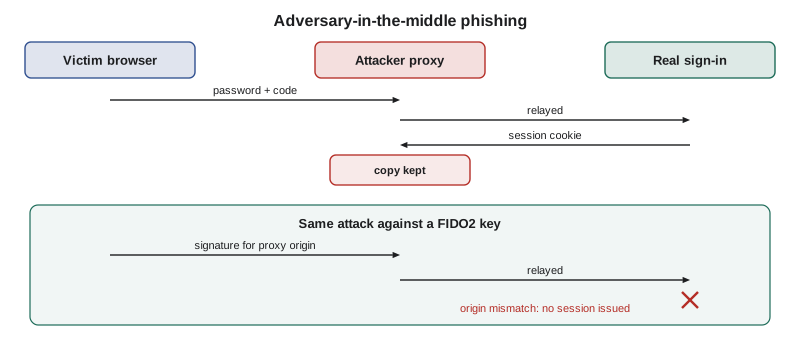
Classic phishing tricks users into entering credentials on a fake page. Adversary-in-the-middle phishing, also called AiTM or reverse-proxy phishing, goes further: the fake site relays everything between the user and the real site in real time, so the user sees the genuine login flow, completes multifactor authentication, and the attacker captures both the password and the session cookie that results. Phishing kits that automate this are sold as a service. Because the attacker steals the authenticated session, one-time codes and push approvals provide no protection. Phishing-resistant authenticators do, because their responses are bound to the genuine origin, as lesson 4 explained, and the fake site cannot obtain a usable one.
Consent phishing targets OAuth rather than passwords. The attacker registers an application with a plausible name and tricks a user into granting it permissions, such as reading mail and files, through the genuine identity provider's consent screen. The attacker never learns the password, and resetting it does not revoke the grant. Countermeasures are restricting which applications users may consent to, requiring administrator approval for high-risk permissions, verifying publishers and reviewing granted applications regularly.
Attacks on multifactor authentication and recovery
Where phishing-resistant methods are not used, attackers target the second factor. MFA fatigue, or prompt bombing, floods a user with push requests until one is approved, sometimes combined with a phone call pretending to be IT support. SIM swapping persuades or bribes a mobile carrier to move a victim's number to the attacker's SIM, capturing SMS codes and recovery messages. Help desk social engineering impersonates an employee to have passwords or authenticators reset; a series of widely reported intrusions in 2023 against casino and hospitality companies began with calls to help desks. Countermeasures include number matching for push, phishing-resistant methods, carrier account locks for executives, strict help desk verification through independent channels and alerts to the user whenever an authenticator is added or reset.
Worked problem
A help desk call
A help desk receives a call from someone claiming to be a network engineer who has a new phone and needs his authenticator re-registered. The caller knows the engineer's employee number and manager's name. Which controls should apply, and what should happen after the reset?
Show solution
- Treat employee numbers and manager names as public; they prove nothing.
- Verify through an independent channel, such as a video call compared with the HR photo plus confirmation from the manager by a known number, or in-person verification for privileged staff.
- If reset, require registration of a phishing-resistant authenticator, alert the engineer through all registered channels and flag the account for heightened monitoring for 72 hours.
- Review the account's sign-ins and changes over that period, especially privileged actions and new mail rules.
Answer: Recovery is the weakest link in many MFA deployments. Engineers and administrators are prime targets, so their recovery should require the strongest verification.
Session and token theft
After authentication, a session cookie or token stands in for the user. If an attacker steals it, through AiTM phishing, malware on the endpoint that harvests browser cookies, cross-site scripting or insecure storage, they can replay it from their own machine without knowing the password or passing MFA. Session hijacking also covers predicting or fixing session identifiers, which modern frameworks prevent by issuing random identifiers and regenerating them at login. Countermeasures include short session and token lifetimes, re-evaluating sessions continuously against device and location signals, binding tokens to devices with technologies such as token binding or proof-of-possession, protecting cookies with the Secure, HttpOnly and SameSite attributes, revoking refresh tokens on suspicious activity and detecting impossible travel.
import math
def km(lat1, lon1, lat2, lon2):
    r = 6371.0
    p1, p2 = math.radians(lat1), math.radians(lat2)
    dp, dl = p2 - p1, math.radians(lon2 - lon1)
    a = math.sin(dp / 2) ** 2 + math.cos(p1) * math.cos(p2) * math.sin(dl / 2) ** 2
    return 2 * r * math.asin(math.sqrt(a))
signins = [  # (time in hours, city, lat, lon)
    (9.00, 'Calgary', 51.05, -114.07),
    (9.75, 'Calgary', 51.05, -114.07),
    (10.25, 'Amsterdam', 52.37, 4.90),
]
for (t1, c1, a1, o1), (t2, c2, a2, o2) in zip(signins, signins[1:]):
    d = km(a1, o1, a2, o2); hours = t2 - t1
    speed = d / hours if hours else float('inf')
    verdict = 'impossible travel - challenge or revoke session' if speed > 1000 else 'plausible'
print(f'{c1} -> {c2}: {d:,.0f} km in {hours:.2f} h = {speed:,.0f} km/h: {verdict}')Calgary -> Calgary: 0 km in 0.75 h = 0 km/h: plausible Calgary -> Amsterdam: 7,176 km in 0.50 h = 14,351 km/h: impossible travel - challenge or revoke session
Attacks on Windows authentication
In Windows domains, attackers who gain administrative access to one machine try to harvest credential material from memory and reuse it. Pass-the-hash uses a captured NTLM password hash to authenticate as the user without knowing the password, because NTLM's challenge-response accepts the hash itself. Pass-the-ticket reuses captured Kerberos tickets. Overpass-the-hash uses a hash to request Kerberos tickets. Golden and silver tickets, and Kerberoasting, were described in lesson 5. These techniques let an attacker move laterally until they reach an account with domain-wide privileges. Countermeasures are the tiered administration model, so that privileged credentials are never exposed on lower-tier machines; unique local administrator passwords managed by tools such as Windows LAPS; credential protection features such as Credential Guard; restricting or disabling NTLM; adding privileged users to protected groups that cannot use weak protocols or cached credentials; and monitoring for anomalous authentication patterns.
| Technique | What is reused | Primary defenses |
|---|---|---|
| Pass-the-hash | NTLM password hash | Tiered admin; unique local admin passwords (LAPS); restrict NTLM; Credential Guard |
| Pass-the-ticket | Kerberos ticket from memory | Tiered admin; short ticket lifetimes; endpoint detection |
| Golden ticket | Forged TGT using the krbtgt key | Protect domain controllers as Tier 0; double krbtgt reset after compromise |
| Kerberoasting | Service ticket cracked offline | Long random managed service account passwords; AES only |
| Token theft in cloud | Session cookie or refresh token | Phishing-resistant MFA; token protection; conditional access; short lifetimes |
Authorization attacks and insider misuse
Some attacks target authorization rather than authentication. Privilege escalation exploits misconfiguration or vulnerabilities to gain more rights than granted: vertical escalation reaches higher privilege, such as a user becoming an administrator; horizontal escalation reaches another user's data at the same level, such as the insecure direct object reference in lesson 7. Cloud misconfigurations allow escalation when an identity can, for example, attach a more powerful policy to itself or pass a privileged role to a resource it controls. Insiders, by contrast, need no escalation: they misuse access they legitimately hold, which is why least privilege, separation of duties, monitoring of sensitive data access and prompt removal of access matter so much.
Physical access attacks belong in this domain too. Tailgating and piggybacking follow an authorized person through a controlled door; cloned proximity badges, many of which use older unencrypted technology, can be copied at a distance; and lost badges that are not revoked remain valid. Countermeasures include mantraps or turnstiles at sensitive areas, guards and staff trained to challenge, modern encrypted badge technology, badge plus PIN for high-security doors and immediate revocation of lost badges.
Worked problem
Investigating a token theft
A finance manager reports nothing unusual, but the identity provider shows her session in use from two countries at once, a new inbox rule forwarding invoices externally and a newly consented application called Invoice Helper with mail permissions. She uses push MFA. What happened and what should responders do?
Show solution
- The pattern fits adversary-in-the-middle phishing: the attacker captured her session cookie after she completed push MFA, then added persistence.
- Revoke all sessions and refresh tokens, reset her password and re-register her authenticators, preferably with a phishing-resistant method.
- Remove the forwarding rule and revoke the consent granted to Invoice Helper; a password reset alone would leave both in place.
- Search for the same phishing domain, rule and application across all users, alert finance to confirm recent payment changes by phone and review conditional access and consent policies.
Answer: Token theft and consent grants survive password resets. Response must revoke sessions, tokens and grants, remove persistence and fix the gaps that allowed it.
Thinking like a manager
When an exam question describes an access attack, identify which step it defeats. Guessing attacks defeat weak authentication; phishing and AiTM defeat non-phishing-resistant MFA; recovery attacks defeat help desk processes; token theft defeats session controls; credential reuse defeats tiering; insider misuse defeats least privilege. The most comprehensive answers move toward phishing-resistant authentication, least privilege with just-in-time administration, short-lived and bound sessions, strict recovery and detection that looks across accounts and sessions.
Common mistakes
MistakeRelying on per-account lockout to stop password spraying.
InsteadDetect across accounts and sources, block common passwords and require MFA.
MistakeBelieving any MFA stops phishing.
InsteadUse phishing-resistant MFA; codes and push are vulnerable to AiTM proxies and fatigue.
MistakeResponding to account takeover with only a password reset.
InsteadAlso revoke sessions, refresh tokens and OAuth consents, and remove persistence such as mail rules.
MistakeLetting administrators use privileged accounts on ordinary workstations.
InsteadUse tiered administration and privileged access workstations to prevent credential harvesting.
MistakeLeaving users free to consent to any third-party application.
InsteadRestrict consent, require admin approval for high-risk permissions and review grants.
Summary and key terms
- Spraying and stuffing exploit common and reused passwords; detect across accounts and require MFA.
- Adversary-in-the-middle phishing steals authenticated sessions; only phishing-resistant MFA stops it.
- MFA fatigue, SIM swapping and help desk social engineering target weaker factors and recovery.
- Stolen session cookies and tokens bypass passwords and MFA; keep them short-lived and bound, and revoke them on suspicion.
- Pass-the-hash, pass-the-ticket and golden tickets reuse Windows credential material; tiering and LAPS limit them.
- Privilege escalation can be vertical or horizontal; insiders misuse legitimate access.
- Physical attacks such as tailgating and badge cloning need physical access controls.
- Password spraying
- Trying a few common passwords against many accounts.
- Credential stuffing
- Using leaked credential pairs from other breaches.
- Adversary-in-the-middle phishing
- A reverse proxy that relays a real login and captures the session.
- Consent phishing
- Tricking a user into granting OAuth permissions to a malicious application.
- MFA fatigue
- Flooding a user with push prompts until one is approved.
- SIM swapping
- Fraudulently moving a phone number to an attacker's SIM.
- Pass-the-hash
- Authenticating with a captured NTLM hash instead of the password.
- Impossible travel
- Sign-ins whose locations and times imply an impossible speed.
- Vertical privilege escalation
- Gaining a higher level of privilege.
- Tailgating
- Following an authorized person through a controlled entrance.
Practice problems
Work each problem on paper first, then reveal the answer to check.
How does password spraying avoid lockouts?
Show answer
It tries only a few passwords per account across many accounts.
Why do OTP codes not stop AiTM phishing?
Show answer
The proxy relays the code and captures the resulting session cookie.
Why doesn't a password reset end a consent phishing compromise?
Show answer
The OAuth grant remains valid until revoked.
Name two countermeasures to MFA fatigue.
Show answer
Number matching and phishing-resistant authenticators.
What does pass-the-hash exploit?
Show answer
NTLM accepting the password hash in place of the password.
What tool provides unique local administrator passwords on Windows?
Show answer
Windows LAPS.
Which cookie attributes help protect session cookies?
Show answer
Secure, HttpOnly and SameSite.
What is horizontal privilege escalation?
Show answer
Accessing another user's resources at the same privilege level.
Why is impossible travel only a signal?
Show answer
VPNs and cloud proxies can make legitimate sign-ins appear far apart.
What physical control stops tailgating at sensitive areas?
Show answer
Mantraps or turnstiles, plus staff who challenge.
Lesson quiz · 5 questions
Score 60% or more to complete this lesson.
Create a free account to save your progress, take quizzes and earn a certificate.