
CISSP-114 · Lesson 3 of 12 · 31 min
Authentication factors and passwords
Authentication is the proof behind an identity claim, and its strength decides how hard it is for someone else to become you. Passwords remain the most common authenticator in the world, and also the most abused: they are guessed, phished, reused across sites, stolen in bulk from poorly protected databases and sprayed against login pages by automated tools. This lesson covers the types of authentication factor, the modern rules for passwords set out in NIST SP 800-63B-4, how systems should store passwords so that a stolen database is not a disaster, and how password managers change the picture. Lesson 4 builds on it with multifactor, passwordless and biometric authentication.
Types of authentication factor
Authentication factors are traditionally grouped into three types. Something you know is a secret held in memory, such as a password, passphrase or PIN; NIST calls these memorized secrets or passwords. Something you have is a physical or cryptographic device, such as a smart card, a security key, a phone running an authenticator app or a hardware token. Something you are is a biometric characteristic, such as a fingerprint, face or iris; something you do, such as typing rhythm or signature dynamics, is often grouped with it as a behavioral biometric. Some texts add somewhere you are, such as location or network, but location is better treated as context that informs risk than as a factor that proves identity.
Multifactor authentication combines factors of different types, so that an attacker must defeat two different kinds of protection. Two passwords, or a password plus a security question, are two instances of the same type and do not count as multifactor: both can be phished in the same conversation or stolen from the same breach. Each type has characteristic weaknesses. Knowledge can be guessed, shared, phished or stolen. Possession can be lost, stolen or, for phones, hijacked through SIM swapping or malware. Biometrics cannot be changed if compromised and raise privacy concerns. Good designs combine types so that their weaknesses do not overlap.
| Factor type | Examples | Strengths | Weaknesses |
|---|---|---|---|
| Something you know | Password, passphrase, PIN | Cheap, familiar, no device needed | Guessable, phishable, reused, forgotten |
| Something you have | Security key, smart card, authenticator app, hardware token | Hard to steal remotely if bound to hardware | Loss, theft, SIM swap for phone-based methods |
| Something you are | Fingerprint, face, iris, voice | Always with the user, fast | Cannot be revoked, false matches, privacy and legal limits |
| Something you do | Typing rhythm, gait, signature dynamics | Continuous and passive | Variable, mainly useful as a risk signal |
| Context (not a true factor) | Location, network, device health, time | Adds risk information cheaply | Easily spoofed; never sufficient alone |
Authentication can also be described by when it happens. Most authentication occurs once at the start of a session. Step-up authentication asks for a stronger factor before a sensitive action, such as approving a payment. Continuous authentication monitors signals such as device posture and behavior throughout a session and can end or challenge it if risk rises. Reauthentication timeouts, discussed in lesson 4, put a limit on how long a session may last before the user proves their identity again.
Password rules after NIST SP 800-63B-4
For decades, organizations forced users to create passwords with uppercase letters, digits and symbols and to change them every 60 or 90 days. Research showed that these rules produced predictable patterns, such as Spring2026! followed by Summer2026!, while frustrating users into writing passwords down. NIST changed its guidance in 2017 and strengthened the change in SP 800-63B-4, finalized in August 2025. The rules for verifiers, the systems that check passwords, are now direct (checked October 2026).
| Requirement | NIST SP 800-63B-4 position |
|---|---|
| Minimum length, password as the only factor | At least 15 characters (shall) |
| Minimum length, password as part of multifactor | At least 8 characters |
| Maximum length | Should allow at least 64 characters, including spaces and Unicode |
| Composition rules | Shall not require mixtures of character types |
| Periodic expiry | Shall not require routine changes; force a change only on evidence of compromise |
| Blocklist | Shall check new passwords against commonly used, expected and compromised values |
| Hints and knowledge-based questions | Shall not use them for recovery or authentication |
| Failed attempts | Limit consecutive failures, to no more than 100 for an authenticator unless otherwise specified |
| Paste and password managers | Should allow pasting and autofill so managers work |
Length beats complexity because the number of possible passwords grows exponentially with length. If a password is chosen uniformly at random from an alphabet of \(N\) symbols and has length \(L\), its entropy in bits is:
Human-chosen passwords are far from random, so their real entropy is much lower than this formula suggests; that is why blocklists matter. But for passphrases made of randomly chosen words, the formula works with \(N\) equal to the size of the word list. Five words drawn at random from a list of 7,776 words give \(5 \times \log_2 7776 \approx 64.6\) bits, more than a random eight-character password using all 95 printable characters, about 52.6 bits, and far easier to remember.
import math
def bits(alphabet, length):
    return length * math.log2(alphabet)
cases = [
    ('8 random printable characters', 95, 8),
    ('12 random lowercase letters', 26, 12),
    ('15 random lowercase letters', 26, 15),
    ('5 random words from 7,776', 7776, 5),
    ('6 random words from 7,776', 7776, 6),
]
rates = {'online, throttled (100 per hour)': 100 / 3600, 'offline, slow hash (10 thousand/s)': 1e4, 'offline, fast hash (100 billion/s)': 1e11}
year = 365.25 * 24 * 3600
for name, n, l in cases:
    h = bits(n, l)
    print(f'{name:31s} {h:5.1f} bits')
    for rate_name, r in rates.items():
        t = 2 ** (h - 1) / r / year  # expected time: half the space
print(f' {rate_name:36s} {t:10.3g} years')8 random printable characters 52.6 bits
online, throttled (100 per hour) 3.78e+09 years
offline, slow hash (10 thousand/s) 1.05e+04 years
offline, fast hash (100 billion/s) 0.00105 years
12 random lowercase letters 56.4 bits
online, throttled (100 per hour) 5.44e+10 years
offline, slow hash (10 thousand/s) 1.51e+05 years
offline, fast hash (100 billion/s) 0.0151 years
15 random lowercase letters 70.5 bits
online, throttled (100 per hour) 9.57e+14 years
offline, slow hash (10 thousand/s) 2.66e+09 years
offline, fast hash (100 billion/s) 266 years
5 random words from 7,776 64.6 bits
online, throttled (100 per hour) 1.62e+13 years
offline, slow hash (10 thousand/s) 4.5e+07 years
offline, fast hash (100 billion/s) 4.5 years
6 random words from 7,776 77.5 bits
online, throttled (100 per hour) 1.26e+17 years
offline, slow hash (10 thousand/s) 3.5e+11 years
offline, fast hash (100 billion/s) 3.5e+04 yearsThe rates in the output are illustrative, but the pattern is real. Online guessing against a throttled login is hopeless for the attacker even with modest passwords; that is why throttling is a required control. Offline guessing against a stolen database is a different matter: against a fast hash such as unsalted SHA-256 on modern graphics processors, eight random characters fall within hours, while a slow, salted password hash raises the cost by many orders of magnitude. The length and storage decisions work together.
Worked problem
Evaluating a password policy
A hospital's policy requires eight-character passwords with one capital, one digit and one symbol, changed every 60 days, with five failed attempts locking the account for 24 hours. Users authenticate with a password only. Evaluate the policy against NIST SP 800-63B-4.
Show solution
- Length: eight characters is below the 15-character minimum for single-factor passwords.
- Composition rules and 60-day expiry are expressly discouraged; they produce predictable patterns.
- There is no blocklist check, so Hospital2026! would be accepted.
- A 24-hour lockout after five failures lets an attacker lock out clinicians at will, a denial-of-service risk in a hospital.
- Better: require multifactor authentication, which allows a shorter password; if passwords remain single-factor, require 15 characters, a blocklist, no expiry without cause and throttling with progressive delays rather than long lockouts.
Answer: The policy is both weaker and more painful than modern guidance. The largest single improvement is adding a second factor, ideally phishing-resistant.
Storing passwords safely
A verifier never needs to know a user's password, only to check that the user knows it. Passwords must therefore never be stored in plain text or with reversible encryption. They should be stored as the output of a password hashing function: a one-way function that is deliberately slow and uses a unique random salt for each password. The salt, stored alongside the hash, ensures that two users with the same password have different stored values and defeats precomputed rainbow tables. The work factor, such as an iteration count or memory cost, makes each guess expensive. Some systems add a pepper, a secret value kept outside the database, for example in a hardware security module, so that a stolen database alone is not enough to start guessing.
General-purpose hash functions such as SHA-256 are designed to be fast, which is exactly wrong for passwords; they are covered in CISSP-112 for integrity uses. Password hashing functions include Argon2id, the winner of the 2015 Password Hashing Competition and generally preferred because it is memory-hard; scrypt, also memory-hard; bcrypt, long used with an adjustable cost; and PBKDF2, which NIST accepts and which is widely available in standard libraries. Guidance such as the OWASP Password Storage Cheat Sheet publishes recommended parameters, for example hundreds of thousands of iterations for PBKDF2-HMAC-SHA256, and these rise over time as hardware improves.
import hashlib, os, hmac
pw = 'correct horse battery staple'
# Fast, unsalted hash: identical passwords give identical stored values
print('SHA-256 user A:', hashlib.sha256(pw.encode()).hexdigest()[:24], '...')
print('SHA-256 user B:', hashlib.sha256(pw.encode()).hexdigest()[:24], '...')
# Salted, slow PBKDF2 (fixed salts here so the output is repeatable)
for user, salt in (('A', bytes.fromhex('3f9a1c22d07e5b41aa09c6e18b2f7d55')), ('B', bytes.fromhex('c1d2e3f405162738495a6b7c8d9eafb0'))):
    dk = hashlib.pbkdf2_hmac('sha256', pw.encode(), salt, 600_000)
    print(f'PBKDF2 user {user}: salt {salt.hex()[:8]}... hash {dk.hex()[:24]}...')
# Verification recomputes with the stored salt and compares in constant time
stored_salt = bytes.fromhex('3f9a1c22d07e5b41aa09c6e18b2f7d55')
stored = hashlib.pbkdf2_hmac('sha256', pw.encode(), stored_salt, 600_000)
attempt = hashlib.pbkdf2_hmac('sha256', b'correct horse battery stapler', stored_salt, 600_000)
print('Correct password accepted:', hmac.compare_digest(stored, hashlib.pbkdf2_hmac('sha256', pw.encode(), stored_salt, 600_000)))
print('Wrong password accepted: ', hmac.compare_digest(stored, attempt))SHA-256 user A: c4bbcb1fbec99d65bf59d85c ... SHA-256 user B: c4bbcb1fbec99d65bf59d85c ... PBKDF2 user A: salt 3f9a1c22... hash 4d9ae9638bb9710d963bff0f... PBKDF2 user B: salt c1d2e3f4... hash 086ab76400374e09686294dc... Correct password accepted: True Wrong password accepted: False
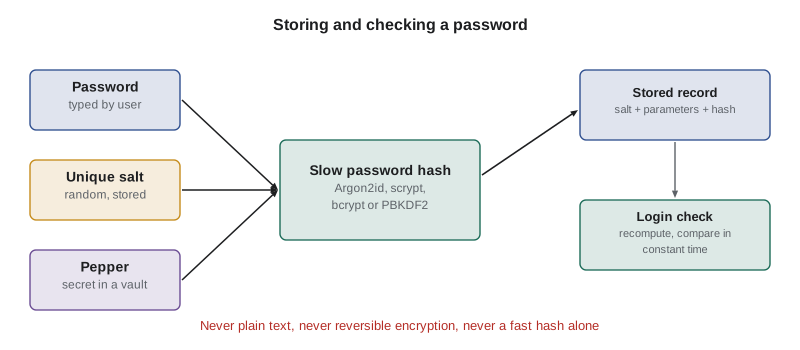
Two further points matter in practice. Verification should compare hashes in constant time, as hmac.compare_digest does, so that response timing does not leak how many bytes matched. And when an organization upgrades its hashing algorithm, it cannot rehash existing passwords it does not know; instead it rehashes each password at the user's next successful login, or wraps the old hash inside the new function immediately.
Password managers and secrets hygiene
Password managers generate long, random, unique passwords for every site, store them encrypted under a master secret and fill them in automatically, which removes password reuse and makes phishing harder because the manager will not fill a password into a look-alike domain. Enterprise managers add shared vaults for team credentials with access logging. They are now widely recommended, and NIST's requirement to allow pasting exists partly so that they work. The risks are concentration, since the vault is a valuable target, and recovery, if the master secret is lost; both are managed with strong multifactor protection of the vault, careful vendor selection and documented recovery.
Breached-password checking is another practical control. Services can compare new passwords against lists of passwords exposed in breaches, often using a k-anonymity range query that sends only the first characters of the password's hash, so that the password itself never leaves the organization. Credential-stuffing attacks, covered in lesson 10, depend entirely on reuse, so preventing reuse of breached passwords removes much of their effect.
BLOCKLIST = {'password', 'password123', 'qwertyuiop', 'letmein', 'welcome1', 'hospital2026', 'iloveyou', '123456789012345'}
CONTEXT = {'hospital', 'stmarys', 'priya'}
def check(pw, single_factor=True):
    reasons = []
    minimum = 15 if single_factor else 8
    if len(pw) < minimum:
        reasons.append(f'shorter than {minimum}')
    if len(pw) > 64:
        reasons.append('longer than the 64 this system accepts')
    low = pw.lower()
    if low in BLOCKLIST:
        reasons.append('on the blocklist')
    if any(word in low for word in CONTEXT):
        reasons.append('contains a context-specific word')
    if len(set(pw)) <= 2:
        reasons.append('repetitive')
    return 'accepted' if not reasons else 'rejected: ' + ', '.join(reasons)
for pw, sf in [('Hospital2026!', True), ('Hospital2026!', False), ('maple kettle orbit lantern', True), ('aaaaaaaaaaaaaaaa', True), ('Tr0ub4dor&3', False)]:
print(f'{pw!r:30} single-factor={sf!s:5} -> {check(pw, sf)}')'Hospital2026!' single-factor=True -> rejected: shorter than 15, contains a context-specific word 'Hospital2026!' single-factor=False -> rejected: contains a context-specific word 'maple kettle orbit lantern' single-factor=True -> accepted 'aaaaaaaaaaaaaaaa' single-factor=True -> rejected: repetitive 'Tr0ub4dor&3' single-factor=False -> accepted
Other knowledge-based and possession-based authenticators
PINs are short secrets that are acceptable when they unlock a local device or authenticator that enforces throttling, as a smart card or security key does after a few wrong attempts, because the attacker cannot guess offline. A six-digit PIN protecting a server login over the network would be weak; the same PIN unlocking a hardware key that wipes itself after eight failures is strong. Cognitive passwords, such as security questions, are discouraged because the answers are guessable or discoverable. Possession factors range from one-time password tokens and authenticator apps through smart cards with certificates to FIDO2 security keys and passkeys; lesson 4 compares them in detail, including which resist phishing.
Worked problem
Choosing a password store
A small software firm stores customer passwords as unsalted SHA-1 hashes. A developer proposes switching to SHA-512 because it is a stronger hash. Respond as the security manager.
Show solution
- SHA-512 is still a fast general-purpose hash; graphics processors can test billions of guesses per second against it.
- The real problems are the lack of a salt and the lack of a work factor.
- Recommend Argon2id, or PBKDF2 with a high iteration count if a FIPS-validated module is required, with a unique random salt per password and optionally a pepper in a key vault.
- Migrate by wrapping existing SHA-1 hashes in the new function immediately, then rehash with the plain password at each user's next login, and force resets for accounts known to be exposed.
Answer: Choose a slow, salted password hashing function, not a longer fast hash. Migration must protect existing records at once rather than waiting for every user to log in.
Thinking like a manager
Password questions on the exam test whether you have moved past outdated rules. The modern answer favors length, blocklists, throttling, password managers and multifactor authentication over complexity rules and forced rotation. For storage, the answer is always a slow, salted password hashing function, never encryption and never a fast hash. And where the risk is high, the best answer usually reduces dependence on passwords altogether, through phishing-resistant multifactor or passwordless authentication.
Common mistakes
MistakeRequiring complex characters and 90-day expiry.
InsteadRequire length, check a blocklist and force changes only on evidence of compromise.
MistakeStoring passwords with reversible encryption or a fast hash such as SHA-256.
InsteadUse Argon2id, scrypt, bcrypt or PBKDF2 with a unique salt and appropriate work factor.
MistakeCounting a password and a security question as two-factor authentication.
InsteadCombine factors of different types, such as a password and a security key.
MistakeLocking accounts for long periods after a few failures.
InsteadThrottle with increasing delays and monitoring, so attackers cannot lock users out at will.
MistakeBlocking paste in password fields.
InsteadAllow paste and autofill so password managers can generate and fill unique passwords.
Summary and key terms
- Factors are something you know, have and are; multifactor means combining different types.
- NIST SP 800-63B-4 requires 15 characters for single-factor passwords, 8 within multifactor, no composition rules and no routine expiry.
- Blocklists of common and breached passwords replace complexity rules.
- Entropy grows with length; random passphrases are strong and memorable.
- Store passwords with slow, salted password hashing functions, compared in constant time.
- Throttling makes online guessing impractical; slow hashing protects stolen databases.
- Password managers prevent reuse and resist look-alike phishing domains.
- Memorized secret
- A password, passphrase or PIN known to the user.
- Multifactor authentication
- Authentication using factors of two or more different types.
- Entropy
- A measure, in bits, of how unpredictable a secret is.
- Salt
- A unique random value combined with a password before hashing.
- Pepper
- A secret value, stored separately from the database, added to password hashing.
- Work factor
- A parameter that makes each hash computation deliberately expensive.
- Argon2id
- A memory-hard password hashing function, generally preferred for new systems.
- PBKDF2
- A password-based key derivation function that iterates an HMAC many times.
- Blocklist
- A list of common, expected or compromised passwords that must be rejected.
- Step-up authentication
- Requiring stronger authentication before a sensitive action.
Practice problems
Work each problem on paper first, then reveal the answer to check.
What minimum length does NIST SP 800-63B-4 require for a password used as the only factor?
Show answer
15 characters.
Does NIST require periodic password expiry?
Show answer
No; change is required only on evidence of compromise.
Why are a password and a PIN not multifactor?
Show answer
Both are something you know.
What does a salt defeat?
Show answer
Precomputed rainbow tables and the matching of identical passwords across users.
Why is SHA-256 a poor password storage function?
Show answer
It is fast, so stolen hashes can be guessed at enormous rates.
Compute the entropy of a 4-word random passphrase from a 7,776-word list.
Show answer
About 51.7 bits.
What is a pepper?
Show answer
A secret added to hashing and stored outside the database.
Why is a short PIN acceptable on a security key?
Show answer
The key enforces throttling or wipes itself, so offline guessing is impossible.
Why should verifiers allow paste?
Show answer
So password managers can fill long, unique passwords.
How should an organization migrate from an old password hash?
Show answer
Wrap old hashes in the new function at once and rehash at next login.
Lesson quiz · 5 questions
Score 60% or more to complete this lesson.
Create a free account to save your progress, take quizzes and earn a certificate.