
CISSP-117 · Lesson 5 of 12 · 26 min
Secure coding I: input, output and data handling
The objective 'define and apply secure coding guidelines and standards' asks a security manager to make sure developers know how to write code that resists common weaknesses, that those expectations are written down, and that compliance can be checked. A secure coding standard is a short, enforceable document: it states the rules (for example, 'all database access uses parameterized queries'), explains why, gives approved patterns and libraries, and says how the rule is verified, whether by code review, static analysis or tests. Good standards are specific to the languages and frameworks the organization actually uses and are maintained like code. They draw on public sources such as the OWASP Cheat Sheet Series, the OWASP ASVS, the SEI CERT coding standards for C, C++ and Java, and vendor framework guidance.
This lesson and the next cover the core secure coding practices a manager should recognize. The examples are in Python because it is easy to read, but the principles apply in every language. CMPUT-331 Lessons 8 and 9 and CMPUT-404 Lesson 10 go deeper into implementation for students who write code. Every example here shows the defensive pattern only.
The root cause: mixing data and instructions
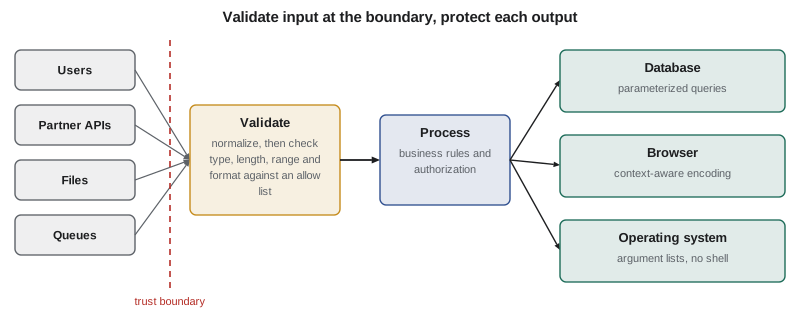
A large share of serious vulnerabilities share one root cause: untrusted data is interpreted as instructions. When a program builds a database query, an operating system command, a web page or a file path by joining strings together, and part of that string comes from a user, the user may be able to change the meaning of the whole string. SQL injection, command injection, cross-site scripting, path traversal and many other weaknesses are variations on this theme. Two families of controls address it. Input handling makes sure that what enters the program is what the program expects. Output handling makes sure that when data leaves the program for another interpreter, such as a database, a browser or a shell, it is passed in a way that keeps it as data.
Input validation
Input validation checks that data conforms to what the application expects before it is used. The strongest form is allow-list validation: define exactly what is acceptable, such as a merchant identifier of the letter M followed by eight digits, a currency code from a fixed list, or an amount between 0.01 and 50,000 with at most two decimal places, and reject everything else. Deny-list validation, which tries to reject known bad patterns, is weaker because attackers find variations that the list misses. Validation should happen on the server; checks in a browser or mobile app improve the user experience but can be bypassed by anyone who sends requests directly.
Before validating, data should be canonicalized: converted to a single standard form. The same character or path can be represented in many ways through different encodings, Unicode normalization forms, letter case or redundant path segments. If validation is applied before canonicalization, an attacker may submit a form that passes the check and is later converted into something dangerous. The rule is to decode and normalize first, then validate, and to avoid decoding twice.
import re, unicodedata
from decimal import Decimal, InvalidOperation
# Allow-list validation for a refund request (defensive pattern)
MERCHANT = re.compile(r'M\d{8}')
CURRENCIES = {'CAD', 'USD'}
def validate(req):
    errors = []
    mid = unicodedata.normalize('NFKC', str(req.get('merchant_id', ''))).strip()
    if not MERCHANT.fullmatch(mid):
        errors.append('merchant_id format')
    if req.get('currency') not in CURRENCIES:
        errors.append('currency not allowed')
    try:
        amt = Decimal(str(req.get('amount')))
        if not (Decimal('0.01') <= amt <= Decimal('50000')) or amt.as_tuple().exponent < -2:
            errors.append('amount out of range')
    except InvalidOperation:
        errors.append('amount not a number')
    return errors or ['ok']
for r in [
    {'merchant_id': 'M00012345', 'currency': 'CAD', 'amount': '125.50'},
    {'merchant_id': 'M0001234',  'currency': 'CAD', 'amount': '125.50'},
    {'merchant_id': 'M00012345', 'currency': 'EUR', 'amount': '10'},
    {'merchant_id': 'M00012345', 'currency': 'USD', 'amount': '10.005'},
    {'merchant_id': 'M00012345', 'currency': 'USD', 'amount': 'ten'},
]:
print(r['merchant_id'], r['currency'], r['amount'], '->', ', '.join(validate(r)))M00012345 CAD 125.50 -> ok M0001234 CAD 125.50 -> merchant_id format M00012345 EUR 10 -> currency not allowed M00012345 USD 10.005 -> amount out of range M00012345 USD ten -> amount not a number
Validation is necessary but not sufficient. Many legitimate inputs contain characters that are dangerous in some context: a customer named O'Brien has an apostrophe, a product description may contain angle brackets, and a free-text complaint can contain almost anything. The application cannot reject these without rejecting real customers. That is why the decisive defense against injection is correct output handling, which keeps data as data no matter what it contains.
Parameterized queries
For databases, the standard defense is the parameterized query, also called a prepared statement. The program sends the database the structure of the query, with placeholders, separately from the values. The database driver passes the values in a way that can never change the query's structure. Building a query by joining strings is the pattern that causes SQL injection; the example below shows why it fails even for honest input, and what the safe version looks like.
import sqlite3
db = sqlite3.connect(':memory:')
db.execute('CREATE TABLE customers (id INTEGER PRIMARY KEY, surname TEXT, merchant TEXT)')
db.executemany('INSERT INTO customers (surname, merchant) VALUES (?, ?)',
               [("O'Brien", 'M00012345'), ('Nakamura', 'M00012345'), ('Okafor', 'M00098765')])
name = "O'Brien"   # a real customer, not an attack
# Unsafe pattern (shown only to explain the failure): joining strings breaks on the apostrophe
try:
    db.execute("SELECT id FROM customers WHERE surname = '" + name + "'").fetchall()
except sqlite3.Error as e:
    print('String-built query failed:', type(e).__name__)
# Safe pattern: placeholders keep the value as data
rows = db.execute('SELECT id, surname FROM customers WHERE surname = ? AND merchant = ?',
                  (name, 'M00012345')).fetchall()
print('Parameterized query returned:', rows)String-built query failed: OperationalError Parameterized query returned: [(1, "O'Brien")]
The string-built query fails on an ordinary surname because the apostrophe ends the quoted text early. The same weakness is what allows deliberately crafted input to rewrite a query. The parameterized query has no such problem. Object-relational mappers (ORMs) generate parameterized queries by default, which is one reason secure coding standards encourage them, but most ORMs also offer ways to write raw queries, and those must follow the same rule. Stored procedures help only if they themselves avoid building dynamic SQL from their inputs. Least privilege for the database account adds a second layer: the refunds service's account should be able to read and write only the tables it needs, so that even a flaw has limited reach.
Output encoding for web pages
When an application places data into a web page, the browser interprets the page as a mixture of HTML, JavaScript, CSS and URLs. Data that contains characters with special meaning in those languages can change the page's behavior, which is the root of cross-site scripting (XSS). The defense is output encoding, also called escaping: converting special characters into safe representations appropriate to the context where the data appears. The rules differ by context. Text placed between HTML tags needs HTML entity encoding; data in an HTML attribute needs attribute encoding and quotation; data in a URL needs URL encoding; data placed inside JavaScript needs JavaScript encoding, and is best avoided altogether.
import html, json
from urllib.parse import quote
# Context-aware encoding of an untrusted product note (defensive pattern)
note = 'Fragile <handle with care> & keep "upright"'
print('HTML body     :', '<p>' + html.escape(note) + '</p>')
print('HTML attribute:', '<input value="' + html.escape(note, quote=True) + '">')
print('URL parameter :', '/search?q=' + quote(note, safe=''))
print('JSON data :', json.dumps({'note': note}))HTML body : <p>Fragile <handle with care> & keep "upright"</p>
HTML attribute: <input value="Fragile <handle with care> & keep "upright"">
URL parameter : /search?q=Fragile%20%3Chandle%20with%20care%3E%20%26%20keep%20%22upright%22
JSON data : {"note": "Fragile <handle with care> & keep \"upright\""}In practice, developers should rarely write encoding calls by hand. Modern web frameworks and template engines encode output automatically by default, and the secure coding standard should require their use and forbid the features that bypass encoding, except through a reviewed exception. A Content Security Policy (CSP) sent by the server adds defense in depth by telling the browser which scripts may run, which limits the damage if an encoding mistake slips through. Lesson 7 returns to XSS as a vulnerability class.
Commands, files and other interpreters
The same principle applies to every interpreter. To run an operating system program, use an API that accepts the program and its arguments as a list, not a single command string passed to a shell, and better still use a library function that does the job without starting a program at all. For file access, never build a path from user input without checking it. Resolve the full path and confirm that it remains inside the directory the application is meant to use, which defeats path traversal attempts that use sequences such as '..' to climb out. For XML, disable external entity processing, which several older parsers enable by default. For deserialization of data from untrusted sources, use simple data formats such as JSON with schema validation rather than formats that can reconstruct arbitrary objects; Lesson 7 explains why.
from pathlib import Path
# Keep file access inside an allowed directory (defensive pattern)
BASE = Path('/srv/ridgeline/statements').resolve()
def safe_statement_path(filename):
    candidate = (BASE / filename).resolve()
    if candidate.parent != BASE or candidate.suffix != '.pdf':
        return None
    return candidate
for f in ['2026-09.pdf', '2026-10.pdf', '../config/settings.yaml', 'sub/2026-09.pdf', '2026-09.exe']:
    p = safe_statement_path(f)
print(f'{f:28s} ->', p if p else 'rejected')2026-09.pdf -> /srv/ridgeline/statements/2026-09.pdf 2026-10.pdf -> /srv/ridgeline/statements/2026-10.pdf ../config/settings.yaml -> rejected sub/2026-09.pdf -> rejected 2026-09.exe -> rejected
Handling sensitive data in code
Secure coding also covers how programs handle sensitive data internally. Collect and keep only what is needed. Avoid writing personal information, card numbers, passwords or secrets to logs, error messages, analytics events or crash reports. Mask values when they must be displayed, for example showing only the last four digits of an account number. Clear sensitive values from memory where the language allows it, and avoid caching them in places such as browser storage. Use well-reviewed libraries for encryption and hashing rather than writing your own; Lesson 6 covers cryptography in code. These practices reduce the impact when other controls fail.
Worked problem
Writing a secure coding rule that can be enforced
After a code review finds two string-built SQL queries, Ridgeline's application security lead is asked to update the secure coding standard so the problem does not recur.
Show solution
- State the rule: 'All database access uses parameterized queries or the approved ORM. Raw SQL built by joining strings with any variable is prohibited.'
- Explain why in one paragraph, linking to the internal example and the OWASP SQL Injection Prevention Cheat Sheet.
- Give the approved pattern for each language Ridgeline uses, with copy-ready examples.
- Define verification: a static analysis rule fails the build on string-built queries; reviewers check raw SQL; exceptions need application security approval and are recorded.
Answer: A good rule is short, explains its purpose, gives approved patterns and states exactly how compliance is verified.
Common mistakes
MistakeRelying on browser-side validation for security.
InsteadValidate on the server; client-side checks are only for convenience.
MistakeUsing deny lists of dangerous characters as the main defense.
InsteadUse allow-list validation and, above all, correct output handling for each interpreter.
MistakeValidating input before decoding and normalizing it.
InsteadCanonicalize first, then validate, and avoid double decoding.
MistakeBuilding SQL queries by joining strings with user data.
InsteadUse parameterized queries or an ORM, with least-privilege database accounts.
MistakeEncoding all output the same way regardless of context.
InsteadUse context-aware encoding, preferably through frameworks that encode by default, plus a Content Security Policy.
MistakeWriting secure coding standards as long, generic documents.
InsteadKeep them specific to the organization's languages, with approved patterns and defined verification.
Summary and key terms
- A secure coding standard states enforceable rules, the reasons, approved patterns and how compliance is verified.
- Injection weaknesses arise when untrusted data is interpreted as instructions.
- Input validation should use allow lists, run on the server and follow canonicalization.
- Parameterized queries keep values separate from SQL structure and prevent SQL injection.
- Output encoding must match the context: HTML body, attribute, URL or JavaScript; frameworks should do it by default.
- Use argument-list APIs for commands, contain file paths, disable XML external entities and avoid unsafe deserialization.
- Keep sensitive data out of logs and errors, mask it in displays and use reviewed cryptographic libraries.
- Secure coding standard
- An organization's enforceable rules and approved patterns for writing secure code.
- Allow-list validation
- Accepting only input that matches an explicit definition of what is valid.
- Canonicalization
- Converting data to a single standard form before validation.
- Parameterized query
- A database query whose structure is sent separately from its values, which are passed as data.
- Output encoding
- Converting special characters so that data is treated as text by the receiving interpreter.
- Content Security Policy
- A browser security header that restricts which scripts and resources a page may load.
- Path traversal
- A weakness in which crafted file paths reach files outside the intended directory.
- Object-relational mapper
- A library that maps program objects to database tables and usually generates parameterized queries.
Practice problems
Work each problem on paper first, then reveal the answer to check.
What is the common root cause of injection weaknesses?
Show answer
Untrusted data being interpreted as instructions by an interpreter.
Why is allow-list validation stronger than deny-list validation?
Show answer
It accepts only known-good input, while deny lists miss new variations.
Why must canonicalization come before validation?
Show answer
Otherwise an encoded form can pass validation and later decode into something dangerous.
Why does a string-built query fail for the surname O'Brien?
Show answer
The apostrophe ends the quoted string early and breaks the query structure.
What makes a parameterized query safe?
Show answer
Values are passed separately and cannot change the query structure.
Name four web output contexts that need different encoding.
Show answer
HTML body, HTML attribute, URL and JavaScript.
What does a Content Security Policy add?
Show answer
Defense in depth by restricting which scripts and resources the browser will load.
How should a program run an operating system command safely?
Show answer
Use a library function or an API that takes an argument list without a shell.
How can path traversal be prevented?
Show answer
Resolve the full path and confirm it stays inside the allowed directory.
Give two ways to protect sensitive data handled by code.
Show answer
Keep it out of logs and errors, mask it in displays, avoid caching it, and use reviewed crypto libraries.
Lesson quiz · 5 questions
Score 60% or more to complete this lesson.
Create a free account to save your progress, take quizzes and earn a certificate.