
CMPUT-174 · Lesson 11 of 12 · 28 min
Testing, debugging and program design
Writing code that runs is the easy part. Writing code that is correct, that stays correct as it changes, and that other people can read and fix, is the real craft of programming. This lesson brings together the habits that make that possible: testing with assertions, doctests and the unittest framework; choosing test cases systematically; debugging methodically rather than by guesswork; developing programs in small, verified steps; and writing readable code that follows Python's style conventions. These are the habits employers ask for and that every later course, especially CMPUT-301 and CMPUT-401, will build on.
Why test?
A test runs part of a program with known inputs and checks that the outputs are what they should be. Tests catch mistakes early, when they are cheapest to fix; they document what the code is supposed to do; and, most valuably, they let you change code with confidence, because rerunning the tests tells you immediately if a change broke something that used to work. That last property, protection against regressions, is why professional software teams run thousands of automated tests every time anyone changes the code.
Testing has limits. As the computing pioneer Edsger Dijkstra put it in 1969, testing can show the presence of bugs, but never their absence: no finite set of tests can try every possible input. That is why good testing is systematic, choosing inputs most likely to reveal mistakes, and why computing science also studies ways of reasoning about correctness, which you will meet in CMPUT-272. In practice, well-chosen tests catch the great majority of everyday bugs.
Assertions
The simplest test is an assert statement, which checks that a condition is true and raises an AssertionError if it is not. Asserts are handy inside your own code to check assumptions, such as a list not being empty, and as quick tests while you develop a function. Write the expected values by working them out independently, by hand or from a trusted source, never by copying what the code currently produces, or the test will simply confirm whatever bug exists.
def letter_grade(mark):
    if not 0 <= mark <= 100:
        raise ValueError(f"mark must be 0 to 100, got {mark}")
    for cutoff, letter in [(80, "A"), (70, "B"), (60, "C"), (50, "D")]:
        if mark >= cutoff:
            return letter
    return "F"

# Expected values worked out from the grading scale, including every boundary
assert letter_grade(100) == "A"
assert letter_grade(80) == "A"
assert letter_grade(79.9) == "B"
assert letter_grade(70) == "B"
assert letter_grade(60) == "C"
assert letter_grade(50) == "D"
assert letter_grade(49.9) == "F"
assert letter_grade(0) == "F"
print("all assertions passed")

try:
    assert letter_grade(65) == "B", "65 should be a B?"   # a deliberately wrong expectation
except AssertionError as e:
print("AssertionError:", e)all assertions passed AssertionError: 65 should be a B?
The failing assertion at the end shows what a failure looks like; the message after the comma explains the expectation. Python can be run in an optimized mode that skips assert statements entirely, so never use assert to check things that must always be enforced, such as user input; use if and raise for those, as letter_grade does for out-of-range marks.
Choosing test cases
Since you cannot test every input, choose tests that are most likely to expose mistakes. A practical approach combines a few techniques. Equivalence partitioning divides inputs into groups the program should treat the same way, such as passing marks and failing marks, and tests one or two from each group. Boundary values, from lesson 5, test the edges between groups, where most bugs live. Special cases test the unusual inputs programmers forget: empty lists, a single item, zero, negative numbers, very large values, duplicates, and text with spaces, accents or unexpected case. Invalid inputs check that the program rejects what it should, clearly.
| Technique | Idea | Tests for an average(values) function |
|---|---|---|
| Typical case | Ordinary input | [70, 80, 90] gives 80 |
| Equivalence partitions | One test per group of similar inputs | All positive; mixed signs; all equal |
| Boundaries | Edges between groups | A list of exactly one item |
| Special cases | Inputs people forget | Floats such as [0.1, 0.2]; a very long list; negative numbers |
| Invalid input | Inputs that must be rejected | [] raises ValueError with a clear message |
Doctests
A doctest is an example written inside a docstring in the form of an interactive session: a line starting with >>> followed by the expected output. The doctest module finds these examples and runs them, reporting any whose output differs. Doctests do double duty: they show readers exactly how to use a function, and they verify that the documentation stays true. They work best for small functions with simple outputs.
import doctest

def average(values):
    """Return the arithmetic mean of a non-empty list of numbers.

    >>> average([70, 80, 90])
    80.0
    >>> average([5])
    5.0
    >>> average([-2, 2])
    0.0
    >>> average([])
    Traceback (most recent call last):
        ...
    ValueError: average of an empty list
    """
    if not values:
        raise ValueError("average of an empty list")
    return sum(values) / len(values)

result = doctest.testmod()
print(f"doctests attempted {result.attempted}, failed {result.failed}")doctests attempted 4, failed 0
The unittest framework
For larger programs, tests are kept in separate files and run by a test framework. Python's standard library includes unittest. You write a class whose methods start with test, and each method uses assertion methods such as assertEqual, assertAlmostEqual for floats, assertTrue and assertRaises. The framework runs every test, reports which passed and which failed, and keeps going after a failure so you see every problem at once. Many professional Python projects use a third-party framework called pytest, which uses plain assert statements; the ideas are the same.
import unittest, io

def split_bill(bill, tip_percent, people):
    """Return each person's share including tip, rounded to cents."""
    if people < 1:
        raise ValueError("people must be at least 1")
    return round(bill * (1 + tip_percent / 100) / people, 2)

class TestSplitBill(unittest.TestCase):
    def test_typical(self):
        self.assertEqual(split_bill(84.00, 18, 3), 33.04)

    def test_no_tip(self):
        self.assertEqual(split_bill(100, 0, 4), 25.0)

    def test_one_person(self):
        self.assertAlmostEqual(split_bill(10, 15, 1), 11.5)

    def test_zero_people_rejected(self):
        with self.assertRaises(ValueError):
            split_bill(10, 15, 0)

    def test_shares_cover_total(self):          # a property every answer should have
        share = split_bill(100, 0, 3)
        self.assertGreaterEqual(round(share * 3, 2), 99.99)

suite = unittest.defaultTestLoader.loadTestsFromTestCase(TestSplitBill)
result = unittest.TextTestRunner(stream=io.StringIO(), verbosity=0).run(suite)
print(f"ran {result.testsRun} tests: {len(result.failures)} failures, {len(result.errors)} errors")
print("all passed" if result.wasSuccessful() else "some tests failed")ran 5 tests: 0 failures, 0 errors all passed
In a real project the test class would live in a file such as test_bill.py and you would run python3 -m unittest from a terminal, which discovers and runs every test file and prints a summary. The example runs the tests inside the program and prints its own summary so that its output is repeatable. The last test checks a property rather than an exact value: whatever the inputs, the shares should add up to at least the total less a cent. Property checks like this catch whole families of bugs.
Some programmers write the tests before the code, a practice called test-driven development: write a failing test for the next small piece of behavior, write just enough code to make it pass, then tidy the code while keeping the tests passing. Even if you do not follow it strictly, writing a few tests first forces you to decide exactly what a function should do, which is step 1 of the problem-solving process from lesson 3.
Debugging methodically
Debugging is the process of finding and fixing the cause of a failure. Beginners often debug by making random changes until the symptom disappears, which is slow and leaves the real cause in place. Experienced programmers treat debugging like a small scientific investigation: reproduce the failure reliably, form a hypothesis about the cause, design an experiment that would confirm or refute it, run the experiment, and repeat until the cause is found. Only then fix it, and add a test that would have caught it, so it never returns.
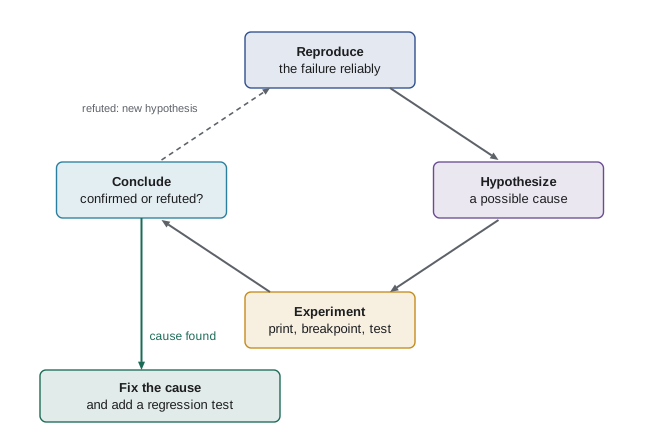
The most useful experiments are simple. Printing intermediate values shows where the program's state first differs from what you expect. A debugger, such as the one built into Thonny, IDLE or Visual Studio Code, or Python's own pdb, lets you pause the program at a line, called a breakpoint, inspect variables and step through one line at a time. Explaining the code line by line to someone else, or even to an inanimate object, a technique programmers call rubber duck debugging, often reveals the flaw as you hear yourself describe what you assumed.
def median(values):
    """Return the median of a non-empty list (buggy version)."""
    s = sorted(values)
    mid = len(s) // 2
    return s[mid]

# Reproduce: compare with hand-worked answers
cases = {(3, 1, 2): 2, (4, 1, 3, 2): 2.5, (7,): 7}
for data, expected in cases.items():
    got = median(list(data))
    print(f"{data}: got {got}, expected {expected}, {'ok' if got == expected else 'WRONG'}")

# Hypothesis: even-length lists are handled wrongly. Experiment: print the state.
s = sorted([4, 1, 3, 2]); mid = len(s) // 2
print("sorted", s, "mid", mid, "picks", s[mid], "but the middle pair is", s[mid - 1:mid + 1])

def median_fixed(values):
    if not values:
        raise ValueError("median of an empty list")
    s = sorted(values)
    mid = len(s) // 2
    return s[mid] if len(s) % 2 == 1 else (s[mid - 1] + s[mid]) / 2

print([median_fixed(list(d)) == e for d, e in cases.items()])(3, 1, 2): got 2, expected 2, ok (4, 1, 3, 2): got 3, expected 2.5, WRONG (7,): got 7, expected 7, ok sorted [1, 2, 3, 4] mid 2 picks 3 but the middle pair is [2, 3] [True, True, True]
Two further techniques find bugs fast. Divide and conquer: if a long computation goes wrong somewhere, check the state halfway through; if it is already wrong, the bug is in the first half, otherwise the second, and keep halving, exactly like binary search. And minimize: shrink the failing input to the smallest example that still fails, which often makes the cause obvious. A bug that appears with a 10,000-line data file but also appears with three lines is much easier to understand with three.
Worked problem
Debugging with a hypothesis
A function meant to count words longer than five letters returns 0 for the sentence "Computing science rewards careful thinking." How would you debug it?
Show solution
- Reproduce: confirm the call returns 0 when the hand-worked answer is 4 (computing, science, rewards, careful; "thinking." has a full stop attached).
- Hypothesis 1: the comparison is wrong. Experiment: print each word and its length; the lengths look right but nothing is counted.
- Look closer at the code and find count = 0 inside the loop, resetting the accumulator on every word, so only the last word can count.
- Fix by moving count = 0 before the loop, decide whether punctuation should be stripped, and add a test with this sentence.
Answer: The accumulator was reset inside the loop; moving the initialization out and adding a test fixes and protects it.
Incremental development and program design
The most reliable way to write a program is incrementally: build the smallest version that does something useful, test it, then add one feature at a time, testing after each. When something breaks, the cause is almost certainly in the few lines you just added. Combined with version control, introduced in ROB-110 lesson 4 and covered fully in CMPUT-301, which lets you return to any earlier working version, incremental development turns large projects into a series of small, safe steps.
Good program design keeps those steps small. Separate concerns: keep input and output apart from computation, as lesson 7 recommended, so the computation can be tested without files or keyboards. Give each function one job. Avoid repeating code; if you copy and paste a block, make it a function instead, a principle often summarized as "don't repeat yourself". Replace unexplained constants such as 0.05 or 7.99 with named constants such as TAX_RATE, written in capitals by convention, so they can be found and changed in one place.
Readable code and style
Code is read far more often than it is written, by teammates, by reviewers, by markers and by you months later. Python has an official style guide, PEP 8, which most Python code follows. Its main points are easy to adopt: four spaces per indentation level, lines no longer than about 79 to 99 characters, snake_case names for variables and functions, CAPITALS for constants, spaces around operators and after commas, blank lines between functions, and comments that explain why rather than restating what the code obviously does. Tools called linters and formatters, such as flake8, pylint and black, check or fix style automatically.
# Hard to read
def f(l,t):
  r=[]
  for x in l:
    if x[1]>=t:r.append(x[0])
  return r

# Easier to read: descriptive names, a docstring, a named constant, standard spacing
PASS_MARK = 50

def passing_students(records, threshold=PASS_MARK):
    """Return the names of students whose mark is at least threshold."""
    return [name for name, mark in records if mark >= threshold]

records = [("Aiyana", 91), ("Ben", 47), ("Chen", 78)]
print(f(records, 50), passing_students(records))['Aiyana', 'Chen'] ['Aiyana', 'Chen']
| Habit | Why it helps |
|---|---|
| Write the docstring and a few tests before the body | Forces a clear decision about what the function should do |
| Build in small steps and run after each | Bugs are found within the last few lines written |
| Keep computation separate from input and output | Computation can be tested automatically and reused |
| Use descriptive names and named constants | Code explains itself and changes happen in one place |
| Rerun all tests after every change | Regressions are caught immediately |
| When a bug is found, add a test for it | The same bug can never quietly return |
Common mistakes
MistakeWriting expected test values by copying the program's current output.
InsteadWork expected values out independently, by hand or from a trusted source.
MistakeTesting only typical inputs.
InsteadInclude partitions, boundaries, special cases and invalid inputs.
MistakeUsing assert to validate user input.
InsteadAsserts can be disabled; use if and raise for checks that must always run.
MistakeChanging code at random until a bug seems to disappear.
InsteadReproduce, hypothesize, experiment, then fix the real cause and add a test.
MistakeWriting a whole program before running any of it.
InsteadDevelop incrementally, testing after each small addition.
MistakeUsing cryptic names and unexplained numbers.
InsteadUse descriptive snake_case names and named CAPITAL constants, following PEP 8.
Summary and key terms
- Tests check outputs against independently known answers, catch regressions and document behavior.
- Testing shows the presence of bugs, not their absence, so choose tests systematically.
- assert gives quick checks; doctests put runnable examples in docstrings; unittest organizes larger test suites.
- Good test sets cover typical cases, partitions, boundaries, special cases and invalid inputs.
- Debug scientifically: reproduce, hypothesize, experiment, fix, and add a regression test.
- Printing state, debuggers, divide and conquer and minimizing inputs locate bugs quickly.
- Incremental development, separation of concerns and PEP 8 style keep programs reliable and readable.
- Test case
- A specific input with a known expected output used to check a program.
- Regression
- A bug in behavior that used to work, introduced by a later change.
- Assertion
- A statement that checks a condition and raises AssertionError if it is false.
- Doctest
- A test written as an interactive example inside a docstring.
- unittest
- Python's standard library framework for organizing and running tests.
- Equivalence partitioning
- Dividing inputs into groups that should behave alike and testing each group.
- Debugging
- Finding and fixing the cause of incorrect program behavior.
- Breakpoint
- A place where a debugger pauses a running program for inspection.
- Incremental development
- Building a program in small steps, testing after each.
- PEP 8
- The official style guide for Python code.
Practice problems
Work each problem on paper first, then reveal the answer to check.
Write three assert statements for a function is_even(n), including a negative number.
Show answer
assert is_even(4); assert not is_even(7); assert is_even(-2).
Why must expected values in tests not be copied from the program's output?
Show answer
Because the test would then confirm any existing bug instead of detecting it.
List five test inputs for a function that returns the largest item in a list.
Show answer
A typical list, a list with the maximum first, one with the maximum last, a single-item list, all negative numbers, and an empty list that should raise an error.
Write a doctest example for a function square(n).
Show answer
>>> square(4) followed on the next line by 16.
What does assertRaises check in unittest?
Show answer
That the code inside raises the stated exception type.
What is a regression, and how do automated tests help?
Show answer
A previously working behavior that breaks after a change; rerunning tests reveals it immediately.
Describe the steps of methodical debugging.
Show answer
Reproduce the failure, form a hypothesis, test it with an experiment, repeat until the cause is found, fix it and add a test.
A program fails on a 5,000-row file. How can minimizing help?
Show answer
Remove rows until the smallest input that still fails remains, which usually makes the cause obvious.
Rewrite def F(X,Y):return X*1.13+Y in PEP 8 style with a named constant.
Show answer
TAX_MULTIPLIER = 1.13, then def total_cost(price, fee): return price * TAX_MULTIPLIER + fee
Why keep computation separate from input and output?
Show answer
So computations can be tested automatically and reused without a keyboard, screen or file.
Lesson quiz · 5 questions
Score 60% or more to complete this lesson.
Create a free account to save your progress, take quizzes and earn a certificate.