
CMPUT-174 · Lesson 5 of 12 · 26 min
Control flow: conditionals
The programs so far have run every statement in order, top to bottom. Real problems need choices: charge a different fare for children, reject an invalid percentage, warn when a tank is nearly empty. Conditional statements let a program choose which statements to run based on the values it is working with. This lesson covers Python's if, elif and else statements, how indentation defines blocks, nested conditions, the conditional expression, the match statement, and the important skill of testing decisions at their boundaries. Together with loops in lesson 6, conditionals are what turn a list of instructions into an algorithm that can respond to its input.
The if statement and blocks
An if statement runs a block of statements only when a condition is true. The condition is any expression that produces a Boolean, or a value Python can treat as one. The line ends with a colon, and the statements that belong to the if are indented beneath it, conventionally by four spaces. When the indentation returns to the earlier level, the block has ended and the program continues with the next statement regardless of the condition.
temperature = -18

if temperature < -10:
    print("Extreme cold: limit time outdoors.")
    print("Cover exposed skin.")
print("Forecast shown.") # not indented: always runsExtreme cold: limit time outdoors. Cover exposed skin. Forecast shown.
Indentation in Python is not decoration; it is part of the language's grammar. Many languages, such as C and Java, mark blocks with braces and treat indentation as optional style. Python's designers chose to make indentation mandatory so that the way code looks always matches what it does. The price is that you must be consistent: mixing tabs and spaces, or indenting one line by three spaces and the next by four, produces an IndentationError. Configure your editor to insert four spaces when you press Tab, which IDLE, Thonny and Visual Studio Code do by default for Python files.
An if statement can have an else part, which runs when the condition is false, so exactly one of the two blocks runs. For more than two choices, add elif branches, short for "else if". Python tests the conditions from top to bottom and runs the block for the first condition that is true, then skips the rest. If none is true, the else block runs, if there is one.
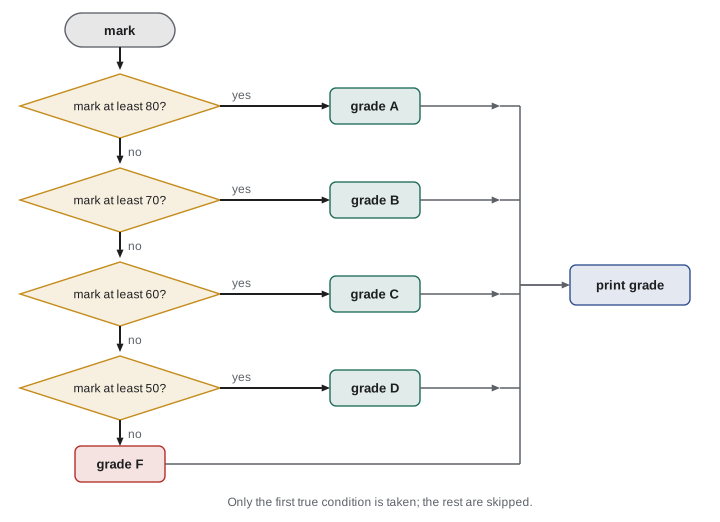
def letter_grade(mark):
    """Return a letter grade for a percentage mark from 0 to 100."""
    if mark >= 80:
        return "A"
    elif mark >= 70:
        return "B"
    elif mark >= 60:
        return "C"
    elif mark >= 50:
        return "D"
    else:
        return "F"

for m in [95, 80, 79.9, 70, 65, 50, 49.5, 0]:
print(f"{m:5} -> {letter_grade(m)}") 95 -> A
80 -> A
79.9 -> B
70 -> B
65 -> C
50 -> D
49.5 -> F
0 -> FOrder matters in a chain. Because Python takes the first true condition, the test mark >= 70 only needs to check the lower limit: by the time it is reached, we already know the mark is below 80. If the conditions were written in the opposite order, starting with mark >= 50, every passing mark would get a D, a logic error that produces no message. When the branches of a chain are ranges, either test from highest to lowest or write each range in full, for example 70 <= mark < 80, so that the order no longer matters.
def letter_grade_wrong_order(mark):
    if mark >= 50:
        return "D"
    elif mark >= 60:
        return "C"
    elif mark >= 80:
        return "A"
    else:
        return "F"

print([letter_grade_wrong_order(m) for m in (95, 72, 55, 30)]) # every pass is a D['D', 'D', 'D', 'F']
Designing conditions
Many decisions combine several facts. Python's and, or and not, from lesson 4, combine conditions; parentheses make the grouping explicit. Suppose a transit system charges a reduced fare to riders under 13 or 65 and over, but children under 6 ride free. A first attempt often gets the order or the grouping wrong. Writing the rules as a small decision table first, listing every combination of facts and the required outcome, makes the logic easy to check before writing code.
| Age | Fare category | Fare in this example |
|---|---|---|
| 0 to 5 | Free | 0.00 |
| 6 to 12 | Child | 2.00 |
| 13 to 64 | Adult | 3.50 |
| 65 and over | Senior | 2.00 |
| Negative or over 130 | Invalid input | Rejected |
def fare(age):
    """Return the fare for a rider of the given age (illustrative prices)."""
    if age < 0 or age > 130:
        raise ValueError(f"implausible age: {age}")
    if age <= 5:
        return 0.00
    elif age <= 12 or age >= 65:
        return 2.00
    else:
        return 3.50

for age in [0, 5, 6, 12, 13, 64, 65, 90]:
    print(f"age {age:3d}: {fare(age):.2f}")
for age in [-1, 200]:
    try:
        fare(age)
    except ValueError as e:
print("rejected:", e)age 0: 0.00 age 5: 0.00 age 6: 2.00 age 12: 2.00 age 13: 3.50 age 64: 3.50 age 65: 2.00 age 90: 2.00 rejected: implausible age: -1 rejected: implausible age: 200
Two design habits appear in this function. First, it validates its input before doing anything else. Checking for impossible values at the start, sometimes called a guard clause, keeps the main logic simple and stops bad data from producing plausible-looking nonsense later. Second, the test values were chosen at the boundaries of each category, 5 and 6, 12 and 13, 64 and 65, because boundaries are exactly where off-by-one mistakes, such as writing < where <= was intended, hide.
That second habit has a name: boundary value testing. For any condition that splits inputs into ranges, test the values just below, on and just above each boundary. For letter_grade, that means 79.9, 80 and 80.1, and so on down the scale. It is one of the most productive testing techniques there is, because a large fraction of real bugs are boundary bugs. Lesson 11 builds it into automated tests.
Worked problem
Finding a boundary bug
A store gives free shipping on orders of 50 dollars or more. The code says: if total > 50: shipping = 0, else: shipping = 7.99. Which test reveals the bug, and what is the fix?
Show solution
- The rule says 50 dollars or more, so a total of exactly 50.00 should ship free.
- With total > 50, a total of 50.00 gives shipping 7.99: the boundary value exposes the bug.
- Totals of 49.99 and 50.01 both behave correctly, so tests that avoid the exact boundary would miss it.
- Fix the condition to total >= 50.
Answer: Test exactly 50.00; change > to >=.
Nested conditions
A conditional block can contain another conditional. Nesting is natural when a second question only makes sense after the first is answered, but deep nesting quickly becomes hard to read. Two techniques keep it under control: combining conditions with and, and returning early from a function once the answer is known, so the remaining code does not need to be indented further.
# Nested version: correct but hard to follow
def can_borrow_nested(is_member, overdue_items, fines):
    if is_member:
        if overdue_items == 0:
            if fines < 10:
                return True
            else:
                return False
        else:
            return False
    else:
        return False

# Flattened version with early returns: same results, easier to read
def can_borrow(is_member, overdue_items, fines):
    if not is_member:
        return False
    if overdue_items > 0:
        return False
    return fines < 10

cases = [(True, 0, 0), (True, 0, 12), (True, 2, 0), (False, 0, 0)]
for c in cases:
print(c, can_borrow_nested(*c), can_borrow(*c))(True, 0, 0) True True (True, 0, 12) False False (True, 2, 0) False False (False, 0, 0) False False
The test compares both versions on the same inputs, a cheap way to check that a rewrite did not change behavior, which programmers call a refactoring. The asterisk in can_borrow(*c) unpacks the tuple c into three separate arguments; lesson 9 explains tuples.
Conditional expressions
For a simple choice between two values, Python has a compact conditional expression: value_if_true if condition else value_if_false. It is an expression, not a statement, so it can appear inside other expressions, such as an f-string or an assignment. Use it when both choices are short; for anything longer, an ordinary if statement is clearer.
for n in [1, 2, 7]:
    print(f"{n} item{'s' if n != 1 else ''} in your cart")

reading = 38.4
status = "fever" if reading >= 38.0 else "normal"
print("Temperature:", status)

values = [12, -3, 0, 8]
print([abs(v) if v < 0 else v for v in values])1 item in your cart 2 items in your cart 7 items in your cart Temperature: fever [12, 3, 0, 8]
The match statement
Python 3.10 added a match statement for choosing among many specific values or shapes of data. Each case lists a pattern; the first matching case runs, and case _ matches anything, like a final else. For simple value choices, match reads more cleanly than a long if-elif chain, and it becomes powerful when matching structured data, which CMPUT-274 explores. Because older Python versions do not have it, some code you read will use if-elif chains where match would now fit.
def describe(command):
    match command.lower().split():
        case ["quit"] | ["exit"]:
            return "Goodbye."
        case ["go", direction] if direction in ("north", "south", "east", "west"):
            return f"You walk {direction}."
        case ["go", _]:
            return "You cannot go that way."
        case ["take", item]:
            return f"You pick up the {item}."
        case []:
            return "Say something."
        case _:
            return "I do not understand."

for cmd in ["go north", "GO up", "take lamp", "exit", "", "dance wildly"]:
print(f"{cmd!r:15} -> {describe(cmd)}")'go north' -> You walk north. 'GO up' -> You cannot go that way. 'take lamp' -> You pick up the lamp. 'exit' -> Goodbye. '' -> Say something. 'dance wildly' -> I do not understand.
This example also previews the capstone in lesson 12, where you can build a small text adventure. The patterns match lists of words: ["go", direction] matches any two-word command starting with go and binds the second word to the name direction, and the if after it, called a guard, adds an extra condition.
Truthiness and common traps
An if condition does not have to be a Boolean. Python treats zero, empty strings, empty lists, empty dictionaries and None as false, and nearly everything else as true. So if items: means "if the list is not empty". This is idiomatic and concise, but it can hide bugs when zero is a legitimate value: if a sensor reading of 0 is valid, if reading: will wrongly treat it as missing. In such cases test explicitly, for example if reading is not None:.
def report(reading):
    if reading:                          # treats 0 as missing
        sloppy = f"value {reading}"
    else:
        sloppy = "missing"
    if reading is not None:              # only None means missing
        careful = f"value {reading}"
    else:
        careful = "missing"
    return sloppy, careful

for r in [12.5, 0, None]:
print(r, report(r))12.5 ('value 12.5', 'value 12.5')
0 ('missing', 'value 0')
None ('missing', 'missing')Another trap is writing a comparison against several values incorrectly. The condition if answer == "y" or "yes": is always true, because Python reads it as (answer == "y") or ("yes"), and the non-empty string "yes" is truthy. The correct forms are answer == "y" or answer == "yes", or, more neatly, answer in ("y", "yes").
answer = "no"
print(bool(answer == "y" or "yes"))     # always True: a classic bug
print(answer in ("y", "yes")) # correctTrue False
| Situation | Prefer | Avoid |
|---|---|---|
| Several ranges of one value | if-elif-else from highest to lowest, or full ranges | Unordered tests that overlap |
| Invalid input | A guard clause at the start that raises an error or returns | Letting bad values flow into calculations |
| Two short alternatives for a value | A conditional expression | A four-line if-else for one assignment |
| Many specific values or shapes | match, or a dictionary lookup (lesson 9) | A very long if-elif chain |
| Comparing with several values | x in (a, b, c) | x == a or b or c |
| Zero or empty is valid data | is not None or an explicit comparison | Relying on truthiness |
Common mistakes
MistakeForgetting the colon at the end of an if, elif or else line.
InsteadEvery such line ends with a colon, and the block below is indented.
MistakeMixing tabs and spaces, or indenting inconsistently.
InsteadUse four spaces per level; set your editor to insert spaces.
MistakeWriting range tests in an order where an early branch captures values meant for later ones.
InsteadTest from highest to lowest, or write each range in full.
MistakeTesting only typical values.
InsteadTest just below, on and just above every boundary.
MistakeWriting if x == 1 or 2:
InsteadWrite if x == 1 or x == 2:, or if x in (1, 2):.
MistakeUsing if value: when 0 is a valid value.
InsteadTest explicitly, for example if value is not None:.
Summary and key terms
- if runs a block only when its condition is true; else and elif add alternatives.
- Indentation defines blocks in Python and must be consistent.
- An if-elif-else chain runs only the first branch whose condition is true, so order matters.
- Validate input early with guard clauses and keep nesting shallow with early returns.
- Boundary value testing checks just below, on and just above every decision boundary.
- Conditional expressions choose between two short values; match chooses among many values or patterns.
- Truthiness is concise but can mistake zero or empty for missing; x == a or b is a classic bug.
- Conditional statement
- A statement that runs code only when a condition holds, such as if.
- Block
- A group of statements indented under a line ending in a colon.
- elif
- Short for else if; an extra condition tested when earlier ones were false.
- Guard clause
- A check at the start of a function that rejects invalid input or returns early.
- Boundary value testing
- Testing values just below, on and just above each decision boundary.
- Decision table
- A table listing combinations of conditions and the required outcome for each.
- Nested condition
- A conditional statement inside the block of another.
- Conditional expression
- An expression of the form a if condition else b.
- match statement
- A statement that selects a case by comparing a value against patterns.
- Truthiness
- Python's rules for treating non-Boolean values as true or false in conditions.
Practice problems
Work each problem on paper first, then reveal the answer to check.
Write an if-elif-else chain that prints "cold" below 5, "mild" from 5 to below 20, and "warm" at 20 or above.
Show answer
if t < 5: print("cold") / elif t < 20: print("mild") / else: print("warm")
Which values would you test for the chain in the previous question?
Show answer
4.9, 5, 5.1, 19.9, 20 and 20.1, plus an extreme such as -40.
What does letter_grade(80) return, and which branch decides it?
Show answer
"A", from the first branch, mark >= 80.
Rewrite: if x > 0: if x < 10: print("single digit") using one condition.
Show answer
if 0 < x < 10: print("single digit")
Why is if color == "red" or "blue": always true?
Show answer
It means (color == "red") or "blue", and the non-empty string "blue" is truthy.
Write a conditional expression that sets sign to "negative", or "non-negative".
Show answer
sign = "negative" if x < 0 else "non-negative"
A parking lot charges nothing for the first 15 minutes, 3 dollars per started hour after that, to a maximum of 20 dollars. Write the decision logic in words.
Show answer
If minutes <= 15, charge 0; otherwise charge 3 times the number of started hours, computed as (minutes + 59) // 60, capped at 20.
Why validate input at the start of a function?
Show answer
To reject impossible values before they produce misleading results, and to keep the main logic simple.
What does case _ do in a match statement?
Show answer
It matches anything, like a final else.
A thermostat function uses if reading: to detect a missing sensor value. When does this go wrong?
Show answer
When the reading is exactly 0, which is valid but treated as missing.
Lesson quiz · 5 questions
Score 60% or more to complete this lesson.
Create a free account to save your progress, take quizzes and earn a certificate.