
CMPUT-174 · Lesson 8 of 12 · 26 min
Strings and text processing
Much of the data programs handle is text: names, addresses, messages, web pages, log files, survey answers, DNA sequences written as letters, and program source code itself. Python's string type, str, provides a rich set of tools for working with text. This lesson covers how strings are indexed and sliced, why they cannot be changed in place, the most useful string methods, formatting output precisely with f-strings, special characters, and several classic text-processing algorithms: counting words, reversing and checking palindromes, a simple cipher and validating input. Lesson 2 explained how characters are stored as Unicode code points; here the focus is on what you can do with them.
Indexing and slicing
A string is a sequence of characters, and each character has a position, called its index, starting from 0. The expression s[0] is the first character, s[1] the second, and s[len(s) - 1] the last. Python also allows negative indices that count from the end: s[-1] is the last character and s[-2] the second last. Asking for an index beyond the end raises an IndexError.
A slice extracts a substring: s[start:stop] gives the characters from index start up to, but not including, stop, the same convention as range. Either end can be omitted: s[:3] is the first three characters and s[3:] is everything from index 3 on. A third number gives a step, so s[::2] takes every second character and s[::-1] steps backwards through the whole string, reversing it. Unlike indexing, slicing never raises an error for out-of-range positions; it just returns whatever part exists.
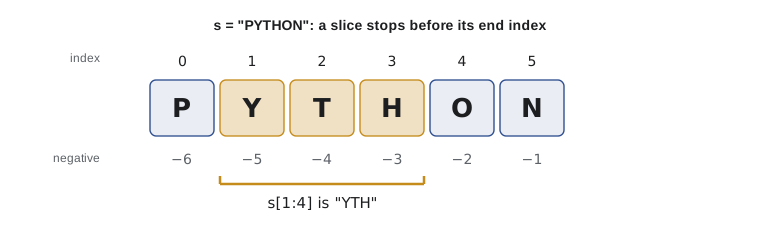
s = "PYTHON"
print(s[0], s[5], s[-1], s[-2])
print(s[1:4], s[:3], s[3:], s[::2], s[::-1])
print(s[2:100], repr(s[10:]))        # slices never raise IndexError
print(len(s), "Y" in s, "ON" in s, "py" in s)

code = "CMPUT-174"
subject, number = code[:5], code[6:]
print(subject, int(number) + 100)P N N O YTH PYT HON PTO NOHTYP THON '' 6 True True False CMPUT 274
The in operator tests whether one string occurs inside another, and it is case-sensitive, so "py" is not found in "PYTHON". The last two lines show a common real task: pulling the parts out of a structured code such as a course number. When the parts have variable length, splitting on the hyphen, shown later, is more robust than fixed slice positions.
Strings are immutable
Strings cannot be changed in place. An assignment such as s[0] = "J" raises a TypeError. Every string method that seems to change a string, such as upper or replace, actually returns a new string and leaves the original alone. To change a variable's text, assign the new string to the name: s = s.replace("P", "J"). Immutability has benefits: strings can be shared safely between parts of a program, and they can be used as dictionary keys, as lesson 9 shows.
s = "PYTHON"
try:
    s[0] = "J"
except TypeError as e:
    print("TypeError:", e)

t = s.replace("P", "J")
print(s, t)          # s is unchanged; t is a new string
s = s.lower()        # rebind the name to a new string
print(s)TypeError: 'str' object does not support item assignment PYTHON JYTHON python
Useful string methods
Methods are functions that belong to a type and are called with a dot after a value, such as name.upper(). Strings have dozens of methods; a handful cover most everyday needs. The table lists the ones you will use most often.
| Method | What it returns | Example | Result |
|---|---|---|---|
| upper(), lower() | Copy in upper or lower case | "Hi There".lower() | "hi there" |
| strip() | Copy without leading and trailing whitespace | " ok \n".strip() | "ok" |
| split(sep) | List of pieces separated by sep (whitespace if omitted) | "a,b,c".split(",") | ["a", "b", "c"] |
| sep.join(list) | One string joining the pieces with sep | "-".join(["a", "b"]) | "a-b" |
| replace(old, new) | Copy with every old replaced by new | "2026-10-19".replace("-", "/") | "2026/10/19" |
| find(sub) | Index of first occurrence, or -1 | "banana".find("an") | 1 |
| count(sub) | Number of non-overlapping occurrences | "banana".count("a") | 3 |
| startswith(p), endswith(p) | True or False | "report.csv".endswith(".csv") | True |
| isdigit(), isalpha() | True if all characters are digits or letters | "2026".isdigit() | True |
raw = "   Grace Hopper , computer scientist ,  1906  "
parts = [p.strip() for p in raw.split(",")]
print(parts)
name, role, born = parts
first, last = name.split()
print(f"{last.upper()}, {first} ({role}), born {born}")
print(" ".join(word.capitalize() for word in "the art of computer programming".split()))
print("banana".find("an"), "banana".find("x"), "banana".count("an"))
print("data.CSV".lower().endswith(".csv"))['Grace Hopper', 'computer scientist', '1906'] HOPPER, Grace (computer scientist), born 1906 The Art Of Computer Programming 1 -1 2 True
The pattern split, clean each piece, then join is at the heart of a huge amount of real text processing. Note the use of lower before endswith in the last line: file extensions, email addresses and user answers often arrive in unpredictable case, and normalizing to lower case before comparing avoids a whole class of bugs. For case-insensitive comparison of text in many languages, casefold is even more thorough than lower.
Formatting output with f-strings
Clear output matters: a table of results with aligned columns and sensible decimal places is far easier to read and check than a jumble of numbers. F-strings, introduced in lesson 3, accept a format specification after a colon inside the braces. The specification can set the width, alignment, number of decimal places, thousands separators and more.
| Specification | Meaning | Example | Output |
|---|---|---|---|
| :8 | Minimum width 8 | f"[{42:8}]" | [ 42] |
| :<8, :>8, :^8 | Left, right or center alignment | f"[{'ab':^8}]" | [ ab ] |
| :.2f | Fixed point with 2 decimals | f"{3.14159:.2f}" | 3.14 |
| :, | Thousands separators | f"{1234567:,}" | 1,234,567 |
| :.1% | Percentage with 1 decimal | f"{0.256:.1%}" | 25.6% |
| :08.3f | Width 8, zero-padded, 3 decimals | f"{3.5:08.3f}" | 0003.500 |
| :e | Scientific notation | f"{0.00012:e}" | 1.200000e-04 |
| !r | Show the repr, with quotes for strings | f"{'hi'!r}" | 'hi' |
items = [("Notebook", 3, 4.5), ("Calculator", 1, 24.99), ("Pens (box)", 2, 6.25)]
print(f"{'Item':<12}{'Qty':>4}{'Price':>9}{'Total':>10}")
print("-" * 35)
grand = 0
for name, qty, price in items:
    line_total = qty * price
    grand += line_total
    print(f"{name:<12}{qty:>4}{price:>9.2f}{line_total:>10.2f}")
print("-" * 35)
print(f"{'Subtotal':<25}{grand:>10.2f}")
tax_rate = 0.05
print(f"{'Tax ' + format(tax_rate, '.0%'):<25}{grand * tax_rate:>10.2f}")
print(f"{'Total':<25}{grand * (1 + tax_rate):>10.2f}")
print(f"Population: {41_465_298:,} Share: {0.2287:.1%}")Item Qty Price Total ----------------------------------- Notebook 3 4.50 13.50 Calculator 1 24.99 24.99 Pens (box) 2 6.25 12.50 ----------------------------------- Subtotal 50.99 Tax 5% 2.55 Total 53.54 Population: 41,465,298 Share: 22.9%
The 5 percent tax rate here is just an example; real sales taxes vary by province and state, which is exactly the kind of rule a program should take as data rather than hard-code. An older method, str.format, and an even older style using the % symbol also appear in existing code, and they use similar specifications; f-strings are the modern choice.
Special characters and multi-line strings
Some characters cannot be typed directly inside quotation marks, so Python uses escape sequences that start with a backslash: \n is a newline, \t a tab, \\ a backslash itself, and \" or \' a quotation mark inside a string delimited by the same mark. A string written with triple quotation marks can span several lines, which is how docstrings work. A raw string, written with r before the quotation marks, treats backslashes literally; raw strings are convenient for Windows file paths and for regular expressions.
print("line one\nline two")
print("name\tmark\nAda\t93")
print('She said "hello" and left.')
print("It's 5\" tall")
print(r"C:\Users\student\notes.txt")      # raw string: backslashes kept
poem = """Roses are red,
  code can be neat;
tests that all pass
  make the day sweet."""
print(poem)
print(len("a\nb"), repr("a\nb"))line one line two name mark Ada 93 She said "hello" and left. It's 5" tall C:\Users\student\notes.txt Roses are red, code can be neat; tests that all pass make the day sweet. 3 'a\nb'
Classic algorithm: counting words
Counting how often each word appears is a building block of search engines, spam filters, authorship studies and language models. The algorithm is: normalize the text to lower case, split it into words, strip punctuation from each word, and keep a count for each distinct word. Python's dictionary type, covered fully in lesson 9, is ideal for the counts: it maps each word to its count. The standard library's collections.Counter does the same job in one line, and shows the most common words directly.
text = """It was the best of times, it was the worst of times, it was the age of
wisdom, it was the age of foolishness, it was the epoch of belief."""

counts = {}
for raw_word in text.lower().split():
    word = raw_word.strip(".,;:!?\"'()")
    if word:
        counts[word] = counts.get(word, 0) + 1

top = sorted(counts.items(), key=lambda pair: pair[1], reverse=True)[:5]
for word, n in top:
    print(f"{word:<8}{n:>3} {'*' * n}")

from collections import Counter
print(Counter(w.strip(".,") for w in text.lower().split()).most_common(3))
print("distinct words:", len(counts), " total words:", sum(counts.values()))it 5 *****
was 5 *****
the 5 *****
of 5 *****
times 2 **
[('it', 5), ('was', 5), ('the', 5)]
distinct words: 12 total words: 30The opening of Charles Dickens's A Tale of Two Cities (1859) is in the public domain, which is why it can be quoted freely. Real text processing must decide many small questions this example glosses over: is "it's" one word or two? Should "Times" and "times" be merged? Should hyphenated words be split? Those decisions depend on the purpose, and making them explicit is part of designing the program.
Classic algorithms: reversing, palindromes and ciphers
A palindrome reads the same forwards and backwards, like "level" or the phrase "Was it a car or a cat I saw?" once spaces, punctuation and case are ignored. Checking one is a two-step algorithm: clean the text to just lower-case letters and digits, then compare it with its reverse. The reversal can be a slice, or a loop comparing characters from both ends inward, which stops early at the first mismatch.
def clean(text):
    return "".join(ch.lower() for ch in text if ch.isalnum())

def is_palindrome(text):
    s = clean(text)
    return s == s[::-1]

def is_palindrome_loop(text):
    s = clean(text)
    left, right = 0, len(s) - 1
    while left < right:
        if s[left] != s[right]:
            return False
        left += 1
        right -= 1
    return True

for t in ["level", "Was it a car or a cat I saw?", "Python", "", "Taco cat!"]:
print(f"{t!r:32} {is_palindrome(t)} {is_palindrome_loop(t)}")'level' True True 'Was it a car or a cat I saw?' True True 'Python' False False '' True True 'Taco cat!' True True
The Caesar cipher, said to have been used by Julius Caesar, shifts each letter a fixed number of places along the alphabet, wrapping from Z back to A. It is hopelessly insecure, since there are only 25 possible shifts to try, but it is a perfect exercise in converting between characters and numbers with ord and chr and in modular arithmetic from lesson 4. CMPUT-331 covers real cryptography.
def caesar(text, shift):
    result = []
    for ch in text:
        if "a" <= ch <= "z":
            result.append(chr((ord(ch) - ord("a") + shift) % 26 + ord("a")))
        elif "A" <= ch <= "Z":
            result.append(chr((ord(ch) - ord("A") + shift) % 26 + ord("A")))
        else:
            result.append(ch)              # leave spaces and punctuation alone
    return "".join(result)

secret = caesar("Meet at the library at noon.", 3)
print(secret)
print(caesar(secret, -3))

# Breaking it: try every shift and look for a common English word
for shift in range(26):
    guess = caesar(secret, -shift)
    if " the " in guess:
print("shift", shift, "->", guess)Phhw dw wkh oleudub dw qrrq. Meet at the library at noon. shift 3 -> Meet at the library at noon.
Note that caesar builds a list of characters and joins them at the end. Building a long string by repeated += can be slow in some situations, because each step may create a new string; collecting pieces in a list and joining once is the reliable idiom.
Validating text input
Text from people is messy. A program asking for a postal code, a phone number or a student ID must check the input and respond helpfully to mistakes rather than crashing or storing nonsense. String methods handle simple checks; for complex patterns, Python's re module provides regular expressions, a compact language for describing text patterns, which CMPUT-325 and CMPUT-415 connect to the theory of formal languages.
import re

def valid_zip_code(text):
    """Check the US ZIP code format 12345 or 12345-6789 (format only, not existence)."""
    return re.fullmatch(r"\d{5}(-\d{4})?", text.strip()) is not None

def valid_student_id(text):
    t = text.strip()
    return len(t) == 7 and t.isdigit()

for code in ["90210", "02139-4307", "2139", "ABCDE"]:
    print(f"{code!r:12} ZIP code ok? {valid_zip_code(code)}")
for sid in ["1234567", " 7654321 ", "12345a7", "123"]:
print(f"{sid!r:12} student ID ok? {valid_student_id(sid)}")'90210' ZIP code ok? True '02139-4307' ZIP code ok? True '2139' ZIP code ok? False 'ABCDE' ZIP code ok? False '1234567' student ID ok? True ' 7654321 ' student ID ok? True '12345a7' student ID ok? False '123' student ID ok? False
These checks confirm only the format, not that the code exists or belongs to the person. That distinction matters in real systems: format checking catches typing mistakes early, while existence checking needs a database. Accept reasonable variation, such as lower-case letters or a missing space, and normalize the input before storing it, rather than forcing people to type it exactly your way.
Common mistakes
MistakeForgetting that indices start at 0, so s[len(s)] is out of range.
InsteadThe last character is s[len(s) - 1] or simply s[-1].
MistakeCalling a method and expecting the original string to change, as in name.upper() on its own.
InsteadStrings are immutable; assign the result: name = name.upper().
MistakeComparing user input without normalizing case and whitespace.
InsteadUse strip() and lower() or casefold() before comparing.
MistakeBuilding long strings with repeated +=.
InsteadCollect pieces in a list and join them once.
MistakeWriting Windows paths such as "C:\new\data" in normal strings.
InsteadUse a raw string, forward slashes or the pathlib module; \n would become a newline.
MistakeTreating format validation as proof that data is real.
InsteadFormat checks catch typos; existence and ownership need separate checks.
Summary and key terms
- Strings are sequences of characters indexed from 0, with negative indices counting from the end.
- Slices s[start:stop:step] extract substrings and never raise errors for out-of-range positions.
- Strings are immutable: methods return new strings, so assign the result.
- strip, split, join, replace, find, count, startswith and the is methods cover most everyday text work.
- F-string format specifications control width, alignment, decimals, separators and percentages.
- Escape sequences, raw strings and triple-quoted strings handle special characters and multi-line text.
- Classic text algorithms include word counting with dictionaries, palindrome checks, ciphers with ord and chr, and input validation.
- Index
- The position of a character in a string, starting at 0.
- Slice
- A part of a sequence selected with start, stop and optional step.
- Immutable
- Unable to be changed after creation; strings are immutable.
- Method
- A function attached to a type, called with a dot after a value.
- Concatenation
- Joining strings end to end.
- Escape sequence
- A backslash code such as \n that represents a special character.
- Raw string
- A string literal prefixed with r in which backslashes are not special.
- Format specification
- The instructions after a colon in an f-string field that control how a value is displayed.
- Palindrome
- Text that reads the same forwards and backwards.
- Regular expression
- A pattern language for matching and searching text.
Practice problems
Work each problem on paper first, then reveal the answer to check.
For s = "computing", what are s[0], s[-1], s[2:5] and s[::-1]?
Show answer
"c", "g", "mpu" and "gnitupmoc".
Write an expression that gives the file extension of name = "report.final.pdf".
Show answer
name.split(".")[-1], or name[name.rfind(".") + 1:].
Why does name.strip() on its own line not change name?
Show answer
Strings are immutable; strip returns a new string that must be assigned.
Format 1234.5678 to show 1,234.57 right-aligned in a 12-character field.
Show answer
f"{1234.5678:>12,.2f}"
Write a function that counts the vowels in a string, ignoring case.
Show answer
return sum(1 for ch in text.lower() if ch in "aeiou")
Encrypt "abc xyz" with a Caesar shift of 2.
Show answer
"cde zab"
Is "Never odd or even" a palindrome once cleaned?
Show answer
Yes: "neveroddoreven" reads the same both ways.
Split "2026-10-19" into year, month and day as integers.
Show answer
year, month, day = (int(p) for p in "2026-10-19".split("-"))
Three friends split 100 dollars. Each share rounded to the cent is 33.33. What problem arises, and how could a program fix it?
Show answer
The shares total 99.99; work in cents and give the leftover cent to one person.
Why should a postal or ZIP code check accept lower-case letters and missing spaces?
Show answer
People type codes in different ways; accepting and normalizing reasonable variation is more helpful than rejecting it.
Lesson quiz · 5 questions
Score 60% or more to complete this lesson.
Create a free account to save your progress, take quizzes and earn a certificate.