
CMPUT-174 · Lesson 4 of 12 · 26 min
Values, variables, expressions and types
Programs compute with values: numbers, pieces of text, true-or-false answers and, later, collections of these. To work with values, a program gives them names, combines them with operators into expressions and converts them from one kind to another. This lesson covers Python's basic types, how variables really work, the arithmetic and comparison operators, the order in which Python evaluates expressions, and type conversion. These ideas are small individually, but nearly every bug in a beginner's program traces back to a misunderstanding of one of them, so it pays to get them exactly right.
Values and types
Every value in Python has a type, which determines what the value means and what operations make sense on it. The four types you will use constantly in this course are integers (int), such as 42 and minus 7; floating-point numbers (float), such as 3.14 and 2.0; strings (str), such as "hello" and "42"; and Booleans (bool), which have only two values, True and False. The built-in type function tells you the type of any value, which is a useful tool when a program behaves unexpectedly.
values = [42, -7, 3.14, 2.0, "hello", "42", True, False, None]
for v in values:
print(f"{v!r:10} has type {type(v).__name__}")42 has type int -7 has type int 3.14 has type float 2.0 has type float 'hello' has type str '42' has type str True has type bool False has type bool None has type NoneType
Note that 2.0 is a float, not an int, even though it equals 2, and that "42" in quotation marks is a string of two characters, not a number. Adding "42" and 1 is an error, because Python will not guess whether you meant arithmetic or text. The value None, of type NoneType, means "no value"; it is what a function returns when it does not return anything else, and you will meet it again in lesson 7.
Types matter because the same operator does different things on different types. The plus sign adds numbers but joins, or concatenates, strings; the asterisk multiplies numbers but repeats strings. This is called operator overloading, and Python uses it to make common operations read naturally. It also means that a value of the wrong type can produce a surprising result rather than an error, as when "3" * 4 gives "3333" instead of 12.
print(3 + 4, "3" + "4")
print(3 * 4, "3" * 4, "-" * 20)
print(type(3 + 4.0).__name__) # mixing int and float gives float7 34 12 3333 -------------------- float
Variables are names for objects
An assignment statement such as score = 87 gives a name to a value. It is tempting to think of a variable as a box that holds a value, and for numbers that picture usually works. The more accurate picture in Python is that every value is an object somewhere in memory, and a variable is a name, or label, that refers to an object. Assignment makes the name on the left refer to the object produced by the expression on the right. The equals sign in Python does not mean mathematical equality; it means "make this name refer to that value". That is why count = count + 1, which is nonsense as an equation, is perfectly sensible as an assignment: work out count + 1 using the current value, then make count refer to the result.
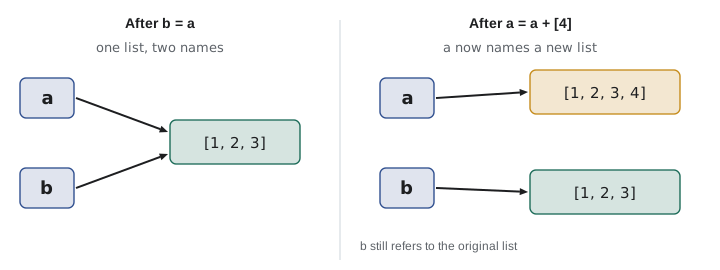
The name picture explains a behavior that surprises many beginners. If you write b = a, you do not copy anything: b now refers to the same object as a. For numbers and strings, which cannot be changed in place, this never causes trouble. For lists, which can be changed in place, a change made through one name is visible through the other. Lesson 9 returns to this, but it is worth seeing now.
a = [1, 2, 3]
b = a              # b refers to the SAME list as a
b.append(4)        # change the list through the name b
print("a:", a, " b:", b, " same object?", a is b)

c = a.copy()       # c refers to a NEW list with the same items
c.append(5)
print("a:", a, " c:", c, " same object?", a is c)

x = 10
y = x
y = y + 1          # makes y refer to a new int; x is unaffected
print("x:", x, " y:", y)a: [1, 2, 3, 4] b: [1, 2, 3, 4] same object? True a: [1, 2, 3, 4] c: [1, 2, 3, 4, 5] same object? False x: 10 y: 11
Variable names must start with a letter or underscore and contain only letters, digits and underscores; they are case-sensitive, so Total and total are different names. Python's own keywords, such as if, for, while, def, return and True, cannot be used as names. By convention, Python programmers write variable and function names in lowercase with underscores between words, a style called snake_case, as in hours_worked or average_mark. Choosing descriptive names is one of the cheapest ways to make code readable: compare p = h * r with pay = hours * hourly_rate.
| Name | Allowed? | Comment |
|---|---|---|
| total_cost | Yes | Good: descriptive snake_case |
| totalCost | Yes | Legal, but not the usual Python style |
| _temp | Yes | Leading underscore conventionally marks something internal |
| 2nd_place | No | Cannot start with a digit |
| class | No | class is a keyword |
| cost$ | No | Only letters, digits and underscores are allowed |
| l, O, I | Yes | Legal, but easily confused with 1 and 0; avoid |
Arithmetic operators
Python's arithmetic operators are mostly familiar, with two that deserve special attention. The single slash, /, is true division and always gives a float: 7 / 2 is 3.5 and even 6 / 3 is 2.0. The double slash, //, is floor division and gives the largest whole number not greater than the true quotient: 7 // 2 is 3. The % symbol gives the remainder, called the modulo: 7 % 2 is 1. Floor division and modulo work together: for any integers a and b with b not zero, a equals b times (a // b) plus (a % b). The double asterisk, **, raises to a power.
| Operator | Meaning | Example | Result |
|---|---|---|---|
| + | Addition | 7 + 2 | 9 |
| - | Subtraction | 7 - 2 | 5 |
| * | Multiplication | 7 * 2 | 14 |
| / | True division (always a float) | 7 / 2 | 3.5 |
| // | Floor division | 7 // 2 | 3 |
| % | Remainder (modulo) | 7 % 2 | 1 |
| ** | Exponent | 7 ** 2 | 49 |
| -x | Negation | -(7 - 2) | -5 |
Floor division and modulo are surprisingly useful. Converting 200 minutes into hours and minutes is 200 // 60 hours and 200 % 60 minutes. Checking whether a number is even is n % 2 == 0. Extracting the last digit of a number is n % 10, and removing it is n // 10, which is how the digit-sum function in lesson 7 works. Clock arithmetic, such as finding the day of the week 100 days from now, is modulo 7.
total_minutes = 200
print(f"{total_minutes} minutes = {total_minutes // 60} h {total_minutes % 60} min")

seconds = 98_765
hours, rest = divmod(seconds, 3600)     # divmod gives quotient and remainder together
minutes, secs = divmod(rest, 60)
print(f"{seconds} s = {hours} h {minutes} min {secs} s")

days = ["Mon", "Tue", "Wed", "Thu", "Fri", "Sat", "Sun"]
today = 3                                # Thursday
print("100 days after Thursday is", days[(today + 100) % 7])

for n in (-7, 7):
print(f"{n} // 2 = {n // 2}, {n} % 2 = {n % 2}")200 minutes = 3 h 20 min 98765 s = 27 h 26 min 5 s 100 days after Thursday is Sat -7 // 2 = -4, -7 % 2 = 1 7 // 2 = 3, 7 % 2 = 1
The last two lines show a detail worth knowing: Python's floor division rounds toward negative infinity, so minus 7 // 2 is minus 4, not minus 3, and the remainder takes the sign of the divisor, so minus 7 % 2 is 1. Some other languages, including C in CMPUT-201, round toward zero instead. When negative numbers are possible, check which rule your language uses.
Precedence: the order of evaluation
When an expression has several operators, Python applies them in a fixed order of precedence, much as in school algebra. Exponents bind tightest, then negation, then multiplication and the division family, then addition and subtraction, then comparisons, then the Boolean operators not, and, or. Operators at the same level are applied left to right, except **, which goes right to left, so 2 ** 3 ** 2 is 2 ** 9 = 512. When in doubt, add parentheses: they cost nothing and make your intention clear to readers.
print(2 + 3 * 4)          # multiplication first: 14
print((2 + 3) * 4)        # parentheses first: 20
print(-3 ** 2)            # ** binds tighter than negation: -(3**2) = -9
print((-3) ** 2)          # 9
print(2 ** 3 ** 2)        # right to left: 2 ** 9 = 512
print(10 - 4 - 3)         # left to right: (10 - 4) - 3 = 3
print(100 / 10 / 5) # left to right: 2.014 20 -9 9 512 3 2.0
Worked problem
Evaluating an expression by hand
What is the value of 3 + 18 // 4 * 2 ** 2 - 7 % 3?
Show solution
- Exponent first: 2 ** 2 = 4, giving 3 + 18 // 4 * 4 - 7 % 3.
- Then //, * and % from left to right: 18 // 4 = 4, then 4 * 4 = 16, and separately 7 % 3 = 1, giving 3 + 16 - 1.
- Then addition and subtraction left to right: 3 + 16 = 19, 19 - 1 = 18.
Answer: 18, which Python confirms.
Comparisons and Boolean values
Comparison operators compare two values and produce a Boolean: == for equal (two equals signs, because one is assignment), != for not equal, and <, <=, > and >=. Python allows chained comparisons that read like mathematics: 0 <= mark <= 100 means mark is at least 0 and at most 100. Strings compare alphabetically by code point, so "apple" < "banana" is True, but "Zebra" < "apple" is also True, because uppercase letters have smaller code points than lowercase ones, as lesson 2 showed.
Booleans can be combined with and, or and not. The expression a and b is True only if both are True; a or b is True if at least one is; not a reverses a. Python evaluates and and or lazily, or with short-circuit evaluation: in a and b, if a is False, b is never evaluated, because the answer is already known. This is useful for guarding against errors, as in count > 0 and total / count > 50, which never divides by zero.
| a | b | a and b | a or b | not a |
|---|---|---|---|---|
| True | True | True | True | False |
| True | False | False | True | False |
| False | True | False | True | True |
| False | False | False | False | True |
mark = 85
print(mark >= 80, mark == 85, mark != 85)
print(0 <= mark <= 100)                    # chained comparison
print("apple" < "banana", "Zebra" < "apple")

count, total = 0, 0
print(count > 0 and total / count > 50)    # short-circuit: no division happens

age, has_permit = 17, True
can_drive_alone = age >= 16 and has_permit
print("can drive alone:", can_drive_alone)True True False True True True False can drive alone: True
Converting between types
Programs constantly convert values from one type to another. Data read from the keyboard or a file arrives as text, so "42" must become the number 42 before arithmetic. Results must become text before being joined into messages. The built-in functions int, float, str and bool perform conversions. Converting a float to an int with int truncates toward zero; to round to the nearest whole number, use round instead. Be aware that Python's round uses round-half-to-even, sometimes called banker's rounding, so round(2.5) is 2 and round(3.5) is 4; this avoids a small upward bias when many values are rounded.
print(int("42") + 1)          # text to integer
print(float("3.5") * 2)       # text to float
print("Total: " + str(17))    # number to text
print(int(7.9), int(-7.9))    # truncates toward zero
print(round(7.9), round(2.5), round(3.5), round(2.675, 2))
print(bool(0), bool(42), bool(""), bool("no"))   # empty and zero are False

for text in ["12", " 12 ", "12.5", "twelve"]:
    try:
        print(f"int({text!r}) = {int(text)}")
    except ValueError:
print(f"int({text!r}) fails: not a whole number in text form")43
7.0
Total: 17
7 -7
8 2 4 2.67
False True False True
int('12') = 12
int(' 12 ') = 12
int('12.5') fails: not a whole number in text form
int('twelve') fails: not a whole number in text formTwo results deserve comment. round(2.675, 2) gives 2.67, not 2.68, because 2.675 cannot be stored exactly as a float and is actually slightly less than 2.675, an echo of lesson 2. And bool converts zero, empty strings and empty collections to False and almost everything else to True, including the string "no". This notion of truthiness lets you write if name: to mean "if name is not empty", which is idiomatic Python but should be used with care.
Python is dynamically typed: a variable has no fixed type, so the same name can refer to an int now and a string later. That flexibility makes Python quick to write, but it also means type mistakes are discovered only when the program runs. Modern Python lets you add optional type hints, such as def area(width: float, height: float) -> float:, which document intent and let tools such as mypy check types before the program runs. Python itself ignores the hints at run time. CMPUT-274 and CMPUT-325 explore static and dynamic typing in depth.
def area(width: float, height: float) -> float:
    """Return the area of a rectangle."""
    return width * height

print(area(3, 4.5))
print(area.__annotations__)13.5
{'width': <class 'float'>, 'height': <class 'float'>, 'return': <class 'float'>}Common mistakes
MistakeUsing = when you mean to compare, as in if mark = 80.
InsteadUse == to compare; = assigns.
MistakeExpecting 7 / 2 to give 3.
InsteadSingle slash is true division and gives 3.5; use // for floor division.
MistakeAdding a number to text read from input, as in "5" + 1.
InsteadConvert first: int("5") + 1.
MistakeAssuming b = a copies a list.
InsteadBoth names refer to the same list; use a.copy() or list(a) for a copy.
MistakeWriting -3 ** 2 and expecting 9.
InsteadExponentiation binds tighter than negation; write (-3) ** 2.
MistakeUsing int() to round a float to the nearest whole number.
Insteadint truncates toward zero; use round, and remember it rounds halves to even.
Summary and key terms
- Every value has a type; the core types are int, float, str and bool, plus None.
- Operators such as + and * behave differently for different types.
- A variable is a name that refers to an object; assignment rebinds the name, and two names can refer to one object.
- / always gives a float, // floor-divides and % gives the remainder; Python floors toward negative infinity.
- Operators follow a precedence order; parentheses make intentions clear.
- Comparisons produce Booleans; and, or and not combine them, with short-circuit evaluation.
- int, float, str and bool convert between types; Python is dynamically typed, and type hints are optional documentation.
- Type
- The kind of a value, which determines what it means and which operations apply.
- Integer
- A whole number, type int; Python integers have no fixed size limit.
- String
- A sequence of characters, type str, written in quotation marks.
- Boolean
- A value of type bool, either True or False.
- Variable
- A name that refers to an object.
- Assignment
- A statement that makes a name refer to the value of an expression.
- Expression
- A combination of values, names and operators that Python evaluates to a value.
- Floor division
- Division that rounds down to the nearest whole number, written //.
- Precedence
- The rules that decide which operators in an expression are applied first.
- Short-circuit evaluation
- Stopping evaluation of and or or as soon as the result is known.
Practice problems
Work each problem on paper first, then reveal the answer to check.
What are the types of 7, 7.0, "7" and 7 > 3?
Show answer
int, float, str and bool.
Evaluate 17 // 5, 17 % 5 and 17 / 5.
Show answer
3, 2 and 3.4.
Convert 500 seconds to minutes and seconds using // and %.
Show answer
500 // 60 = 8 minutes and 500 % 60 = 20 seconds.
What does "ha" * 3 + "!" evaluate to?
Show answer
"hahaha!"
Evaluate 2 + 3 * 4 ** 2 // 8.
Show answer
4 ** 2 = 16; 3 * 16 = 48; 48 // 8 = 6; 2 + 6 = 8.
After a = [1]; b = a; b.append(2), what is a? Why?
Show answer
[1, 2], because a and b refer to the same list object.
Write a single expression that is True when year is a leap year in the Gregorian calendar.
Show answer
year % 4 == 0 and (year % 100 != 0 or year % 400 == 0).
What do int(-3.7) and round(-3.7) give?
Show answer
-3 and -4.
Which names are invalid: max_speed, 3d, my-var, _count, for?
Show answer
3d, my-var and for are invalid.
Why does count > 0 and total / count > 50 never raise ZeroDivisionError?
Show answer
If count is 0, the left side is False and and short-circuits, so the division is never evaluated.
Lesson quiz · 5 questions
Score 60% or more to complete this lesson.
Create a free account to save your progress, take quizzes and earn a certificate.