
CMPUT-174 · Lesson 6 of 12 · 28 min
Control flow: loops
Computers are valuable because they repeat work tirelessly and exactly. Adding up a million numbers, checking every word in a book, simulating a thousand dice rolls or retrying a network request until it succeeds all need repetition. Loops let a short program do an enormous amount of work. Python has two loop statements: while, which repeats as long as a condition is true, and for, which repeats once for each item in a sequence. This lesson covers both, the standard patterns built from them, how to trace a loop by hand, how to control loops with break and continue, nested loops, simulations with random numbers, and how to count the steps a loop takes, which is the beginning of analyzing efficiency.
The while loop
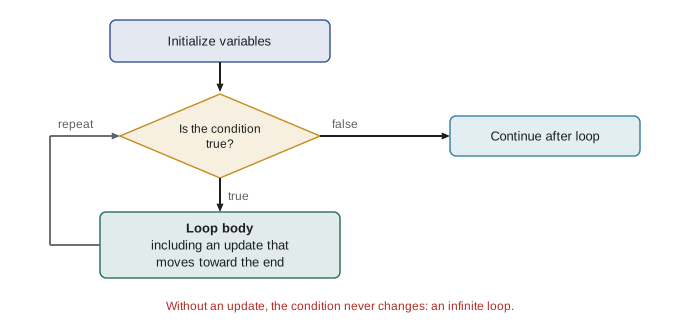
A while loop tests a condition; if it is true, the loop runs its block and then tests the condition again, repeating until the condition is false. Something inside the block must eventually make the condition false, or the loop runs forever. Every while loop therefore has three parts to get right: initialization of the variables the condition uses, the condition itself, and an update inside the block that moves toward ending the loop.
# How many years until savings double at 5 % interest a year?
balance = 1000.00          # initialization
years = 0
while balance < 2000:      # condition
    balance = balance * 1.05
    years = years + 1      # update: moves toward ending the loop
print(f"{years} years, balance {balance:.2f}")15 years, balance 2078.93
This is the natural use of while: when you do not know in advance how many repetitions are needed. The "rule of 72" from finance estimates the doubling time as 72 divided by the interest rate, 72 / 5 = 14.4 years, and the loop's 15 years agrees, since balances only grow once a year.
An infinite loop happens when the condition never becomes false, usually because the update is missing or moves the wrong way. If your program seems to hang, an infinite loop is the first suspect; press Control-C in a terminal, or the stop button in your editor, to interrupt it. A useful defensive habit while developing is to add a safety limit, a maximum number of iterations, to any loop whose termination you are not sure of.
# The Collatz process: if n is even, halve it; if odd, triple it and add 1.
# Nobody has proven that it always reaches 1, so we add a safety limit.
def collatz_steps(n, limit=10_000):
    steps = 0
    while n != 1 and steps < limit:
        n = n // 2 if n % 2 == 0 else 3 * n + 1
        steps += 1
    return steps

for start in [6, 7, 27, 97]:
print(f"start {start:3d}: reaches 1 after {collatz_steps(start)} steps")start 6: reaches 1 after 8 steps start 7: reaches 1 after 16 steps start 27: reaches 1 after 111 steps start 97: reaches 1 after 118 steps
The Collatz conjecture says this process reaches 1 for every positive starting number. It has been checked by computer for every starting value up to enormous sizes, yet nobody has proven it, which makes it a nice reminder that knowing whether a loop terminates can be genuinely hard. The notation steps += 1 is shorthand for steps = steps + 1; Python has similar shorthands such as -=, *= and //=.
The for loop and range
A for loop runs its block once for each item in a sequence, assigning the item to the loop variable each time. It is the right choice when you are processing every item of a collection, or when you know how many times to repeat. Because the loop handles the stepping itself, for loops cannot forget the update, which makes them safer than while loops when either would do.
The built-in range function produces a sequence of whole numbers for counting loops. range(5) gives 0, 1, 2, 3, 4: it starts at 0 and stops before 5, so it gives exactly 5 numbers. range(1, 6) gives 1 to 5, and range(10, 0, -2) counts down by twos: 10, 8, 6, 4, 2. The "stop before the end" rule seems odd at first, but it makes range(n) produce exactly n values and range(a, b) produce b minus a values, which avoids many off-by-one errors once you are used to it.
print(list(range(5)))
print(list(range(1, 6)))
print(list(range(10, 0, -2)))

for i in range(3):
    print("lap", i + 1)

for letter in "loop":
    print(letter.upper(), end=" ")
print()

for city in ["Edmonton", "Halifax", "Whitehorse"]:
print(f"{city} has {len(city)} letters")[0, 1, 2, 3, 4] [1, 2, 3, 4, 5] [10, 8, 6, 4, 2] lap 1 lap 2 lap 3 L O O P Edmonton has 8 letters Halifax has 7 letters Whitehorse has 10 letters
Loop patterns
Most loops in practice follow a handful of patterns. Recognizing them lets you write correct loops quickly and read other people's loops easily. The most important is the accumulator: a variable initialized before the loop and updated on each pass, to build up a sum, a count, a product, a maximum or a new collection.
| Pattern | Initialize | Update on each item | Example |
|---|---|---|---|
| Sum | total = 0 | total += x | Total sales for the day |
| Count | count = 0 | if condition: count += 1 | Number of failing marks |
| Product | product = 1 | product *= x | Factorial, compound growth |
| Maximum or minimum | best = first item | if x > best: best = x | Warmest day |
| Build a list | result = [] | result.append(f(x)) | Converted temperatures |
| Search | found = False | if match: found = True; break | Is a name on the list? |
marks = [72, 45, 88, 91, 38, 67, 80]

total = 0
failing = 0
highest = marks[0]
passed = []
for m in marks:
    total += m                  # sum
    if m < 50:
        failing += 1            # count
    if m > highest:
        highest = m             # maximum
    if m >= 50:
        passed.append(m)        # build a list

print("average:", round(total / len(marks), 1))
print("failing:", failing, " highest:", highest)
print("passing marks:", passed)
print("built-ins agree:", sum(marks), max(marks), len([m for m in marks if m < 50]))average: 68.7 failing: 2 highest: 91 passing marks: [72, 88, 91, 67, 80] built-ins agree: 481 91 2
The last line uses Python's built-in sum and max and a list comprehension, a compact way to build a list that lesson 9 explains. Experienced Python programmers use these built-ins whenever they fit, because they are shorter and less error-prone. You still need to understand the loop patterns underneath, because many problems need a combination the built-ins do not offer, and because every other programming language you learn will need them.
Tracing a loop by hand
Tracing means stepping through code by hand, writing down the value of each variable after each step, exactly as the computer would. It is the single best way to understand what a loop does and to find out why it does something unexpected. A trace table has a column for each variable and a row for each pass through the loop. It feels slow, but a few minutes of tracing often finds a bug that an hour of staring at code does not.
# Trace: sum of the digits of n
n = 4072
digit_sum = 0
print(f"{'n':>6} {'digit':>6} {'digit_sum':>10}")
while n > 0:
    digit = n % 10
    digit_sum += digit
    n = n // 10
    print(f"{n:>6} {digit:>6} {digit_sum:>10}")
print("result:", digit_sum) n digit digit_sum
407 2 2
40 7 9
4 0 9
0 4 13
result: 13Printing the variables inside a loop, as here, produces the trace automatically, and is a simple, effective debugging technique. Tools such as Thonny and the Python Tutor website draw the trace for you, showing each variable changing step by step. Try tracing by hand first, then check yourself with the tool.
Worked problem
Tracing to find an off-by-one error
This loop is meant to add the numbers from 1 to 5: total = 0; i = 1; while i < 5: total += i; i += 1. What does it compute, and how should it be fixed?
Show solution
- Trace: i = 1, total = 1; i = 2, total = 3; i = 3, total = 6; i = 4, total = 10; i becomes 5 and the condition 5 < 5 is false.
- The loop stops before adding 5, so total is 10, not 15.
- Fix the condition to i <= 5, or use for i in range(1, 6).
- Check against the formula for 1 + 2 + ... + n, which is n(n + 1)/2 = 15.
Answer: It computes 10; change the condition to i <= 5 or use range(1, 6).
break, continue and else
The break statement leaves a loop immediately, skipping any remaining iterations; it is most often used in searches, to stop as soon as the item is found. The continue statement skips the rest of the current iteration and moves on to the next. Both are useful, but overusing them makes loops harder to follow, so prefer a clear condition when one will do.
Python loops can also have an else clause, which runs only if the loop finished without hitting break. It is handy for searches: the else block handles the "not found" case. Many programmers find loop-else unusual, so if you use it, a short comment helps readers.
readings = [21.5, 22.0, -999, 23.1, 24.8, 31.2, 25.0]   # -999 marks a failed sensor read

for r in readings:
    if r == -999:
        continue                 # skip bad data
    if r > 30:
        print("Over-temperature reading:", r)
        break                    # stop scanning at the first problem
    print("ok", r)
else:
    print("all readings within limits")   # runs only if no break happened

def first_negative(values):
    for i, v in enumerate(values):
        if v < 0:
            return i
    return None                  # not found

print(first_negative([3, 8, -2, 5]), first_negative([1, 2]))ok 21.5 ok 22.0 ok 23.1 ok 24.8 Over-temperature reading: 31.2 2 None
The enumerate function, used in first_negative, gives both the position and the item on each pass, so you do not need to manage a separate counter. Returning from inside the loop, as first_negative does, is an even cleaner way to stop a search than break when the loop is inside a function.
Nested loops
A loop inside another loop runs its whole sequence once for every pass of the outer loop. Nested loops naturally handle two-dimensional problems: rows and columns of a table, pixels in an image, every pair of items in a list. They also multiply the work: an outer loop of 100 passes containing an inner loop of 100 passes runs the inner block 10,000 times.
# A multiplication table
for row in range(1, 6):
    line = ""
    for col in range(1, 6):
        line += f"{row * col:4d}"
    print(line)

# Count how many pairs of students can be formed from a group of n
for n in (4, 10, 100):
    pairs = 0
    for i in range(n):
        for j in range(i + 1, n):
            pairs += 1
print(f"n = {n:3d}: {pairs} pairs, formula n(n-1)/2 = {n * (n - 1) // 2}")1 2 3 4 5 2 4 6 8 10 3 6 9 12 15 4 8 12 16 20 5 10 15 20 25 n = 4: 6 pairs, formula n(n-1)/2 = 6 n = 10: 45 pairs, formula n(n-1)/2 = 45 n = 100: 4950 pairs, formula n(n-1)/2 = 4950
The pairs example shows why nested loops matter for efficiency: the number of pairs grows roughly with the square of n. Doubling the group size roughly quadruples the work. For 100 students that is 4,950 pairs, trivial for a computer, but for a million records it is about 500 billion, which would take a long time. Lesson 9 compares the growth of different search algorithms, and CMPUT-204 makes this kind of analysis precise.
Simulation with random numbers
Loops combined with random numbers let you simulate processes that are hard to calculate exactly: games of chance, queues at a store, the spread of an illness or the reliability of a machine. Python's random module generates pseudo-random numbers: they look random but come from a deterministic algorithm. Setting a seed with random.seed makes the sequence repeatable, which is essential when you want to test a program or compare results, and is why this course's simulations use one.
import random
random.seed(174)

# Roll two dice 10,000 times and count how often each total appears
counts = {total: 0 for total in range(2, 13)}
rolls = 10_000
for _ in range(rolls):
    total = random.randint(1, 6) + random.randint(1, 6)
    counts[total] += 1

for total, c in counts.items():
    expected = (6 - abs(total - 7)) / 36
print(f"{total:2d}: {c / rolls:6.3f} (exact {expected:.3f}) {'#' * (c // 100)}")2: 0.027 (exact 0.028) ## 3: 0.057 (exact 0.056) ##### 4: 0.086 (exact 0.083) ######## 5: 0.114 (exact 0.111) ########### 6: 0.135 (exact 0.139) ############# 7: 0.161 (exact 0.167) ################ 8: 0.143 (exact 0.139) ############## 9: 0.112 (exact 0.111) ########### 10: 0.080 (exact 0.083) ######## 11: 0.060 (exact 0.056) ###### 12: 0.025 (exact 0.028) ##
The simulated frequencies are close to the exact probabilities, and they get closer as the number of rolls grows, an example of the law of large numbers. The underscore used as the loop variable, for _ in range(rolls), is a convention meaning "I need to repeat, but I do not use the counter". The counts variable is a dictionary, a collection that maps keys to values, introduced fully in lesson 9.
Pseudo-random numbers from the random module are fine for simulations and games but must not be used for passwords, security tokens or anything an attacker might want to predict, because the sequence can be reconstructed from enough outputs. For those purposes Python provides the secrets module. CMPUT-331 explains why.
Counting steps
How long does a loop take? Measuring time with a stopwatch is unreliable, because it depends on the computer, what else it is doing and even its temperature. Computing scientists count steps instead: how many times the loop body runs, as a function of the input size. Adding the numbers from 1 to n with a loop takes n steps; using the formula n(n + 1)/2 takes one step regardless of n. The nested pairs loop takes about n squared over 2 steps. These counts predict how a program will scale far better than a single timing.
def sum_loop(n):
    steps = 0
    total = 0
    for i in range(1, n + 1):
        total += i
        steps += 1
    return total, steps

def sum_formula(n):
    return n * (n + 1) // 2, 1

for n in (10, 1_000, 100_000):
print(f"n = {n:>7,}: loop {sum_loop(n)}, formula {sum_formula(n)}")n = 10: loop (55, 10), formula (55, 1) n = 1,000: loop (500500, 1000), formula (500500, 1) n = 100,000: loop (5000050000, 100000), formula (5000050000, 1)
If you do want to time code, use the timeit module, which runs a snippet many times and reports the best result to reduce noise, and remember that timings vary between runs and machines. That is why timing results in this course are never checked against fixed outputs.
Common mistakes
MistakeForgetting the update in a while loop, creating an infinite loop.
InsteadCheck initialization, condition and update for every while loop.
MistakeAssuming range(1, 5) includes 5.
Insteadrange stops before its end value: range(1, 5) is 1, 2, 3, 4.
MistakeInitializing an accumulator inside the loop, resetting it every pass.
InsteadInitialize accumulators before the loop starts.
MistakeStarting a maximum at 0 when values may be negative.
InsteadStart with the first item, or with float('-inf').
MistakeUsing while with a manual counter where for would do.
InsteadUse for with range or the collection itself; it cannot forget the update.
MistakeUsing the random module for passwords or security codes.
InsteadUse the secrets module for anything security-related.
Summary and key terms
- while repeats while a condition is true; it needs correct initialization, condition and update.
- for repeats once per item in a sequence; range(a, b, step) produces counting sequences that stop before b.
- Accumulator patterns build sums, counts, maximums and new lists across a loop.
- Trace tables, written by hand or printed, reveal exactly what a loop does.
- break stops a loop, continue skips to the next pass, and loop-else runs when no break occurred.
- Nested loops multiply work; all pairs of n items take about n squared over 2 steps.
- Seeded pseudo-random numbers make simulations repeatable; counting steps predicts scaling better than timing.
- Loop
- A statement that repeats a block of code.
- Iteration
- One pass through the body of a loop.
- Infinite loop
- A loop whose condition never becomes false.
- range
- A built-in that produces a sequence of integers from a start up to, but not including, a stop.
- Accumulator
- A variable that builds up a result across the iterations of a loop.
- Trace table
- A table recording the values of variables after each step of a program.
- break
- A statement that exits the innermost loop immediately.
- continue
- A statement that skips the rest of the current iteration.
- Seed
- A starting value that makes a pseudo-random sequence repeatable.
- Off-by-one error
- A bug where a loop runs one time too many or too few.
Practice problems
Work each problem on paper first, then reveal the answer to check.
Write a for loop that prints the even numbers from 2 to 20.
Show answer
for n in range(2, 21, 2): print(n)
What does list(range(5, 0, -1)) give?
Show answer
[5, 4, 3, 2, 1]
Write a while loop that finds the smallest power of 2 greater than 1,000.
Show answer
p = 1; while p <= 1000: p *= 2; then p is 1024.
Trace the digit-sum loop for n = 905.
Show answer
digit 5, sum 5, n 90; digit 0, sum 5, n 9; digit 9, sum 14, n 0; result 14.
Write a loop that counts the vowels in a string.
Show answer
count = 0; for ch in text.lower(): if ch in "aeiou": count += 1
How many times does the inner body run in for i in range(4): for j in range(3): ...?
Show answer
12 times.
Why does the pairs loop start j at i + 1?
Show answer
So each pair is counted once and no student is paired with themselves.
What does continue do in a loop processing readings?
Show answer
It skips the rest of the current pass, for example ignoring a bad reading, and moves on to the next.
Why seed the random number generator in a simulation you are testing?
Show answer
So the same random sequence, and therefore the same results, appear every run.
A loop over n items does 3 steps per item plus 5 steps of setup. How many steps for n = 1,000?
Show answer
3,005 steps.
Lesson quiz · 5 questions
Score 60% or more to complete this lesson.
Create a free account to save your progress, take quizzes and earn a certificate.