
ROB-360 · Lesson 7 of 12 · 27 min
Continuous integration, containers and deployment
A robot team that builds and tests by hand on each developer's laptop will eventually ship software that works only on that laptop. Continuous integration (CI) means that every change is automatically built and tested in a clean, standard environment as soon as it is pushed, and continuous delivery (CD) extends the pipeline so that every passing build is packaged and ready to deploy. Containers make the environment reproducible, and disciplined versioning and release practices make it possible to know exactly which software is running on each robot. This lesson builds the pipeline from commit to fleet.
Continuous integration
In CI, a server watches the repository. When a developer opens or updates a pull request, the server checks out the code into a fresh environment, installs dependencies, builds everything, runs the linters and static analyzers (lesson 3) and runs the tests (lesson 4), and reports the results on the pull request. Branch protection rules prevent merging until the checks pass and a reviewer approves. The main branch is therefore always in a buildable, tested state, which is the foundation for everything else in this lesson.
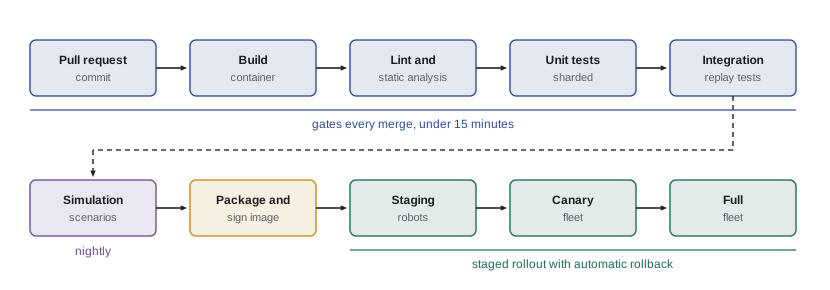
The value of CI comes from speed and trust. Fast feedback, ideally under ten to fifteen minutes for the checks that gate a merge, keeps developers in flow; slow pipelines lead to batching changes, which makes failures harder to diagnose. Trust requires reliable results: flaky tests and inconsistent environments (lesson 4) quickly train people to click 'rerun' rather than read failures.
Building ROS 2 software in CI
ROS 2 workspaces are built with colcon, and dependencies are declared in each package's package.xml and installed with rosdep. A CI job for a ROS 2 repository typically starts from an official ROS container image for the target distribution, runs rosdep install to fetch dependencies, builds with colcon build, and runs colcon test followed by colcon test-result to collect results. The ros-tooling setup-ros and action-ros-ci actions for GitHub Actions, and the industrial_ci project, package these steps. For multi-repository workspaces, a .repos file lists the repositories and versions to check out with vcs, so CI builds the same combination every time.
# .github/workflows/ci.yml  (listing)
name: ci
on: [pull_request, push]
jobs:
  build-test:
    runs-on: ubuntu-24.04
    container: ros:jazzy           # pin the distribution image
    steps:
      - uses: actions/checkout@v4
      - name: Install dependencies
        run: |
          apt-get update
          rosdep update && rosdep install --from-paths src -y --ignore-src
      - name: Build
        run: . /opt/ros/jazzy/setup.sh && colcon build --mixin release --event-handlers console_cohesion+
      - name: Test
        run: |
          . /opt/ros/jazzy/setup.sh
          colcon test --event-handlers console_direct+
          colcon test-result --verbose
Build time grows quickly with workspace size, so CI systems cache aggressively: dependency installation in a prebuilt base image, compiled objects with ccache, and unchanged packages skipped entirely by building only what a change affects. Running jobs in parallel across machines and splitting the test suite into shards brings the wall-clock time down further.
# Pipeline time: stages in sequence, with test shards running in parallel
build_min, lint_min = 9.0, 2.0
unit_total_min, integ_total_min = 6.0, 24.0
ccache_hit = 0.8                      # 80 % of compile work served from cache
def pipeline(shards, cached):
    b = build_min * ((1 - ccache_hit) + 0.15) if cached else build_min   # 15 % fixed overhead
    tests = (unit_total_min + integ_total_min) / shards + 1.0            # +1 min per shard start-up
    return b + lint_min + tests
for shards in (1, 4, 8):
    for cached in (False, True):
print(f"shards={shards} cached={str(cached):5}: {pipeline(shards, cached):5.1f} min")shards=1 cached=False: 42.0 min shards=1 cached=True : 36.1 min shards=4 cached=False: 19.5 min shards=4 cached=True : 13.7 min shards=8 cached=False: 15.8 min shards=8 cached=True : 9.9 min
Worked problem
Is the merge gate fast enough?
Using the model above, the team wants merges gated in under 15 minutes. Which configuration meets the target, and what is the trade-off?
Show solution
- Uncached with 1 shard: 9 + 2 + 31 = 42 min, far too slow.
- Cached with 4 shards: about 3.2 + 2 + 8.5 = 13.7 min, under the target.
- Cached with 8 shards: about 3.2 + 2 + 4.75 = 9.9 min, faster but using twice the runners.
Answer: Caching plus about four shards meets the 15-minute target; eight shards buys four more minutes at double the compute cost. Slow scenario simulations are moved to nightly jobs rather than gating every merge.
Containers and reproducible environments
A container packages an application with its operating-system libraries, language runtime and dependencies into an image that runs the same way on any compatible host. Docker and Podman are the common tools, and the Open Container Initiative (OCI) defines the image format. For robotics, containers solve the classic 'works on my machine' problem: developers, CI and robots can all run the same image. Official ROS images exist for each distribution, and teams build their own images on top, often in layers: a base image with the ROS distribution and system dependencies, a development image with build tools, and a slim runtime image with only the compiled software, built with multi-stage Dockerfiles.
# Dockerfile (listing): multi-stage build for a robot runtime image
FROM ros:jazzy AS build
WORKDIR /ws
COPY src/ src/
RUN apt-get update && rosdep install --from-paths src -y --ignore-src \
 && . /opt/ros/jazzy/setup.sh && colcon build --merge-install --cmake-args -DCMAKE_BUILD_TYPE=Release

FROM ros:jazzy-ros-core AS runtime
COPY --from=build /ws/install /opt/robot
ENV ROS_DOMAIN_ID=12
HEALTHCHECK CMD ros2 node list | grep -q dock_manager || exit 1
CMD ["bash", "-c", ". /opt/robot/setup.sh && ros2 launch robot_bringup robot.launch.py"]
Containers on robots raise practical questions: access to devices (cameras, serial ports, GPUs) has to be granted explicitly; real-time scheduling needs the right privileges; DDS discovery across containers needs host networking or careful configuration; and image size matters when updates travel over a cellular link. Many teams run the real-time control and hardware drivers natively or in privileged containers, and the rest in ordinary containers managed by a supervisor such as systemd, Docker Compose or a lightweight Kubernetes distribution.
Reproducibility needs more than a container. Images should be tagged with immutable identifiers, ideally referenced by content digest rather than a moving tag like latest; package versions should be pinned or locked; and the base image should be rebuilt on a schedule to pick up security fixes, with that rebuild itself passing CI. A reproducible build is one that produces identical outputs from identical sources, which lets anyone verify that a binary on a robot really came from a given commit.
Pinning creates its own risk: pinned dependencies age and accumulate known vulnerabilities. Teams therefore automate updates as well. Bots such as Dependabot or Renovate open pull requests that bump pinned versions and base images on a schedule, CI runs the full test suite against each bump, and reviewers merge the ones that pass. Small, frequent dependency updates are far easier to test and roll back than a large upgrade attempted once a year, and they keep the fleet within reach of security fixes.
Versioning and releases
Semantic versioning (MAJOR.MINOR.PATCH) communicates the impact of a change: increment PATCH for backward-compatible bug fixes, MINOR for backward-compatible new features and MAJOR for incompatible changes, such as a changed message interface. ROS packages use semantic versions in package.xml, and the bloom tool releases them into the ROS build farm, which builds binary packages for supported platforms; open-source packages released this way can be installed with apt by anyone. Proprietary robot software usually follows the same versioning but publishes to a private package or container registry.
def bump(version, change):
    major, minor, patch = map(int, version.split("."))
    if change == "breaking": return f"{major + 1}.0.0"
    if change == "feature":  return f"{major}.{minor + 1}.0"
    if change == "fix":      return f"{major}.{minor}.{patch + 1}"
    raise ValueError(change)
v = "2.4.7"
for change in ("fix", "feature", "breaking"):
    print(f"{v} + {change:8} -> {bump(v, change)}")
# Interface compatibility rule of thumb for ROS messages
changes = {"add optional field": "feature", "rename field": "breaking",
           "change units of field": "breaking", "fix typo in comment": "fix"}
for c, kind in changes.items():
print(f"{c:24} -> {kind}")2.4.7 + fix -> 2.4.8 2.4.7 + feature -> 2.5.0 2.4.7 + breaking -> 3.0.0 add optional field -> feature rename field -> breaking change units of field -> breaking fix typo in comment -> fix
Each release should carry a changelog describing what changed, generated from commit messages or pull request titles, and a record of exactly what went into it: the commit hashes of every repository, the container digests and the configuration. This bill of materials is what lets a field engineer answer 'which robots have the fix?' and what lets a security team respond to a newly disclosed vulnerability (lesson 10).
Continuous delivery and staged rollout
Deploying to robots is riskier than deploying to servers: robots are physical, often in customers' buildings, sometimes offline, and a bad update can stop a warehouse. Safe delivery therefore uses stages. A release candidate first runs on internal test robots and in the full simulation suite. It then goes to a canary group, a small fraction of the fleet chosen to represent the variety of sites, while key health metrics are watched: mission success rate, localization failures, crashes and operator interventions. Only if those stay within limits does the rollout widen in steps. Every step needs a fast, tested rollback: keep the previous image on the robot and switch back automatically if health checks fail.
Updates must also respect the robot's state: never update mid-mission, update when docked and charging, verify the image signature before installing, apply the update atomically (for example with A/B partitions, so a failed update leaves the old system intact) and confirm health after restart before reporting success. Lesson 9 covers the over-the-air mechanisms and fleet monitoring that make this possible.
Worked problem
Canary sizing
A fleet has 400 robots. A bad release would increase the mission failure rate from 0.5 % to 2 %. Robots each run about 30 missions a day. How many failures would the canary group of 5 % of the fleet show in one day under the bad release, and is that enough to notice?
Show solution
- Canary robots: \( 0.05 \times 400 = 20 \). Missions per day: \( 20 \times 30 = 600 \).
- Expected failures at 0.5 %: \( 600 \times 0.005 = 3 \). At 2 %: \( 600 \times 0.02 = 12 \).
- A jump from about 3 to about 12 failures in a day is a strong signal; with Poisson variation, seeing 12 or more when expecting 3 is very unlikely by chance.
Answer: About 12 failures against 3 expected, enough to halt the rollout within a day while the other 380 robots stay on the old release. Smaller effects need longer canary periods or larger groups.
Common mistakes
MistakeGating merges on a two-hour pipeline
InsteadKeep merge gates under about 15 minutes with caching and sharding, and run long simulations nightly.
MistakeDeploying images tagged latest
InsteadReference images by version and content digest so deployments are reproducible.
MistakeChanging a message field's units in a minor release
InsteadInterface-breaking changes need a major version or a new message type.
MistakeUpdating the whole fleet at once
InsteadRoll out in stages with a canary group, health metrics and automatic rollback.
MistakeInstalling updates while a robot is mid-mission
InsteadUpdate only when docked, verify signatures and apply atomically.
Summary and key terms
- Continuous integration builds and tests every change in a clean environment and keeps the main branch always releasable.
- ROS 2 CI uses pinned distribution images, rosdep, colcon build and colcon test, with caching and sharding to stay fast.
- Containers make environments reproducible; multi-stage builds give slim runtime images, and robots need device and network access planned.
- Reproducibility needs pinned dependencies, immutable image digests and scheduled, tested base-image rebuilds.
- Semantic versioning signals the impact of changes, and interface-breaking changes require a major version.
- Releases need changelogs and a bill of materials of commits, images and configuration.
- Robots are updated in stages with canaries, health metrics, signature checks, atomic installs and automatic rollback.
- Continuous integration
- Automatically building and testing every change in a clean environment.
- Continuous delivery
- Keeping every passing build packaged and ready to deploy.
- Branch protection
- Rules that block merging until required checks and reviews pass.
- colcon
- The build tool for ROS 2 workspaces.
- rosdep
- The tool that installs system dependencies declared in package.xml.
- Container image
- A packaged filesystem and configuration that runs an application consistently.
- Multi-stage build
- A Dockerfile pattern that compiles in one image and ships only the results in another.
- Semantic versioning
- MAJOR.MINOR.PATCH numbers that signal breaking changes, features and fixes.
- Canary release
- Deploying first to a small group and watching health before wider rollout.
- A/B update
- An update scheme with two system partitions so a failed update can fall back to the old one.
Practice problems
Work each problem on paper first, then reveal the answer to check.
What must pass before a pull request can merge under branch protection?
Show answer
The required CI checks and reviews.
Which commands build and test a ROS 2 workspace?
Show answer
colcon build and colcon test (then colcon test-result).
What does rosdep do?
Show answer
Installs system dependencies declared in package.xml.
Name two ways to shorten CI time.
Show answer
Caching (for example ccache) and test sharding.
Why reference images by digest?
Show answer
A digest identifies exactly one immutable image.
What does a multi-stage Dockerfile achieve?
Show answer
A slim runtime image containing only the built software.
Version 3.2.5 gets a backward-compatible feature. New version?
Show answer
3.3.0.
Is renaming a message field a breaking change?
Show answer
Yes.
What is a canary group?
Show answer
A small set of robots that receive a release first while health is monitored.
Why use A/B partitions for updates?
Show answer
A failed update leaves the old system intact to fall back to.
Lesson quiz · 5 questions
Score 60% or more to complete this lesson.
Create a free account to save your progress, take quizzes and earn a certificate.