
CON-375 · Lesson 2 of 12 · 22 min
Document control and the common data environment
Three weeks after the Westgate podium slab was poured, a carpentry crew from one of Brightwater's subcontractors set out the formwork for the level 2 transfer beam from a drawing that had been superseded eleven days earlier. The revised drawing moved two embedded steel plates 150 millimetres to suit the timber connections above. Nobody on the crew had done anything careless: the old sheet was still pinned to the wall of their site trailer, and the revision had been posted to the project platform with a notification that went to their office, not to the foreman. The error was caught by Hannah Lowe during her pre-pour check, and it cost a day of rework rather than a cracked connection, but it showed Brightwater exactly why document control is not clerical work.
Document control is the set of rules, roles and tools that make sure everyone on a project works from the right version of the right document, and that every document can be found, traced and trusted later. On Westgate it is run by project coordinator Jun Park, with help from the platform Brightwater uses for every project. In this lesson we look at the parts of a document control system: the register, naming and numbering, revisions and status, the common data environment, distribution, and the audit trail that ties them together.
What a document control system must do
Whatever tools a project uses, from shared network folders to a full construction management platform, the system has to do the same five things.
| Function | What it means on site |
|---|---|
| Identify | Every document has a unique number, a title, a revision and a status |
| Control versions | Only the current revision is available for construction; older ones are marked superseded |
| Distribute | The right people receive each issue, and the system records who received what and when |
| Protect | Documents cannot be altered or deleted without a record; access matches each person's role |
| Retrieve | Anyone authorized can find a document in seconds by number, area, discipline or date |
A system that does only some of these will fail at the worst moment. A perfect filing structure is useless if the foreman cannot reach it from the slab edge. Instant mobile access is dangerous if superseded drawings stay on the tablets. The rest of this lesson takes each function in turn.
The document register
The heart of document control is the register: a list of every controlled document with its current state. For drawings it is often called the drawing register or drawing list; for the whole project it may be called the master document register. On Westgate the register covers about 1,400 drawing sheets across architectural, structural, mechanical, electrical, civil and landscape disciplines, plus specifications, reports and the contract itself.
| Field | Example | Why it matters |
|---|---|---|
| Document number | WGT-AMA-L2-DR-A-2104 | Unique identity; never reused |
| Title | Level 2 floor plan, east wing | Human-readable description |
| Revision | C03 | Which version is current |
| Status or suitability | Issued for construction | What the document may be used for |
| Date of issue | 2026-04-14 | When it took effect |
| Originator | Arden Moss Architects | Who is responsible for its content |
| Transmittal reference | TR-0418 | Links the issue to its distribution record |
| Reason for revision | RFI-112 response; plate locations | Explains why it changed |
A register is only as good as its discipline. Every incoming issue is logged the day it arrives, the previous revision is marked superseded at the same time, and the register is reconciled with the designers' own lists at least monthly. On Westgate, Jun sends the register to Arden Moss each month and asks them to confirm it matches theirs; mismatches are investigated, not ignored.
Naming and numbering
Good numbering makes a document self-describing. A person who sees the number should be able to tell the project, the author, the area, the type of document and the discipline without opening the file. Many projects now follow the field structure of ISO 19650, the international standard for managing information over the life of a built asset using building information modelling. ISO 19650 itself leaves the exact codes to each project, and its national annexes and the project's information standard fill in the details.
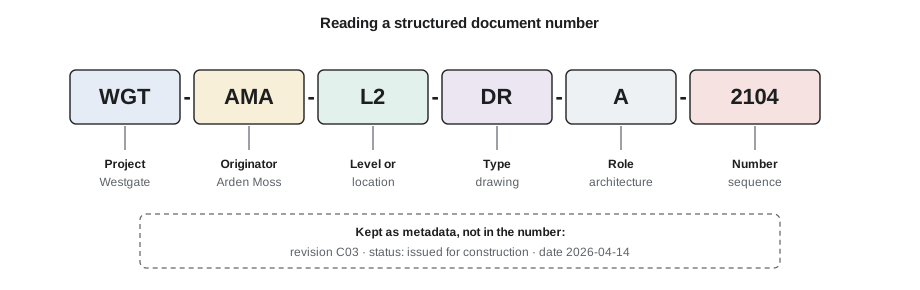
The figure breaks down a typical Westgate number. WGT is the project. AMA is the originator, Arden Moss Architects. L2 is the level. DR says the file is a drawing, as opposed to M3 for a model or SP for a specification. A is the role, architecture, and 2104 is the sequence number. Revision and status are kept as metadata alongside the number rather than built into it, so the number never changes when the document is revised.
- Keep numbers short enough to read aloud on a site radio, but long enough to be unique across the project.
- Never embed the revision in the file name as the only record of revision; metadata and the register must carry it too.
- Agree the codes at the start of the project and publish them in the project's information standard or BIM execution plan.
- Never reuse a number for a different document, even if the original was cancelled.
Revisions and status
Every document goes through versions as it develops. Two pieces of information describe where it stands: the revision, which identifies the version, and the status or suitability, which says what the version may be used for. Confusing the two causes many site errors. A drawing at its latest revision may still be marked for coordination only and must not be built from.
| Code (typical) | Meaning | May it be built from? |
|---|---|---|
| P01, P02 … | Preliminary revisions while the design is being developed and shared | No |
| S1 | Suitable for coordination | No |
| S2 | Suitable for information | No |
| S3 | Suitable for review and comment | No |
| S4 | Suitable for stage approval | No |
| C01, C02 … | Contractual revisions after the document is authorized and published | Yes, if status permits |
| Issued for construction | Published and authorized for building | Yes |
Many North American projects still use simpler schemes, such as numbered revisions with descriptions like 'Issued for tender', 'Issued for permit' and 'Issued for construction', with clouds and delta symbols marking what changed on each sheet. The scheme matters less than consistency: everyone on the project should be able to look at a sheet and know instantly whether they may build from it.
Revision clouds deserve a warning. A cloud shows what the designer thinks changed. It is not a guarantee that nothing else changed. When a revision arrives, Hannah compares the new sheet with the previous one using the overlay tool in the platform, which highlights every difference. Twice on Westgate the overlay found changes that had not been clouded, including a door swing that affected the fire separation layout.
The common data environment
A common data environment, or CDE, is the agreed source of information for the project: the place where information is collected, managed and shared among the whole team. It is usually a cloud platform, but ISO 19650 defines it by its process, not its software. Information moves through four states, and gates between the states make sure that only checked and approved information is shared and relied on.
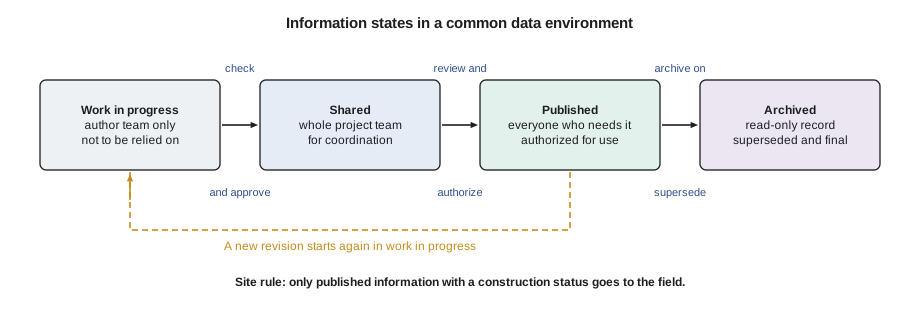
| State | Who sees it | Purpose |
|---|---|---|
| Work in progress | Only the authoring team | Information being developed; not to be relied on by others |
| Shared | The wider project team | Checked information shared for coordination and comment |
| Published | Everyone who needs it, including site | Authorized information that may be used for construction or handover |
| Archived | Read-only record for the life of the project and beyond | Superseded and final information kept as the project record |
The important point for a contractor is the line between shared and published. A model or drawing in the shared state is there to coordinate. Trades who download shared information and build from it take a risk that the contract may not cover. Brightwater's rule is simple: if it is not published with a construction status, it does not go to the field.
In Canada, ISO 19650 is increasingly referenced by public owners and in BIM requirements, often alongside a BIM execution plan and the owner's own information standard. Federal departments and some provincial infrastructure agencies have moved toward requiring structured information management on major projects, although practice still varies widely from owner to owner.
Distribution and the field
Getting the right revision into the hands of the people building the work is the step that failed on the transfer beam. Distribution has two halves: sending the issue, and making sure the old version is withdrawn. Brightwater uses three habits on every project.
- Push to people, not just to companies. Every subcontractor names the foreman and project manager who must receive each discipline's updates, and the distribution list is reviewed monthly.
- Withdraw what is superseded. When a new revision arrives, the old sheet is marked superseded in the platform, and Jun issues a short weekly list of superseded sheets that foremen must remove from trailers and tablets. Paper sets on site carry a stamp showing the date they were printed.
- Check at the point of use. Pre-task plans and pre-pour checklists include a line confirming the drawing revision against the register, which is how Hannah caught the transfer beam error.
Controlled copies and uncontrolled copies need to be distinguished. A controlled copy is one the document controller tracks and updates; an uncontrolled copy, such as a printout taken for a meeting, carries no promise of being current. On Westgate every printed sheet carries a footer: 'Uncontrolled when printed. Check revision in the project platform before use.'
Worked problem
How many superseded sheets are still in the field?
At Brightwater's monthly field audit, Jun samples the paper drawing sets in six subcontractor trailers. The sets hold 412 sheets in total. Comparing each sheet's revision against the register, she finds 23 sheets that have been superseded, 9 of them on the critical structural and mechanical packages. What percentage of sheets in the field are superseded, and what share of the superseded sheets are critical?
Show solution
- Superseded share: 23 ÷ 412 = 0.0558, or about 5.6 percent of sheets in the field.
- Critical share of superseded sheets: 9 ÷ 23 = 0.391, or about 39 percent.
- Brightwater's target is zero superseded sheets on critical packages, so every one of the 9 is removed the same day, and the subcontractors involved are asked to show how they will withdraw sheets in future.
Answer: About 5.6 percent of field sheets are superseded, and about 39 percent of those are on critical packages.
Jun also checks that every file uploaded to the platform follows the project's naming standard. A file with a wrong or missing field is hard to find and easy to confuse with another. A short script checks each name against the pattern before files are accepted.
# Check document names against the Westgate naming standard
import re
pattern = re.compile(r'^WGT-(AMA|KSE|TMC|BWC|LDS)-(L[0-4]|RF|ZZ)-(DR|M3|SP|RP)-[ASMECL]-\d{4}$')
names = ['WGT-AMA-L2-DR-A-2104', 'WGT-KSE-L2-DR-S-3010', 'WGT-TMC-L3-M3-M-0007',
         'WGT-AMA-L2-DR-A-2104-rev3', 'wgt-bwc-l1-rp-c-0102', 'WGT-LDS-ZZ-DR-L-5001']
ok = [n for n in names if pattern.match(n)]
bad = [n for n in names if not pattern.match(n)]
print('Accepted:', len(ok))
for n in bad:
print('Rejected:', n)Accepted: 4 Rejected: WGT-AMA-L2-DR-A-2104-rev3 Rejected: wgt-bwc-l1-rp-c-0102
Two names fail. One has the revision added to the end of the name, which would make the same document appear as different files over time. The other uses lower-case letters, which the standard does not allow. Both are returned to their authors with a note explaining the rule.
Protecting records and the audit trail
A good CDE records who uploaded, viewed, downloaded, changed and approved each item, and when. That audit trail is valuable evidence. If a subcontractor later says it never received a revision, Brightwater can show the transmittal, the distribution list and the download log. If an owner asks when a drawing was published, the platform can answer to the minute.
Permissions should follow roles. Designers can upload to their work-in-progress areas; only the document controller or an authorized reviewer can move information to published; nobody can delete a published document, only supersede it. When people leave the project, their access is removed the same day. Exports of the register and the audit log are taken monthly and stored outside the platform, so the record survives if the contract with the software provider ends.
Common mistakes
MistakeTreating the latest revision as automatically suitable for construction.
InsteadCheck both revision and status; build only from published information with a construction status.
MistakeRelying on revision clouds to show every change.
InsteadOverlay the new and previous sheets to find every difference.
MistakeSending issues to a company's general inbox.
InsteadName the individuals who must receive each discipline's updates and review the list regularly.
MistakeLeaving superseded paper sets in trailers.
InsteadIssue a weekly superseded list, stamp printed sets with a print date and audit field sets.
MistakeBuilding the revision into file names.
InsteadKeep the document number stable and record revision and status as metadata and in the register.
Summary and key terms
- Document control makes sure everyone works from the right version and that every document can be found and trusted later.
- The register lists every controlled document with its number, title, revision, status, date, originator and reason for change.
- Structured numbering, often based on ISO 19650 fields, makes documents self-describing.
- Revision identifies the version; status or suitability says what it may be used for.
- A common data environment moves information through work in progress, shared, published and archived states, with checks at each gate.
- Distribution must both deliver new revisions and withdraw superseded ones.
- The audit trail and role-based permissions protect the record and provide evidence of who received what and when.
- Document control
- The rules, roles and tools that keep project documents identified, current, distributed, protected and retrievable.
- Register
- A list of every controlled document with its current revision, status and issue history.
- Revision
- An identifier for a particular version of a document.
- Status (suitability)
- A code stating what a document version may be used for, such as coordination or construction.
- Common data environment (CDE)
- The agreed source of information for a project, where information is collected, managed and shared through defined states.
- Superseded
- Replaced by a later revision and no longer to be used for construction.
- Controlled copy
- A copy of a document that the document controller tracks and keeps current.
Practice problems
Work each problem on paper first, then reveal the answer to check.
What is the difference between a revision and a status?
Show answer
The revision identifies the version of the document; the status says what that version may be used for, such as coordination, review or construction.
Name the four information states of a CDE.
Show answer
Work in progress, shared, published and archived.
A field audit finds 14 superseded sheets among 350 sampled. What percentage is that?
Show answer
14 ÷ 350 = 0.04, or 4 percent.
Why should the revision not be part of the document number?
Show answer
The number must stay the same as the document is revised; putting revision in the number makes one document look like several and breaks links to it.
What two halves does distribution have?
Show answer
Delivering the new revision to the right people and withdrawing the superseded version from use.
Lesson quiz · 5 questions
Score 60% or more to complete this lesson.
Create a free account to save your progress, take quizzes and earn a certificate.