
SLS-140 · Lesson 10 of 12 · 20 min
AI assistants for sellers
▶ Video coming soon A video version of this lesson is on the way.
After the Keystone demonstration in late October, Maya asked the AI assistant built into Ridgeline's meeting tool to summarize the recorded call. In about a minute it produced a tidy summary, a list of action items and a draft follow-up email to Dale Petrie and Linda Sorensen. It was good. It was also wrong in two places. It said Keystone wanted video equipment in three rooms, when Dale had said two rooms now and perhaps a third next year. And it listed an action item for Ridgeline to "provide pricing for annual billing", which nobody had asked for; the assistant had picked up a question Maya asked herself out loud. Maya fixed both points before sending anything or saving the summary to the CRM. "That," Darnell said when she told him, "is exactly how to use it."
AI assistants, powered by large language models, have spread quickly into sales tools since 2023. By late 2026, every major CRM and many sales tools include them, under names that change frequently. This lesson explains what these assistants can do, where they are useful, where they go wrong, and the rules sellers should follow when using them. Because the products change so quickly, the lesson focuses on capabilities and habits rather than on specific screens.
What AI assistants do in sales tools
Most AI features in sales tools fall into a few groups.
| Capability | What it does | Example |
|---|---|---|
| Summarize | Condenses calls, meetings, email threads and records | A summary of the Keystone demo; a one-paragraph briefing on an account before a call |
| Draft | Writes first versions of emails, messages, proposals and notes | A follow-up email after a meeting; a personalized first line for a sequence |
| Research | Gathers information about companies and contacts from the CRM and the web | Recent news about Prairie Valley schools; Keystone's product lines |
| Update records | Suggests or makes changes to fields and tasks from conversations | Adds next steps and contacts mentioned in a call; updates a close date |
| Recommend | Suggests next actions, priorities or likely deals to focus on | A list of deals at risk of stalling; accounts with leases ending soon |
| Answer questions | Responds to plain-language questions about CRM data | "Which of my deals have no next step?" |
| Act as an agent | Carries out multi-step tasks with some independence, within set limits | Researching new inbound leads and drafting first replies for a rep to approve |
The last row, agents, is the area changing fastest. An AI agent is a system that can plan and carry out a sequence of steps toward a goal, such as qualifying inbound leads or keeping records up to date, rather than only answering one request at a time. Vendors in 2026 market many such agents. Most companies still keep a person in the loop for anything that is sent to a customer or changes important records.
Examples in the market (late 2026)
The major CRM vendors all offer AI features, and their product names and packaging change often. As of late 2026, Salesforce markets its sales product as Agentforce Sales, with AI agents included in its new Core, Advanced and Max editions announced in September 2026. Microsoft offers a Sales Agent inside Microsoft 365 Copilot, Outlook, Teams and Dynamics 365, which it announced as generally available in July 2026; it summarizes accounts and opportunities and can log meeting takeaways into CRM fields. HubSpot's AI tools are branded Breeze: in July 2026 HubSpot moved its agents, including a Prospecting Agent and a Deal Progression agent, into a new Agent Hub, and relaunched Breeze Assistant in September 2026 as the assistant that runs them. Zoho offers Zia, including Zia agents in Zoho CRM. Meeting tools such as Teams, Zoom and Google Meet, and conversation intelligence tools, offer their own summaries and action items.
These descriptions are illustrations, not endorsements, and they will date quickly. When a company chooses or switches on an AI feature, the questions to ask are the same regardless of brand: what data does it read, where is that data processed and stored, is customer data used to train the vendor's models, who can see the outputs, what can it change on its own, and how can its actions be reviewed or reversed.
Where AI helps most
Used well, AI assistants save time on the parts of selling that are necessary but not personal. The biggest gains for most sellers are in preparation (a quick briefing before a call, pulled from the account history and recent news), in follow-up (a first draft of a recap email and a list of action items after a meeting) and in record-keeping (suggested updates to fields, contacts and tasks, so the CRM stays current with less typing). Grace's informal survey of Ridgeline's sellers in October found that the three account executives who used meeting summaries regularly reported spending about 20 to 30 minutes less per day on notes and follow-up email.
AI can also help sellers think: suggesting questions to ask in a discovery call, pointing out a stakeholder who has not been contacted, or pulling together a comparison of two lease options. Treated as a well-read but inexperienced assistant, it can be a useful second opinion.
Where AI goes wrong
Large language models generate text that sounds right. Usually it is right, but sometimes it is not, and the errors can be hard to spot because they are written as confidently as everything else. Several kinds of error matter in sales.
| Error | What it looks like | How to catch it |
|---|---|---|
| Fabrication | A detail that was never said or does not exist, such as a made-up product feature or a wrong number | Check every fact, figure and promise against the source |
| Misattribution | Something said by the seller recorded as the customer's request, or by one buyer as another's | Check who said what, especially in action items |
| Loss of nuance | "Two rooms now, maybe a third next year" becoming "three rooms" | Compare summaries with your own notes on key points |
| Out-of-date information | Research based on old web pages or stale CRM data | Check dates and current sources |
| Wrong tone | A draft that is too formal, too casual, too long or too pushy for this buyer | Rewrite in your own voice for the relationship |
| Overreach | An agent that changes a field, sends a message or creates a task it should not have | Limit what agents can do without approval; review their actions |
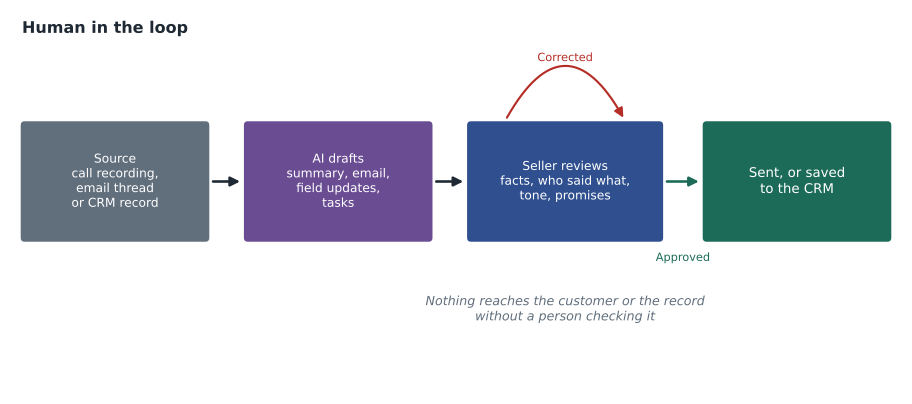
Errors like these are especially risky when they reach the customer or the CRM. A wrong figure in a follow-up email becomes a promise. A wrong field in the CRM becomes a fact that the next person trusts. That is why the most important rule for AI in sales is human review before anything is sent or saved.
Rules for using AI assistants
Ridgeline's guidelines, which Grace wrote with Ridgeline's IT provider in 2026, are typical of what many companies now use.
Use only approved tools. Sellers use the AI features in the company's CRM, email and meeting tools, which the company has reviewed for security and privacy. They do not paste customer information into free personal AI chat services, because the company cannot control how that data is stored or used.
Review everything before it leaves you. Every AI-drafted email, summary, proposal paragraph or record update is read and corrected by the seller before it is sent to a customer or saved. The seller is responsible for it, not the tool.
Check facts, figures and promises. Prices, dates, quantities, product capabilities, contract terms and anything that sounds like a commitment are checked against the quote, the price list or the source conversation.
Be transparent when it matters. Sellers tell customers when a meeting is recorded and transcribed, and do not use AI to impersonate a person or to make claims they could not stand behind. If a customer asks whether a message was written with AI help, they answer honestly.
Respect privacy and consent. AI tools that read emails and calls are processing personal information, so the privacy rules in lesson 11 apply, and so do the consent rules for recording in lesson 8 and for outreach in lesson 7.
Watch for bias and fairness. AI recommendations learn from past data, and past data can reflect past habits, such as neglecting certain kinds of customers or territories. Treat recommendations as suggestions to consider, not instructions.
Worked problem
Checking an AI summary
The AI summary of the Keystone demo listed six action items. Maya checked each against her notes and the transcript. Two were wrong (three rooms instead of two; annual billing pricing that nobody asked for), one was incomplete (it left out that the IT contractor must approve the software), and three were correct. What fraction of the action items needed correction, and what should Maya do with the summary?
Show solution
- Items needing correction: 2 wrong plus 1 incomplete.
- \[2 + 1 = 3\]
- Fraction of the six items.
- \[3 \div 6 = 0.5\]
- Correct the room count, delete the annual billing item and add the IT approval step before saving.
- Turn each corrected action item into a CRM task with an owner and due date (lesson 5).
- Rewrite the draft email in her own voice and check every figure before sending.
Answer: Half of the action items needed correction. The summary still saved time, but only because Maya checked it; saved unchecked, it would have put a wrong quantity and a false commitment into the record.
Maya's experience is not unusual. AI summaries are often largely right, but "largely right" is not good enough for a customer record or a commitment. Many sellers find the best routine is to take brief notes on key points during a meeting anyway (who wants what, numbers, deadlines, promises) and use them to check the AI's summary afterward.
AI in retail
Retail uses AI in similar ways on a different scale. Juniper & Pine's website uses AI to recommend products and answer simple questions in chat, and its clienteling app can suggest which customers to contact, such as those whose protection plans are expiring or who looked at a product that is now on sale. Associates can ask the app to draft a short follow-up text. Bev's rule is the same as Ridgeline's: every message that goes to a customer is read by the associate first. "The app doesn't know Mrs. Kowalchuk," she says. "You do."
Looking ahead
AI in sales tools will keep changing quickly, and some of what this lesson describes will be out of date within a year or two. The habits will not. A seller who knows what a tool reads, checks what it writes, keeps a person responsible for every customer communication and protects customer data will be able to use whatever tools arrive next. Lesson 12's lab includes a step where students check an AI-style summary against their own notes.
Writing good prompts for sales assistants
Many AI features work from instructions typed in plain language, called prompts. Clear prompts produce better results. A useful prompt says what you want, for whom, from which sources, and in what form: "Using only the notes and emails on the Keystone opportunity, draft a five-sentence follow-up email to Dale Petrie confirming the two video rooms, the IT approval step and the next meeting date. Use a friendly, direct tone." Limiting the assistant to specific sources reduces the chance that it invents details, and stating the length and tone saves rewriting. Even with a good prompt, the review rule still applies.
Common mistakes
MistakeAI summaries can be saved to the CRM without review because they are usually right.
InsteadReview every summary; errors that reach the record become facts others trust.
MistakeAny AI chat tool is fine for drafting customer emails.
InsteadUse only approved company tools; personal AI services may store or use customer data in ways the company cannot control.
MistakeIf the AI wrote it, the AI is responsible for it.
InsteadThe seller is responsible for everything sent to a customer or saved in the record.
MistakeAI recommendations are objective because they come from data.
InsteadThey learn from past data and can repeat past habits and biases; treat them as suggestions.
MistakeAgents should be allowed to do as much as possible without approval.
InsteadKeep a person in the loop for customer messages and important record changes.
Summary and key terms
- AI assistants in sales tools summarize, draft, research, update records, recommend, answer questions and, increasingly, act as agents.
- Product names and features change quickly; ask what data a tool reads, where it is processed, whether it trains on customer data, and what it can change on its own.
- AI saves the most time in preparation, follow-up and record-keeping.
- Common errors include fabrication, misattribution, loss of nuance, out-of-date information, wrong tone and overreach.
- Use approved tools, review everything, check facts and promises, be transparent, respect privacy and consent, and treat recommendations as suggestions.
- Keep brief notes on key points so you can check AI summaries against them.
- Large language model
- An AI system trained on large amounts of text that generates text in response to prompts.
- AI agent
- An AI system that plans and carries out a sequence of steps toward a goal within set limits.
- Fabrication
- An AI output that states something false or invented as if it were true.
- Human in the loop
- A process in which a person reviews and approves AI outputs before they take effect.
- Conversation summary
- An AI-generated condensed account of a call or meeting, with action items.
Practice problems
Work each problem on paper first, then reveal the answer to check.
Name two errors the AI made in Maya's Keystone summary.
Show answer
It said three rooms instead of two, and it listed annual billing pricing as a customer request when no one asked for it.
Why should sellers not paste customer information into free personal AI chat services?
Show answer
The company cannot control how that data is stored or used, which creates privacy and security risks.
An AI summary has 8 action items and 2 need correction. What fraction is that?
Show answer
2 divided by 8 is 0.25, or one in four.
What five questions should a company ask before switching on an AI feature?
Show answer
What data it reads, where data is processed and stored, whether customer data trains the model, who sees outputs, and what it can change on its own.
Lesson quiz · 5 questions
Score 60% or more to complete this lesson.
Create a free account to save your progress, take quizzes and earn a certificate.