
SLS-140 · Lesson 6 of 12 · 23 min
Data quality and hygiene
▶ Video coming soon A video version of this lesson is on the way.
In late September 2026, Ridgeline sent a mailing to its customers about a new RoomFlow feature. Within a day, Grace Liu had three complaints. Halverson Law received two copies addressed to slightly different versions of the firm's name. A contact at Northfield Family Clinic who had left the clinic in 2024 still received it, and the clinic's new office manager forwarded it back with a polite note. And a school in the Prairie Valley division got a letter addressed to "Dear FirstName". None of these was a disaster. All of them made Ridgeline look careless, and all of them came from the same source: data quality problems in the CRM. Rob Kowalski asked Grace to run a full clean-up in October, and this lesson follows what she found and what she changed.
Data quality means how fit the data is for its purpose. A CRM with high-quality data has records that are accurate, complete enough for the job, consistent, current and free of duplicates. Data hygiene is the ongoing work of keeping it that way. Every lesson so far has depended on good data: a pipeline is only as honest as its stages and dates, a hand-off only works if the notes are clear, and a report is only as good as the records it counts. This lesson explains the main kinds of data problems, how to measure them and how to prevent them.
Dimensions of data quality
Data specialists describe data quality along several dimensions. Five matter most for sales teams.
| Dimension | Question it asks | Example of a problem at Ridgeline |
|---|---|---|
| Accuracy | Is the information correct? | A contact's phone number belongs to a different person |
| Completeness | Is the information needed for the job there? | Accounts with no website or industry; contacts with no email |
| Consistency | Is the same thing recorded the same way everywhere? | "Health care", "Healthcare" and "Medical" used for the same industry |
| Timeliness | Is the information current? | A contact who left the clinic in 2024 is still marked active |
| Uniqueness | Is each real-world thing recorded once? | Halverson Law exists as two accounts with different spellings |
These dimensions are linked. A duplicate record (a uniqueness problem) usually means that each copy is incomplete, that activities are split between them and that some fields disagree. A field typed as free text instead of a picklist leads to consistency problems. A contact list that nobody updates becomes inaccurate as people change jobs.
Why data decays
Data quality is not a one-time job because data decays. People change jobs, get promoted, retire and change email addresses. Companies move, merge, rename themselves and close. Phone systems change. Even data that was perfect when entered becomes less accurate every month. Estimates of how fast business contact data decays vary by source and industry, and many published figures come from data vendors with something to sell, but every sales team that has looked at its own records finds that a meaningful share of contacts goes out of date each year.
Data also degrades through how it is entered. Different people type the same thing differently. Imports from trade show lists or spreadsheets bring in records with missing or badly formatted fields. Integrations between tools can create duplicates when matching rules are weak. Shortcuts under time pressure, such as creating a new contact rather than searching for the existing one, add up.
Measuring data quality
Grace began the clean-up by measuring. She ran reports on accounts and contacts to count specific problems, which gave her a baseline and a way to show progress. A measure is most useful when it is simple: a count of records with a problem, divided by the number of records checked, gives a rate.
Worked problem
Measuring Ridgeline's data problems
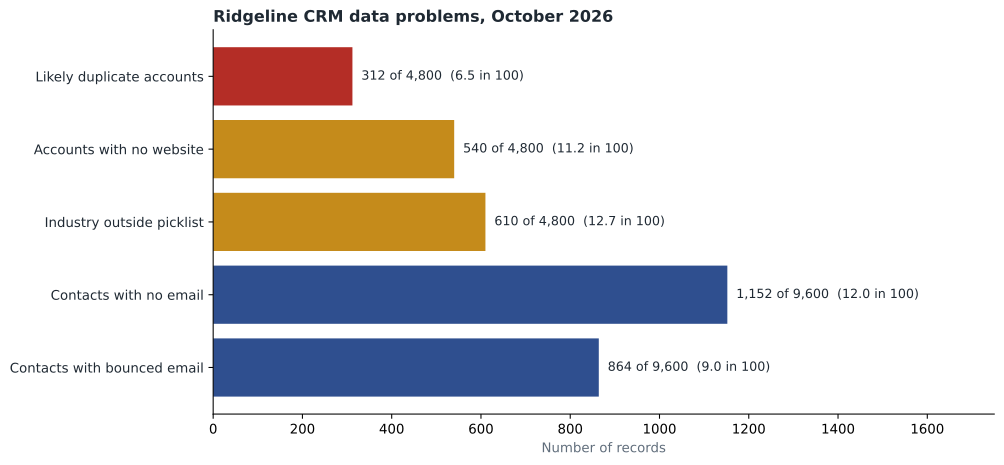
In October 2026, Ridgeline's CRM held 4,800 account records and 9,600 contact records. Grace's reports found 312 accounts that were likely duplicates of another account, 1,152 contacts with no email address and 864 contacts whose email had bounced in the past year. Calculate each rate.
Show solution
- Duplicate account rate: 312 out of 4,800.
- \[312 \div 4800 = 0.065\]
- Contacts with no email: 1,152 out of 9,600.
- \[1152 \div 9600 = 0.12\]
- Contacts with a bounced email: 864 out of 9,600.
- \[864 \div 9600 = 0.09\]
- Contacts with no usable email (missing or bounced): 1,152 plus 864.
- \[1152 + 864 = 2016\]
- \[2016 \div 9600 = 0.21\]
Answer: About 6.5 in 100 accounts were likely duplicates, 12 in 100 contacts had no email and 9 in 100 had a bounced one: about 21 in 100 contacts, or roughly one in five, could not be reached by email.
Duplicates
Duplicates are the most damaging common problem in sales data. When an organization or person exists as two or more records, its history is split, reports count it twice, two sellers may contact the same customer, and customers receive repeated messages. Duplicates arise from manual entry without searching, from imports, from integrations and from leads converted without checking for existing accounts, the problem lesson 3 described.
Most CRMs offer two tools for duplicates. Matching rules define when two records are likely the same: for example, accounts with the same website domain, or contacts with the same email address, or the same first name, last name and company. Duplicate rules then decide what happens when a match is found: warn the user, block the new record, or report it. Ridgeline now warns users when a new account matches an existing website domain or a very similar name, and blocks new contacts with an email address that already exists.
Existing duplicates must be merged. Merging combines two or more records into one, keeping the best value for each field and moving all linked activities, opportunities and contacts to the surviving record. Merging cannot always be undone, so it needs care: Grace merges high-value accounts by hand after checking the history, and uses the CRM's bulk tools only for simple cases such as two copies of the same contact with identical details.
Worked problem
Choosing values when merging
Two Halverson Law accounts are to be merged. Record A: "Halverson Law LLP", website filled in, industry "Legal services", owner Maya Chen, 14 activities, last activity Oct 2. Record B: "Halverson Law", no website, industry "Law firm" (not on the picklist), owner a former employee, 6 activities, last activity in 2025. Which values should the merged record keep?
Show solution
- Name: "Halverson Law LLP", the full legal name.
- Website: from record A, since B has none.
- Industry: "Legal services", the picklist value.
- Owner: Maya Chen, the current owner; the former employee is no longer active.
- Activities: all 20, from both records, moved to the surviving record.
Answer: The merged record keeps record A's name, website, industry and owner, and all 20 activities from both records, so nothing in the history is lost.
Standards and validation
Prevention is cheaper than clean-up. Grace's changes after the October clean-up show the main tools.
Picklists replace free text wherever values will be counted or filtered: industry, lead source, contact role, loss reason. The 610 accounts with industry values outside the picklist were mapped to the correct values in one bulk update, and the field was locked to the picklist.
Required fields make sure essential information is entered: an opportunity cannot be saved without an amount, close date and next step, and an account cannot be saved without a website or a note explaining why there is none. Required fields should be few. Every additional required field slows sellers down and tempts them to type anything just to save the record, which creates inaccurate data.
Validation rules check that values make sense: a close date cannot be in the past for an open opportunity, a phone number must have the right number of digits, an email must contain an @ sign and a domain.
Formats and standards make data consistent: province or state abbreviations from a list, phone numbers in one format, addresses checked against a postal address service.
Ownership makes someone responsible. Every account has an owner, and the owner is responsible for keeping it current. Records owned by people who have left the company are reassigned promptly; in October, Grace found 96 accounts still owned by former employees.
Enrichment and verification
Data enrichment means adding or updating information from outside sources: company size and industry from a business data provider, updated job titles from a contact data service, verified mailing addresses from a postal service. Many CRMs now include enrichment features, and AI assistants can suggest updates based on email signatures and public information.
Enrichment helps, but it is not automatically right. Data from providers can itself be out of date or wrong, and some of it may have been collected in ways that raise privacy questions. Lesson 11 explains why companies need to know where their data comes from. Ridgeline's rule is that enrichment can fill empty fields automatically but must not overwrite a value a seller entered from a direct conversation without a review. A seller who heard from Janet Morrow last week that she is now the clinic's operations manager knows more than a database that still says office manager.
Email verification tools check whether addresses are likely to be deliverable before a mailing or sequence is sent. Bounced emails are worth acting on quickly: a bounce often means the person has left, which is a reason to find out who replaced them.
Hygiene as a habit
Clean-ups are expensive and disruptive. The aim is to need fewer of them by building small habits into the daily work: search before creating, update a contact the moment something changes, mark contacts who have left as inactive and link their replacement, choose picklist values carefully, and fix small errors when you see them. Ridgeline also schedules a short data review each quarter, when each owner looks at their accounts' reports of missing fields and bounced emails.
Retail has its own version. At Juniper & Pine, the most common data problems are duplicate customer profiles, created when an associate cannot find an existing profile under a different phone number, and out-of-date delivery addresses. Bev asks associates to search by phone number, then email, then name and postal code before creating a new profile, and to confirm the delivery address with the customer at every sale. When Aiden found three profiles for the same couple, created over two years by three associates, he asked the store's system administrator to merge them, and the merged profile showed nearly 9,000 dollars of past purchases that none of the three had shown on its own.
Worked problem
Measuring progress
After the October clean-up and the new rules, Grace measured again in early November. Likely duplicate accounts fell from 312 to 41, and contacts with no usable email fell from 2,016 to 1,190, out of the same totals of 4,800 accounts and 9,600 contacts. What are the new rates, and by how much did each fall?
Show solution
- New duplicate rate.
- \[41 \div 4800 \approx 0.0085\]
- From about 6.5 in 100 to under 1 in 100.
- New no-usable-email rate.
- \[1190 \div 9600 \approx 0.124\]
- From about 21 in 100 to about 12.4 in 100.
Answer: Duplicates fell to under 1 in 100 accounts, and contacts with no usable email fell to about 12 in 100. The rest of the email problem needs sellers to find updated contacts in conversations, which takes longer than a technical fix.
Who owns data quality
Data quality is often treated as sales operations' job, but most problems start with everyday entries by sellers, and only the people who talk to customers can fix many of them. A contact's new job title, a company's move to a new address or a person who has left are all things a seller learns in conversation long before any database does. Ridgeline divides the work: sellers own the accuracy of their own accounts and contacts, sales operations owns standards, rules, matching and bulk clean-ups, and managers make data review part of their regular one-to-one meetings. Shared ownership, with clear responsibilities, works better than leaving it all to one analyst.
Common mistakes
MistakeData quality is a one-time clean-up project.
InsteadData decays continuously; it needs daily habits and regular reviews as well as occasional clean-ups.
MistakeMore required fields mean better data.
InsteadToo many required fields lead people to type anything to save the record; keep them to what is essential.
MistakeMerging duplicates is always safe and reversible.
InsteadMerges often cannot be undone; check important records by hand and keep the best value for each field.
MistakeEnrichment data should always overwrite what sellers entered.
InsteadFresh information from a direct conversation is often more accurate; review conflicts before overwriting.
MistakeA bounced email is just a technical problem.
InsteadA bounce often means the contact has left; it is a prompt to find out who replaced them.
Summary and key terms
- Data quality means fitness for purpose: accuracy, completeness, consistency, timeliness and uniqueness.
- Data decays as people and companies change, and degrades through inconsistent entry, imports and integrations.
- Measuring problems as rates gives a baseline and shows progress.
- Duplicates are especially damaging; matching and duplicate rules prevent them, and careful merging fixes existing ones.
- Picklists, a few required fields, validation rules, standard formats and clear ownership prevent many problems.
- Enrichment and verification help but need review; daily habits and regular reviews keep data healthy.
- Data quality
- How fit data is for its purpose.
- Data hygiene
- The ongoing work of keeping data accurate, complete, consistent, current and unique.
- Duplicate record
- Two or more records describing the same real-world organization or person.
- Matching rule
- A rule that defines when two records are likely to be the same.
- Merge
- Combining duplicate records into one surviving record with all linked history.
- Validation rule
- A rule that checks whether an entered value makes sense before the record is saved.
- Data enrichment
- Adding or updating record information from outside sources.
Practice problems
Work each problem on paper first, then reveal the answer to check.
Which data quality dimension does "Dear FirstName" in a mailing reflect?
Show answer
Completeness (the first name field was empty) and, in the mailing setup, a missing fallback value.
A CRM has 2,500 contacts, of which 300 have no phone number. What is the rate?
Show answer
300 divided by 2,500 is 0.12, or 12 in 100.
Give two matching rules that would catch duplicate contacts.
Show answer
Same email address; same first name, last name and account.
Why does Juniper & Pine search by phone, email and name and postal code before creating a profile?
Show answer
Customers may have changed one detail, so searching several ways finds existing profiles and prevents duplicates.
Lesson quiz · 5 questions
Score 60% or more to complete this lesson.
Create a free account to save your progress, take quizzes and earn a certificate.