
SLS-140 · Lesson 2 of 12 · 20 min
What a CRM is for
▶ Video coming soon A video version of this lesson is on the way.
In her second week, Maya took a call from Janet Morrow, the office manager at Northfield Family Clinic. Janet wanted to know whether Ridgeline could still honour the price it had quoted for a multifunction printer in the spring. Maya had never spoken to Janet before. Before calling back, she opened the clinic's account in the CRM. In two minutes she learned that a colleague, now moved to another territory, had quoted the printer in April; that the quote had expired at the end of June; that Janet had mentioned the clinic had paid a penalty to leave a previous five-year lease; and that Northfield's finance contact preferred quotes by email with the lease terms spelled out. When Maya called back she could say, 'I see the April quote expired in June, and I know flexibility on the term matters to you after the last lease. Let me check what we can do.' Janet's reply was short: 'Finally, someone who knows our history.'
That small moment is what a CRM is for. Lesson 1 described the CRM as the foundation of the sales technology stack. This lesson looks at what a CRM actually does, who uses it and for what, how it differs in business and retail selling, and what a good CRM record looks like from the customer's point of view.
A definition
Customer relationship management, or CRM, means two related things. As a business practice, it is the discipline of managing a company's relationships with customers and prospects over time: knowing who they are, what they need, what has been promised and how to serve them well. As software, a CRM system is the shared database and set of tools that support that practice. In everyday speech, "the CRM" almost always means the software, and this course uses the word that way.
A CRM system stores records about organizations, people, deals and interactions, and links them together. It lets authorized users see a customer's history in one place, plan and record their work, track sales opportunities through stages, send and log communication, and report on what is happening. Modern CRMs are almost all cloud services: the data is stored by the vendor and accessed through a web browser or mobile app, and the company pays a subscription.
Who uses a CRM, and for what
A CRM serves several groups of people, and each needs something different from it. Understanding those needs explains why the system asks sellers to record what it does.
| User | What they need from the CRM | What they need sellers to record |
|---|---|---|
| Account executives (Maya) | Customer history before every call; a list of what to do today; a view of their own deals | Accurate contacts, notes after each conversation, next steps with dates |
| Inside reps (Owen Pelletier's team) | Lists of prospects to contact; who has already been contacted and how | Logged calls and emails, meeting bookings, reasons a prospect is not interested |
| Account managers (Farida Haddad) | A clean handover after the sale: what was sold, promised and agreed | Final terms, promises made, key contacts and their roles |
| Sales manager (Darnell Brooks) | Which deals are moving or stuck; where to coach | Honest stages, amounts and close dates; next steps |
| Sales operations (Grace Liu) | Reliable data for reports, forecasts and territory planning | Consistent fields, no duplicates, complete required information |
| Service and installation teams | Who to call, what was sold, delivery and installation details | Site contacts, access notes, special requirements |
| Senior leaders (Rob Kowalski) | Revenue outlook and trends | Everything above, done consistently |
Each group depends on the others. Darnell cannot coach well if stages are wrong, Farida cannot look after a new customer if the promises made during the sale are not written down, and the installation crew arrives at the wrong door if no one recorded that the clinic's loading entrance is at the back. When sellers understand who reads what they write, record-keeping stops feeling like paperwork for the boss.
The main things a CRM does
CRMs differ in detail, but almost all of them do the same core things.
They hold records. Organizations (usually called accounts), people (contacts), potential sales (opportunities or deals) and early prospects (leads) are stored as records with fields such as name, phone, address, industry and owner. Lesson 3 explains these record types.
They link records. A contact belongs to an account, a deal belongs to an account and involves several contacts, and every call, email and meeting is attached to the records it concerns. The links are what let Maya open the Northfield account and see everything in one place.
They track deals through a pipeline. Each opportunity moves through stages, from first qualification to won or lost. Lesson 4 covers pipelines and stages.
They record and plan activity. Calls, meetings, emails, tasks and notes are logged against records, and upcoming tasks appear on the seller's list. Lesson 5 covers activities.
They automate routine work. Workflows can assign new leads to the right rep, remind a seller when a quote is about to expire, or create a follow-up task after a meeting. Automation saves time but needs care, because a badly designed rule can send the wrong message to hundreds of people.
They report. Lists, reports and dashboards show what is in the system. Lesson 9 introduces them.
They connect. Email, calendar, phone systems, engagement platforms, e-signature and finance systems can all be linked, as lesson 1 described.
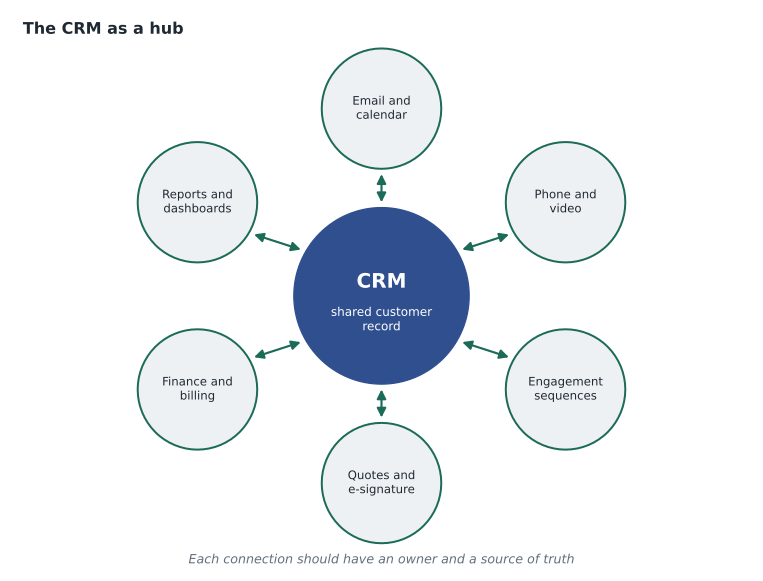
A CRM from the customer's side
Customers never see a company's CRM, but they feel its effects constantly. When a company has good records and uses them, customers experience continuity: they do not have to repeat themselves, promises are kept, the right person calls back, and offers fit their situation. When records are poor, customers experience the opposite: two salespeople calling about the same thing, a sales call offering a product they already own, a service technician who does not know what was agreed. Janet's relief at Northfield was a reaction to years of the second kind of experience with other suppliers.
Good CRM practice is therefore part of customer service, which SLS-130 covers in depth. It is also part of trust, covered in SLS-120: a seller who remembers what a customer said, and acts on it, shows reliability. Darnell puts it simply: 'Your memory is not good enough for forty accounts. The CRM is how you keep your promises.'
Business and retail CRM
The CRM idea applies to both business and retail selling, but the shape differs.
| Business sales (Ridgeline) | Retail (Juniper & Pine) | |
|---|---|---|
| Main record | The account (an organization) with several contacts | The customer profile (a person or household) |
| Number of customers | Hundreds or thousands of accounts per team | Tens or hundreds of thousands of profiles |
| Typical sale | Weeks or months, several decision makers | Minutes to weeks, one household |
| Main tracked item | Opportunities moving through a pipeline | Purchases, deliveries, protection plans and follow-ups |
| Who updates records | Mostly sellers, after each interaction | Mostly the point-of-sale system, plus associates' notes |
| Typical tools | A business CRM linked to email, calendar and quoting | Point-of-sale system with customer profiles, a clienteling app, e-commerce |
At Juniper & Pine, most of the customer record is created automatically when a sale is rung up and the customer agrees to have a profile. Associates add notes in the clienteling app: the colours the customer liked, the room measurements they brought in, the fact that a couch has to fit up a narrow staircase. Bev asks every associate to add at least one useful note per sale. When Aiden met a returning customer who had measured a staircase on her last visit, he pulled up the note, saw "stairwell turn, 81 cm clear" and could steer her straight to the sofas that would fit. In the US store the same note reads "stairwell turn, 32 in clear".
What the CRM is not
A CRM is not a contact list that a seller owns. Records belong to the company, and so does the relationship history they contain. When Maya leaves a customer to someone else, the record stays. This is also why sellers should never keep a private spreadsheet of customers outside the CRM: it breaks the shared memory, and it can break privacy law if customer information is copied to places the company cannot protect. Lesson 11 returns to this point.
A CRM is not a substitute for judgment. The system can show that a deal has been in the same stage for ninety days, but only the seller can say why. It can suggest the next best action, but only someone who knows the customer can tell whether the suggestion makes sense.
A CRM is not a surveillance tool, though it can be misused as one. Managers can see activity counts and deal histories, and good managers use that visibility to coach and help. A manager who uses activity counts only to punish people quickly teaches the team to log meaningless activity, which destroys the value of the data. Darnell's rule for his own coaching is to start every pipeline conversation with "What help do you need on this deal?" rather than "Why haven't you logged more calls?"
Worked problem
How much does missing information cost?
In October 2026 Grace reviewed 60 deals that Ridgeline lost in the previous year. In 18 of them, the notes showed that the customer had asked for something (a revised quote, a site visit or a reference) that was never delivered. If Ridgeline's average lost deal was worth 14,500 dollars, how many dollars of lost deals involved a dropped request, and what fraction of the lost deals was that?
Show solution
- Fraction of lost deals with a dropped request: 18 out of 60.
- \[18 \div 60 = 0.3\]
- Value of those deals: 18 deals times 14,500 dollars.
- \[18 \times 14500 = 261000\]
Answer: About 3 in 10 lost deals, worth about 261,000 dollars, involved a customer request that was never delivered. Not all of those deals would have been won, but a reliable task list in the CRM would have prevented the dropped requests.
That review changed one of Ridgeline's habits. Every customer request mentioned in a call note must now also become a task with a due date. Lesson 5 explains why notes and tasks are different, and why a request buried in a note is easy to forget.
Signs of a healthy CRM
Grace uses a short list to judge whether a CRM is helping the team or getting in its way. A healthy CRM has records that people trust enough to act on without double-checking. Sellers open it before calls because it saves them time, not because they are told to. Managers run their pipeline meetings from it rather than from separate spreadsheets. New team members can pick up an account and understand its history in a few minutes. And customers notice continuity: they do not have to repeat themselves.
An unhealthy CRM shows the opposite signs: side spreadsheets, duplicate records, deals that sit in the same stage for months, notes that say only "called" or "follow up", and people saying "don't trust the CRM, ask me". The rest of this course is largely about building the habits that keep a CRM healthy.
The CRM and the customer's whole life cycle
It helps to picture a customer's whole history with a company as a cycle: first contact, qualification, the sale, onboarding and installation, regular use and service, renewal or expansion, and sometimes a lapse and a return. Different teams are responsible for different parts of the cycle, but the CRM is the one place that holds all of it. At Ridgeline, a printer customer's record carries the original deal, the installed equipment, every service request, the lease end date and the renewal opportunity that the system creates six months before it. When a renewal conversation starts, the account manager can see not only what the customer bought but how the equipment has performed and how service calls were handled, which is often what decides whether the customer renews.
Common mistakes
MistakeCRM means the software and nothing more.
InsteadCRM is also a business practice: managing relationships with customers over time. The software supports the practice.
MistakeA seller's customers and records belong to the seller.
InsteadRecords and relationship history belong to the company and stay when a seller moves on.
MistakePrivate spreadsheets of customers are a harmless shortcut.
InsteadThey break the shared memory and can expose customer data where the company cannot protect it.
MistakeThe CRM can tell you why a deal is stuck.
InsteadIt can show that a deal is stuck; only the seller's judgment and conversation with the customer explain why.
MistakeActivity counts are the best measure of a seller.
InsteadUsing counts to punish teaches people to log meaningless activity. Use the data to coach.
Summary and key terms
- CRM is both a business practice and the software that supports it; the software stores and links records of accounts, contacts, deals and activities.
- Many people use the CRM for different purposes, and each depends on sellers recording accurate, complete information.
- Core CRM functions are holding and linking records, tracking deals, recording and planning activity, automating routine work, reporting and connecting to other tools.
- Customers feel the effects of good CRM practice as continuity and kept promises.
- Business CRMs centre on accounts and opportunities; retail CRMs centre on customer profiles created through the point-of-sale system.
- A CRM is not a private contact list, a substitute for judgment or a surveillance tool.
- Customer relationship management
- The practice of managing relationships with customers and prospects over time, and the software that supports it.
- Record
- One entry in the CRM, such as an account, contact or deal, made up of fields.
- Field
- One piece of information on a record, such as a phone number or close date.
- Workflow automation
- Rules that perform routine actions automatically, such as assigning leads or creating tasks.
- Customer profile
- In retail, the record of a customer and household, usually linked to purchases at the point of sale.
Practice problems
Work each problem on paper first, then reveal the answer to check.
Give two ways Maya's call back to Janet was better because of the CRM.
Show answer
She knew the quote had expired and why contract flexibility mattered, so Janet did not have to repeat herself and felt understood.
Why should sellers not keep a private spreadsheet of their customers?
Show answer
It breaks the shared memory and can put customer data where the company cannot protect it.
In a review of 40 lost deals, 10 had a dropped customer request. What fraction is that?
Show answer
10 divided by 40 is 0.25, or one in four.
Name two signs of an unhealthy CRM.
Show answer
Any two of: side spreadsheets, duplicates, deals stuck for months, empty notes, people saying not to trust it.
Lesson quiz · 5 questions
Score 60% or more to complete this lesson.
Create a free account to save your progress, take quizzes and earn a certificate.