
VIS-410 · Lesson 4 of 12 · 27 min
Websites and online portfolios
For most photographers, the website is where a first impression is made. An art director who hears your name, a curator who sees one image on social media or a couple searching for a photographer will usually look at your site before contacting you. A professional website is your portfolio, your business card and your shop window at once, and it works while you sleep. This lesson covers what a portfolio site needs, how to choose a platform without locking yourself in, image sizes and page speed, search basics, accessibility, protecting images and making copyright and contact information clear.
What a portfolio website must do
A good portfolio site answers the same questions as a printed portfolio, quickly and on any device. Who are you, what do you do, can I see examples, and how do I contact you? Most visitors look at a site on a phone first, many for less than a minute. Everything else is secondary.
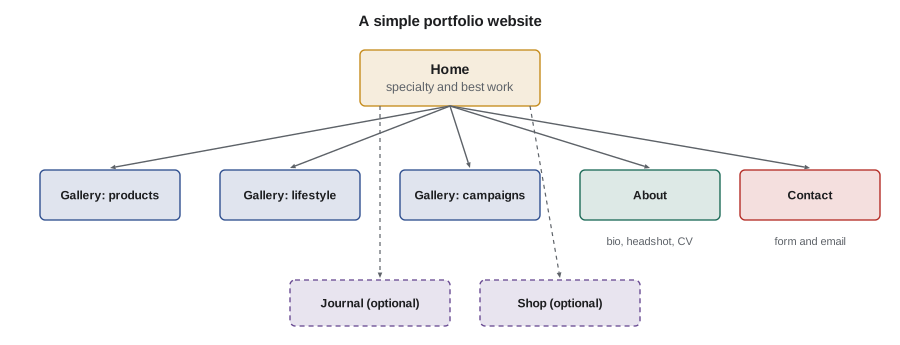
- A clear home page that states your specialty in a few words and shows your strongest work immediately.
- A small number of galleries, each built for one audience or type of work, typically 12 to 25 images each.
- An about page with a short bio, a professional headshot and, for artists, a CV and statement.
- A contact page or simple form, with an email address that uses your own domain name.
- Optional pages for services and process, client list, press, shop or blog, only if you will keep them current.
Choosing a platform
Portfolio platforms fall into three broad groups. Hosted portfolio builders designed for photographers offer templates, galleries and image protection with little setup. General website builders offer more flexibility for shops, blogs and booking tools. Self-hosted systems give full control but require you to manage updates, security and backups. At the time of writing (October 2026) there are many reputable options in each group; this course does not endorse particular products.
| Approach | Setup effort | Flexibility | Ongoing work | Main risk |
|---|---|---|---|---|
| Hosted portfolio builder | Low | Moderate | Low | Template limits, platform price changes |
| General website builder | Low to moderate | High | Low to moderate | Paying for features you do not use |
| Self-hosted content system | High | Very high | High (updates, security, backups) | Security problems if neglected |
Whatever you choose, register your own domain name (for example yourname.com or yourname.ca) and connect it to the platform. The domain belongs to you and can move with you if you change platforms, which protects years of links, search ranking and printed business cards. Keep a complete local copy of every image and text on the site so you can rebuild it elsewhere.
Image sizes and page weight
Large images look impressive, but slow pages lose visitors, especially on mobile networks. The goal is images that look sharp on high-resolution screens while keeping pages light. Most platforms now generate several sizes automatically and serve modern formats such as WebP or AVIF to browsers that support them; your job is to upload sensible originals and avoid enormous files.
- Upload images around 2,000 to 3,000 pixels on the long edge unless your platform recommends otherwise.
- Export in sRGB with embedded profile, at a JPEG quality that keeps files roughly under 1 MB before the platform's own compression.
- Avoid uploading full-resolution files: they slow uploads, may be resized poorly and make it easier for others to misuse your images.
- Check how pages load on a phone over a mobile connection, not just on studio Wi-Fi.
Worked problem
How long does a gallery page take to load?
A gallery page loads 20 images that the platform serves at an average of 350 KB each, plus 1.5 MB of code, fonts and other assets. A visitor on a mobile connection gets an effective 10 Mb/s. Roughly how long does the full page take to download, and how much faster would it be with images averaging 180 KB?
Show solution
- Page size: \( 20 \times 0.35 + 1.5 = 7 + 1.5 = 8.5 \) MB.
- Time: \( 8 \times 8.5 / 10 = 6.8 \) seconds.
- With 180 KB images: \( 20 \times 0.18 + 1.5 = 5.1 \) MB, so \( 8 \times 5.1 / 10 \approx 4.1 \) seconds.
Answer: About 6.8 seconds at 350 KB per image, or about 4.1 seconds at 180 KB. Most platforms load images progressively, so the first images appear sooner, but lighter images make the site feel much faster.
The factor of 8 converts megabytes to megabits. Real loading time also depends on the server, caching and how the page loads images as the visitor scrolls, but the calculation shows why page weight matters.
Search and discovery
Search engine optimization (SEO) means helping search engines understand your site so that people looking for your services can find it. For photographers the basics are simple and honest:
- Use clear page titles and headings that say what you do and where, such as "Food photographer in Halifax" or "Architectural photography, Denver".
- Write a short paragraph of real text on key pages; images alone give search engines little to work with.
- Name image files descriptively before uploading ("halifax-restaurant-interior-dusk.jpg", not "IMG_4821.jpg").
- Write alt text for every image (see accessibility below), which also helps search.
- Create or claim local business listings and keep your name, address and contact details consistent across them.
- Earn links from credible sources: client credits, published features, association directories and exhibition listings.
Avoid tricks such as stuffing pages with repeated keywords or buying links; search engines penalize them, and they make your site read badly for people.
Accessibility and alt text
An accessible website can be used by people with disabilities, including people who are blind or have low vision and use screen readers, people who navigate by keyboard and people with cognitive or motor disabilities. The Web Content Accessibility Guidelines (WCAG) 2.2, published by the World Wide Web Consortium in 2023, are the international reference. For a portfolio site, the most important practices are alt text for images, sufficient colour contrast for text, keyboard-accessible menus and galleries, readable font sizes and captions for video.
Alt text is a short written description of an image read aloud by screen readers. For a portfolio, describe what matters about the image in one or two sentences: subject, setting and mood, as you would to a colleague on the phone. Do not start with "image of", do not stuff keywords and do not leave alt text blank for meaningful images.
Worked problem
Writing useful alt text
Improve this alt text for a portfolio image: "IMG_2231 photographer Toronto food photography best food photographer".
Show solution
- Remove the file name and repeated keywords; they mean nothing to a listener.
- Describe what the image shows and why it matters: subject, setting, light and mood.
- A better version: "A steaming bowl of ramen on a dark wooden counter, lit from one side by window light, with chopsticks resting on the rim."
Answer: Replace keyword lists with a short, specific description of the photograph that a screen reader user would find meaningful.
In Canada, accessibility law for websites varies by jurisdiction. Ontario's Accessibility for Ontarians with Disabilities Act (AODA) requires designated public-sector organizations and private and non-profit organizations with 50 or more employees in Ontario to make websites conform to WCAG 2.0 Level AA, with some exceptions. The federal Accessible Canada Act applies to federally regulated organizations. A sole photographer is often not directly covered, but clients may require accessible deliverables, and following WCAG 2.2 is good practice for everyone.
Protecting your images online
No technical method can completely stop people from copying images displayed on the web; anything a browser can show, someone can capture. The realistic goal is to discourage casual copying, make ownership clear and keep the evidence you would need to enforce your rights.
- Upload web-sized files rather than full resolution, so copied images are less useful for print.
- Embed copyright and contact information in image metadata (IPTC fields such as creator, copyright notice and contact), and check that your platform does not strip it.
- Consider content credentials (the C2PA standard), now supported by some cameras, editing software and platforms, which attach verifiable information about who made an image and how it was edited.
- Use visible watermarks sparingly; large watermarks spoil the viewing experience and are easily cropped or removed. A small, discreet credit is a reasonable compromise for some uses.
- Disabling right-click deters only the least determined users and can annoy legitimate visitors.
- Use reverse image search services periodically to find unauthorized uses of your key images.
In Canada, copyright arises automatically when you create an original photograph; you do not need to register it or add a notice. Registration with the Canadian Intellectual Property Office is optional but provides a certificate that serves as evidence of ownership in a dispute. Since 2012, the photographer is generally the first owner of copyright even in commissioned photographs unless there is an agreement to the contrary or the photographer was an employee.
A copyright line such as "© 2026 Your Name. All rights reserved." in the site footer costs nothing and reminds visitors that the images are not free to use. PHOT-302 covers licensing and infringement in more depth.
Privacy, cookies and contact forms
If your site collects personal information through contact forms, mailing lists or analytics, you have privacy obligations. Keep forms short, explain how you use the information, protect enquiries and do not add people to mailing lists without consent (lesson 5 covers email law). If you use analytics or advertising tools that set cookies, check whether your platform provides a privacy notice and consent options suitable for visitors from your country and from regions with stricter rules, such as the European Union.
Maintaining the site
A website that is out of date damages your credibility: a news section last updated three years ago or galleries full of old work suggest you are no longer active. Set a calendar reminder to review the site every quarter, test the contact form, check links, update galleries from your candidates collection and renew the domain name well before it expires. Keep the site focused; a smaller site that is current is better than a large one that is neglected.
Common mistakes
MistakeUsing a free subdomain instead of your own domain name
InsteadRegister your own domain so your address stays with you if you change platforms.
MistakeUploading full-resolution files to the website
InsteadUpload sensibly sized sRGB files, around 2,000 to 3,000 pixels on the long edge, with metadata.
MistakeLeaving alt text empty or filling it with keywords
InsteadWrite a short, specific description of each meaningful image.
MistakeRelying on watermarks and disabled right-click to protect images
InsteadCombine web-sized files, metadata, credentials and monitoring, and register work where it strengthens your rights.
MistakeLetting galleries and news go stale
InsteadReview the site quarterly and keep it small enough to maintain.
Summary and key terms
- Your website is usually the first place clients, curators and employers see your work.
- Keep the structure simple: a clear home page, a few focused galleries, an about page and easy contact.
- Own your domain name and keep local copies of all site content.
- Lighter images and pages load faster, especially on phones and mobile networks.
- Honest SEO uses clear titles, real text, descriptive file names, alt text and credible links.
- WCAG 2.2 is the international accessibility reference; alt text and contrast matter most for portfolios.
- Protect images with web-sized files, metadata and monitoring, and understand registration rules in your country.
- Domain name
- A web address you register and control, such as yourname.com
- Hosted platform
- A service that runs your website on its servers for a subscription fee
- Page weight
- The total size of all files a browser downloads to display a page
- SEO
- Search engine optimization, making a site easier for search engines to understand and rank
- Alt text
- A short written description of an image read by screen readers and search engines
- WCAG
- Web Content Accessibility Guidelines, the international standard for accessible web content
- IPTC metadata
- Standard fields embedded in image files for creator, copyright, captions and contact details
- Content credentials
- Verifiable information attached to an image about its origin and edits, based on the C2PA standard
- Reverse image search
- A search that finds other web pages using the same or a similar image
- Watermark
- A visible mark added to an image to show ownership
Practice problems
Work each problem on paper first, then reveal the answer to check.
Name the four essential parts of a portfolio website.
Show answer
A clear home page, focused galleries, an about page and a contact page.
Why should you own your domain name?
Show answer
It stays with you if you change platforms, protecting links, search ranking and printed materials.
A page has 15 images at 400 KB and 2 MB of other assets. How long does it take at 8 Mb/s?
Show answer
\( 15 \times 0.4 + 2 = 8 \) MB; \( 8 \times 8 / 8 = 8 \) seconds.
Rewrite "DSC_0042 wedding photographer" as useful alt text for a first-dance photograph.
Show answer
For example: "A couple dancing under string lights in a barn, the bride laughing as the groom dips her."
What accessibility standard is the current international reference?
Show answer
WCAG 2.2, published by the World Wide Web Consortium in 2023.
Why do watermarks offer limited protection?
Show answer
They are easily cropped or removed and large ones spoil the viewing experience.
What metadata should you embed in web images?
Show answer
Creator name, copyright notice and contact details in IPTC fields.
Give two honest SEO practices.
Show answer
Clear page titles saying what you do and where, and descriptive image file names (also real text and alt text).
What is the risk of a self-hosted website for a busy photographer?
Show answer
Security problems if updates and backups are neglected.
How often should you review your website?
Show answer
About every quarter, testing forms and links and updating galleries.
Lesson quiz · 5 questions
Score 60% or more to complete this lesson.
Create a free account to save your progress, take quizzes and earn a certificate.