
CRE-350 · Lesson 8 of 12 · 26 min
Moderation tools and community defenses
A community is one of a creator's most valuable assets, and also one of the main places harassment happens. Moderation is how you keep the space safe enough for your audience and for yourself. This lesson covers community guidelines, the built-in tools platforms provide, keyword filters and how to measure them, human moderators and how to look after them, and the wider community defenses that make abuse less likely to take hold in the first place.
Start with community guidelines
Moderation is easier and fairer when everyone knows the rules. Community guidelines are a short public statement of what is welcome and what is not. They do not replace platform rules, which apply everywhere, but they let you set a higher standard for your own space. Good guidelines are short, specific and written in your own voice. They usually cover respect for others, no hate or harassment, no sharing of personal information, no spam or scams, no self-promotion without permission and what happens when rules are broken.
Publish the guidelines where people will see them: in a pinned comment, a channel description, a community tab or the rules section of a chat server. Refer to them when you remove content or ban someone. Consistent enforcement builds trust: audiences accept moderation more readily when they can see it follows clear rules rather than personal whims.
| Guideline | Example wording | Typical action when broken |
|---|---|---|
| Respect | Disagree with ideas, not people. | Hide comment; warn |
| No hate or harassment | No slurs, threats or attacks on identity. | Remove; ban; report if serious |
| Privacy | Never share anyone's personal information. | Remove immediately; ban; report |
| No spam or scams | No links to giveaways or impersonator accounts. | Remove; block |
| Self-promotion | Ask before promoting your own channel. | Hide; warn |
Platform tools
Major platforms provide moderation tools, and they change often, so check each platform's help center for current options. Common tools include:
- Blocking, which stops an account from seeing or interacting with you.
- Muting or restricting, which hides an account's comments from others without telling them, reducing the chance of escalation.
- Keyword filters, which hide or hold comments containing words or phrases you choose.
- Automatic filters for offensive language, provided by the platform.
- Comment controls, such as limiting comments to followers, followers of a certain age or approved accounts, or turning comments off for a post.
- Held-for-review queues, where comments wait until a moderator approves them.
- Slow mode and follower-only modes in live chat, which limit how often people can post.
- Moderator roles, which let trusted people remove comments and ban users on your behalf.
- Limits on direct messages, such as allowing messages only from people you follow.
- Hidden word lists for direct message requests.
During a pile-on, temporary restrictions can make a big difference. Limiting comments to long-standing followers for a few days, or turning off comments on a particular post, stops a flood of new accounts from reaching you while the attention passes.
Keyword filters
Keyword filters are a creator's first line of defense. A good filter list includes slurs and common insults, threats, words linked to doxxing such as "address" or the name of your town, spam phrases and common misspellings or substitutions harassers use to get around filters. Lists need regular updates, because harassers adapt. Filters are not perfect: they miss abuse that uses ordinary words, and they sometimes catch innocent comments. Treat them as a way to reduce volume, not a complete solution.
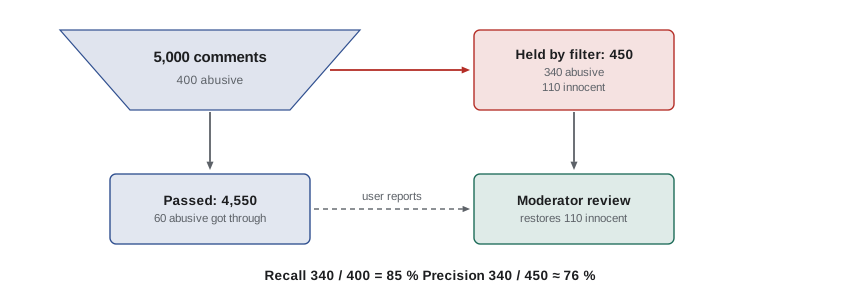
Two measures help you judge a filter. Recall, sometimes called the catch rate, is the share of abusive comments the filter catches. Precision is the share of caught comments that are actually abusive. A filter with high recall but low precision catches most abuse but also hides many innocent comments. A filter with high precision but low recall rarely hides innocent comments but lets much abuse through. In practice, creators usually aim for high recall with a review queue, so that a human can rescue innocent comments.
Worked problem
Measuring a keyword filter
In a week, a creator receives 5,000 comments. A moderator reviews them all and finds 400 abusive comments. The filter held 450 comments, of which 340 were abusive. Calculate recall and precision, and how many abusive comments got through.
Show solution
- Recall: 340 ÷ 400 = 0.85, or 85 %.
- Precision: 340 ÷ 450 ≈ 0.76, or about 76 %.
- Abusive comments that got through: 400 − 340 = 60.
- Innocent comments held by mistake: 450 − 340 = 110.
Answer: Recall 85 %, precision about 76 %; 60 abusive comments got through and 110 innocent comments were held for review.
Human moderators
As a channel grows, one person cannot read everything. Human moderators, whether trusted fans, friends or paid staff, can remove abuse, answer questions, enforce guidelines and spot problems early. Moderators should be chosen carefully: they need good judgment, discretion and loyalty to the community's values, not just enthusiasm. Give them clear guidelines, examples of what to remove and what to leave, a way to escalate serious cases such as threats or doxxing to you or your manager, and limited permissions that match their role.
Volunteer moderators do valuable work, and creators should treat them fairly. Thank them, include them in decisions about community rules, and consider paying regular moderators or offering other compensation. Remove permissions promptly when someone steps down.
Worked problem
Planning moderator capacity
A creator's live streams receive about 3,000 chat messages an hour, and their filters hide about 60 % of rule-breaking messages. Moderators estimate that 4 % of messages break rules and that a moderator can comfortably handle about 30 rule-breaking messages an hour while staying attentive. How many moderators are needed per stream?
Show solution
- Rule-breaking messages: 3,000 × 0.04 = 120 an hour.
- Caught by filters: 120 × 0.60 = 72.
- Left for moderators: 120 − 72 = 48 an hour.
- Moderators needed: 48 ÷ 30 = 1.6, so 2 moderators.
Answer: Two moderators per stream, with a third on call for streams likely to attract pile-ons.
Looking after moderators
Moderation exposes people to large volumes of abuse, sometimes including threats, hate and disturbing images. Research on professional content moderators has found high levels of stress and symptoms of trauma among people who review harmful content for long periods. Volunteer and part-time moderators for creators face a smaller version of the same risk.
Protect moderators by rotating shifts so no one moderates for too long, encouraging breaks, letting them step back from particularly upsetting content, using filters to reduce what they see, blurring images by default where tools allow and checking in after difficult incidents. Make it clear that moderators can say no to tasks that are too much. If someone is struggling, encourage them to talk to someone they trust or a professional.
| Practice | Why it helps |
|---|---|
| Shift limits and rotation | Reduces cumulative exposure |
| Filters before human review | Cuts the volume of abuse seen |
| Escalation path for threats | Moderators need not carry serious cases alone |
| Debriefs after incidents | Lets people process and improve the response |
| Option to step back | Respects limits and prevents burnout |
Community defenses
The best moderation is supported by the community itself. Communities with clear norms, active and respected moderators and a culture of kindness tend to self-correct: members discourage bad behavior, report problems and welcome newcomers. Creators can encourage this by modeling the behavior they want, highlighting positive comments, thanking members who help others and explaining why rules exist.
Some creators also use structure to slow down abuse. Membership tiers, verification steps or waiting periods before new members can post in private communities make it harder for brigades to arrive all at once. Separate spaces for different purposes, such as a public comment section and a members-only chat, let creators keep their most personal interactions in safer places.
Reporting to platforms
Platform reporting tools let you flag content that breaks platform rules, such as hate, harassment, threats, impersonation, private information and non-consensual intimate images. Report through the specific category that fits, include links and context, and keep a record of reports and responses in your evidence log. Many platforms have dedicated processes for creators, such as partner support teams or creator help lines, which can be faster than standard reporting. If you work with a multichannel network, agency or manager, they may have direct contacts at platforms.
Platforms do not always act quickly or consistently. If a report is rejected, check whether an appeal is possible, try a more specific category, and escalate through creator support channels. For threats, stalking, image abuse and extortion, do not rely on platform reporting alone; Lesson 9 covers legal options.
Moderating live streams
Live streams need faster moderation than recorded videos, because messages appear in real time and harmful content can be seen by many viewers before anyone acts. Useful practices include having at least one moderator present for every stream, turning on slow mode or follower-only chat during busy or contentious streams, using automatic filters for slurs and links, and giving moderators the power to time out users quickly. Agree in advance on what moderators should do if a raid of hostile accounts arrives, such as switching chat to subscriber-only mode for ten minutes.
Creators should also decide how they will react on camera. Reading abuse aloud can amplify it and encourage more. A calm, brief acknowledgment, such as "Mods are handling it; let's keep going", keeps the focus on the content. If a stream becomes unsafe or overwhelming, it is fine to end it early.
Transparency and appeals
Communities trust moderation more when it is transparent. Explain your guidelines, let people know when and why content was removed where practical and offer a simple way to appeal a ban, such as an email address or form. Most appeals will be from people who genuinely misunderstood a rule or were caught by a filter by mistake. Handling them fairly keeps good members in the community and shows that moderation is about safety, not silencing disagreement. Keep notes on recurring issues so that you can clarify guidelines or adjust filters.
Moderation for small creators
Creators with small audiences often think moderation is only for big channels. In fact, a small community is easier to shape early. Setting guidelines, turning on basic filters and responding consistently from the start establishes norms before problems arise. A small creator can usually moderate alone using reply windows and filters, but it is worth identifying one trusted person who can step in if a video unexpectedly attracts a large, hostile audience. Viral attention can arrive without warning, and having a plan ready is much easier than building one in the middle of a pile-on.
As your community grows, revisit your moderation setup every few months: check filter recall and precision, ask moderators how their workload feels and update guidelines to reflect new kinds of problems.
Common mistakes
MistakeModerating without public guidelines.
InsteadPublish short, specific guidelines and enforce them consistently.
MistakeSetting up a keyword filter once and forgetting it.
InsteadReview recall and precision and update the list regularly.
MistakeLetting filters delete comments with no review.
InsteadUse review queues so innocent comments can be restored.
MistakeGiving moderators full account access.
InsteadUse limited moderator roles and remove access promptly.
MistakeIgnoring the toll on moderators.
InsteadRotate shifts, reduce exposure and check in after hard incidents.
Summary and key terms
- Community guidelines set clear, public rules that make moderation fair and consistent.
- Platform tools include blocking, restricting, filters, comment controls, slow mode and moderator roles.
- Temporary restrictions are effective during pile-ons.
- Recall measures how much abuse a filter catches; precision measures how much of what it catches is abusive.
- Human moderators need clear guidelines, limited permissions and an escalation path.
- Moderators face exposure to harmful content and should be protected with rotation, filters and support.
- Strong community norms and structured spaces help communities defend themselves.
- Community guidelines
- Public rules for behavior in a creator's spaces.
- Keyword filter
- A tool that hides or holds comments containing chosen words.
- Recall
- The share of abusive comments a filter catches.
- Precision
- The share of caught comments that are actually abusive.
- Review queue
- Held comments waiting for a moderator's decision.
- Restrict
- Hiding an account's comments from others without notifying them.
- Slow mode
- A live chat setting that limits how often users can post.
- Moderator role
- Limited permissions granted to trusted helpers.
- Escalation path
- A defined route for passing serious cases to someone with authority.
- Brigade
- A group arriving from elsewhere to harass a target.
Practice problems
Work each problem on paper first, then reveal the answer to check.
Name four topics community guidelines usually cover.
Show answer
Respect, hate and harassment, privacy, spam, self-promotion.
A filter catches 270 of 300 abusive comments. Recall?
Show answer
90 %.
A filter holds 400 comments, 300 abusive. Precision?
Show answer
75 %.
In that case, how many innocent comments were held?
Show answer
100.
What does restricting an account do?
Show answer
Hides its comments from others without notifying it.
Chat has 2,000 messages an hour, 5 % rule breaking, filters catch half. Messages for moderators?
Show answer
2,000 × 0.05 × 0.5 = 50 an hour.
At 25 messages per moderator per hour, how many moderators for 50?
Show answer
Two.
Name three ways to protect moderators.
Show answer
Rotation, filters, escalation paths, debriefs, option to step back.
Why use temporary restrictions during a pile-on?
Show answer
They stop new accounts flooding the comments while attention passes.
What should you do if a platform rejects a report?
Show answer
Appeal, try a more specific category or escalate through creator support.
Lesson quiz · 5 questions
Score 60% or more to complete this lesson.
Create a free account to save your progress, take quizzes and earn a certificate.