
PHOT-310 · Lesson 12 of 12 · 28 min
Delivery, client relations and capstone campaign
A commercial job is not finished when the last frame is captured. Images must be selected, approved, retouched, prepared for every use, delivered securely with correct metadata, archived, invoiced and followed up. These final stages shape the client's experience as much as the shoot itself: a beautiful set of images delivered late, in the wrong color space or with confusing file names makes the client's work harder and makes them less likely to book again. This lesson covers selection and approval, preparing master and derivative files for print and screen, metadata and license information, secure delivery and archiving, invoicing and follow-up, and building long-term client relationships. It ends with a capstone campaign that brings together every lesson in the course.
Selection and approval
On many commercial shoots, the client approves images on set as they are captured, marking selects in the tethering software. Where approval happens after the shoot, the photographer delivers a proof gallery or contact sheet of lightly processed images, clearly watermarked or low resolution, and the client chooses selects for retouching. Agree in advance how selects will be communicated, by file name, star rating or online gallery, and by when, because retouching cannot start until selects are final.
Retouching proofs follow the same pattern: deliver the first round of retouched images for review, collect consolidated feedback, revise, and repeat for the agreed number of rounds. Ask for feedback from a single point of contact who has collected comments from everyone involved, to avoid contradictory requests from different people. Mark-up tools that let clients draw and comment directly on images reduce misunderstandings.
Master files and derivatives
A well-organized delivery begins with master files: full-resolution, high-bit-depth retouched files, usually 16-bit TIFF or layered PSD, in a wide-gamut working space such as Adobe RGB or ProPhoto RGB or in the color space agreed with the client. From the masters, derivative files are produced for each use:
- Web and e-commerce: sRGB JPEG or PNG at the sizes required by each platform, sharpened for screen, often with modern formats such as WebP or AVIF generated by the client's systems.
- Print: CMYK files converted with the profile specified by the printer, such as a FOGRA or GRACoL characterization for offset printing, or high-resolution RGB files if the printer prefers to convert. Ask the printer for specifications rather than guessing.
- Packaging: files prepared to the packaging printer's specifications, often with clipping paths and at the final reproduction size and resolution.
- Large format: billboards and posters are viewed from a distance, so their resolution requirements in pixels per inch at final size are much lower than for magazines; the printer will specify them.
For print, the pixel dimensions needed depend on the final size and the required resolution:
Worked problem
Pixels for a magazine page and a poster
An image will run as a full-bleed magazine page trimmed at 8.5 × 11 inches with 0.125 inch bleed on all sides, at 300 ppi. A second use is a 24 × 36 inch poster printed at 150 ppi. What pixel dimensions are needed? The master is 8,256 × 11,008 pixels (portrait).
Show solution
- Page with bleed: 8.75 × 11.25 inches.
- Pixels: 8.75 × 300 = 2,625; 11.25 × 300 = 3,375; so 2,625 × 3,375 px.
- Poster: 24 × 150 = 3,600; 36 × 150 = 5,400; so 3,600 × 5,400 px.
- The master exceeds both requirements.
Answer: 2,625 × 3,375 px for the page and 3,600 × 5,400 px for the poster. The master provides enough resolution for both with room for cropping.
Naming, metadata and license information
File names should follow the client's convention or a clear system that identifies the client, job, product, view and version, for example ACME-SS26_kettle-black_front_v2.tif. Avoid spaces and special characters that can break on some systems.
Metadata embedded in each file carries information that travels with the image. Using the IPTC Photo Metadata Standard, photographers can embed the creator's name, copyright notice, contact information, credit line, description and keywords, license terms or a link to them, and release status. Some clients specify metadata fields for their DAM systems, such as SKU, color and season. Embedded copyright and license information helps clients and their partners understand usage limits, and helps the photographer if images are later used beyond the license. Content Credentials (C2PA) can also be attached where clients request a record of capture and editing history.
Many studios include a delivery note or license document with each delivery listing the images, their file names, the licensed usage and any restrictions, such as talent usage periods that expire before the image license does.
Secure delivery and confidentiality
Deliver files through secure, reliable transfer services or the client's DAM system, with links that expire and, for confidential products, password protection and access logs. Avoid sending unreleased product images through personal email or public file-sharing links. Keep a record of what was delivered, when and to whom. Some large clients specify approved transfer systems and security requirements as part of their supplier agreements, and some require the photographer to delete files after delivery or after a set period.
Archiving and backup
Photographers are usually the long-term custodians of the raw files and masters, which clients may request months or years later for new uses or reprints. A robust archive follows the 3-2-1 principle: at least three copies of the data, on at least two different types of storage, with at least one copy off-site, such as in a cloud service or at a separate location. On set, files are written to two places at once; after the shoot, they are copied to the main storage and backups before memory cards are reformatted.
Worked problem
Estimating storage
A studio shoots about 1,500 raw files a week at 60 MB each, keeps about 5 percent as retouched layered masters at 500 MB each, and follows the 3-2-1 rule. How much storage is needed per year for all copies?
Show solution
- Raw files per year: 1,500 × 52 × 60 MB = 4,680,000 MB ≈ 4.68 TB.
- Masters per year: 1,500 × 52 × 0.05 × 500 MB = 1,950,000 MB ≈ 1.95 TB.
- One copy: about 6.6 TB per year.
- Three copies: about 19.9 TB per year.
Answer: About 6.6 TB per year for one copy and roughly 20 TB across three copies. Many studios cull rejected raw files after a defined period to control storage costs, keeping selects and masters indefinitely.
Agree the retention policy with clients: how long you will keep raw files and masters, whether you will charge for retrieval, and what happens to confidential files.
Invoicing and follow-up
Invoice promptly when the job is delivered, referencing the estimate, purchase order number if the client uses one, the agreed fees, actual expenses with receipts if required, taxes and payment terms. The license should state that it takes effect on full payment. Follow up politely on late payments and keep records of communications.
After the job, ask for feedback. A short conversation about what went well and what could improve shows professionalism and gives valuable information. Ask permission to use the images in your portfolio and social media, respecting any embargoes and NDAs. When the client allows it, a short case study showing the brief, the solution and the result is a powerful marketing tool for winning similar clients.
Building long-term client relationships
In commercial photography, a client who books repeatedly is worth far more than a one-off job. Clients return when the photographer makes their work easier: understanding their brand, remembering their preferences, keeping templates and lighting diagrams for consistency between seasons, delivering on time, solving problems without drama and communicating clearly. Keep notes on each client's specifications, file naming, color targets and preferences. Check in between jobs with relevant ideas, such as how to adapt their product images for a new platform, without being intrusive.
Difficult situations will arise: a client who rejects images after approving them on set, scope that expands without agreement, late payments or disputes over usage. Clear estimates, written approvals, change orders and license terms make these situations manageable. Address problems early, calmly and in writing, and look for solutions that preserve the relationship where possible.
Capstone: a product campaign
The capstone brings together every stage of the course in a single campaign for a fictional client. You will produce the documents and images that a commercial photographer would produce for a real client.
The brief: Northbrook Kettle Co. is launching a stainless steel and matte black electric kettle with a glass water window and a walnut handle. They need images for their website and online shop, two marketplaces, social media and a printed in-store display card. The brand values are craftsmanship, warmth and calm mornings. Budget and schedule should be realistic for a small brand.
Deliverables for the capstone:
- Confirmed brief and questions: a one-page confirmation including the questions you would ask the client and your assumed answers.
- Treatment and mood board: a short creative approach with references for the hero and lifestyle images.
- Shot list and schedule: at least one hero image, six e-commerce angles on white meeting a marketplace main image specification, three detail images including the glass window and walnut handle, and two lifestyle images with a hand model or talent.
- Lighting plans: diagrams for the hero image (polished steel and matte black), the e-commerce template and one lifestyle setup, with calculations for at least one light distance or power change.
- Images: the hero image, the e-commerce set, one detail image produced with focus stacking and one lifestyle image, retouched to the appropriate levels.
- Estimate and license: a complete estimate with fees, usage, crew, expenses, markup and tax, and a license statement.
- Delivery package: master and derivative files named to a clear convention, with embedded IPTC metadata and a delivery note.
- Ethics statement: a short note explaining which retouching, compositing or AI tools you used and why the final images do not mislead consumers about the product.
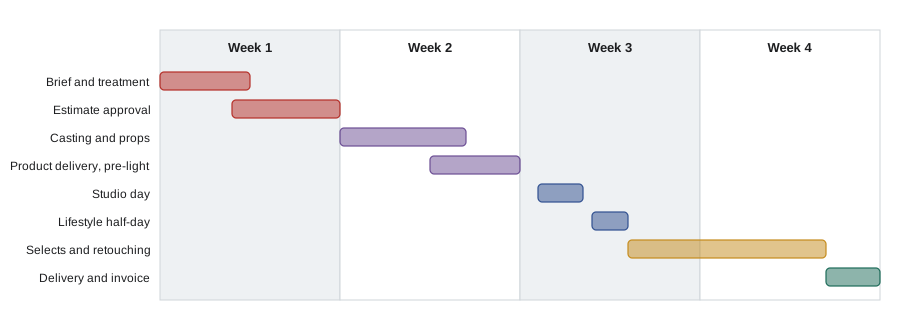
Worked problem
Checking the capstone shoot day
The studio day includes: hero setup 3 hours and shooting 1 hour; e-commerce template setup 45 minutes and 6 angles at 8 minutes each; detail stack setup 30 minutes and 2 stacks at 20 minutes each; and 1 hour total for client reviews, plus 45 minutes for lunch. Does it fit in a 10-hour day with 15 percent contingency on working time?
Show solution
- Hero: 3 + 1 = 4 h.
- E-commerce: 0.75 + 6 × 8 / 60 = 0.75 + 0.8 = 1.55 h.
- Details: 0.5 + 2 × 20 / 60 ≈ 0.5 + 0.67 = 1.17 h.
- Reviews: 1 h. Working total: 4 + 1.55 + 1.17 + 1 = 7.72 h.
- With 15% contingency: 7.72 × 1.15 ≈ 8.88 h; plus lunch 0.75 h = 9.63 h.
Answer: About 9.6 hours, which fits within a 10-hour day with little margin. Shooting the e-commerce set first, while the hero lighting is built by an assistant on a second set, would add safety.
Assessment of the capstone considers how well the images meet the brief, the technical quality of lighting and retouching, consistency and accuracy of the e-commerce set, the professionalism of the documents, the realism of the estimate and schedule, and the clarity of the ethics statement. Together, these show that you can manage a commercial product job from first conversation to final invoice.
Before delivery, open a sample of the derivative files on a different computer and, where possible, on the platforms where they will be used, to confirm that color, size, sharpening and file names are correct.
Common mistakes
MistakeDelivering only one file version for every use.
InsteadProduce derivatives from a master for each medium and specification.
MistakeConverting to CMYK without the printer's profile.
InsteadAsk the printer for specifications and profiles.
MistakeLeaving metadata empty.
InsteadEmbed creator, copyright, contact, license and description fields.
MistakeKeeping one copy of the archive on one drive.
InsteadFollow the 3-2-1 backup rule.
MistakeAccepting conflicting feedback from several people.
InsteadAsk for consolidated feedback from one point of contact.
Summary and key terms
- Selects and retouching proofs need agreed methods, deadlines and consolidated feedback.
- Masters are high-bit-depth retouched files from which derivatives are made for each use.
- Print pixel dimensions equal final inches times required ppi.
- File names and IPTC metadata carry identification, copyright and license information.
- Secure delivery and the 3-2-1 backup rule protect clients and the photographer.
- Prompt invoicing, feedback and case studies support the business.
- The capstone campaign integrates brief, lighting, e-commerce, macro, lifestyle, retouching, estimating and delivery.
- Selects
- Images chosen by the client for retouching and use.
- Proof
- A preview image for review and approval.
- Master file
- The full-resolution, high-bit-depth retouched file.
- Derivative
- A file produced from the master for a specific use.
- Bleed
- Image area extending beyond the trim edge.
- IPTC metadata
- A standard for embedded descriptive and rights information.
- 3-2-1 rule
- Three copies, two media types, one off-site.
- DAM
- A digital asset management system.
- Purchase order
- A client's document authorizing a purchase.
- Case study
- A description of a project's brief, solution and result.
Practice problems
Work each problem on paper first, then reveal the answer to check.
Why use a single point of contact for feedback?
Show answer
To avoid contradictory requests.
What format is common for master files?
Show answer
16-bit TIFF or layered PSD.
Pixels for a 5 × 7 inch print at 300 ppi?
Show answer
1,500 × 2,100 px.
Pixels for 210 mm at 300 ppi?
Show answer
About 2,480 px.
Who specifies the CMYK profile?
Show answer
The printer.
Name three IPTC fields.
Show answer
Creator, copyright notice, description, license.
What is the 3-2-1 rule?
Show answer
Three copies, two media, one off-site.
Storage for 1,000 files a week at 50 MB for a year (one copy)?
Show answer
About 2.6 TB.
When should the license take effect?
Show answer
On full payment.
Why keep lighting diagrams for each client?
Show answer
For consistency between seasons and reshoots.
Lesson quiz · 5 questions
Score 60% or more to complete this lesson.
Create a free account to save your progress, take quizzes and earn a certificate.